Code Compare: A File Diff and Merge Tool for Windows and Visual Studio, Free or $69.95 for Pro
Code Compare by Devart compares and merges source files and folders on Windows, either in its own window or inside Visual Studio. The Free edition covers everyday two-way comparison, and Pro costs $69.95 for a perpetual license that adds three-way merge and a comparison that understands code structure.
It's aimed at developers who have outgrown the built-in Visual Studio diff, especially C# and C++ teams who reorganize code often. If a method moves 200 lines down the file, a plain diff shows a deletion and an insertion. Code Compare Pro can show you it's the same method, plus the few lines that changed.
Quick facts
- Developer: Devart
- Version: 5.5.11, released March 6, 2026
- Platform: Windows only, as a standalone program and a Visual Studio extension
- Visual Studio: 2015, 2017, 2019, 2022 and 2026, not the Express editions
- Price: Free edition at no cost. Pro is $69.95 at checkout, then the order page bills $34.95 a year for updates and support until you cancel
- Trial: 30 days of Pro, then buy Pro or switch to Free
- Guarantee: 30-day money-back guarantee; Devart's ordering FAQ is stricter and refunds only when a technical problem its support can't fix stops the product working
- What we checked: Devart lists a 12.85 MB installer, and the download needs a free Devart account. Version 5.5.11 was the latest on Devart's revision history and the Visual Studio Marketplace, and Pro was $69.95 on the order page with a $34.95 renewal after 12 months, on November 6, 2026. We didn't install it or run a comparison ourselves, so the feature details come from Devart's documentation and the user reviews quoted.
Before you buy
Try Free first, and read the matrix. Two-way comparison, folder comparison, Visual Studio and Windows Explorer integration and version control integration are all in the Free edition. You only need Pro for the features listed under Editions and Pricing below, so a solo developer who just wants a better diff may never need to pay.
Pro is limited to two installs per person. Devart's license lets one person install and use two copies, and activation ties a license to a computer's hardware ID and needs an internet connection. That's a real problem if you work across many virtual machines.
Download Free TrialBuy Now
Overview
Code Compare opens two files side by side, with colored blocks marking inserted, deleted and changed text, and connecting lines showing how the blocks relate. Small arrows between the panes copy a change from one side to the other, and you can type directly in either pane, so you can fix something while you're looking at it. Devart says more than 70,000 developers actively use it.
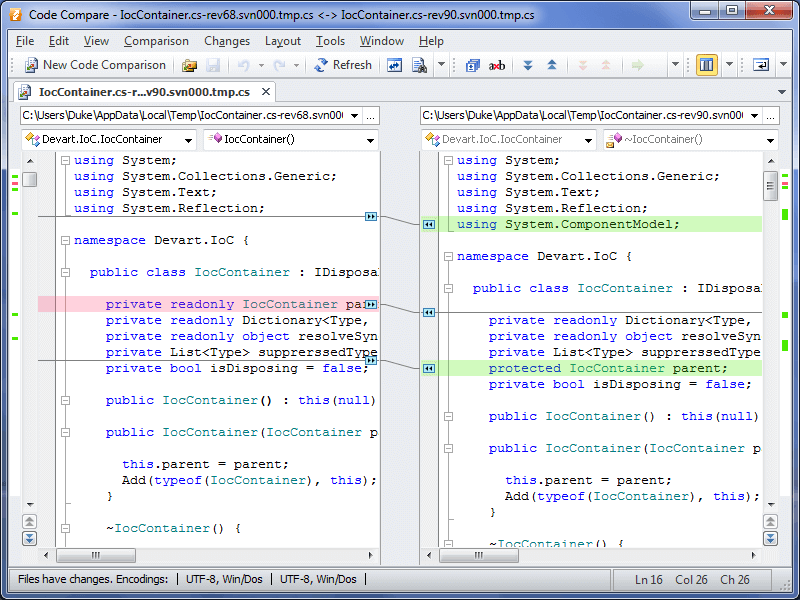
Two revisions of a C# file, with an added line in green, a removed line in red and merge arrows between the panes. The screenshot shows the older Windows look.
Features
Code Compare Pro compares code by structure, not just by position
Code Compare Pro's structure comparison matches code by its signature instead of where it sits in the file. It works for C#, C++, JavaScript, Java, Visual Basic and XML. When a method moves or the file gets reordered, the matched code lines up and the diff shows only the real edit. That's what you're paying for, and it's most useful after a refactoring or a code cleanup tool has reshuffled a file.
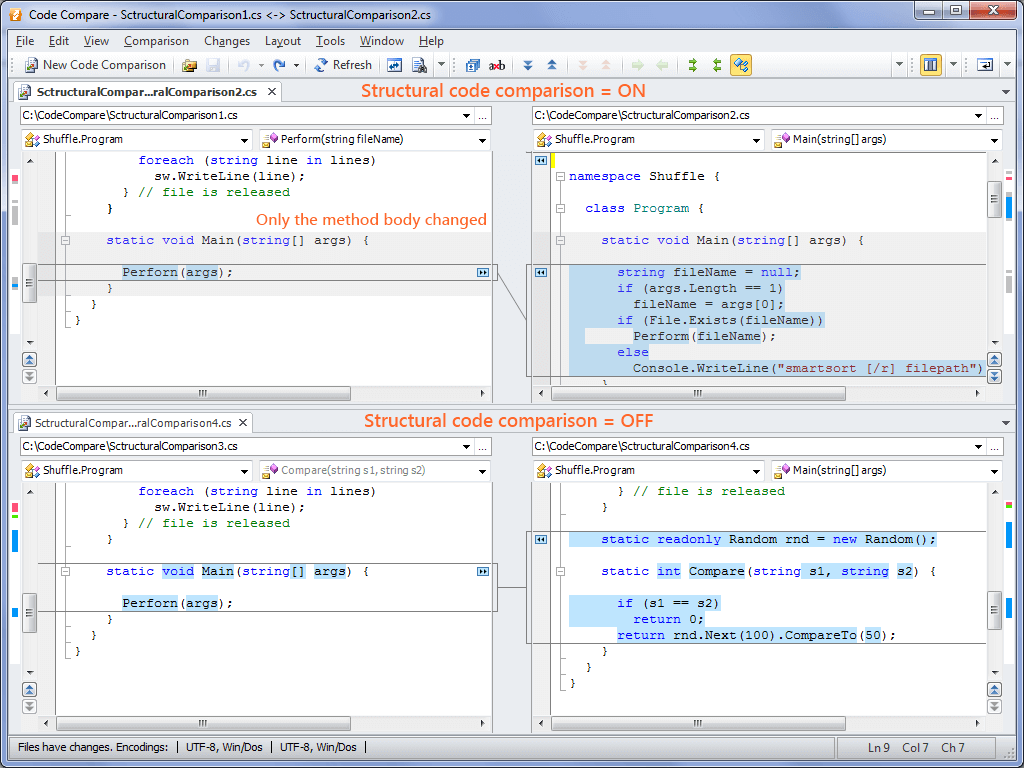
Devart's comparison of the same change with structure comparison on (top, only the method body changes) and off (bottom).
Code Compare Pro spots code that moved
Code Compare Pro's moved block detection marks blocks of code that are identical but sit in different places, and similar line detection pairs up lines that are nearly the same. Word-by-word and line-by-line comparison modes are Pro features too.
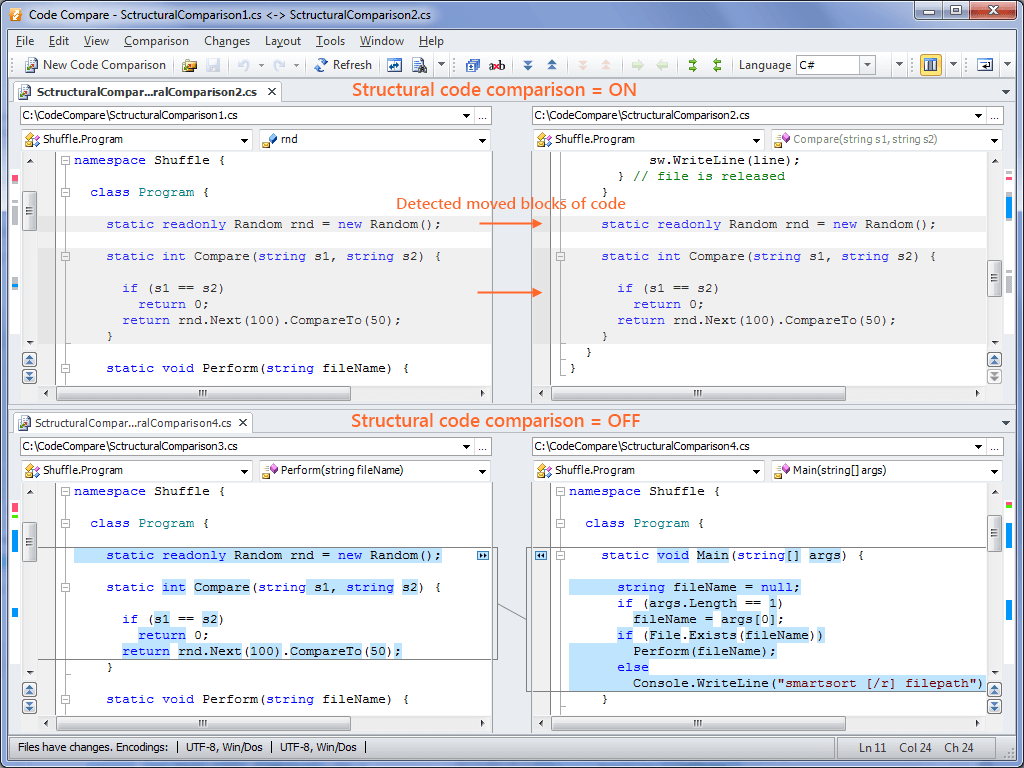
Moved blocks of code detected with structure comparison on, compared with the same files with it off.
Code Compare Pro merges three files
Code Compare Pro shows three files side by side for a three-way merge and can merge files automatically. Non-conflicting changes are merged for you, conflicts are highlighted, and each conflict is a click to resolve. This is the feature to look at if you resolve branch conflicts regularly.
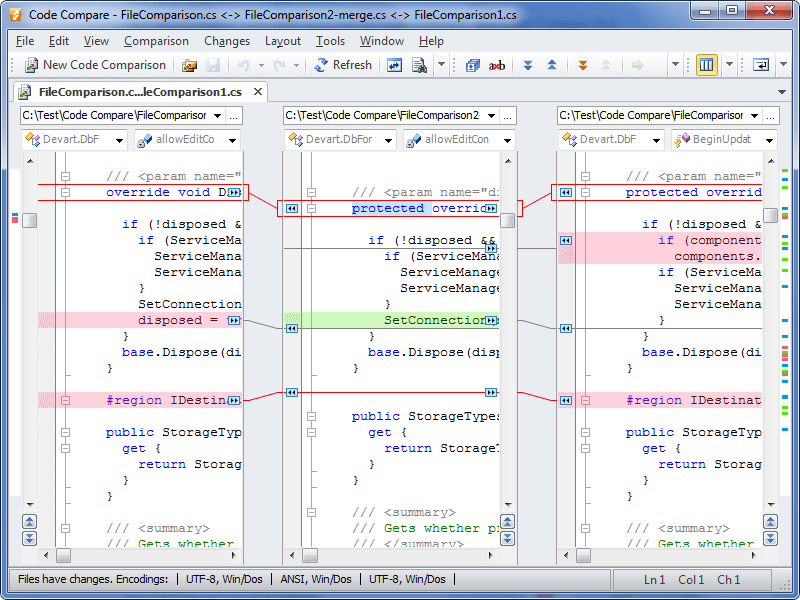
A three-way merge of three versions of a C# file.
Code Compare compares whole folders in both editions
Code Compare's folder comparison is in the Free edition too. It color-codes added, deleted and modified files, filters by file type, opens any file pair in a comparison tab, and copies batches of files from one side to the other.
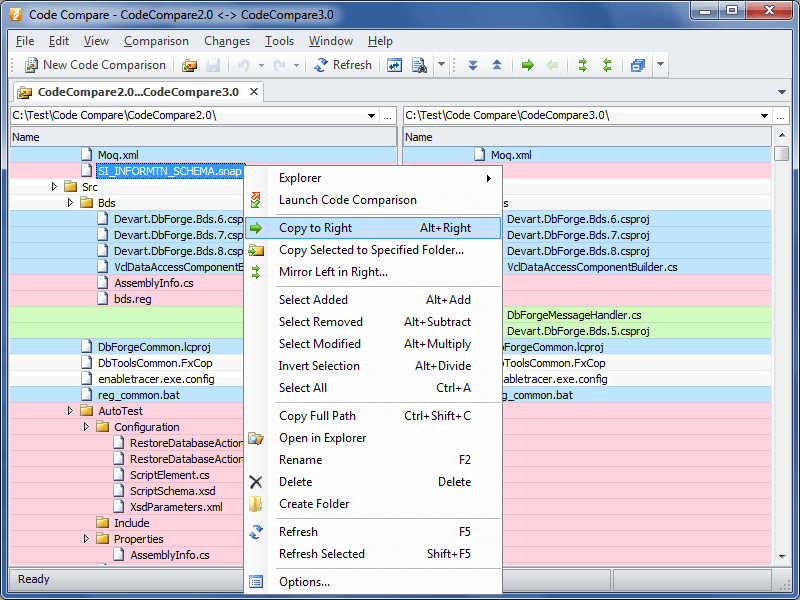
Two versions of a project folder, with the context menu for copying and selecting files.
Code Compare works inside Visual Studio
Code Compare's extension replaces the built-in diff with its own comparison documents, keeping the editor features you'd expect, including IntelliSense. In Pro, the Difference Explorer window lists the classes and methods that changed, so you can jump straight to them.
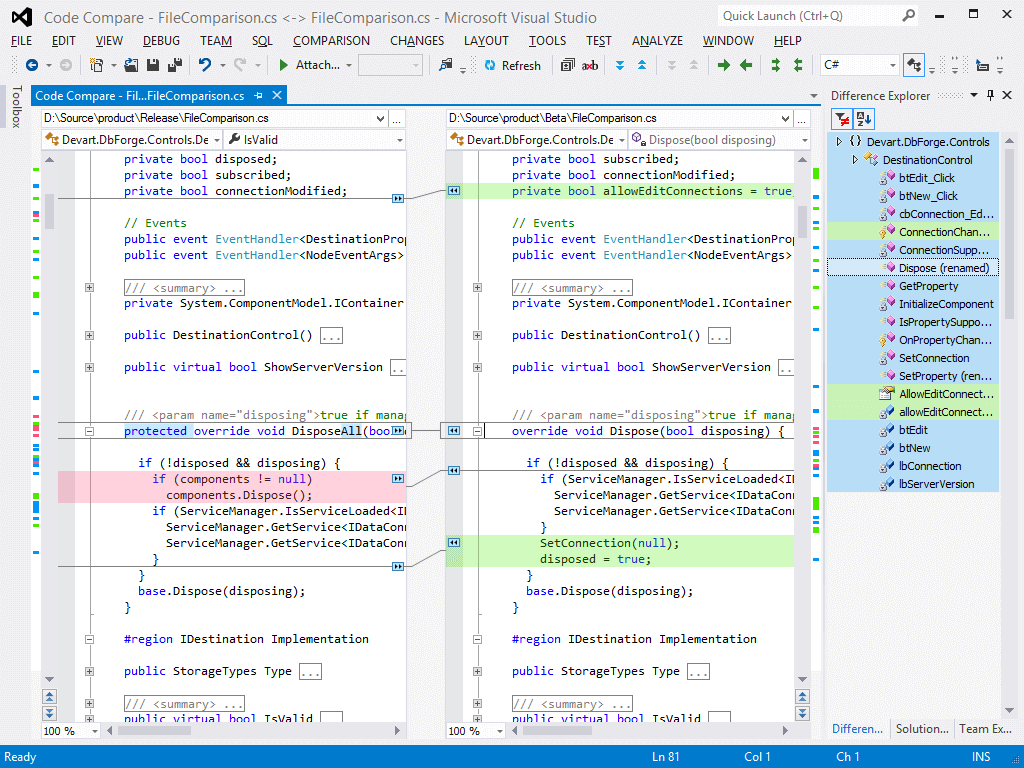
The Visual Studio extension, with the Difference Explorer listing changed members on the right.
Code Compare plugs into your version control client
Code Compare can be set as the diff and merge tool for Git, Mercurial, Perforce, TFS, TortoiseGit, TortoiseSVN, TortoiseHg, SmartSVN, AnkhSVN, RapidSVN and GitKraken. It also has a command line interface and a Windows Explorer menu, which is handy for a quick compare of two files without opening an IDE.
Benefits
- Cleaner reviews after a refactor. With structure comparison, moved code stops looking like a rewrite.
- Faster merges. Automatic merging handles the easy changes and leaves you the real conflicts.
- One tool in every workflow. The same comparison shows up in Visual Studio, your Git client and Explorer.
- A license that doesn't expire. Pro keeps working after the year of updates ends.
Real-World Uses
- Checking a colleague's pull request: open the changed files with structure comparison on and skip the code that only moved.
- Resolving a branch conflict: set Code Compare as Git's merge tool and work through the conflicts in three panes.
- Comparing two releases: point the folder comparison at two versions of a project to see which files changed, then open the pairs you care about.
- Reviewing an automatic cleanup: confirm that a tool which rearranged a class didn't change its behavior.
Who it's for, and who should skip it
Buy Pro if you spend real time in Visual Studio on C#, C++ or similar code and you merge or review reshuffled code every week. Skip it if you're on Mac or Linux, since it's Windows only. Skip Pro if your code is in a language outside the structure comparison list, because you'd lose the main reason to pay: Python, Go and PHP developers get plain text comparison. If you work in VS Code or a JetBrains IDE, the built-in diff there is likely enough, and if you want a free open-source tool for occasional diffs, WinMerge does that job.
Usage Guide
- Sign in to or create a Devart account on the download page, then download and install Code Compare.
- On first run, the Register Product window opens with the 30-day Pro trial selected. Click OK to continue.
- To activate Pro later, open Help, then Register Product, choose Professional, paste the activation key from your order email and click Activate. You need to be online for this.
- Start a New Code Comparison, or pick files from Windows Explorer or Visual Studio.
- Use the arrows between the panes to copy changes, or edit either side directly.
- To use it with version control, follow Devart's setup notes for your client so it opens as the diff and merge tool.
Where it falls short
- A slow release pace. The revision history jumps from version 5.3 in February 2020 to 5.4.20 in May 2024, and that update is the one that added Visual Studio 2022 support, more than two years after that Visual Studio came out. The Marketplace reviews show how much that annoyed users. If you upgrade Visual Studio on day one, expect to wait.
- Speed inside Visual Studio. Several Marketplace reviews from 2015 to 2018 report slow-opening compare tabs. They're old reviews, and Devart's 5.3 notes claim a 35 percent more compact and faster package, but test it on your own solution during the trial.
- It can disturb the built-in compare tool. A few reviewers reported that the default Visual Studio diff stopped working after installing or removing it.
- Dated interface. Devart's screenshots still show a much older Windows look, so do not expect a modern design.
What Users Say
The largest body of real user opinion is on the Visual Studio Marketplace. The praise is long-standing, while most of the sharp complaints are about compatibility with new Visual Studio versions.
Visual Studio Marketplace: overall
On November 6, 2026 the Code Compare extension had 4.3 out of 5 from 233 ratings and 162,086 installs. Of the 100 reviews we read, 78 gave four or five stars and 16 gave one or two.
Marketplace: praise
Thomas Guenther, five stars, December 2018: "This tool is awesome. I use it nearly every day in Visual Studio i.e. to compare versioning conflicts or just compare current file with it's it's version history. and it works perfectly. Performance is very good."
Robert Bratton, five stars, March 2017: "I really like the intelligence of Code Compare: structure understanding, unchanged block collapsing, whitespace ignoring. I'm using the paid version of Code Compare. Some features aren't available in the free version."
Fred Malone, four stars, September 2016: "This is so much better than the built-in tool in Visual Studio. Most of my merge headaches are now gone. Those that remain no tool can resolve. This is definitely worth the money."
van Eykelen, Frank (Nextens-AMS), five stars, August 2017: "Excellent tool, have been using it for years now. I mostly use it from the Windows Explore context menu. I love the folder compare: great for comparing branches."
Arnaud Thiry, four stars, August 2016: "I'm using the free version. Much better than the built-in comparison tool. I like the code highlighting capabilities. I like the VS integration."
Marketplace: criticism
Hryhorii, three stars, August 2022: "Good software, but only one bad thing is that it does not support the VS 2022 version. I hope soon we can see new version with support VS 2022." Version 5.4.20 fixed that in May 2024.
Greg Veres, three stars, February 2018: "I had to uninstall Code Compare after working with MS support staff to figure out why my editor sessions were very slow. They came back and told me that the time was being spent in devart.common.dll."
Anthony Day, one star, November 2019: "Was an excellent tool, but can not use since they changed the license to only allow 2 installs. I develop in multiple virtual machines built for the needs of the roject and need all tools in all virtual machines."
Roland Benjes, one star, November 2019: "Did not work in VS 2019. Diff window empty. Uninstall broke default compare tool. Must repair VS installation."
Martin Zarate, two stars, October 2015: "Frequently takes painfully long to load, and is often highlighting entire nearly-identical lines with no indication whatsoever where the actual difference lies."
Chrys Perdue, four stars, April 2023: "Really like this tool but pain to restart a trial for it to review the pro features. This never got accomplished even working with Devart."
Devart's own page
Devart quotes Alex Boesel: "Best code diffing tool I've ever used. Ability to edit the current version directly in the tool is great both for easy reversal of changes as well as for formatting, as is the case when diffing poorly formatted code (e.g. single line XML documents)." It also quotes Martin L. Shoemaker: "It's phenomenally better than the native diff in Visual Studio." These are selected by the vendor, so weigh them accordingly.
The themes: people who use it daily like the Visual Studio integration, folder comparison and structure comparison, and many call it better than the built-in tool. The recurring complaints are late support for new Visual Studio versions, slow opening inside the IDE on some setups, and the two-install limit. Few of the reviews are recent, so treat the performance reports as things to test rather than settled facts.
Comparisons
Code Compare vs Beyond Compare
Beyond Compare costs $35 for Standard and $70 for Pro at Scooter Software, so Pro prices are nearly identical. Beyond Compare also runs on Mac and Linux and compares more than source code. Code Compare's edge is its Visual Studio extension and structure comparison, and it has a free edition. If you don't live in Visual Studio, Beyond Compare is the wider tool.
Code Compare vs WinMerge
WinMerge is free and open source, and handles two-way file and folder comparison well. It has no structure comparison. For occasional diffs, it and Code Compare Free cover similar ground, and Code Compare Free adds the Visual Studio extension.
Code Compare vs the built-in Visual Studio diff
The built-in diff costs nothing and needs no install. Reviewers keep saying Code Compare is better at showing what really changed, so try the Free edition and see if you notice the difference on your own code.
Editions and Pricing
| Feature | Free | Pro |
|---|
| Price | Free | $69.95 at checkout |
| Two-way text and folder comparison and merge | Yes | Yes |
| Visual Studio and Windows Explorer integration | Yes | Yes |
| Command line and version control integration | Yes | Yes |
| IntelliSense, syntax highlighting, inline changes | Yes | Yes |
| Three-way comparison and automatic merging | No | Yes |
| Structure comparison and Difference Explorer | No | Yes |
| Moved block and similar line detection | No | Yes |
| Code folding and unchanged region collapsing | No | Yes |
| Word-by-word and line-by-line comparison | No | Yes |
Devart's own store also offers two-year and three-year update plans, plus priority support at extra cost. Volume discounts start at 5 percent for five licenses, 10 percent for ten and 15 percent for twenty.
FAQs
Is Code Compare really free?
Yes, Code Compare has a Free edition with no time limit, and Devart's license allows any number of copies of it. You install the same download, and it starts as a 30-day Pro trial that you then switch to Free.
Does Code Compare Pro stop working after the first year?
No, Code Compare Pro is a perpetual license, so the version you have keeps working. The year covers support and free upgrades, and the order is set up with a $34.95 yearly renewal. Cancel it if you don't want more updates.
Does Code Compare work with Visual Studio 2026?
Yes, Code Compare added Visual Studio 2026 support in version 5.5.11, released in March 2026. It also supports 2015, 2017, 2019 and 2022, but not Express editions. Support for Visual Studio 2010 to 2013 was dropped in version 5.3.
Does Code Compare run on Mac or Linux?
No, Code Compare is a Windows program. Devart publishes no Mac or Linux version.
Can I use Code Compare with Git?
Yes, Code Compare can be set as the diff and merge tool for Git, and for clients such as TortoiseGit and GitKraken. Three-way merge, which you'd want for conflicts, needs Pro.
Which languages does Code Compare's structure comparison support?
Code Compare Pro's structure comparison supports C#, C++, JavaScript, Java, Visual Basic and XML. Other languages still get text comparison, with syntax highlighting for many of them.
Can I get a refund on Code Compare Pro?
Yes, Devart refunds a Code Compare Pro purchase within 30 days if you aren't satisfied, for a perpetual license or an annual subscription.
Can I get a second Code Compare trial?
Devart says installing the latest version or upgrading the trial gives you another 30 days, but one Marketplace reviewer could not get a trial restarted even with Devart's help, so plan your testing within the first 30 days.
System Requirements
- Windows
- Visual Studio 2015, 2017, 2019, 2022 or 2026 for the extension, except Express editions. The standalone program doesn't need Visual Studio
- A free Devart account to download
- Internet connection to activate a Pro license
Conclusion
Start with Free, and pay for Pro only if you use structure comparison or three-way merge. At $69.95 once, Pro is fair value for a Visual Studio developer who reviews or merges C# and C++ code every week, because nothing else at that price shows moved and reordered code as clearly inside the IDE. The main reason not to buy is Devart's slow pace: new Visual Studio versions can wait a long time for support, and you're limited to two installs. If you don't work in Visual Studio, Beyond Compare is the better buy.
Download Free TrialBuy Now