Excel Add-in for Oracle: Two-Way Oracle Tables in Excel, No Oracle Client Required
Excel Add-in for Oracle is a Devart add-in for Excel on Windows that reads Oracle tables, views and SQL queries into a worksheet and writes your edits back with a Commit button. It connects straight over TCP/IP, SSL or SSH without installing Oracle Client, works with Oracle 8.0 through 26ai, and costs $179.95 with a year of updates.
The usual alternatives are a read-only ODBC query in Excel, or asking a DBA to run an UPDATE from a spreadsheet someone emailed. This add-in is for the people in between: analysts and power users who are allowed to change a set of reference or planning tables and would rather do it in Excel than in SQL Developer.
Quick facts
- Build: 3.1.70, dated September 7, 2026
- Publisher: Devart
- Excel: 2007 to 2024, Windows editions only
- Oracle servers: 8.0, 8i, 9i, 10g, 11g, 12c, 18c, 19c, 21c, 23c/23ai and 26ai, including Express and Personal editions
- Hosted Oracle: Oracle Cloud DBaaS, Oracle on Azure, Amazon RDS for Oracle
- Connection: Direct mode (no client) or through Oracle Client and a TNS alias
- Price: $179.95, then $89.95 for each further year of updates
- Trial: 30 days; a free Devart account is needed to download
What we checked: the Oracle server and client versions on Devart's compatibility page, both connection modes and the advanced options in the Oracle section of Devart's documentation, the Oracle fixes in the revision history, version 3.1.70 (76.60 MB) on the download page, and the order total itself: $179.95 for one license with a year of updates, $89.95 to renew, read at checkout on November 14, 2026. We did not run it against an Oracle server.
Before you buy
Your Oracle grants decide what users can change. The add-in commits with the database account you sign in with, so create a schema user that can update only the tables meant for spreadsheet editing. Leave the "Connect as SYSDBA" option to DBAs.
Views and custom queries need ROWID to be editable. Include the ROWID column in the SELECT, which tells the add-in which base-table row each line belongs to.
Download Free TrialBuy Now
Overview
Excel Add-in for Oracle is built on the same Oracle connectivity Devart sells to developers in its data providers, packaged as a ribbon tab for Excel users. Get Data opens a wizard where you connect, pick a table or write a query, and preview the rows. The data lands as an Excel table you can sort, chart and pivot, and the Refresh button reloads it from Oracle whenever you like.
What separates it from Excel's own data connections is the edit session. Turn on Edit Mode and the table becomes a front end for Oracle: changed cells, new rows and deletions are tracked and sent as one batch when you press Commit.
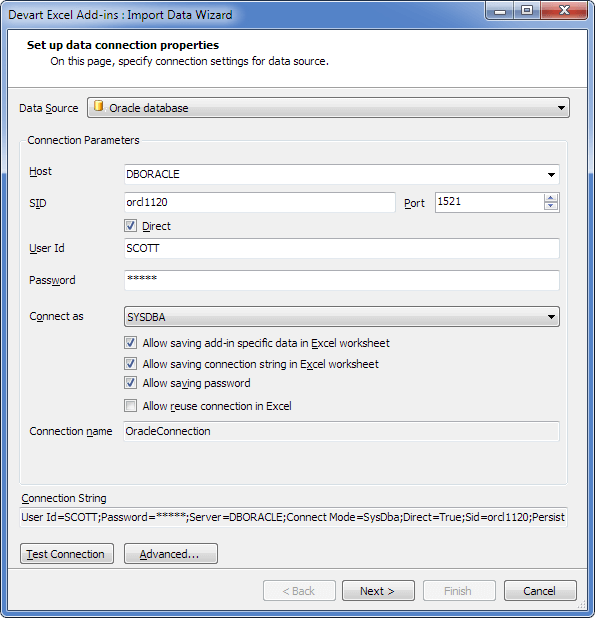
The Oracle connection page of the wizard: Direct ticked, host DBORACLE, SID orcl1120 on port 1521, user SCOTT and Connect as set to SYSDBA, with the connection string shown below.
Features
Direct mode: connect without installing Oracle Client
Excel Add-in for Oracle talks to the Oracle listener itself in Direct mode, so you only need the host, the port (1521 by default), the SID or Service Name, and a login. That removes the usual Oracle Client install and TNSNAMES setup from every analyst's PC. If your company already standardises on Oracle Client, clear the Direct box, choose the Oracle Home, and connect by TNS alias instead.
Encrypted connections through SSL or an SSH tunnel
Excel Add-in for Oracle encrypts Direct connections by prefixing the host with tcps:// for SSL/TLS or ssh:// for an SSH tunnel, with the certificates or keys set in the advanced options. Recent releases added modern SSH ciphers and key exchange (June 2026), PuTTY PPK3 key files (August 2026), and a fix for servers from 19c up that enforce Oracle native encryption or data integrity checks.
Edit views and custom queries, not just tables
Excel Add-in for Oracle can make the result of your own SELECT or a view editable when it returns the ROWID column, so you can join a lookup table for readability and still save changes to the base table. Before committing you can see the SQL statements the add-in will send, which helps when a DBA wants to know exactly what an Excel user is doing.
Current Oracle types and versions
Excel Add-in for Oracle 3.0.0 added Oracle Database 26ai, the JSON type on 21c, 23ai and 26ai, the native BOOLEAN type on 23ai and 26ai, and the long passwords newer releases allow. It also fixed reading TIMESTAMP WITH TIME ZONE values with large offsets and CLOB/NCLOB reads through Oracle Client. A Number Mappings option controls how NUMBER columns of a given precision appear in Excel, which matters for flags stored as NUMBER(1).
Oracle's own login options
Excel Add-in for Oracle accepts a normal schema login, OS authentication (leave user and password blank), proxy authentication through a proxy user, and administrative sessions as SYSDBA or SYSOPER. For RAC clusters it can use HA events and Database Resident Connection Pooling settings, though most spreadsheet users will never touch them.
Benefits
- Less IT setup per user. Direct mode means no client install, no Oracle Home and no TNS file on each laptop.
- Database rules enforced early. Type, null and unique-key errors show in the cell before the batch is sent, rather than as an ORA- error halfway through.
- An audit-friendly workflow. Changes are reviewed in colour, committed in one step, and the generated SQL can be shown first.
Real-World Uses
- Budget and forecast tables: finance staff fill in next year's figures in Excel and commit them to the planning schema instead of emailing a file to IT.
- Reference data upkeep: price lists, cost centres or product codes kept in Oracle tables are edited by the business owners who know them.
- Data fixes on Amazon RDS or Oracle Cloud: connect over SSL to a hosted database and correct a set of rows found by a query.
- Quick reporting: run a SQL query with joins, load it into a pivot table, and refresh it before each meeting.
Who It's For, and Who Should Skip It
Worth it for Oracle shops where a handful of business users maintain data in tables, and where DBAs would rather grant a controlled Excel path than field ad-hoc UPDATE requests.
Look elsewhere if you only need to read Oracle data into Excel: Excel's built-in Oracle connector or an ODBC driver does that without a write path. Mac users can't run it at all, and nightly or scheduled loads need an ETL tool, since the add-in is operated by hand.
Usage Guide
- Download and install the 76.60 MB package after signing in to Devart, from a Windows account with administrator rights.
- Collect the server details: host name, port, SID or service name for Direct mode, or the TNS alias and Oracle Home if you'll go through Oracle Client.
- Connect: on the Devart tab choose Get Data, pick Oracle database, fill in the fields, open Advanced if you need SSL or SSH settings, and click Test Connection.
- Load a table or query: pick an object and columns in the Query Builder, or switch to SQL Query and include ROWID if you want to edit the result.
- Edit and commit: click Edit Mode, make changes, correct any red cells, then Commit, or Rollback to discard.
Where it falls short
- No scripting. Devart describes its Excel add-ins as interactive tools without automation, so a macro can't trigger Refresh or Commit.
- Large LOBs can need tuning. Devart's documentation advises setting Lob Block Size to 8 if reading or writing very large CLOB values fails.
- Excel is still the limit. A worksheet tops out at about a million rows, so huge tables have to be filtered before loading.
- One add-in per database brand. If your data is spread over Oracle and SQL Server or PostgreSQL, each needs its own add-in or a pack.
What Users Say
Oracle add-in listings
Devart Excel Add-in for Oracle is listed on Capterra, GetApp and Software Advice with no user reviews as of November 14, 2026.
The add-in family on TrustRadius
The broader "Devart Excel Add-ins" profile on TrustRadius scores about 9.3 out of 10 from around 33 ratings, mixed with reviews of other Devart database products. One reviewer filed there credits the add-ins with connecting to many different databases and reshaping data easily, and judges them a better fit for smaller organisations than large ones. Price per add-in and security for big in-house deployments are the usual reservations.
Comparisons
Devart's add-in vs Excel's built-in Oracle connection
Excel's Get Data from Oracle Database is free and good for reading, but it needs Oracle Client components on the PC and cannot write anything back. Devart's add-in adds the write path with validation, and Direct mode drops the client requirement.
Single add-in vs the Database Pack
The Excel Add-in Database Pack bundles six database add-ins (DB2, MySQL, Oracle, PostgreSQL, SQL Server and SQLite) for $399.95, against $1,079.70 for the six bought one by one. If you work with Oracle and even one other of those databases, the pack costs only about $40 more than buying the two separately.
Editions and Pricing
Excel Add-in for Oracle comes in one edition. The order page that the Buy Now button opens has one license with a year of updates selected; longer update periods and priority support are options you can switch on there.
| Product | Price | Covers |
|---|
| Excel Add-in for Oracle | $179.95 | Oracle only; perpetual license, 1 year of updates |
| Update renewal | $89.95 a year | 20% surcharge after a 3-month lapse, 60% after 12 months |
| Database Pack | $399.95 | 6 database add-ins |
| Universal Pack | $599.95 | All 26 database and cloud add-ins |
Volume pricing takes 5%, 10% or 15% off at 5, 10 and 20 licenses. A three-year update period on the order page costs 1.8 times the one-year price, which works out cheaper than renewing twice.
FAQs
Do I need Oracle Instant Client for Excel Add-in for Oracle?
No. Excel Add-in for Oracle connects in Direct mode with no Oracle Client at all. If you prefer to use a client, it works with all Oracle Client versions from 8.0 to 26ai, including Instant Client.
Can Excel Add-in for Oracle connect to Amazon RDS or Oracle Cloud?
Excel Add-in for Oracle lists Oracle Cloud Database as a Service, Oracle on Azure and Amazon RDS for Oracle among its supported targets. Use SSL (tcps://) or an SSH tunnel when the database is reached over the internet.
Does Excel Add-in for Oracle support Oracle 23ai and 26ai?
Yes. Excel Add-in for Oracle supports Oracle 23ai and, since version 3.0.0 of June 2026, 26ai, including their BOOLEAN and JSON data types and longer passwords.
Is the 30-day money-back guarantee unconditional?
No. Devart refunds Excel Add-in for Oracle within 30 days only if a technical problem or bug keeps it from working and Devart's support can't resolve it. The 30-day trial is the way to decide whether it fits.
Can several analysts share one license?
No. An Excel Add-in for Oracle license is for one person, on one computer plus a second device of their own. A team needs one license each, with volume discounts from five, or a site license for unlimited installs at one address.
Does the add-in run on Excel for Mac?
No. Excel Add-in for Oracle installs only into Excel for Windows, versions 2007 to 2024.
System Requirements
- Excel 2007, 2010, 2013, 2016, 2019, 2021 or 2024 running on Windows
- .NET Framework 4.0+ and the Visual Studio 2010 Tools for Office Runtime
- An administrator account for installation
- Oracle 8.0 to 26ai; Oracle Client only if you don't use Direct mode
Conclusion
Excel Add-in for Oracle is a sensible $179.95 buy when business users must maintain Oracle data and IT wants that to happen safely. Direct mode with SSL or SSH, editable views through ROWID, and checks before commit make it a controlled write path that Excel doesn't have on its own.
If you only read Oracle data, Excel's free connector is enough, and if you work in several databases, the $399.95 Database Pack is the better deal. Try it in the 30-day trial on a test schema first.
Download Free TrialBuy Now