Devart ODBC Driver for MongoDB: Query MongoDB and Atlas with SQL from Excel, Power BI and SQL Server
Devart ODBC Driver for MongoDB is a $139.95-per-year ODBC driver for Windows, macOS and Linux that shows MongoDB collections as SQL tables, so Excel, Access, Power BI, Tableau, SSRS, SQL Server linked servers, Python and other ODBC tools can query and update MongoDB with ordinary SELECT, INSERT, UPDATE and DELETE statements. It works with self-hosted MongoDB from version 3.2 and with MongoDB Atlas.
The appeal is simple: the people who need the data in MongoDB often live in Excel, Power BI or SQL Server, and none of those speak MongoDB's query language. An ODBC driver that flattens documents into rows lets them work with tools they know. The trade-off is that a schemaless database has to be given a schema, and how the driver guesses it is the thing to test.
Quick facts
- Version: 6.2.0, released October 16, 2026
- Developer: Devart
- Platforms: Windows x86 and x64, macOS on Intel and Apple Silicon, Linux x86 and x64 (DEB and RPM)
- Database: MongoDB 3.2 and later (self-hosted or replica sets), MongoDB Atlas via the DNS seed list format
- Connection: TCP/IP with the MongoDB client library bundled; SSL/TLS with custom certificates, SSH tunnel
- Price: $139.95 per year for a Desktop license on one platform, or $279.95 perpetual
- Trial: 30 days, chosen as "Trial evaluation" when the installer asks for a license
- What we checked: the Buy Now order page charged $139.95 for Desktop for Windows with a 1-year subscription, and the same cart showed $279.95 for two years, $419.95 for three, $279.95 perpetual, and $899.95 per year or $1,799.95 perpetual for Server Standard. The download page listed version 6.2.0 with a 32.22 MB Windows installer. All checked on November 13, 2026. We didn't install the driver or connect it to a MongoDB server
Before you buy
The driver works out each collection's columns by sampling documents (the number is the "Describe amount" setting). If your documents vary a lot, fields can come out with the wrong type or length until you raise that number, so test with your real collections. The newest server versions named in the change log are MongoDB 6 and 7 (added March 2024); if you run a later release, confirm it in the trial. Licenses are per user and per platform, and a subscription license needs an internet connection to activate and to check its status; a perpetual license activates offline.
Download Free TrialBuy Now
Overview
Devart ODBC Driver for MongoDB turns a MongoDB database into a standard ODBC data source. You create a DSN with the server, port (27017 by default), user, password and database, or a DNS seed list for Atlas, and every ODBC-aware program on that computer sees the collections as tables it can query with SQL, including joins, WHERE clauses and aggregate functions. The MongoDB client libraries (libmongoc and libbson) ship with the driver, so there's nothing else to install.
It's actively developed. Version 6.0.0 in November 2025 added a graphical configuration tool on macOS and Linux and fixed BIGINT values imported into Access. 6.1.0 in April 2026 improved compatibility with Qlik Replicate, PHP's PDO_ODBC and Node.js. 6.2.0 in October 2026 fixed several Decimal128 issues, an Excel table-loading problem and the ComplexAsString option, and worked around a unixODBC 2.3.13-2.3.14 bug. Atlas and DNS seed list support arrived in 4.1.0 (May 2023), and MongoDB 6 and 7 in 5.0.0 (March 2024).
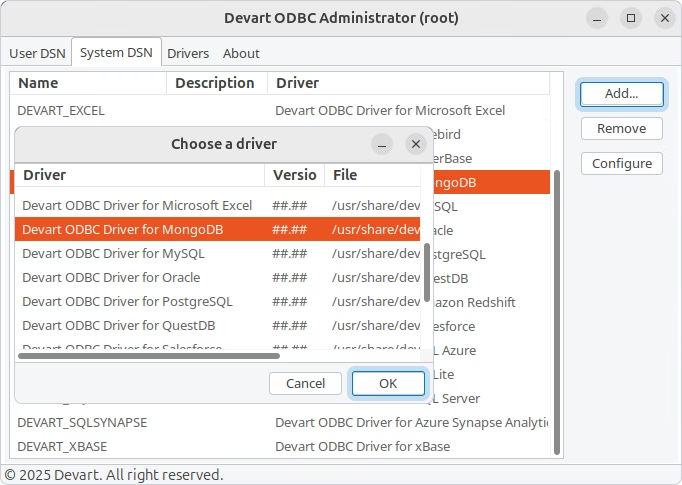
Devart ODBC Administrator on Linux (run as root), with Devart ODBC Driver for MongoDB picked in the Choose a driver dialog over the System DSN list. From Devart's getting-started guide.
Features
Collections as SQL tables
Devart ODBC Driver for MongoDB lets you run SELECT, INSERT, UPDATE and DELETE against MongoDB collections without learning MongoDB's query API. It maps BSON types to ODBC types in both directions, including nested objects, arrays, ObjectId and Decimal128, and a ComplexAsString option returns objects and arrays as text for tools that can't handle them.
MongoDB Atlas and replica sets
Devart ODBC Driver for MongoDB connects to self-hosted servers and replica sets, and to MongoDB Atlas through the DNS seed list connection format, so you don't have to list every node by hand. Authentication options such as SCRAM-SHA-1 go in the Connection options field on the Advanced Settings tab.
Secure and quick
Devart ODBC Driver for MongoDB encrypts connections with SSL/TLS, including custom certificates, can tunnel through SSH, and stores DSN passwords encrypted. Local data caching, connection pooling, batch updates and prepared statements cut the round trips when a BI tool refreshes a large collection.
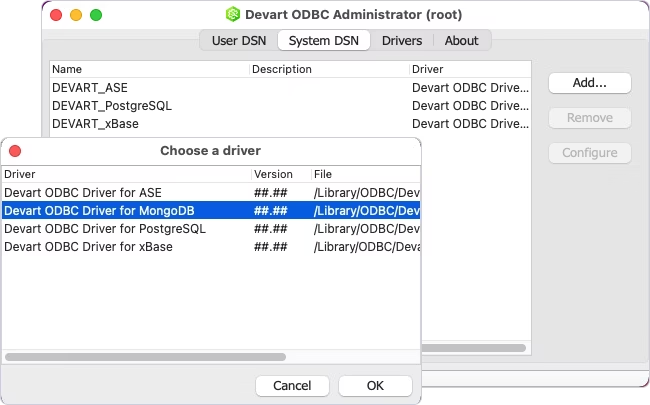
Adding a system DSN on macOS: Devart ODBC Administrator's Choose a driver dialog with Devart ODBC Driver for MongoDB selected. From Devart's getting-started guide.
Same setup on Windows, macOS and Linux
Devart ODBC Driver for MongoDB installs from an EXE or MSI (for Group Policy rollouts) on Windows, a PKG on macOS and DEB or RPM packages on Linux, and since version 6.0 every platform has a configuration dialog, through Devart's ODBC Administrator or iODBC on macOS.
Benefits
- MongoDB data for SQL people. Analysts query collections in Excel or Power BI without learning MongoDB's query language.
- Join MongoDB with SQL Server. A linked server puts MongoDB collections next to relational tables in one query.
- Nothing extra to install. The MongoDB client libraries come with the driver.
- Kept up to date. Devart ships fixes for specific tools and data types twice a year or more.
Real-World Uses
- BI on application data. A web app stores orders in MongoDB Atlas; the finance team builds Power BI reports on them.
- SQL Server reporting. An SSRS report or linked server query combines MongoDB customer documents with SQL Server sales tables.
- Excel exports without code. An analyst pulls a filtered collection into Excel through Microsoft Query.
- ETL. An SSIS or Informatica job copies MongoDB data into a data warehouse.
Who It's For, and Who Should Skip It
Devart ODBC Driver for MongoDB is for teams that need MongoDB data in SQL-speaking tools, such as Excel, Access, Power BI, Tableau, SSRS and SQL Server, on Windows, Mac or Linux.
Skip it if:
- You write application code. MongoDB's own drivers for your language are the natural route; ODBC adds a translation layer you don't need.
- Your documents have no consistent shape. Mapping wildly different documents to fixed columns will fight you, whatever driver you use.
- Several users share one machine. A shared server or gateway needs a Server license ($899.95 a year), not Desktop.
Usage Guide
- Download the installer for your platform from the download page and run it.
- When the License Information dialog appears, choose Trial evaluation, or enter or load your activation key.
- On Windows, open the ODBC Data Source Administrator matching your application's bitness and add a DSN with Devart ODBC Driver for MongoDB.
- Enter the server, port, user, password and database, or switch Connection Format to the DNS seed list for Atlas. Add options such as authMechanism on the Advanced Settings tab if needed.
- Raise Describe amount on the Advanced Settings tab if your documents vary, then click Test Connection.
- On macOS or Linux, use Devart's ODBC Administrator (or iODBC on macOS) to create the DSN the same way.
Where it falls short
- Truncated text in linked servers. Two SQL Server linked-server users reported fields cut short (one saw a column treated as nvarchar(8)); raising Describe amount didn't fix it for either, and Devart asked for sample data to investigate.
- Wrong client libraries. An "auth failed" error can come from the driver loading someone else's libmongoc from the PATH; Devart's fix is to point the Client Library and BSON Library fields at its own copies.
- Atlas authentication settings. There's no dedicated field for the auth mechanism; you type authMechanism=SCRAM-SHA-1 into Connection options.
- Per-platform, per-user pricing. Each platform and each user needs its own license.
What Users Say
Review sites rate Devart's ODBC drivers as one product line, so there are no ratings for the MongoDB driver alone. Below are those family ratings, and threads from Devart's forum.
Ratings for Devart ODBC drivers
- Capterra: 4.7 out of 5 from 26 reviews of Devart ODBC Drivers; one reviewer called it the least expensive option they found, with the best instructions for their needs, while another couldn't get the drivers working.
- G2: about 4.5 to 4.6 out of 5 from 17 to 18 reviews of Devart ODBC Driver.
- TrustRadius: a much lower 5.2 out of 10 from 58 reviews and ratings.
From Devart's forum
An Excel user on the trial in 2018 found that a Microsoft Query join "will return data only when i do not put any WHERE clause". Devart replied within days: "We reproduced the issue and fixed it. This fix will be included in the next driver release," and offered a nightly build in the meantime.
A SQL Server user in 2020: "Whenever I try to pull data from MongoDB via a linked server call, it treats records from a certain field as if it is nvarchar(8)." Devart suggested raising Describe amount "as close to the number of documents in the collection as possible"; the user replied, "I have updated the value ... However, the data was still being truncated," and Devart asked for a dump to reproduce it.
A MongoDB Atlas user in 2021 couldn't find where to set SCRAM-SHA-1. Devart's answer: "set the option authMechanism to SCRAM-SHA-1 in the "Connection options" field in the "Advanced settings" tab." The driver added Atlas's DNS seed list format in 2023.
The pattern: Devart's staff answer and fix reported bugs, while the hard part is the one every MongoDB-to-SQL tool has, turning flexible documents into fixed columns. Try your own collections in the trial before you buy.
Comparisons
ODBC driver vs MongoDB's own drivers
MongoDB's language drivers are free and the right choice for application code. Devart ODBC Driver for MongoDB is for the other side of the house: tools that only speak SQL through ODBC, like Excel, Access, SSRS, SQL Server linked servers and many BI and ETL products.
One driver or the Universal Bundle
Devart's ODBC Universal Bundle, which covers all 92 of its ODBC drivers, starts at $499.95 a year. If you also need SQL Server, PostgreSQL or cloud apps, it can cost less than several single licenses; for MongoDB alone, this driver at $139.95 is the cheaper buy.
Editions and Pricing
All editions use the one Buy Now button on this page: the order page opens set to Desktop for Windows with a 1-year subscription, and you change the edition, platform, term or license model there. Each license covers one platform.
| Edition |
Subscription (1 year) |
Perpetual |
Who can use it |
| Desktop (Windows, macOS or Linux) |
$139.95 |
$279.95 |
One user at a time on one computer |
| Server Standard (Windows, macOS or Linux) |
$899.95 |
$1,799.95 |
Many users on one server with up to 6 cores |
| Server Enterprise, Site, OEM |
On request |
On request |
Any core count, a whole company, or redistribution |
A Desktop subscription paid up front costs $279.95 for two years and $419.95 for three. Priority support is an optional extra.
FAQs
Can Devart ODBC Driver for MongoDB connect to MongoDB Atlas?
Yes. Devart ODBC Driver for MongoDB connects to Atlas using the DNS seed list connection format, supported since version 4.1.0 (May 2023).
Do I need to install the MongoDB client libraries?
No. Devart ODBC Driver for MongoDB ships with the MongoDB client libraries (libmongoc and libbson), so you don't install anything else.
How does it handle nested documents and arrays?
Devart ODBC Driver for MongoDB maps objects and arrays to ODBC types, and its ComplexAsString option returns them as text for tools that can't display structured values.
Can I write to MongoDB, or only read?
Both. Devart ODBC Driver for MongoDB supports INSERT, UPDATE and DELETE as well as SELECT, so tools such as Access can edit documents.
Can I use one license on Windows and Mac?
No. Devart sells ODBC Driver for MongoDB licenses per platform, so Windows, macOS and Linux each need their own license at the same price.
What happens when the subscription ends?
Devart ODBC Driver for MongoDB on a subscription works only during the paid term and checks the license online. A perpetual license keeps the version you bought running indefinitely and activates offline.
System Requirements
- Windows x86 or x64 (32.22 MB EXE or 34.02 MB MSI installer)
- macOS on Intel x64 or Apple Silicon (21.23 MB PKG)
- Linux x86 or x64, DEB or RPM packages (about 5 to 7 MB)
- MongoDB 3.2 or later, or MongoDB Atlas
- Internet access to activate a subscription license
Conclusion
Devart ODBC Driver for MongoDB is worth $139.95 a year if people on your team need MongoDB or Atlas data in Excel, Power BI, SSRS or SQL Server and you'd rather not build exports. It's maintained, it runs on Windows, Mac and Linux, and Devart fixes the bugs users report. The main reason to hold back is the schema problem: if your documents vary a lot, check in the 30-day trial that fields come through with the right types and lengths, and buy the license that matches who will use it: Desktop for one person, Server for a shared machine or linked server.
Download Free TrialBuy Now