Old DOS program, new PC, and an error message instead of a printout
You double-click your trusted DOS accounting or stock program and Windows tells you "Unsupported 16-Bit application". Or the program runs, but printing ends with "write fault error writing device PRN". DosPrint exists to fix exactly those two problems without making you edit configuration files by hand.
Quick facts
- Version: 1.3
- Platforms: Windows, 32-bit and 64-bit, including Windows 11 and Windows Server 2022 Terminal Server
- Price: free for private and commercial use
- Installation: none needed; you run the single DosPrint.exe file
What DosPrint actually does
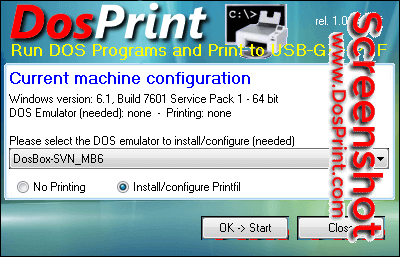
DosPrint doesn't run DOS programs or print by itself. It checks whether your Windows is 32-bit or 64-bit, suggests the right helper programs, then downloads, installs and configures the ones you accept. You can change its suggestions before you click OK -> Start.
Key features
Run DOS programs on 64-bit Windows with a DOS emulator
64-bit Windows can't run 16-bit DOS programs natively, so DosPrint sets up a DOSBox variant for you. The variants it mentions include DOSBox MegaBuild 6, DOSBox SVN Daum, vDos, vDosPlus and DOSBox-X. These add the parallel port (LPT) support that business programs need for printing. On 32-bit Windows, the standard Command Prompt is enough and no emulator is needed.
Print from DOS to USB, network, GDI and PDF printers
DOS programs only know LPT and COM ports. DosPrint can install and configure Printfil, which captures what the program sends to those ports. It redirects the output to any printer installed in Windows, physical or virtual, including PDF writers. Printfil also adds print preview, background image merging (handy for invoices on preprinted forms), and automatic PDF export and e-mailing.
Skip the manual configuration
Normally you would hand-edit long text files and test by trial and error. DosPrint does that setup in a few minutes. Afterwards you open the emulator, run your program and print.
Who it's for
It suits you if you depend on a legacy DOS application and have moved to a modern PC. It also suits whoever supports such users and wants a repeatable setup. It isn't aimed at people who want a polished all-in-one product: it's a setup helper for other tools.
Pros and cons
Pros
- Free for private and commercial use
- Nothing to install or uninstall; you can delete DosPrint.exe once the setup is done
- Picks the right emulator and printing add-on for your Windows version
Cons
- Some of the third-party programs it installs are shareware and may need a paid registration
- Support is limited; the vendor says it is provided as is, and help with the emulators must come from their own makers
- A new code signing certificate may trigger a Microsoft Defender SmartScreen warning on download, so you may need to choose Run anyway
FAQs
Is DosPrint really free?
Yes, DosPrint.exe is free. The extra programs it installs may have their own fees.
Do I need it on 32-bit Windows?
You don't need an emulator there, since Windows can run DOS programs itself. DosPrint can still set up printing to modern printers.
Do I have to install it?
No. You download it and run it.
Can my DOS program print to a PDF?
Yes. With the printing add-on, output can go to the same printers you use from other Windows programs, including PDF writers.
Who supports the emulators?
Their own developers. DosPrint's makers did not write them.
System requirements
DosPrint runs on 32-bit and 64-bit Windows, including Windows 11 and Windows Server 2022 Terminal Server. It needs an internet connection to download the helper programs you select.