You have a pile of cartons, pallets and odd-sized items, and one container to put them in. Guessing the layout wastes space, and a second truck costs real money. Container Loading Calculator, sold by Bee Interactive s.r.o. under the name EasyCargo, works out the load plan for you in your web browser.
Quick facts
- Vendor: Bee Interactive s.r.o., Prague
- Platform: runs online in a web browser (Chrome and Firefox), nothing to install
- Trial: 10 days, full version, no credit card required
- Licences: 24-hour tickets (packs of at least 10), one-month licence, one-year licence; prices are without VAT
- Units: metric or imperial
Key features
Get a load plan by pressing one button
Click Add item, enter dimensions, weight and quantity, then press Load. The vendor says most plans are ready in under a minute, depending on complexity. You can build a plan from more than 10,000 items across 250 item types.
Set rules per item so the plan matches real handling
You can mark items as non-rotatable, non-tiltable or non-stackable. Priority groups let you load by final destination, and a virtual wall splits cargo within a space.
Fix the result by hand with drag and drop
The manual editor lets you click a box, move it and rotate it. Auto-snap aligns it with neighbouring boxes. You can also build a whole plan from scratch.
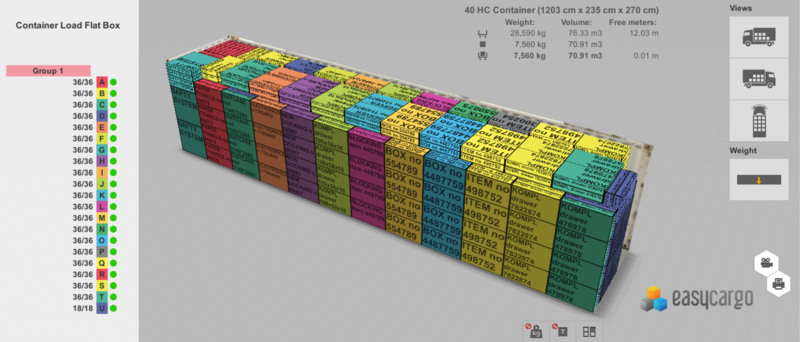
Look inside the container in 3D
The result is an interactive 3D animation you can rotate and zoom. Item names appear right on the boxes, so you can find them in the plan.
Import from Excel, export back, or connect by API
Download the template, fill in your items and upload it. You can export the finished plan back to Excel. An API is available, and a SAP integration by the German company status c is offered in German only.
Share or print step-by-step reports
Reports can be printed or shared online with customers or suppliers. A step-by-step report shows the loading order, and the tool checks weight distribution against permitted limits.
Pick from a library of cargo spaces
Predefined spaces include 20ft and 40ft containers, flatbed trailers, trucks, trailers with semitrailers and pallets. You can also define your own.
Who it's for
Transport providers who need to fill containers and trailers tightly. Shippers who want to show customers how their cargo is laid out. Buyers of freight who want to know how much space they need before paying for a whole semitrailer. Teachers and students can use an education programme.
Pros and cons
Pros
- No installation; one licence can be shared within a company
- Manual editor to correct the automatic result
- Excel import and export, plus API
- Free 10-day trial of the full version
- Updates included in every licence
Cons
- Needs an internet connection, since it is provided as an online service
- A licence cannot be used by several people at the same time
- Subscription model, with tickets sold only in packs of 10 or more
- The SAP integration is currently German only
FAQs
Do I need to install anything?
No. It runs in your browser, and the vendor lists Chrome and Firefox.
Can I try it first?
Yes. The full version is free for 10 days, with no credit card required.
Can I use pounds and inches?
Yes. You can switch between imperial and metric units.
Can several colleagues use one licence?
Yes, within the same company, as long as only one person is logged in at a time.
Is there a discount for larger teams?
The vendor gives 30% off when you buy three or more annual licences. It also gives 30% off centralized orders above $2400.
System requirements
A computer with a modern web browser such as Chrome or Firefox and an internet connection. No extensions are required.