Devart ODBC Driver for QuickBooks Online: Your Accounting Data in Excel, Access and Power BI, With SQL
Devart ODBC Driver for QuickBooks Online is a $179.95-per-year Windows ODBC driver that connects Excel, Access, Power BI, Tableau, Crystal Reports, SQL Server and other ODBC tools to a QuickBooks Online company. You sign in to Intuit once from the driver's setup window, and your customers, invoices, bills, items and accounts appear as SQL tables you can query, join and even update.
QuickBooks Online's built-in reports cover the basics, but accountants and analysts often want the raw data in a spreadsheet or a dashboard, combined with something else. This driver gives them a live connection instead of a pile of exported files. It's for QuickBooks Online only, not QuickBooks Desktop, and it runs on Windows only.
Quick facts
- Version: 2.10.0, released October 16, 2026
- Developer: Devart
- Platform: Windows Vista or later, 32-bit and 64-bit (including Terminal Server), with .NET Framework 4.5 or later
- Connects to: QuickBooks Online over HTTPS with OAuth 2.0 (built-in web login), including sandbox companies, optionally through a proxy
- SQL: SELECT with JOINs, subqueries, GROUP BY and aggregates; INSERT, UPDATE and DELETE
- Price: $179.95 per year for a Desktop license, or $349.95 perpetual
- Trial: 30 days, activated with a trial key from a Devart account
- Refund: within 30 days of purchase, if a technical problem that support can't fix stops the driver from working
- What we checked: the Buy Now order page charged $179.95 for Desktop for Windows with a 1-year subscription, and the same cart showed $349.95 perpetual, $529.95 for three years and $999.95 per year for Server Standard. The download page listed version 2.10.0 with a 32.76 MB Windows installer, and only Windows packages. All checked on November 13, 2026. We didn't install the driver or connect it to a company file
Before you buy
This driver is Windows only. Devart's product page mentions Linux and macOS, but the download page, the order page and the documentation offer only Windows. It works with QuickBooks Online, not the QuickBooks Desktop editions. Updates go straight into your live books, so try any INSERT, UPDATE or DELETE on a sandbox company first, which the driver can connect to. A subscription license needs internet access to activate and to check the license.
Download Free Trial Buy Now
Overview
QuickBooks Online keeps your company data in Intuit's cloud, behind an API. Devart ODBC Driver for QuickBooks Online translates SQL into API calls and returns the results as tables, so to Excel, Access or Power BI your books look like a database. You create a DSN once, click Connect to QuickBooks, sign in and approve access, and the driver stores the Company ID and refresh token for you.
Because the driver handles OAuth itself, you don't have to register a developer app with Intuit, which is the step that usually stops non-developers. It's part of Devart's range of more than 90 ODBC drivers and has been tested with Power BI, Tableau, QlikView, Crystal Reports, Alteryx, SQL Server Management Studio, Excel, Access, LibreOffice, FileMaker, Visual Studio, PHP and Python, among others.
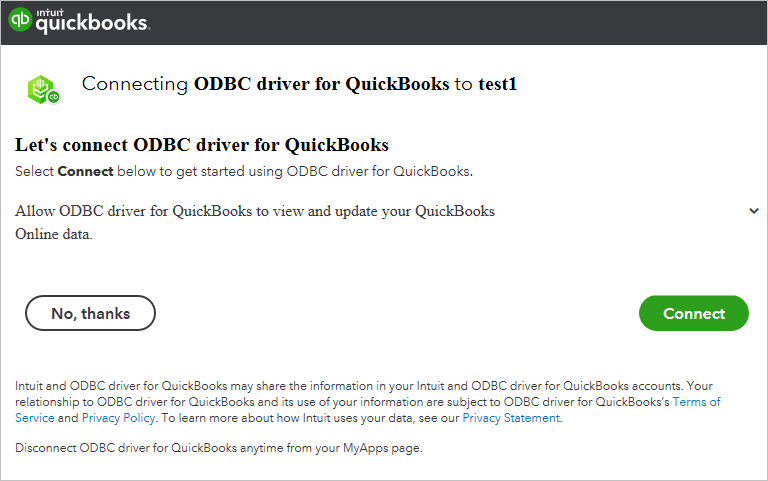
The Intuit authorization screen you see during setup, asking to let "ODBC driver for QuickBooks" view and update a QuickBooks Online company (named test1 here). Clicking Connect fills in the driver's Company ID and refresh token. From Devart's documentation.
Features
Sign in without registering an app
Devart ODBC Driver for QuickBooks Online has OAuth 2.0 built in. In the DSN window you click Connect to QuickBooks, sign in with your Intuit or Google account, enter the 6-digit code Intuit sends, and approve access. The Company ID and refresh token are filled in and, since version 2.7, stored encrypted in the DSN. A Sandbox switch connects to an Intuit sandbox company instead of your real books.
SQL across your accounting data
Devart ODBC Driver for QuickBooks Online accepts SQL-92 SELECT statements with JOINs, WHERE conditions, subqueries, GROUP BY, aggregates and ORDER BY, so you can ask for things like unpaid invoices by customer and month, or item sales joined to item cost, in a single query rather than stitching reports together.
Write back to QuickBooks
Devart ODBC Driver for QuickBooks Online supports INSERT, UPDATE and DELETE. That lets you, for example, load a batch of customers from a spreadsheet or correct item details from an Access form. Because these changes hit your real books, Devart's sandbox option is the place to rehearse them.
Tuned for BI tools, Access and linked servers
Devart ODBC Driver for QuickBooks Online has years of fixes for specific tools: JOINs through SQL Server linked servers and Access linked tables, aggregates in Access, date-time columns in Tableau, data import into Excel, and compatibility with Alteryx, Crystal Reports and Tableau Prep Builder. Options such as ReturnForeignKeys, ANSI or Unicode strings and ODBC 2.x behavior help older tools, and a proxy can be set for locked-down networks.
32-bit and 64-bit on Windows
Devart ODBC Driver for QuickBooks Online installs both 32-bit and 64-bit drivers, which matters because many offices still run 32-bit Excel and Access. An MSI package is available alongside the EXE for managed deployments.
Benefits
- Live numbers in your own tools. Refresh Excel or Power BI and get current invoices and balances, with no exports.
- Reports QuickBooks doesn't have. SQL lets you combine and slice data in ways the built-in reports don't offer.
- No developer setup. The built-in OAuth login avoids registering an Intuit app.
- Join accounting with other systems. Through Access or a SQL Server linked server, combine QuickBooks data with CRM, inventory or payroll data.
Real-World Uses
- Month-end workbook. An accountant builds an Excel workbook of receivables aging and sales by customer that refreshes from QuickBooks Online.
- Management dashboard. A small company connects Power BI to the DSN for a cash, sales and expense dashboard.
- Data import. An office manager adds a batch of new customers or items from a spreadsheet through Access with INSERT queries, tested on a sandbox first.
- SQL Server reporting. An IT team queries QuickBooks Online from SQL Server Management Studio through a linked server and joins it with the company's order database.
Who It's For, and Who Should Skip It
Devart ODBC Driver for QuickBooks Online is for accountants, bookkeepers, finance analysts and IT staff on Windows who need QuickBooks Online data in Excel, Access, Power BI or SQL Server regularly, and want to query or update it with SQL.
Skip it if you use QuickBooks Desktop (this driver doesn't support it), if you work on a Mac or Linux, or if QuickBooks Online's own reports and exports already give you what you need. If you also want other cloud apps or databases, Devart's ODBC Universal Bundle starts at $499.95 per year for all its ODBC drivers.
Usage Guide
- Download the Windows installer (EXE or MSI) from the trial link (a free Devart account is needed) and install it. Make sure .NET Framework 4.5 or later is installed.
- Open the ODBC Data Source Administrator that matches your application's bitness (32-bit for 32-bit Excel or Access) and add a data source with Devart ODBC Driver for QuickBooks Online.
- Activate the driver on the License tab with the trial or purchased key from your registration email or the Devart Customer Portal; the trial needs activating too.
- On the General tab, tick Sandbox if you're testing, then click Connect to QuickBooks, sign in with your Intuit or Google account, enter the 6-digit code and click Connect to approve access.
- Check that the Company Id and Refresh Token are filled in, add proxy details if your network needs them, and click Test Connection.
- In Excel, Access, Power BI or another tool, choose ODBC and select the DSN.
Tip
If a tool is slow to list tables, turn off ReturnForeignKeys in the advanced settings. Foreign key metadata is expensive to fetch from a cloud API, and many tools ask for it without using it.
Where It Falls Short
- Windows only, and Online only. No Mac or Linux build, and no support for QuickBooks Desktop.
- API speed. Every query runs through Intuit's API, so pulling years of transactions takes longer than reading a local database.
- Pricier than the database drivers. At $179.95 per year it costs more than Devart's SQLite or PostgreSQL drivers, and a shared server or gateway needs Server Standard at $999.95 per year.
- Little independent feedback. We found no reviews of this driver on its own, and the product page's Linux and macOS claim doesn't match the downloads.
What Users Say
We found no reviews of the QuickBooks Online driver itself in November 2026; its listings on Software Advice and GetApp had no user opinions. Review sites file Devart's ODBC drivers as one product, so these figures cover the whole line. They came from the sites' listings through search summaries, since the review pages block automated reading.
Ratings and comments for Devart ODBC drivers
Capterra shows 4.7 out of 5 from 26 reviews of Devart ODBC Drivers, G2 about 4.5 to 4.6 out of 5 from 17 to 18 reviews, and TrustRadius 5.2 out of 10 from 58 ratings.
The praise is for reliability ("Great product. Very Reliable." on Capterra), straightforward installation and DSN setup, and support that solved a problem another vendor's driver had left unfixed for two years.
The criticism is about cost and licensing: a TrustRadius reviewer wrote that "Prices are still high", others there disliked paying for each user and wanted more how-to documentation, and a Capterra reviewer got conflicting answers from support about which license fits a network.
These describe Devart as a vendor more than this driver. With a cloud accounting API in the middle, the 30-day trial against your own company, or a sandbox, is the test that counts.
Comparisons
ODBC driver vs. QuickBooks Online reports and exports
QuickBooks Online's own reports and exports are included in your subscription and fine for standard statements. Devart ODBC Driver for QuickBooks Online costs $179.95 per year but gives you a live connection in any ODBC tool, SQL queries across objects, joins with other data, and the ability to write changes back.
Desktop vs. Server editions
The Desktop edition is for one person on one Windows computer. A reporting server, a Power BI gateway or a terminal server shared by several users needs Server Standard (up to 6 cores) or Server Enterprise. Site licenses cover a whole company, and OEM lets software vendors ship the driver inside their own product.
Editions and Pricing
| Edition | Subscription (1 year) | Perpetual | Who can use it |
|---|
| Desktop for Windows | $179.95 | $349.95 | One user at a time on one computer |
| Server Standard for Windows | $999.95 | $1,999.95 | Many users on one server with up to 6 cores |
| Server Enterprise, Site, OEM | On request | On request | Any core count, a whole company, or redistribution |
Every license includes a year of support and upgrades. A Desktop subscription paid up front costs $349.95 for two years and $529.95 for three. Priority support is an optional extra, and Devart takes 5, 10 or 15 percent off for 5, 10 or 20 copies. The Buy Now button opens the order page set to Desktop for Windows with a 1-year subscription; you can switch to Server or a perpetual license there.
FAQs
Does Devart ODBC Driver for QuickBooks Online work with QuickBooks Desktop?
No. Devart ODBC Driver for QuickBooks Online connects only to QuickBooks Online through Intuit's cloud API. QuickBooks Desktop Pro, Premier and Enterprise aren't supported.
Do I need to register an app with Intuit?
No. Devart ODBC Driver for QuickBooks Online has OAuth 2.0 built in: you sign in from the DSN window and approve access, and the driver fills in the Company ID and refresh token.
Can I test on a sandbox company first?
Yes. Devart ODBC Driver for QuickBooks Online has a Sandbox option that connects to an Intuit sandbox company, which is the safe place to try INSERT, UPDATE and DELETE.
Does it run on a Mac?
No. Devart ODBC Driver for QuickBooks Online is sold and downloadable for Windows only, 32-bit and 64-bit, despite a mention of macOS and Linux on its product page.
Can I use it with 32-bit Excel or Access?
Yes. Devart ODBC Driver for QuickBooks Online installs both 32-bit and 64-bit drivers. Create the DSN in the 32-bit ODBC Data Source Administrator for 32-bit Office.
What happens when the subscription ends?
Devart ODBC Driver for QuickBooks Online on a subscription works only during the paid term and checks the license online. A perpetual license keeps the version you bought working indefinitely.
System Requirements
- Windows Vista or later, 32-bit or 64-bit, including Windows Terminal Server
- .NET Framework 4.5 or later
- 32.76 MB EXE or 36.63 MB MSI installer
- A QuickBooks Online company (or Intuit sandbox) and internet access over HTTPS
- Internet access to activate a subscription license
Conclusion
Devart ODBC Driver for QuickBooks Online is worth $179.95 a year for Windows users who pull QuickBooks Online data into Excel, Access, Power BI or SQL Server every week and want SQL and write-back instead of exports. The built-in OAuth sign-in makes setup easy for non-developers, and the driver is maintained twice a year.
Mac users and QuickBooks Desktop users should look elsewhere, and if QuickBooks Online's own reports already cover you, save the money. Otherwise, try it for 30 days, ideally against a sandbox company first, and buy the perpetual license if you'd rather pay once.
Download Free Trial Buy Now