You bought songs and audiobooks through iTunes, and now they won't play on your Android phone, car stereo or Sonos speaker. DRM Converter for Mac is built for that problem. It turns protected iTunes and Apple Music audio into ordinary files that play on other devices.
Quick facts
- Version: 9.1.6
- Platform: Mac, with builds for Apple Silicon and Intel chips
- Requires: Mac OS X 10.12 or later (macOS 12 or later for Intel and Apple Silicon Macs)
- Price: $49.95 USD
- Trial: a trial version is available to download
Key features
Turn protected M4P songs and Apple Music tracks into MP3 and other formats
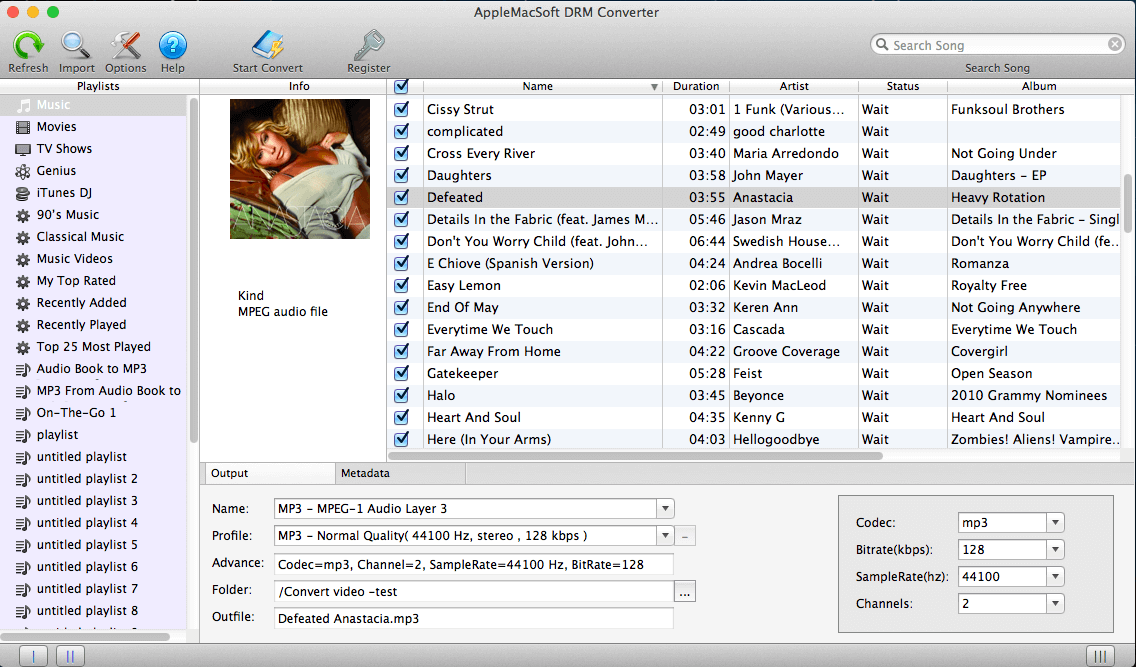
The program removes DRM from iTunes and Apple Music audio. It saves the result as MP3, M4A, WAV, AAC, AIFF, AC3, AU, FLAC, M4R or MKA. The converted files then play on PCs, phones, car players and Sonos.
Convert Audible and iTunes audiobooks to MP3
It handles M4B, AAX and AA audiobook files. When you convert audiobooks to M4A, it keeps the chapter information.
Pull the audio track out of iTunes videos
You can save the audio from iTunes movies, music videos and TV shows as MP3, WAV or another audio format. This only works on the audio track. If you want to remove DRM from the video itself, the vendor points you to its separate DRM Video Converter for Mac.
Pick a song, a playlist or the whole library, then adjust the output
The converter reads your iTunes or Apple Music library directly, so you can convert one track or everything in a batch. You can change sample rate, channels, bit rate and codec, set the output file-name format, and adjust volume. Conversion runs at up to 16X speed. ID tags and metadata are kept, and you can edit metadata by hand before converting.
No extra hardware or virtual drive
The conversion needs no hardware and no virtual drive. The vendor says it takes about three steps. It can also convert Apple Music from iCloud directly, so you don't have to download the tracks to your disk first.
Who it's for
It suits you if you own a lot of iTunes purchases or Audible books and want them on a device Apple doesn't support. That includes Android phones, MP3 players, car stereos, Sonos speakers and Xbox or PlayStation consoles. It also suits you if you want a simple batch tool that works from your existing iTunes or Apple Music library.
Pros and cons
Pros
- Many output formats, including MP3, FLAC, WAV and AAC.
- Handles music, audiobooks and the audio of iTunes videos.
- Keeps tags, metadata and audiobook chapters.
- Separate builds for Apple Silicon and Intel Macs.
- A trial is available, and the vendor advertises a money-back guarantee.
Cons
- It is Mac-only. Windows users need the vendor's separate Windows product.
- It won't remove DRM from iTunes videos. You need a different tool for that.
- Your music or audiobooks must be playable in iTunes or the Apple Music app.
- It needs Mac OS X 10.12 or later.
FAQs
Which formats can I save to?
MP3, M4A, WAV, AAC, AIFF, AC3, AU, FLAC, M4R and MKA.
Does it convert audiobooks?
Yes. It converts iTunes M4B and Audible AAX and AA files to MP3 and other formats.
Can I convert iTunes movies?
It can extract the audio from them. It does not remove DRM from the video files.
Does it run on Apple Silicon Macs?
Yes. The vendor offers one download for Apple Silicon and another for Intel chips.
Can I try it first?
Yes. A trial version is available, and it converts a protected M4P song to MP3.
System requirements
- Mac OS X 10.12 or later (macOS 12 or later for Intel and Apple Silicon Macs).
- Music or audiobooks that play in iTunes or the Apple Music app.