Sleek Bill Desktop: Offline Invoicing, GST Billing and Stock for Small Businesses
Sleek Bill is offline billing software for Windows and Mac that makes invoices, quotations, proformas, delivery challans and purchase bills, handles Indian GST (or a plain VAT-style tax for other countries), and keeps all your data on your own computer. A Premium license is $299 once or $99 a year at checkout, and Premium + Inventory, which adds purchases, stock, accounting reports and a point-of-sale screen, is $399 once or $199 a year.
It's built for the shop owner, trader or freelancer who wants to type a client name, pick items and print a GST-correct invoice in under a minute, without paying monthly for a cloud app or depending on the shop's internet connection.
Quick facts
- Current version: 2.6.0, released September 3, 2026
- Developer: V K Control System Private Limited (Sleek Bill), India
- Platforms: Windows and macOS desktop; works without internet
- Tax systems: Indian GST (CGST, SGST, IGST, cess, composition scheme) or traditional taxation for other countries
- Licenses: Premium or Premium + Inventory, each yearly or lifetime
- Price at checkout: $299 lifetime or $99 a year (Premium); $399 lifetime or $199 a year (Premium + Inventory)
- Trial: 15 days with Premium features, no credit card; then it drops to the Free plan (10 documents a month, with Sleek Bill branding)
- What we checked: the Windows installer (69.8 MB, dated September 3, 2026, digitally signed by V K Control System Private Limited) and the Mac disk image (100.6 MB) on the vendor's download server, and the four prices above on the order page on November 12, 2026. We didn't install it or file a GST return with it.
Download Free TrialBuy Premium LifetimeBuy Premium + Inventory Lifetime
Overview
Sleek Bill opens on a dashboard of big buttons: New Invoice, Quotation, Proforma Invoice, Delivery Note / Challan, Purchase Order, Purchase Bill, Credit Note and Debit Note, with counters for unpaid invoices, overdue quotes, low-stock items and unpaid bills across the top. Reports for sales, purchases, clients and products sit on the right. There's no accounting jargon to learn before your first invoice.
The program is aimed squarely at Indian small businesses, and GST is where it's deepest: HSN/SAC codes, place of supply, reverse charge, cess, SEZ and UTGST, and GSTR-1 and GSTR-3B reports. If you're outside India, you switch it to traditional taxation and set your own tax rates; invoices for overseas clients can show their currency.
It's actively developed. The update history lists ten releases between November 2024 and September 2026, adding barcodes, a POS screen, an accounting module, bank books, WhatsApp sharing and new invoice templates.
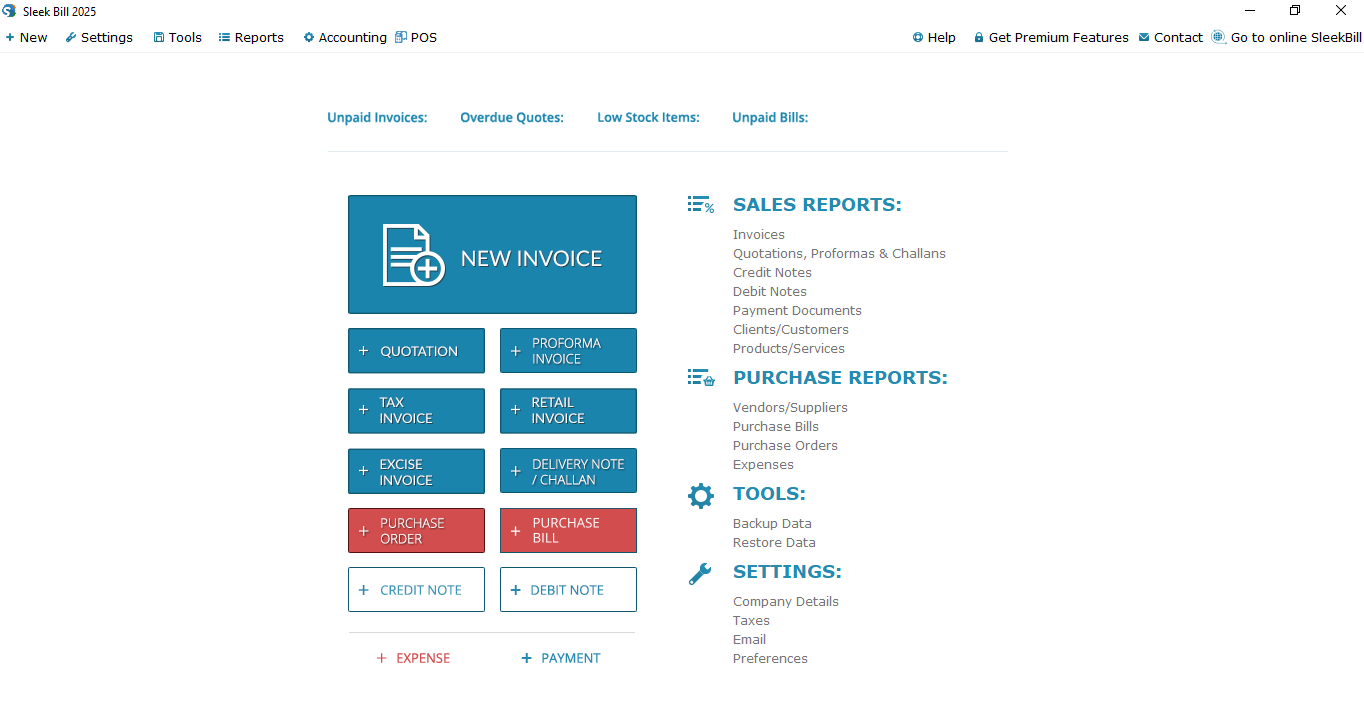
The Sleek Bill 2025 dashboard: New Invoice and buttons for quotations, proformas, tax, retail and excise invoices, delivery notes, purchase orders and bills, credit and debit notes, with the Accounting and POS menus at the top.
Features
Every billing document a small business sends
Sleek Bill makes tax invoices, bills of supply, quotations, proforma invoices, delivery challans, credit and debit notes, payment receipts and export invoices, and converts a quotation into a proforma with one click. Invoices can carry your logo, signature, two custom fields, bank details for up to five banks and a UPI QR code so customers can pay straight from the paper. Templates come in A4, A5 and A6, plus 58 mm and 80 mm thermal receipts. You print, save a PDF, email it from the program or, since version 2.6.0, send it on WhatsApp.
GST returns data ready to upload
Sleek Bill calculates CGST, SGST and IGST from the place of supply, and produces GSTR-1 (including a JSON file for the portal) and GSTR-3B reports, plus an e-way bill JSON file with the transport amount. The upload itself happens on the government portal: Sleek Bill Desktop prepares the files but doesn't submit them, and it doesn't generate e-invoice IRNs.
Stock, purchases and margins (Premium + Inventory)
The Premium + Inventory license turns Sleek Bill into a small stock system: vendors, purchase orders and purchase bills that add stock, opening stock, and reports for stock in and out, sales by client, cost of goods and gross margin per item. Items can carry an SKU, batch and serial numbers, MRP and expiry dates, and you can import and export clients, vendors and items.

The Products/Services report: search by name, price range, quantity or SKU, with quantity in hand, quantity sold, unit of measure, COGS, gross margin and margin percentage for each item.
Simple accounting books
Sleek Bill's accounting module, included only with Premium + Inventory, adds a profit and loss statement, cash book, bank book, inventory book and item stock and amount ledgers. Client, vendor and combined ledgers sit alongside client and vendor statements (with opening balances and carry-forward) that export to PDF, and advance payments are tracked and settled against later invoices.
Counter billing with barcodes
Sleek Bill has a point-of-sale screen for shops: scan a barcode to add an item, take payment, see the change due and today's sales by payment mode, and print a 2 or 3 inch receipt. It can also generate and print barcodes for your items. POS is part of both Premium + Inventory licenses on the vendor's US pricing.
Your data stays on your computer
Sleek Bill Desktop keeps its database locally and works without internet; you only need a connection to download updates, email documents or backups, send on WhatsApp, or upload to the GST portal. Tools, Backup Data saves a backup file wherever you choose, Restore Data brings it back (that's also how you move to a new computer), and scheduled backups can be emailed to you. Password protection is part of Premium + Inventory.
Benefits
- No monthly bill. A lifetime license is paid once, which suits a small shop that would otherwise pay a cloud invoicing service every month for years.
- Billing keeps going when the internet doesn't. A power cut to the router or a patchy rural connection doesn't stop the counter.
- Fewer GST mistakes. Tax is split from the place of supply, and the return data comes out of the same invoices instead of being retyped into a spreadsheet.
- Short learning curve. Reviewers keep coming back to how easy it is; the dashboard is one screen of buttons.
Real-World Uses
- A hardware or electronics shop scanning barcodes at the counter, printing 3 inch receipts and checking which items are running low.
- A small trader or distributor entering purchase bills, tracking stock in and out, and handing the accountant GSTR-1 and GSTR-3B reports each month.
- A consultant or freelancer sending quotations, converting them to proformas and then invoices, with a UPI QR code for quick payment.
- An exporter issuing export invoices in the client's currency, with or without IGST.
Who It's For, and Who Should Skip It
Sleek Bill fits small Indian businesses, retailers and freelancers who bill from one computer, want GST handled properly and prefer a one-time price. It also works for small businesses elsewhere that need straightforward invoicing with a simple sales tax and like keeping data offline.
Skip it if:
- Several people need to bill from different places. The desktop program keeps one local database. Sleek Bill Online, a separate browser product with multi-user plans, or another cloud tool fits better.
- You need e-invoice IRNs generated from your billing software. The desktop version prepares files; it doesn't talk to the IRN portal.
- You need full double-entry accounting, a balance sheet or payroll. Sleek Bill covers billing, stock and simple books; a full accounting package is the better tool.
- You're outside India and need country-specific compliance such as US sales tax by state or UK Making Tax Digital. Sleek Bill's depth is in GST.
Usage Guide
- Install it. Download the Windows installer or the Mac disk image and run it. On a Mac, allow apps from identified developers and drag Sleek Bill to Applications.
- Set up your business. Enter your company details, GSTIN, tax system (GST, composition or traditional), bank details, logo and invoice numbering.
- Add items and clients. Enter products and services with HSN/SAC code, price, GST rate and discount, then your clients and vendors with address and GSTIN. You can import them from a file instead.
- Make an invoice. Click New Invoice, pick the client and items, check the place of supply, and save. Print it, save a PDF, email it or send it on WhatsApp.
- Record payments and purchases. Add payments against invoices, and with Premium + Inventory enter purchase bills so stock updates.
- Back up. Use Tools, Backup Data regularly and keep a copy off the computer, or set up email backups.
- Activate before day 15. The trial runs with Premium features for 15 days; buy a license to keep them, or carry on with the Free plan's 10 documents a month.

The GST version's dashboard (title bar "Sleek Bill for India 2025 2.5.1"), with counters for unpaid invoices, overdue quotes, low-stock items and unpaid bills, and Bill of Supply among the document buttons.
Before you buy
- Pick the license by whether you need stock. Premium covers invoicing and GST; purchases, inventory, the accounting books and POS need Premium + Inventory.
- The Premium + Inventory "lifetime" license includes one year of support, and the order page shows it with a 12-month renewal. Check the renewal terms on the order page before you pay.
- Indian buyers can also pay in rupees on the vendor's Indian pricing page: ₹9,999 + GST lifetime or ₹3,999 + GST a year for Premium, ₹14,999 + GST lifetime or ₹5,999 + GST a year for Premium + Inventory.
- The vendor doesn't publish minimum Windows or macOS versions. Install the trial on the computer you'll bill from before buying, and print a test receipt on your own printer.
Download Free TrialBuy Premium LifetimeBuy Premium + Inventory Lifetime
Where it falls short
- No sync with Sleek Bill Online. You can export clients, items and vendors and import them online, but there's no automatic sync between the two.
- One computer, one database. Moving to another PC means backup and restore, and the vendor asks you to check license transfer and Windows-to-Mac compatibility with support first.
- Frequent GST fixes. The update history includes fixes to GSTR-1 grouping and IGST shown on print, so keep it updated and compare the first returns with your accountant's numbers.
- The Free plan is a teaser. Ten documents a month with Sleek Bill branding won't run a real business.
What Users Say
Sleek Bill's public feedback is strongly positive, and almost all of it comes from Indian users. Trustpilot shows 4.7 out of 5 from 57 reviews, with every review at 4 or 5 stars; that page covers the sleekbill.in brand, so it mixes Desktop and Online users. Negative reviews are hard to find anywhere, so weigh the praise accordingly.
Trustpilot
"Good accounting Software . Been using it for almost 7 years now . No issue whatsoever ." Wiping Solution, October 28, 2026, 5 stars
"User-friendly and the best customer support is really awesome, I highly recommend sleekbill." Raveendran CVT, October 15, 2026, 4 stars
"We are using Sleek Bill for more than 5 years without inconvenience and at best support system." manish kumar, October 15, 2026, 5 stars
"We are using sleek bill software from last 6 years, user interface is good and it's easy to operate." Shravan Pandey, September 16, 2026, 5 stars
"I have been using Sleek Bill since I started my business. It is very convenient to use and very user-friendly. No complicated steps, just simple billing and inventory. Saves a lot of time." sungtiben longkumer, September 4, 2026, 4 stars
Customers quoted by the vendor
"Sleek bill is the best software in terms of simplicity & customer support, there has always been a support system from the Sleek Bill team during all issues and changes, including GST. The updates are immediately reflected in the software." Ali R.J, Babji Enterprises
"Sleek Bill is handy and makes billing a pleasure on my Mac. The support team was excellent when I needed help." Jagadeesh SV, Vyoma Excel
"I have been using Sleek Bill for the last 9 months and it's just too awesome. Quotes and Invoices are just on one click away, I am saving at least 80% of my time." Suhas, Gauree Tech
SoftwareSuggest
SoftwareSuggest has a single review, from a free-trial user in February 2018: "Very easy to use. Thanks for creating this outstanding software for small business owners." Praveen, 4 out of 5
The pattern: long-time users stay for the simplicity and the support team's help through GST changes. The reviews say little about large data sets, multi-location shops or use outside India, so test those yourself in the trial.
Comparisons
Premium vs Premium + Inventory
Premium is an invoicing tool: every sales document, GST reports, templates, unlimited documents without branding. Premium + Inventory adds the buying side and the books: vendors, purchase orders and bills, stock and margin reports, the accounting module, password protection, and POS with thermal printing. If you sell goods from stock, you want Premium + Inventory; if you sell services, Premium is enough.
Sleek Bill Desktop vs Sleek Bill Online
They're two products from the same company. Desktop installs on one computer, works offline and can be bought outright. Online runs in a browser, needs internet, is sold yearly and supports multiple users with permission levels. A license for one doesn't cover the other.
Editions and Pricing
Prices on the order page on November 12, 2026. Each button orders that license.
| License | Price | Term | What it adds | Buy |
|---|
| Free | $0 | After the 15-day trial | 10 documents a month, Sleek Bill branding, one template | Download |
| Premium Yearly | $99 | 1 year, renews | Unlimited documents, no branding, A4/A5/A6 templates, GST reports, credit and debit notes | Buy Yearly |
| Premium Lifetime | $299 | One-time | Same as Premium Yearly, paid once | Buy Lifetime |
| Premium + Inventory Yearly | $199 | 1 year, renews | Vendors, purchases, stock and margin reports, accounting books, password protection, POS and 2/3 inch thermal printing | Buy Inventory Yearly |
| Premium + Inventory Lifetime | $399 | Lifetime, 1 year of support; order page shows a 12-month renewal | Same as Premium + Inventory Yearly, paid once | Buy Inventory Lifetime |
FAQs
Can I use Sleek Bill outside India?
Yes. Sleek Bill has a traditional taxation mode for businesses outside India, where you set your own tax rates instead of GST, and invoices for overseas clients can show the client's currency. Its reports and compliance features, though, are built around Indian GST.
Does Sleek Bill Desktop work on a Mac?
Yes. Sleek Bill Desktop has a separate macOS installer alongside the Windows one, both at version 2.6.0. The vendor doesn't publish a minimum macOS version or say whether it runs natively on Apple silicon, so try the trial first.
What happens when the 15-day trial ends?
Sleek Bill drops to the Free plan: 10 documents a month, Sleek Bill branding on documents and one template. Buying a license restores the Premium features, and your data stays where it is.
Can Sleek Bill generate e-invoice IRNs?
No. Sleek Bill Desktop creates invoices and exports GSTR-1 and e-way bill JSON files, but IRN generation and portal submissions happen online, outside the desktop program.
Can more than one person use Sleek Bill Desktop?
Sleek Bill Desktop is licensed per computer and keeps one local database, so it's built for billing from one machine. For several users at once, the vendor sells Sleek Bill Online's multi-user plans, a separate browser product.
How do I move Sleek Bill to a new computer?
Back up with Tools, Backup Data on the old computer, install the same or a newer Sleek Bill version on the new one, and restore the file with Restore Data. Contact Sleek Bill support to move the license.
Which printers does Sleek Bill support?
Sleek Bill prints A4, A5 and A6 invoices on any printer with a normal driver, and POS receipts on 58 mm (2 inch) and 80 mm (3 inch) thermal printers. Print a sample on your own printer during the trial.
System Requirements
- Windows: 69.8 MB installer; the vendor doesn't publish a minimum Windows version
- macOS: 100.6 MB disk image; minimum macOS version not published
- Internet: not needed for billing; needed for updates, email, WhatsApp and portal uploads
- License: per computer
Conclusion
Sleek Bill is a good buy for a small Indian business that bills from one computer and wants GST invoices, stock and simple books without a monthly fee. The Premium + Inventory lifetime license at $399 is the one most shops should pick, since it's where purchases, stock, accounting and POS live; service businesses can stop at Premium. The reason to buy it is how quickly it turns a client and a few items into a correct GST invoice, offline. The reason not to is if you need several users, IRN generation inside the program, or deep compliance outside India. Run the 15-day trial with your real items and printer first.
Download Free TrialBuy Premium LifetimeBuy Premium + Inventory Lifetime