PC Startup Master 4 PRO: More Control Over What Runs When Windows Starts
PC Startup Master 4 PRO is a Windows startup manager that disables, delays and guards the programs, services and scheduled tasks that launch with your PC, for $18.95 a year at checkout. It's for people with a slow boot, a crowded system tray, or a worry about software quietly adding itself to startup.
Windows already lets you switch startup apps on and off in Task Manager, so the question is whether you need more. You do if you want to delay an app rather than disable it, see services and tasks in one place, or get a warning when something new tries to run at boot.
Quick facts
- Developer: Smart PC Utilities. Formerly called Startup Master
- Version: 4.2.990, released July 22, 2025
- Platform: Windows 11, 10 and 8.1, with .NET Framework 4.8 or later
- Price: $18.95 for one year on one PC at checkout
- Renewal: off unless you tick it. The order page shows $14.95 for the next year
- Lifetime option: $40.95 at checkout, with no renewal
- Free edition: manages and optimizes startup apps, with no time limit
- Trial: 30 days of Pro
- Guarantee: 30-day money-back guarantee
- What we checked: the 14 MB installer's file version is 4.2.990.0, and the one-year license was $18.95 on the order page, with a $14.95 optional renewal, on November 6, 2026. We didn't measure boot times ourselves, so any speed gain on your PC is untested by us.
Before you buy
Try Task Manager first. If all you want is to turn off a few apps, the Startup tab in Windows does this for free. This program is worth it for delay rules, services, tasks and Startup Guard.
One license, one PC. Smart PC Utilities ties a license to your hardware, so a big upgrade can stop it working until you reset the license with a form on its site.
Disabling isn't always safe. Turning off a driver helper, a security tool or a Windows service can break things. Look up anything you don't recognize, and don't disable items in bulk.
Download Free TrialBuy Now
Overview
The main window has three big tabs: Startup Programs, Windows Services and Scheduled Tasks. Each lists its items with description, target, whether the file is signed, and status. A Details pane on the right shows the publisher, the startup location, an on/off switch and a scan result from Windows Defender, and that last detail is useful when you meet an unfamiliar entry. The toolbar above covers New, Disable, Delay, Delete, Run, Edit and Find.
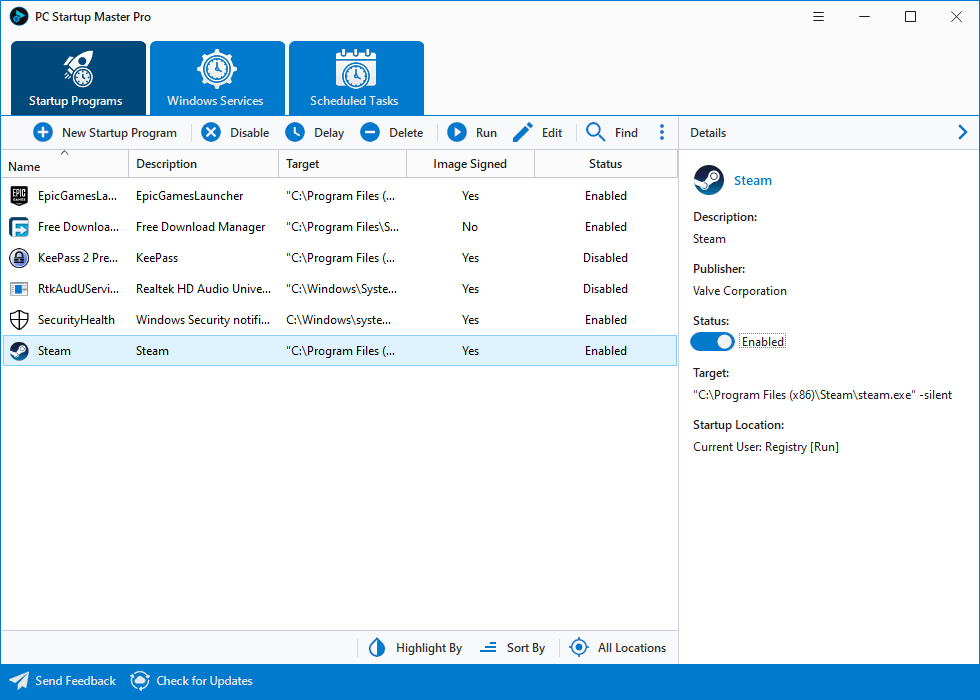
The Startup Programs tab. Details on the right include a Windows Defender scan result.
Features
PC Startup Master delays programs instead of switching them off
PC Startup Master's Delayed Startup launches an app some minutes after Windows starts, so everything isn't fighting for the disk at once. The Pro options add conditions: start only when CPU use is below a set percentage, only with an active internet connection, only on chosen days, or not at all if it's already running. You can also set process priority and window style.
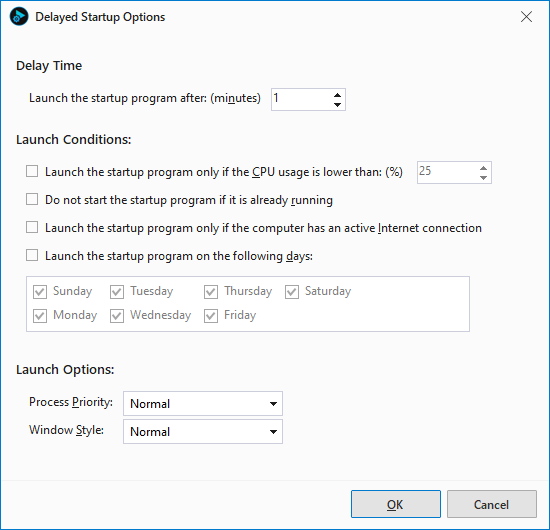
Delayed Startup Options, with the delay, the launch conditions and the priority settings.
PC Startup Master Pro warns you about startup changes
PC Startup Master Pro's Startup Guard watches startup programs, Windows services and scheduled tasks, and shows a notification when one changes. You see the item's name, type, target and location, with an Undo button to reverse it. That helps stop unwanted software and malware from persisting, but it's a monitor, not an antivirus, so keep your security software running.

A Startup Guard alert, showing a new startup item and the Undo button.
PC Startup Master puts services and tasks in one window
PC Startup Master Pro manages Windows services and scheduled tasks as well as startup programs, in the same layout. This matters because many apps start themselves through a service or a task, which is where the Windows Startup tab can't follow them.
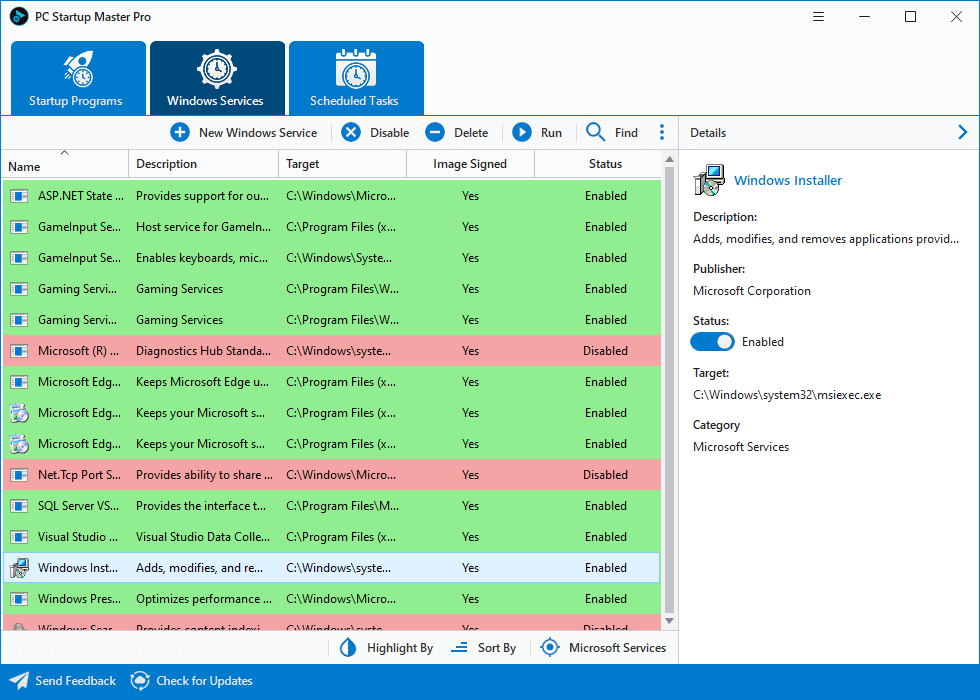
The Windows Services tab, with the same details pane.
PC Startup Master lets you add and edit entries
PC Startup Master can create, edit, verify and delete startup items, and it can filter by location, such as a registry key or startup folder. The Highlight By and Sort By controls at the bottom help you spot new, missing and disabled items. The current version also has dark mode and accent colors, plus Russian, German and Simplified Chinese interfaces.
Benefits
- A smoother first minute. Delaying heavy apps leaves Windows ready to use sooner, without losing those apps.
- A better view. Publisher, signature and scan details tell you what an entry is before you touch it.
- Fewer surprises. You'll find out when an installer adds itself to startup, not months later.
Real-World Uses
- A work laptop that takes minutes to settle: delay the cloud sync and chat apps by a few minutes.
- A game launcher you rarely use: stop its updater starting up, and see whether it also has a service or task.
- Software that keeps coming back: use Startup Guard to catch it when it re-adds itself, then click Undo.
- A backup tool that needs the internet: run it only when there's an active connection.
- A parent's PC you look after: clear out the startup list, then leave Startup Guard on to warn about new items.
Who it's for, and who should skip it
Buy it if you want one tidy place for startup programs, services and tasks, along with the Guard. Skip it if you only want to turn a few apps off, since Task Manager does that. Skip it if you're comfortable with more technical tools as well: Microsoft's free Autoruns shows far more startup locations, though it's harder to read and has no delay feature. A Mac user will need something else, as will anyone on Windows 7, which is no longer supported. Keep expectations in check too: on a PC with an SSD, a cleaner startup list may not make a big difference.
Usage Guide
- Install PC Startup Master. It needs .NET Framework 4.8 or later.
- Start on the Startup Programs tab, and click each item to read its publisher and details.
- Select something you don't need at boot, and click Disable.
- For an app you want but not immediately, click Delay and set the time and any conditions.
- Check the Windows Services and Scheduled Tasks tabs in the same way, and change only what you recognize.
- To activate Pro, paste in the license code, copying it rather than typing it.
- Restart Windows and see how it feels. If something stops working, turn the item back on.
Where it falls short
- No boot-time measurement. Windows Report's review notes that it "Can't measure the impact of startup items on Windows boot," so you can't see which item costs you the most, or how much time you've saved.
- A subscription for a small job. Once your startup list is clean, there's little left to do unless you value the Guard.
- Few reviews of this version. The written reviews we could read cover version 3 or earlier, and the company has no Trustpilot reviews at all.
- Slower release pace. The most recent version in the release notes is from July 2025.
- Older Windows. Version 4 needs Windows 8.1 or later.
What Users Say
PC Startup Master is a small niche utility, so reviews are few and most are older. Here's the short list of what we could verify.
Windows Report (review of version 3)
This review, updated in October 2023, says: "PC Startup Master speeds up your computer and makes Windows boot faster by disabling unnecessary processes. It's one of the best tools to manage startup items." It also lists the free version as being "falsely advertised as open source" and complains that it "Can't measure the impact of startup items on Windows boot." It says "No software updates since 2015," which has since been overtaken by version 4 and its 2025 update.
Quotes on the vendor's page
The vendor chose these. Softpedia: "PC Startup Master is a great utility for users wanting to better protect their computers by guarding the overall startup performance every time the PC is turned on." SoftwareInformer: "This interesting and well designed tool is an excellent choice when in need of a comprehensive and fully customizable startup manager that needs to go beyond what Windows can offer." User Bhuvnesh Nirmal Nirmal: "It enhanced PC startup speed and disabled unnecessary applications which were runned automatically." The page also shows a 4.0 rating in its product data.
Trustpilot
Smart PC Utilities had no reviews on Trustpilot on November 6, 2026, so there's no company rating to report, good or bad.
The themes: reviewers like how simply it handles startup, and they want better evidence of what it achieves. We found no complaints about broken licenses or billing, but with so few reviews that doesn't tell you much.
Comparisons
PC Startup Master vs Windows Task Manager
Task Manager's Startup tab is free and shows each app's startup impact, which this program can't do, but it only turns items on or off. PC Startup Master adds delay rules, services, scheduled tasks and change alerts.
PC Startup Master vs Autoruns
Autoruns, from Microsoft's Sysinternals, is free and shows nearly everything that can start on Windows. It's aimed at technicians, and it has neither delay rules nor change alerts. PC Startup Master is the friendlier choice, and Autoruns is the deeper one.
Editions and Pricing
| Edition | Price | Term | What you get |
|---|
| Free | $0 | No expiry | Manage and optimize startup apps |
| Pro yearly (this listing) | $18.95 at checkout | 1 year, 1 PC | Startup Guard, advanced delay options, services and tasks, updates, support |
| Pro lifetime | $40.95 at checkout | One payment, 1 PC | The same features with no renewal |
FAQs
Is PC Startup Master free?
PC Startup Master has a free edition for managing startup apps with no time limit, and a 30-day trial of Pro. Startup Guard and the advanced delay options need a Pro license.
Does PC Startup Master work on Windows 11?
Yes, PC Startup Master 4 supports Windows 11, 10 and 8.1, including 64-bit versions, and it needs .NET Framework 4.8 or later.
Is PC Startup Master the same as Startup Master?
Yes, PC Startup Master is the current name of Startup Master from Smart PC Utilities, which started as a free tool.
Will PC Startup Master speed up my PC?
PC Startup Master can shorten the wait after you log in if you have many startup apps, but it won't change how fast programs run afterwards. On a clean PC, you may see little difference.
What happens if I replace my PC's hardware with PC Startup Master Pro?
PC Startup Master Pro may stop working, since the license is tied to a hardware ID. The vendor has a form to reset the license so you can register it again.
Can PC Startup Master Pro run on two PCs?
No, a single PC Startup Master Pro license code works on one PC. Smart PC Utilities sells additional licenses at a discount.
Should I choose the yearly or lifetime PC Startup Master license?
PC Startup Master's lifetime license at $40.95 pays for itself in under three years, if you'd keep renewing at $14.95. If you only want a one-time cleanup, one year is enough.
System Requirements
- Windows 11, 10 or 8.1, including 64-bit versions
- Microsoft .NET Framework 4.8 or later
- 14 MB for the download
Conclusion
A good buy at $18.95 if you'll use Startup Guard and delay rules, and not otherwise. PC Startup Master 4 PRO is easier to read than Autoruns and does much more than Task Manager, with useful details about each entry. The one reason to buy it is to control how and when apps start, and to be warned when something new tries to join them. The main reason not to is that Windows covers the basics for free, and the program can't show you how much boot time you've saved. Start with the free edition or the 30-day trial.
Download Free TrialBuy Now