Short answer: choose ON1 Photo RAW 2027 ($99.99 once) if you want a real Lightroom replacement: a photo organizer, RAW developer, layers and masking and AI noise reduction in one app that you own. Choose Luminar Neo ($99 once for Desktop Only) if you want fast, good-looking results from one-slider AI tools on a Mac or a modest Windows PC, and don't need a deep catalog. Both are one-time purchases, but both sell paid upgrades, and Luminar's generative tools need a yearly payment after the first year.
At a glance
| Fact |
ON1 Photo RAW 2027 |
Luminar Neo |
| Price (one-time) | $99.99; MAX $169.99 | Desktop Only $99; All Platforms $139; Max $159 |
| Computers per license | 2 (MAX: 3) | 2, Mac and Windows can be mixed |
| Windows | Windows 11 only (x86 and ARM) | Windows 10 (1909+) and 11, 64-bit |
| Mac | macOS 13 or later | macOS 13 or later |
| Free trial | 30 days, free ON1 account | 7 days, one computer, email only |
| Photo organizer | ✓ Full: keywords, metadata, AI keywording, no import step | Basic: folders, albums, favourites |
| Layers and AI masking | ✓ | ✓ |
| AI noise reduction | ✓ NoNoise AI | ✓ Noiseless AI |
| Generative erase and expand | ✓ Included, runs on your computer (cloud option in MAX) | ✓ First year only, then Luminar Prime (yearly) |
| Plug-in for Photoshop / Lightroom Classic | MAX only | ✓ Every plan |
| Next major version | Paid upgrade (2028) | Updates included; "big upgrades may require extra upgrade payments" |
| Refund | 30-day money-back | 30-day money-back |
How we compared them
- Prices and editions on each order page, and what each license includes after the first year.
- Installers on each vendor's download server, versions and system requirements.
- Feature lists and release notes for ON1 Photo RAW 2027 and Luminar Neo 1.29.
- Reviews on Trustpilot and independent photo sites (Digital Camera World, TechRadar, PhotoWorkout, DPReview, Digital Photo Mentor).
What we checked: ON1's order page listed Photo RAW 2027 at $59.99 (regular $99.99) and MAX at $129.99 (regular $169.99) on November 21, 2026, and its Windows installer is 1.01 GB. Skylum's order page listed Luminar Desktop Only at $99, All Platforms at $139 and Max at $159 on November 21, 2026, and Luminar's Windows trial installer is 83 MB (version 1.29.0, checked November 17, 2026). We compared features, prices, trials and license terms, and didn't edit the same raw files in both apps or time their exports.
ON1 Photo RAW 2027: the all-in-one Lightroom alternative
ON1 Photo RAW 2027 from ON1 Inc. · $99.99 once ($59.99 in ON1's Black Friday sale until November 27, 2026) · Windows 11 and macOS 13+ · 30-day trial
Best for: enthusiasts and working photographers leaving Lightroom and Photoshop who want cataloging, RAW development and layers in one app.
ON1 Photo RAW 2027, released November 2, 2026, is four tools in one window: Browse for rating, keywording and finding photos right where they sit on disk (no import step), Develop for RAW tone and color, Effects for stackable filters and looks, and a layers workspace for masking and retouching. ON1's standalone NoNoise AI, Resize AI, Effects, Portrait AI and Sky Swap AI are built in.
The 2027 version rebuilt the RAW engine for richer default color and contrast, with narrower Highlights and Shadows sliders, and added NoNoise AI models for wildlife, portraits, astro and scanned film. Super Select AI draws a mask on a sky, a subject or the background with one click, and the same masks now work across layers, filters and local adjustments.
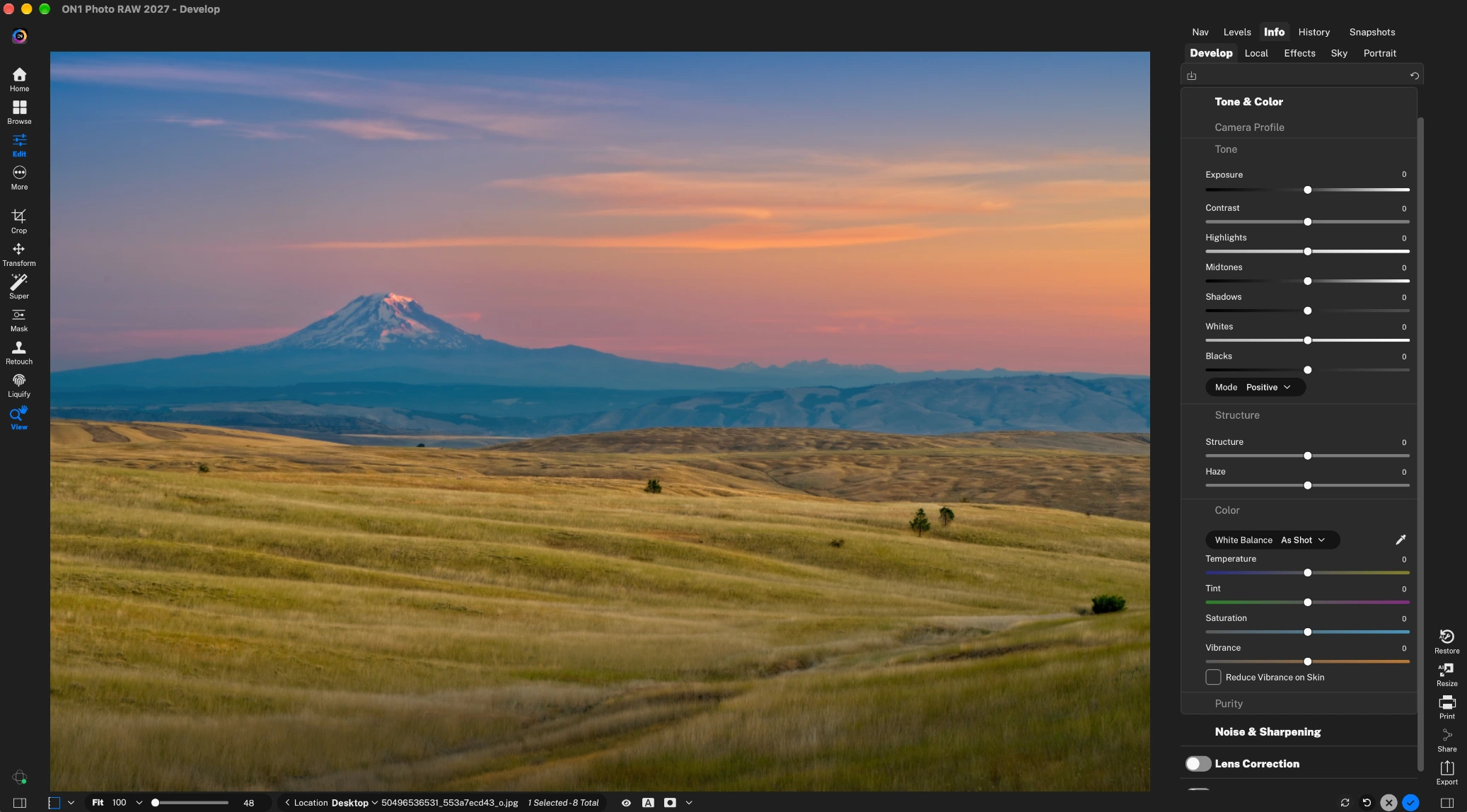
The ON1 Photo RAW 2027 Develop module: a mountain landscape with the Tone & Color panel (Exposure, Contrast, Highlights, Midtones, Shadows, Whites, Blacks), Structure and Color sliders on the right and the editing tools on the left.
The trade-offs are weight and complexity. ON1 recommends 32 GB of RAM and a graphics card with 8 GB of video memory, the Windows installer is about 1 GB, and Windows 10 isn't supported at all. Running Photo RAW as a plug-in inside Photoshop or Lightroom Classic, Restore AI and the AI Culling Assistant all need Photo RAW MAX. And Photo RAW 2028 will be a paid upgrade.

Browse in ON1 Photo RAW 2026 (ON1's annotations): a grid of wildlife RAW files with star ratings, folders on the left, and the metadata and AI keyword panel on the right.
What we like
- A real organizer: keywords, metadata, ratings, albums, no import step
- Layers, one-click AI masks and hundreds of stackable filters
- Generative erase and expand included, no yearly fee
- Most AI runs on your own computer
- 30-day trial
Watch out for
- Windows 11 only; heavy hardware recommendations
- Busy interface with a learning curve
- Plug-in mode, Restore AI and culling need MAX
- Each yearly version is a paid upgrade
What reviewers say
ON1 scores 4.1 out of 5 on Trustpilot from 3,226 reviews. Independent reviews so far cover the 2026 version.
"ON1 Photo RAW 2026 has some quirks and rough edges, and it's not the best at everything, but its sheer scope is a joy." Rod Lawton, Digital Camera World
"Steeper learning curve than simpler editors like Luminar" PhotoWorkout (Andreas De Rosi, 4.3/5), listing its cons
"It crashes few times after using Nonoise AI. Also, the cursor movement of tool eg perfect eraser is lacking" Che Wei Pok, 3 stars, Trustpilot, October 2026
Buy ON1 Photo RAW 2027Download ON1 Photo RAW Free Trial
Luminar Neo: one-slider AI edits for Mac and Windows
Luminar Neo from Skylum · $99 once for Desktop Only on the order page · Windows 10/11 and macOS 13+ · 7-day trial
Best for: hobbyists, travel and portrait photographers who want polished results quickly without learning masks.
Luminar Neo (sold simply as "Luminar" since version 1.28 in August 2026) starts from the result rather than the sliders. Sky AI swaps a sky and relights the scene to match, Skin AI and Face AI retouch portraits without manual masks, Atmosphere adds fog, and Noiseless AI, Supersharp AI and Upscale handle image quality. HDR Merge, panorama stitching and focus stacking are built in. Version 1.29 (October 28, 2026) rebuilt Enhance, added suggested crops and a full-screen export with watermarks, and a print mode with soft proofing.
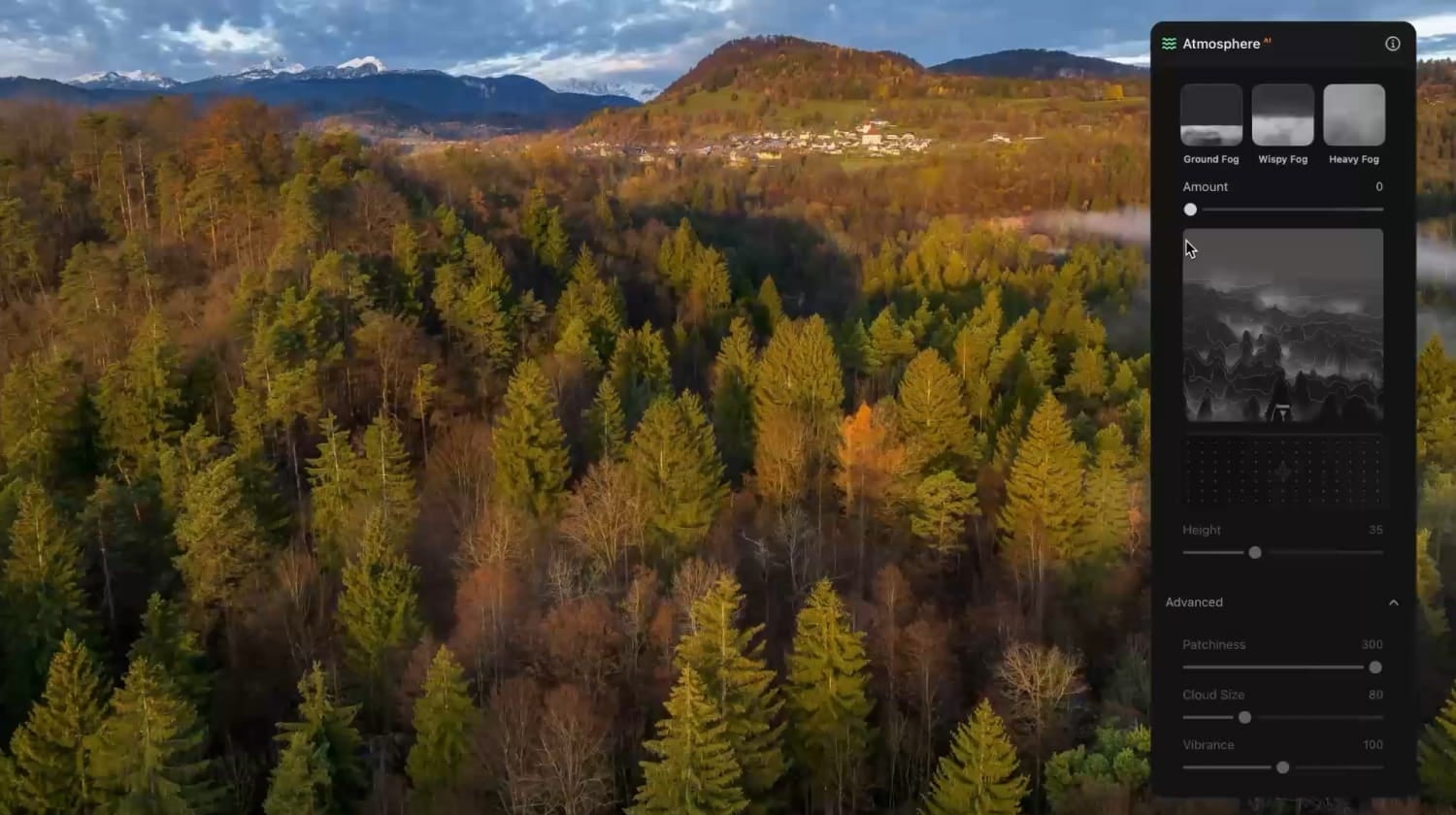
Luminar's Atmosphere AI panel on an aerial autumn forest shot: Ground, Wispy and Heavy Fog presets, an Amount slider, a depth map, and Height, Patchiness, Cloud Size and Vibrance controls.
Luminar is also lighter: the Windows trial installer is 83 MB, Skylum recommends 16 GB of memory rather than 32, and it still runs on Windows 10. It works as a plug-in for Photoshop, Lightroom Classic and Apple Photos on every plan, so you can keep your current organizer and use Luminar only for skies and portraits.
The fine print is the reason to read carefully. GenErase, GenSwap, GenExpand, Restoration and the AI Assistant work for 365 days, then need Luminar Prime, a yearly subscription. The checkout also adds "Auto-upgrades" free for the first year, which then renews at $33 a year for Desktop Only unless you untick it. The non-generative tools (Sky AI, Noiseless AI and the rest) keep working forever.

Luminar's Catalog tab: All Photos, Single Image Edits, Favourites, folders and albums on the left, thumbnails on the right, and the Catalog, Presets and Edit tabs at the top.
What we like
- Quick results: most fixes are one tool and one slider
- Plug-in for Photoshop, Lightroom Classic and Apple Photos on every plan
- Runs on Windows 10 and lighter hardware
- One license covers a Mac and a Windows PC
Watch out for
- Generative tools need Luminar Prime after year one
- Auto-upgrades preselected at checkout
- Basic catalog: no metadata editing or batch renaming
- Only a 7-day trial
What reviewers say
Skylum scores 4.6 out of 5 on Trustpilot from 7,147 reviews, and 4% of them give 1 star.
"I trialled several products before settling on Luminar. It's really impressive, especially for the price." Andrew B, 5 stars, Trustpilot, November 2026
"The only real caveats are the annual renewal for generative AI tools and the one-way mobile sync limitation." PhotoWorkout (Andreas De Rosi, 5/5, version 1.29)
"Paid $140 for Luminar and within days got hit with a demand for another $80 for a 'Fall Upgrade'" Ernesto Ticas, 1 star, Trustpilot, September 2026
Buy Luminar NeoDownload Luminar Neo Free Trial
Photo management: ON1 wins clearly
ON1 Photo RAW is the one to pick if you need to organize a big library. It browses your folders without importing them, then adds star ratings, color labels, keywords (typed or AI-suggested), metadata editing, albums, stacks and smart albums, and the 2027 version adds Folder Actions that apply metadata, presets and exports when photos land in a folder. Luminar Neo's Catalog handles folders, albums and favourites, but has no metadata editing or batch renaming, and DPReview called its image management "a bit limited". PhotoWorkout notes ON1's catalogs can slow down past 50,000 images, so very large archives should test that during the trial.
Editing and AI tools: Luminar is faster, ON1 goes deeper
Luminar Neo gets a good-looking photo in fewer clicks; ON1 Photo RAW gives you more control. Both have AI sky replacement, portrait retouching, noise reduction, generative erase, HDR, panoramas and focus stacking. Luminar's tools are built as single sliders that hide the masking, which is why beginners like it. ON1 gives you the masks themselves (subject, sky, background, depth), a full layer stack and hundreds of filters you can stack and mask, closer to working in Lightroom plus Photoshop. Reviewers note both sides: PhotoWorkout rates ON1's learning curve steeper than Luminar's, and Digital Camera World found ON1's masking options "baffling" at first.
The bigger difference is what happens after the first year. ON1's Generative Erase and Crop & Expand stay in the perpetual license. Luminar's generative tools and AI Assistant stop after 365 days unless you pay for Luminar Prime.

AI masking in ON1 Photo RAW 2026 (ON1's annotations): two photographers on a beach selected in one click, shown in red, with the Sunshine filter applied through the mask.
Price and licensing
The two start at nearly the same price, but ON1 costs less to keep complete. ON1 Photo RAW 2027 is $99.99 and Luminar Desktop Only is $99 on the order page. Both cover 2 computers. ON1 sells each year's version as a paid upgrade, while Skylum includes updates but says big upgrades may cost extra, and charges yearly for Prime if you want the generative tools after year one.
Sales: ON1's Black Friday prices ($59.99 for Photo RAW 2027, $129.99 for MAX) end November 27, 2026 at 11:59 PM Pacific. Skylum's prices change often and differ by country, so check the order page.
One-time price by edition (USD)
Luminar Neo Desktop Only$99.00
Luminar Neo All Platforms$139.00
ON1 Photo RAW MAX 2027$169.99
ON1 regular prices and Skylum order page prices, checked on November 21, 2026.
Hardware and trial
Luminar Neo is the safer choice on an older or modest computer. ON1 Photo RAW 2027 needs Windows 11, a 4-core CPU, 8 GB of RAM minimum and a GPU with 4 GB of video memory, and ON1 recommends 32 GB of RAM. Luminar Neo needs an 8th-generation Core i5 or Ryzen 5, 8 GB of RAM (16 GB recommended) and runs on Windows 10. On a Mac, both need macOS 13 or later. ON1's 30-day trial gives you far longer to test it on your own photos than Luminar's 7 days.
Free trial length (days)
Recommended RAM (GB)
From each vendor's trial terms and system requirements, November 2026.
Which should you choose?
| Your situation |
Pick |
Why |
| Leaving Lightroom, thousands of RAW files to organize | ON1 Photo RAW 2027 | Full organizer, keywords, no import step |
| Layered composites and precise masks | ON1 Photo RAW 2027 | Real layer stack and editable AI masks |
| Quick travel, family and portrait edits | Luminar Neo | One-slider Sky, Skin and Face AI |
| Keeping Lightroom Classic, adding AI tools | Luminar Neo | Plug-in on every plan (ON1 needs MAX) |
| Windows 10 PC or 8-16 GB of RAM | Luminar Neo | ON1 2027 needs Windows 11 and prefers 32 GB |
| Want generative erase without a yearly fee | ON1 Photo RAW 2027 | Included in the perpetual license |
Our pick for most enthusiasts is ON1 Photo RAW 2027. For about the same price it replaces both halves of Adobe's plan, keeps its generative tools without a yearly charge, and gives you 30 days to try it. Pick Luminar Neo instead if speed and simplicity matter more than control, or your computer is too old for ON1.
Who should skip each: skip ON1 Photo RAW if you're on Windows 10, have integrated graphics and 8 GB of RAM, or just want a few quick fixes. Skip Luminar Neo if you manage a large, keyworded library, or if you'd resent paying every year to keep GenErase and the AI Assistant.
What commonly goes wrong
- Taking "one-time" literally. Neither license includes future major versions. ON1 2028 will be a paid upgrade, and Skylum's "big upgrades" and Prime cost extra. Long-time owners of both brands complain about this on Trustpilot.
- Leaving add-ons ticked. Luminar's checkout preselects Auto-upgrades, which renews after a year, and a Trustpilot reviewer reports being refused a refund after a renewal. ON1's checkout offers an optional auto-upgrade for next year's version.
- Testing on too little hardware. Both apps lag on large files on older computers. Use the trial on your real RAW files, not samples.
- Buying the wrong ON1 edition. If you want to use ON1 from inside Lightroom Classic or Photoshop, only MAX does that.
- Expecting perfect AI masks. Reviewers of both find AI selections and generative fills sometimes need cleanup on busy backgrounds.
FAQs
Is ON1 Photo RAW better than Luminar Neo?
ON1 Photo RAW 2027 is better as a complete Lightroom replacement, with a full photo organizer, layers and editable masks, and generative tools that don't expire. Luminar Neo is better for quick, one-slider edits and on older computers.
Do ON1 Photo RAW and Luminar Neo need a subscription?
No. ON1 Photo RAW 2027 and Luminar Neo are both sold as one-time licenses. Luminar's generative tools need the yearly Luminar Prime after the first year, and ON1 offers optional MAX and Photo Studio subscriptions that include future versions.
Can I use Luminar Neo or ON1 Photo RAW inside Lightroom Classic?
Luminar Neo runs as a plug-in for Lightroom Classic, Photoshop and Apple Photos on every plan. ON1 Photo RAW does so only in the MAX edition ($169.99) or the MAX subscription.
Does ON1 Photo RAW 2027 run on Windows 10?
No. ON1 Photo RAW 2027 needs Windows 11 (64-bit, x86 or ARM) or macOS 13 or later. Luminar Neo still supports Windows 10 version 1909 or later.
Which is better for noise reduction?
ON1 Photo RAW 2027 includes NoNoise AI, which ON1 also sells on its own, with models for wildlife, portraits, astro and scanned film. Luminar Neo's Noiseless AI does the same job with fewer controls. We didn't run both on the same files, so test your own high-ISO shots in the trials.
Can I move my Lightroom library to them?
Luminar Neo can migrate a Lightroom Classic library with its folders, albums, ratings and basic edits (since version 1.27.1). ON1 Photo RAW browses the same folders directly without an import step, so your files stay where they are.
Can I get a refund?
Yes. ON1 and Skylum both offer a 30-day money-back guarantee. Cancel any auto-renewing add-on (Luminar's Auto-upgrades or Prime) before it renews if you don't want it.