Short answer
Short answer: for a quick, free check on Windows 11, open Settings > System > Storage > Advanced storage settings > Disks & volumes, choose a drive and click Properties: NVMe SSDs show an estimated remaining life, available spare and temperature there. For every other drive, PowerShell's Get-PhysicalDisk gives a basic Healthy / Warning / Unhealthy status. Windows won't warn you when a drive starts to slip, though. For that, Hard Disk Sentinel ($22, lifetime) watches every HDD, SSD and NVMe drive and alerts you, and Hard Disk Sentinel Professional ($33, lifetime) adds surface repair tests and an automatic backup when a drive begins to fail.
Start with the free checks below. If any drive shows errors, or you want the PC to watch its drives for you, Hard Disk Sentinel's 30-day trial shows health, temperature and S.M.A.R.T. data for free.
At a glance
| Windows 11 built-in | Hard Disk Sentinel | Hard Disk Sentinel Professional |
|---|
| Price | Free | $22, one-time, 1 PC | $33, one-time, 1 PC ($59 Family, 5 PCs) |
| Health of NVMe SSDs | ✓ remaining life, spare, temperature | ✓ | ✓ |
| Health of SATA SSDs and hard disks | Basic status only | ✓ health %, text report, S.M.A.R.T. | ✓ health %, text report, S.M.A.R.T. |
| Warns you when health drops | ✗ | ✓ alerts and daily reports | ✓ plus custom alert conditions |
| Temperature history | ✗ | ✓ | ✓ |
| Surface test | ✗ | Read-only check | ✓ read, refresh, repair, Quick Fix |
| Backup when a drive fails | ✗ | ✗ | ✓ scheduled and panic backup |
| USB enclosures, RAID, NAS | Limited | ✓ many USB and RAID | ✓ plus NAS and portable version |
| Free trial | n/a | ✓ 30 days (health, temperature, S.M.A.R.T.) | ✓ same trial |
What we checked
- We went through the drive health screens and storage cmdlets built into Windows 11 to see what they report for NVMe, SATA SSD and hard disk drives.
- We compared Hard Disk Sentinel's Standard and Professional editions on the vendor's feature comparison, store and manual pages.
- We downloaded both installers from the vendor on November 27, 2026: the Professional zip (42.9 MB) and the Standard zip (42.4 MB) each contain a setup file reporting version 6.40.0.0. The vendor also offers a 6.40.6 beta, released November 5, 2026.
- What we checked: on November 27, 2026 the vendor's store listed Hard Disk Sentinel at $22, Professional at $33 and the Professional Family license (5 computers) at $59, all lifetime licenses, with Enterprise from $219.50.
We compared what each option reports and costs. We didn't run any of them on a failing drive, so how early a failure shows up comes from the vendor and its users.
Step 1: the free check built into Windows 11
Windows 11 shows drive health for NVMe SSDs in Settings. Go to Settings > System > Storage, open Advanced storage settings > Disks & volumes, pick the drive and click Properties. Under Drive health you'll see the estimated remaining life (100% on a new SSD), the available spare and the temperature, and Windows shows a warning there if the drive reports a problem.
That section appears only for NVMe drives. For SATA SSDs and hard disks, open PowerShell as administrator and run:
Get-PhysicalDisk | Select FriendlyName, MediaType, HealthStatus, OperationalStatus
Get-PhysicalDisk | Get-StorageReliabilityCounter | Select DeviceId, Temperature, Wear, ReadErrorsTotal, PowerOnHours
The first line gives a Healthy, Warning or Unhealthy status per drive; the second lists the reliability counters the drive exposes (many drives leave some columns empty). chkdsk is a different tool: it checks and repairs the file system, not the drive's hardware, so a clean chkdsk doesn't mean the disk is healthy.
What the free way misses
- No warnings. Windows doesn't watch the counters over time or tell you when reallocated sectors start climbing; you have to remember to look.
- "Healthy" until late. The built-in status flips only when the drive itself declares a failure threshold, often well after the first bad sectors.
- Little detail for hard disks. There's no health percentage, temperature history or plain-language explanation for SATA drives.
- USB and RAID drives often report nothing at all through Windows.
Step 2: read the full health report with Hard Disk Sentinel
Hard Disk Sentinel reads the S.M.A.R.T. records of every drive (IDE, SATA, SCSI, SAS, NVMe and most USB drives, including many behind RAID controllers) and turns them into a Health and a Performance percentage, a text report in plain words, power-on time, an estimated remaining lifetime and, for SSDs, the total data written. The 30-day trial shows all of this, so you can check a drive free before deciding to buy.
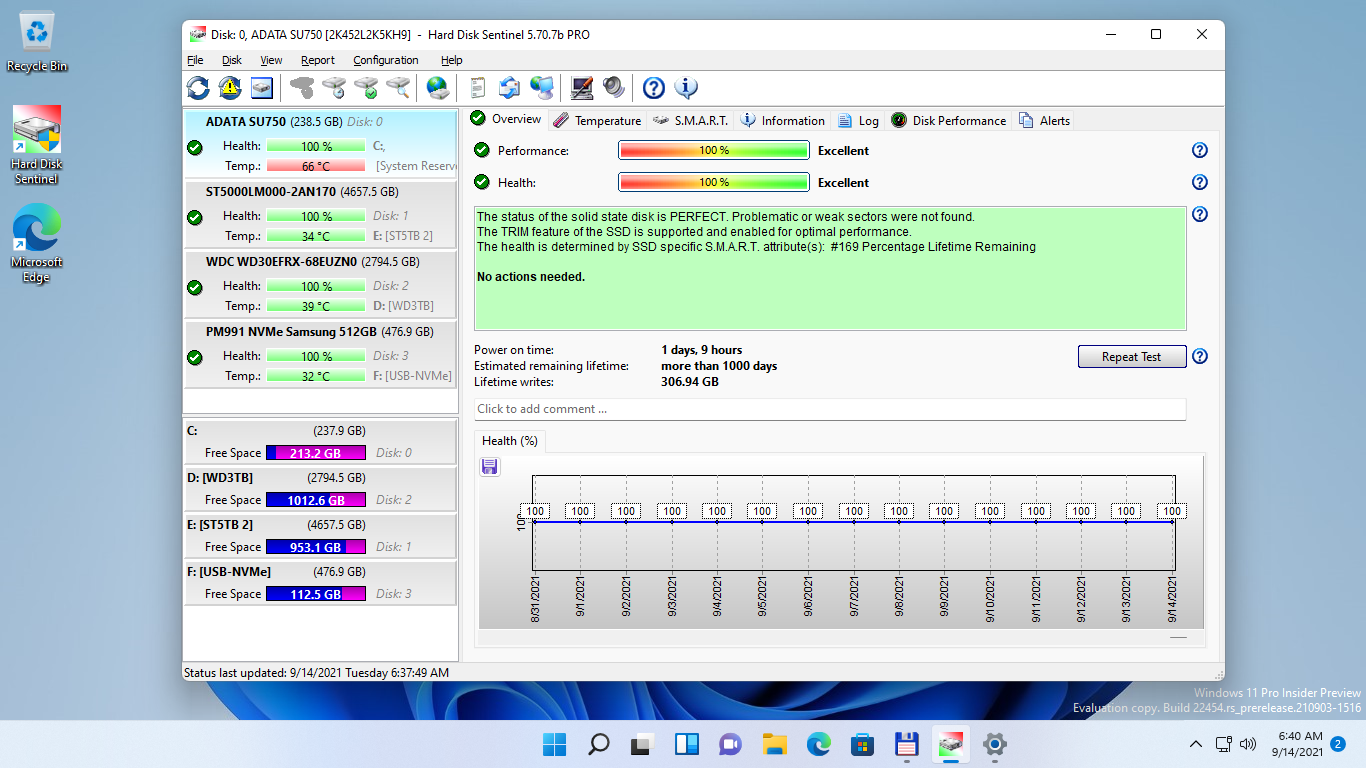
Hard Disk Sentinel's main window on Windows 11: four drives (two SSDs, a hard disk and a USB-connected NVMe drive) with health and temperature on the left, and the Overview tab with performance and health, the text report, power-on time, estimated remaining lifetime, lifetime writes and the health history graph. Shown in version 5.70.7b PRO.
How to read it: 100% health means no errors recorded. Hard Disk Sentinel's rating is deliberately sensitive, so a handful of bad sectors already lowers it, often while the drive maker's own tool still says "Good". Treat anything under 100% as a reason to read the text report, back up the drive and run a surface test, not as proof the drive will die tomorrow. A health figure that keeps falling week after week is the real warning sign.

The Temperature tab for a 3 TB WD hard disk: current, today's average and maximum, lifetime and ever-measured temperatures, a link to set custom thresholds, and the temperature graph.
Step 3: test a suspicious drive
A surface test reads every sector and shows where a drive is slow or failing. Both paid editions can run the drive's own short and extended self tests and a non-destructive read check. Hard Disk Sentinel Professional adds the full surface analysis with refresh, reinitialise and repair modes, Quick Fix for weak sectors, and data destruction for wiping a drive before you sell it.
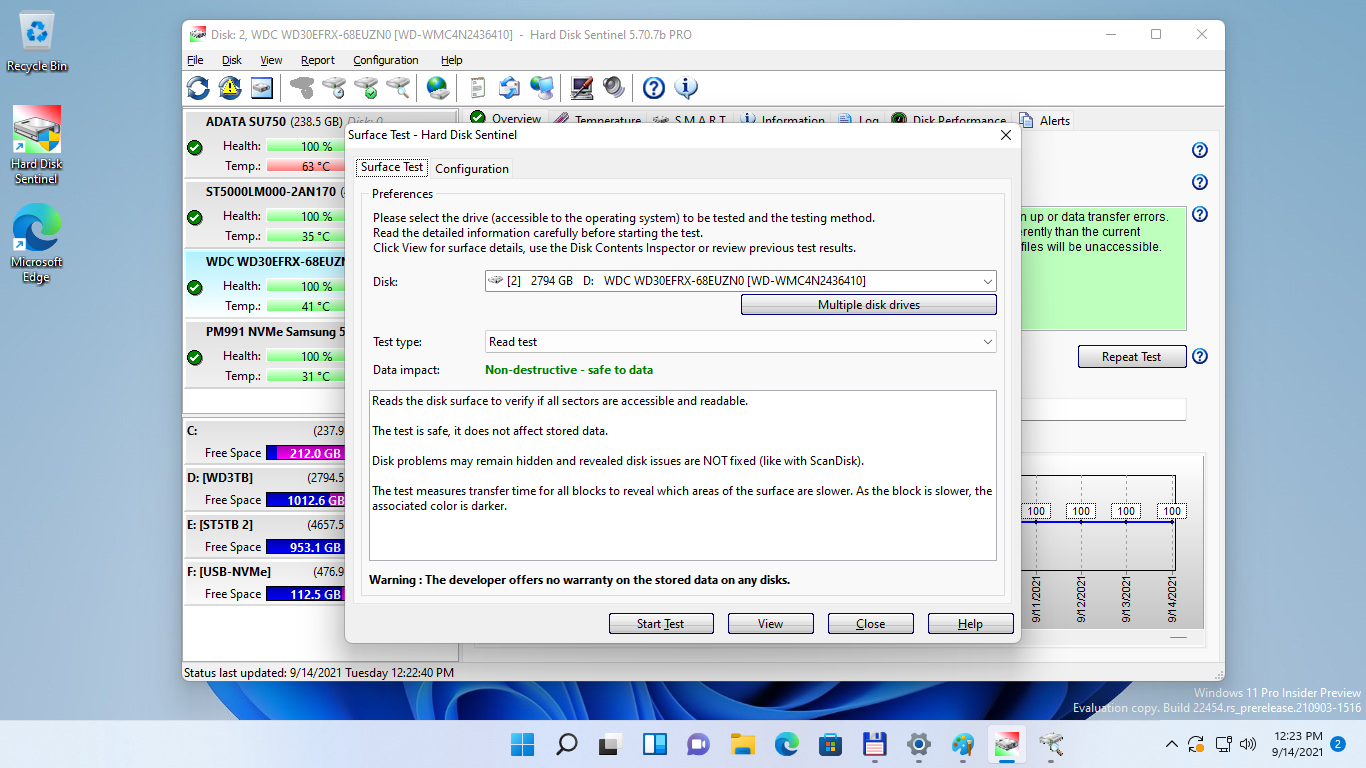
The Surface Test dialog: choose the disk and test type. The Read test is marked "Non-destructive - safe to data".
Back up first. Only the Read test is safe for your files. Refresh, reinitialise and data destruction overwrite data, and a long test also puts a dying drive under heavy load, so copy anything important off before you run one.
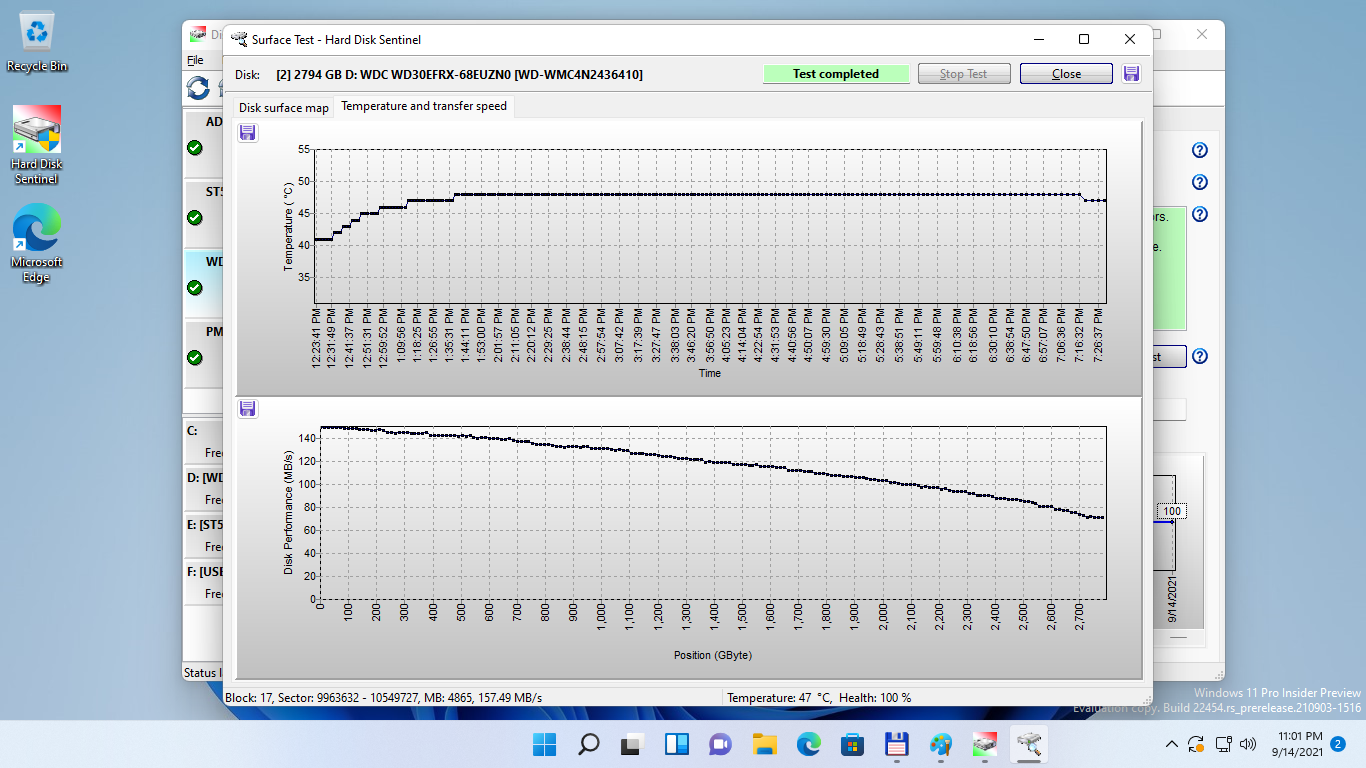
A completed surface test on the 3 TB disk: temperature over the seven-hour test rising from 41 to 48 °C, and transfer speed falling from about 150 to 70 MB/s from the outer to the inner tracks.
Step 4: let it watch your drives
The reason to pay at all is continuous monitoring. Hard Disk Sentinel runs in the tray (or as a Windows service with nobody logged in) and alerts you by email, sound or pop-up when health drops, a temperature limit is passed or new errors appear, and can send a daily status report. Professional adds custom conditions per drive and per S.M.A.R.T. attribute, and panic backup: backup projects you attach to a drive start automatically when that drive develops a problem.

The Panic backup tab under Configuration > Operations: backup projects attached to a hard disk, each set to start automatically or after a number of problems. This older screenshot has the Windows XP look.
Hard Disk Sentinel vs Hard Disk Sentinel Professional
- Price: $22 once for 1 computer, all future versions of the edition included
- Does: health and temperature monitoring, S.M.A.R.T. details, alerts, daily reports, drive self tests, read-only surface check
- Best for: home PCs where you want warnings, not repair tools
- Price: $33 once for 1 computer; Family license $59 for 5 computers
- Adds: refresh/reinitialise/repair surface tests, Quick Fix, data destruction, scheduled and panic backups, custom alerts, NAS and Windows event monitoring, Seagate FARM logs, portable version
- Best for: PCs with irreplaceable data, home servers, technicians
Lifetime license price (USD)
Hard Disk Sentinel (1 PC)$22
Hard Disk Sentinel Professional (1 PC)$33
Professional Family (5 PCs)$59
Prices from the vendor's store, checked on November 27, 2026. The Family license works out to $11.80 per PC.
For $11 more, Professional is the better buy for most people, because panic backup and the repair tests are what you reach for once a drive actually starts failing. Take Standard only if you are sure you'll never need them. Neither license expires, and both cover future versions of their edition.
What we like
- Explains problems in plain words, not just raw S.M.A.R.T. numbers
- Reads many USB enclosures, NVMe adapters and RAID controllers
- One-time price with future versions included
- Light: 64 MB of memory, no .NET or Java
Watch out for
- Health scores can look worse than other tools report
- Busy, dated interface; some screens still look like Windows XP
- Starts with Windows with a countdown by default
- Windows only (separate free DOS and Linux versions, no Mac)
What users say
AlternativeTo: 4.9 out of 5 from 7 ratings
"My system was acting up and Hard Disk Sentinel showed very clearly that the Disk Drive was ready to go in 30 days."
TBayAreaPat, AlternativeTo (August 2022)
"The default starts with Windows and then does a countdown making you wait before you can shut it off."
TBayAreaPat, AlternativeTo (August 2022), the same reviewer's con
"This is by far the most comprehensive tool i've come across for testing lots of hard drives, destructively or not."
Alex Dodd, AlternativeTo (March 2018)
These AlternativeTo excerpts were read through a summarizer, which shortened some of them.
Forums and the developer's site
"Prefer hdd sentinel, but you need a license. Gives you a few more options like error reporting, drive testing."
HighlandeR, Overclockers UK forum (December 2025)
"The Dell Open Manage utility was reporting the RAID and drives were perfectly healthy, yet some were in fact in poor health and ready to fail."
Steve Holmes, a small MSP in Southern California, testimonial on the developer's site
The common thread: users credit it with spotting failing drives early, sometimes when other tools said all was well, and complain about the busy interface and the startup countdown.
Which should you choose?
| Your situation | Pick | Why |
|---|
| One NVMe SSD, just curious | Windows 11 Settings | Remaining life and temperature are already there, free |
| Checking a used or second-hand drive | Hard Disk Sentinel trial | Full S.M.A.R.T. history, power-on hours and a read test, free for 30 days |
| Home PC, want a warning before failure | Hard Disk Sentinel | Alerts and daily reports for $22 |
| Photos or work you can't lose | Hard Disk Sentinel Professional | Panic backup copies files off a failing drive automatically |
| Home server, NAS or several PCs | Professional (Family for up to 5 PCs) | NAS monitoring, service mode, $59 for 5 PCs |
| Technician checking customers' PCs | Hard Disk Sentinel Professional | Portable version and repair-type tests |
Skip Hard Disk Sentinel if you only ever want an occasional glance at one NVMe drive (Windows shows that), if you use a Mac, or if the drive has already failed: it is a monitoring and testing tool, not data recovery software.
What commonly goes wrong
- Trusting "Healthy" in Windows. The built-in status changes only at the drive's own failure threshold. Rising reallocated or pending sectors matter long before that.
- Panicking at one low score. Hard Disk Sentinel's rating is sensitive. Back up and retest; watch whether it keeps falling.
- Running a repair test without a backup. Only the Read test is safe for your data.
- USB enclosures that hide data. Some USB and FireWire enclosures don't pass full status information; connect the drive internally or check it with the trial first.
- Monitoring without backups. A warning gives you time, but only a backup saves the files. Every option here shares that limit.
FAQs
How do I check SSD health in Windows 11 without software?
Open Settings > System > Storage > Advanced storage settings > Disks & volumes, select the SSD and click Properties. Windows 11 shows Drive health (estimated remaining life, available spare and temperature) for NVMe SSDs. For SATA drives, use PowerShell's Get-PhysicalDisk.
Why does Windows say Healthy but Hard Disk Sentinel shows a lower health?
Windows reports the drive's own pass/fail verdict, which changes only when a failure threshold is crossed. Hard Disk Sentinel rates every recorded error, so a few bad sectors already lower its percentage. Read its text report and back up the drive.
Is Hard Disk Sentinel free?
Hard Disk Sentinel has a free 30-day trial for Windows that shows health, temperature and S.M.A.R.T. data, plus free DOS and Linux versions. Alerts, tests and backups on Windows need the $22 Standard or $33 Professional license.
Is Hard Disk Sentinel a one-time purchase?
Yes. Hard Disk Sentinel and Hard Disk Sentinel Professional are lifetime licenses for one computer, and each license covers future versions of that edition.
Can Hard Disk Sentinel check a drive in a USB enclosure?
Usually. Hard Disk Sentinel supports many USB enclosures, docks and NVMe adapters, but some enclosures don't pass full status information. The trial shows exactly what your hardware reports.
Can Hard Disk Sentinel fix a failing hard drive?
Hard Disk Sentinel Professional can refresh or repair weak sectors with its surface tests and Quick Fix, which can make a marginal drive usable again. It can't reverse mechanical wear: a drive whose health keeps dropping should be replaced.
Does Hard Disk Sentinel slow down my PC?
Not noticeably. Hard Disk Sentinel needs about 64 MB of memory and mostly reads S.M.A.R.T. data in the background; only surface tests load a drive, and you start those yourself.
How often should I check my hard drive health?
Monthly is a sensible minimum if you check by hand. With Hard Disk Sentinel running, it checks continuously and alerts you, so you don't need to remember.