Short answer: buy RoboForm if you want the cheaper password manager with the better form filler, a built-in two-factor code generator and a local-only mode: Premium is $29.88 a year, and new users pay $18.00 for the first year in its Black Friday sale, which ends November 30. Buy NordPass if you want the more polished apps, email masking, a native Linux app and a 6-person Family plan: Premium is $23.88 for the first year, then $35.88 a year. Both have a free plan for one device, so try the free version first.
At a glance
| NordPass | RoboForm |
|---|
| Premium, 1 person | $23.88 first year, then $35.88 a year | $29.88 a year ($18.00 first year for new users until November 30) |
| Family plan | 6 people: $44.28 first year, then $71.88 a year | 5 accounts: $47.75 a year ($28.65 first year for new users until November 30) |
| Free plan | ✓ One active device at a time, with a 30-day Premium trial | ✓ Unlimited passwords on one device |
| Sync on all devices | Premium | Premium |
| Encryption | XChaCha20, zero-knowledge | AES-256 with PBKDF2 SHA256, zero-knowledge |
| Built-in authenticator (TOTP codes) | ✗ Not in personal plans | ✓ Free and Premium |
| Email masking | ✓ | ✗ |
| Local-only vault (no cloud) | ✗ | ✓ Premium |
| Emergency access | Not listed on its plans page | ✓ Premium |
| Form filling | ✓ Cards and personal info | ✓ Identities that fill whole forms |
| Apps | Windows, macOS, Linux, Android, iOS, web vault | Windows, Mac, Android, iOS, web access |
| Browser extensions | Chrome, Firefox, Edge, Safari, Opera | Chrome, Edge, Firefox, Brave, Opera |
| Windows installer | Version 7.13.7, 124 MB | Version 9.9.4, 52 MB |
| Money-back guarantee | 30 days | 30 days |
How we picked and what we checked
- The personal plan prices on both vendors' pricing pages, including the first-year and renewal prices and the 1-year and 2-year plans.
- What each free plan includes and leaves out, from each vendor's plan comparison.
- Both Windows installers: we downloaded and sized them, and matched the version numbers to each vendor's release notes.
- Ratings and user reviews on Trustpilot and the app stores, and independent reviews from PCWorld and Tom's Guide.
What we checked: NordPass Premium at $23.88 for the first year and $35.88 a year after, and RoboForm Premium at $18.00 for new users' first year and $29.88 a year after (its Black Friday banner says the offer ends November 30), on the vendors' pricing pages on November 26, 2026; the NordPass installer (version 7.13.7, 124 MB) and the RoboForm installer (52 MB, version 9.9.4, released April 22, 2026), downloaded on November 26, 2026. We compared features, prices, free plans and reviews; we didn't test autofill across a long list of sites or audit either vault's encryption.
NordPass
NordPass is the password manager from the team behind NordVPN. Price: Premium $23.88 for the first year, then $35.88 a year; Family (6 people) $44.28, then $71.88. Platforms: Windows, macOS, Linux, Android, iOS, a web vault and browser extensions. Best for: people who want a clean, simple vault on a computer and a phone, families of up to six, and anyone who already pays for NordVPN Complete or Prime.
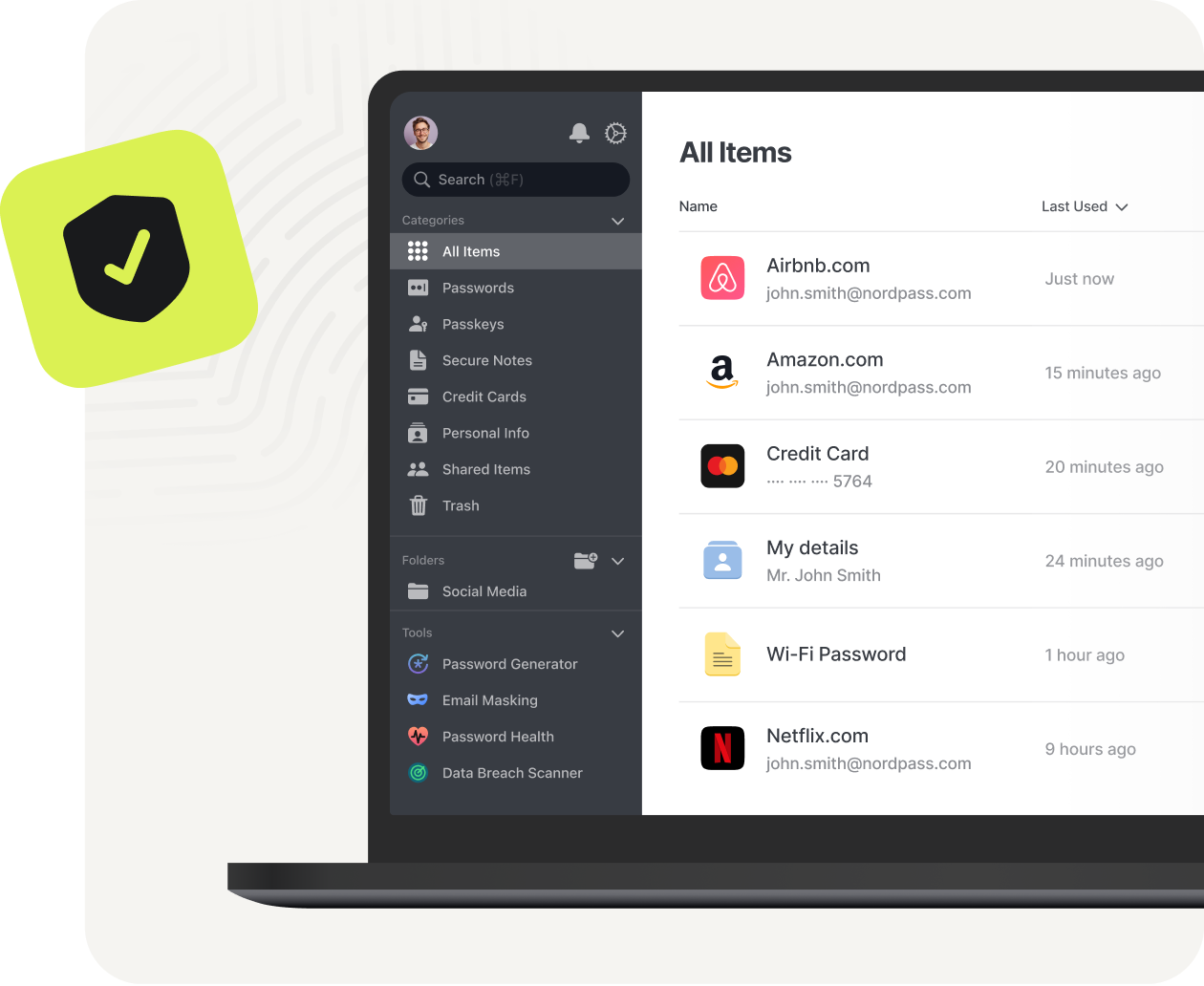
NordPass's own image of its desktop vault: All Items sorted by last use, the Passwords, Passkeys, Secure Notes, Credit Cards and Personal Info categories, and the Password Generator, Email Masking, Password Health and Data Breach Scanner tools.
NordPass does the everyday job well. The browser extension saves a login when you sign up, fills it in next time and generates a strong password on the spot. Passwords, passkeys, notes, cards and personal details sit in one searchable vault, and Premium syncs it across your devices. Password Health lists weak, reused and old passwords, and the Data Breach Scanner warns you when your email address or card turns up in a known breach.
Email masking is the feature RoboForm lacks. NordPass can create a throwaway address for newsletters and one-off sign-ups, so those services never get your real one. NordPass is also the only one of the two with a native Linux app and a Safari extension, and its vault uses XChaCha20 encryption; NordPass says Cure53 audited its desktop app and browser extension.
Where NordPass falls short: the free plan works on one active device at a time, so a phone plus a laptop means Premium. Personal plans don't include the NordPass Authenticator, so you'll still need a separate app for two-factor codes. And the price jumps after the first year, from $23.88 to $35.88. The 2-year plan ($37.53 for the first 27 months, including 3 extra months on November 26) is the cheapest way in if you're sure you'll stay.
What we like
- Polished, simple apps on every major platform, including Linux
- Email masking for sign-ups and newsletters
- Family plan covers 6 people
- Free plan comes with a 30-day Premium trial
- Included in NordVPN's Complete and Prime plans
Watch out for
- Free plan is limited to one active device at a time
- No built-in authenticator in personal plans
- Renewal costs 50% more than the first year
- Trustpilot complaints about renewals and charges after cancelling
What NordPass users say
NordPass scores 3.9 out of 5 from 2,081 reviews on Trustpilot and 4.65 out of 5 from 13,331 ratings on the US App Store. Support gets most of the praise; billing gets most of the complaints.
"I had an excellent experience with NordPass, both with the product and, especially, with their technical support."
Matteo, Trustpilot, August 2026, 5 stars
"Great support staff, safe and easy to use."
Pål Andre Mostue, Trustpilot, October 2026, 5 stars
"I canceled this program, but I am still being billed."
beagle, Trustpilot, August 2026, 1 star
"The whole package has slowed down my laptop to the point of being unusable."
Gary Bampkin, Trustpilot, October 2026, 1 star
Download NordPass FreeBuy NordPass Premium
RoboForm
RoboForm is one of the oldest password managers, made by Siber Systems, and still the best known for filling forms. Price: Premium $29.88 a year; Family (5 Premium accounts) $47.75 a year. New users pay $18.00 and $28.65 for the first year until November 30. Platforms: Windows, Mac, Android, iOS, web access and extensions for Chrome, Edge, Firefox, Brave and Opera (which also cover Linux and Chrome OS). Best for: people on a budget, anyone who fills in a lot of web forms, and people who want their vault kept on their own device.
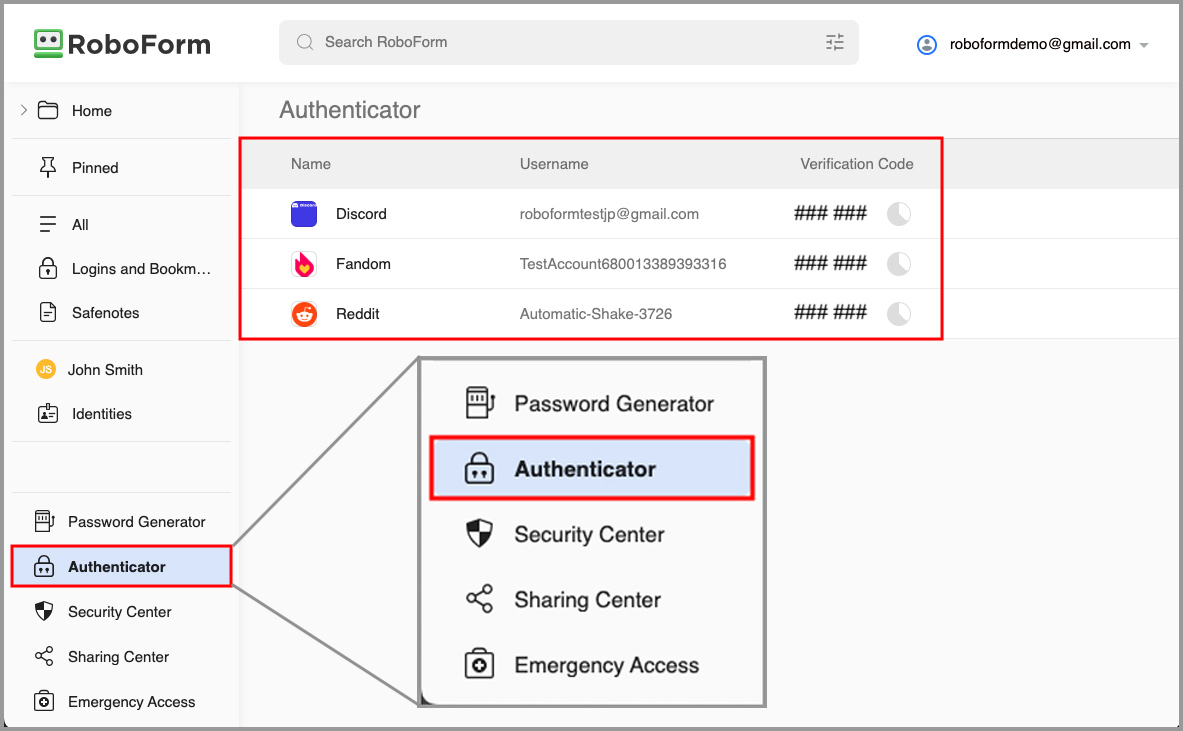
RoboForm's Authenticator view, listing Discord, Fandom and Reddit logins with their verification codes, and the sidebar with Password Generator, Authenticator, Security Center, Sharing Center and Emergency Access.
RoboForm fills forms better than most. Its Identities hold your name, addresses and payment details, so a long checkout or registration form fills in one go, the feature reviewers have praised for years. Logins save and fill with one click, and the Windows app can also log in to Windows programs, not just websites.
RoboForm includes things NordPass doesn't. A built-in authenticator stores two-factor (TOTP) codes next to your logins, and RoboForm's plans page lists it on the free plan as well as Premium. Premium adds Emergency Access (trusted contacts who can get into your vault if something happens to you), shared folders with access levels, dark-web monitoring for five email addresses and a local-only mode that keeps the vault and its backups on your device instead of RoboForm's servers.
Where RoboForm falls short: the Windows desktop app is the weak spot, and reviewers find the browser extension, web vault and phone apps far more polished. PCWorld also found its default security settings lag behind rivals, and some users say autofill misses or hesitates on certain sites. The free plan stays on one device with no web access.
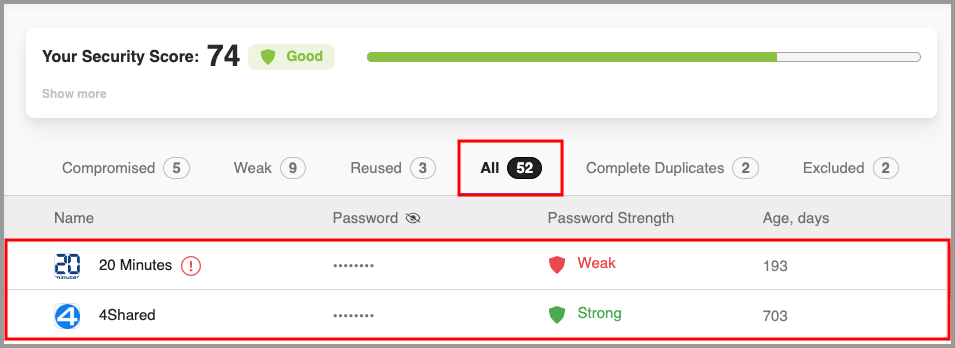
RoboForm's Security Center: a Security Score of 74 (Good), tabs for Compromised, Weak, Reused, All, Complete Duplicates and Excluded passwords, and each login's strength and age in days.
What we like
- Cheaper than NordPass every year, not just the first
- Strong form filling with Identities
- Built-in TOTP authenticator, even on the free plan
- Local-only mode and Emergency Access in Premium
- High ratings: 4.7 on the App Store, 4.6 on Trustpilot
Watch out for
- Windows desktop app feels clunky next to the extension
- No email masking and no native Linux app
- Free plan has no web access or sync
- Family plan covers 5 people, one fewer than NordPass
What RoboForm users say
RoboForm scores 4.6 out of 5 from 550 reviews on Trustpilot (October 2026), and its pricing page shows 4.7 on the Apple App Store (43.2K reviews), 4.6 on Google Play (32.7K), 4.5 in the Chrome Web Store (3.6K) and 4.6 in the Edge store (657).
"Roboform works well across my devices and platforms. I use it for bookmarks, passwords, and secure notes."
Danny Mitchell, Trustpilot, November 2025
"I would have given 5 stars but there are many websites where my sign in info doesn't automatically fill in."
Barry S, Trustpilot, August 2026, 4 stars
"If you use its browser extension, web interface, or mobile apps, the experience of letting it handle your logins is polished and easy. But its default security settings lag behind its rivals, and even moderately advanced usage breaks the seamlessness."
Alaina Yee, PCWorld, September 2025
"RoboForm doesn't offer much more than the basics of password management and form filling, but it does them well for a bargain price."
Sean Riley, Tom's Guide, February 2022
Download RoboForm FreeBuy RoboForm Premium
Price and plans: RoboForm costs less
RoboForm is the cheaper password manager at every stage. At regular prices RoboForm Premium is $29.88 a year against $35.88 for NordPass Premium, and RoboForm Family is $47.75 against $71.88. NordPass narrows the gap only in the first year ($23.88), and RoboForm's Black Friday price ($18.00 for new users until November 30) undercuts that too.
Premium for one person, first year (USD)
RoboForm Premium (sale until November 30)$18.00
NordPass Premium (1-year plan)$23.88
First-year prices for new subscribers on the vendors' pricing pages, November 26, 2026. NordPass shows prices without VAT.
Premium for one person, each year after the first (USD)
Renewal prices on the vendors' pricing pages, November 26, 2026.
Three years of Premium for one person, on 1-year plans (USD)
RoboForm Premium, bought by November 30$77.76
RoboForm Premium at the regular price$89.64
Our sums from the prices above: $18.00 + 2 × $29.88; 3 × $29.88; $23.88 + 2 × $35.88.
For a family, it depends on the head count. NordPass Family covers 6 people for $71.88 a year ($11.98 each), and RoboForm Family covers 5 Premium accounts for $47.75 ($9.55 each). With six people, NordPass is the only one of the two that fits everyone on one plan.
| Plan | NordPass | RoboForm |
|---|
| Free | $0, one active device at a time | $0, unlimited passwords on one device |
| Premium, first year | $23.88 (2-year plan: $37.53 for 27 months) | $18.00 for new users until November 30 |
| Premium, regular | $35.88 a year | $29.88 a year |
| Family, first year | $44.28 for 6 people | $28.65 for 5 accounts until November 30 |
| Family, regular | $71.88 a year | $47.75 a year |
| Refund | 30-day money-back guarantee | 30-day money-back guarantee |
Features: RoboForm does more, NordPass does it more smoothly
RoboForm has the longer feature list for the money: a TOTP authenticator, Emergency Access, local-only storage, Windows application logins and form-filling Identities. NordPass has the privacy extras and the cleaner apps: email masking, a native Linux app, a Safari extension and a Data Breach Scanner that watches card details as well as email addresses.
Both store passkeys alongside passwords, generate strong passwords, flag weak and reused ones, import from browsers and other password managers, and share items with other users without sending them in plain text. If you want two-factor codes in the same app, RoboForm wins outright: NordPass's personal plans don't include its authenticator.
Security: both are zero-knowledge
NordPass and RoboForm both use zero-knowledge designs, so your vault is encrypted on your device with a key that only your master password can open. NordPass uses XChaCha20 and says Cure53 audited its desktop app and browser extension. RoboForm uses AES-256 with PBKDF2 SHA256 and lets you protect your RoboForm account with two-factor sign-in by email, SMS, an authenticator app, a passkey, a trusted device or a hardware key such as a YubiKey. The practical difference is PCWorld's point that RoboForm's default settings are looser than rivals', so turn on two-factor sign-in as soon as you install it.
Ease of use: NordPass is more polished on Windows
NordPass is the easier pick if you'll live in the desktop app. Its Windows, Mac and Linux apps share one clean layout. RoboForm's Windows app is the part reviewers criticize, while its browser extension, web vault and phone apps are well liked. If you mostly work in the browser and on your phone, the difference shrinks.
Ratings out of 5
RoboForm, Apple App Store (43.2K reviews)4.7
NordPass, Apple App Store (13,331 ratings)4.65
RoboForm, Trustpilot (550 reviews)4.6
NordPass, Trustpilot (2,081 reviews)3.9
NordPass ratings checked November 25, 2026; RoboForm's App Store rating from its pricing page on November 26, 2026 and its Trustpilot score from October 2026.
Which should you choose?
| Your situation | Pick | Why |
|---|
| You want the lowest price | RoboForm | $29.88 a year regular, $18.00 for the first year until November 30 |
| You fill in a lot of web forms | RoboForm | Identities fill names, addresses and cards in one go |
| You want two-factor codes in the same app | RoboForm | Built-in TOTP authenticator, even on the free plan |
| You don't want your vault in the cloud | RoboForm | Local-only mode in Premium |
| You want the most polished desktop app | NordPass | Clean apps on Windows, Mac and Linux |
| You use Linux or Safari | NordPass | Native Linux app and a Safari extension |
| You'd rather not hand out your email address | NordPass | Email masking creates throwaway addresses |
| A family of six | NordPass | Family covers 6 people; RoboForm's covers 5 |
| You already pay for NordVPN Complete or Prime | NordPass | It's included, so don't buy it twice |
Who should skip each one
Skip NordPass if you want a free password manager on more than one device, need an authenticator built in, or dislike first-year prices that renew 50% higher.
Skip RoboForm if you spend your day in the Windows desktop app rather than the browser, want email masking, or need a native Linux app.
What commonly goes wrong
- Forgetting the master password. Both are zero-knowledge, so the company can't read your vault. Write the master password down and keep it somewhere safe before you import anything.
- The renewal surprise. First-year prices renew higher on both: NordPass from $23.88 to $35.88, RoboForm's sale price from $18.00 to $29.88. NordPass's worst Trustpilot reviews are about renewals and charges after cancelling or switching plans, so turn off auto-renew in your account well before the date if you won't keep it.
- Expecting the free plan to sync. Neither free plan keeps a phone and a computer in step: NordPass allows one active device at a time, and RoboForm Free keeps the vault on one device.
- Autofill on awkward sites. Every password manager misses some login forms. RoboForm users report the odd site that won't fill, and the usual fix is to edit the saved login or fill it from the extension by hand.
- Leaving passwords in the browser. After importing, delete the passwords saved in Chrome or Edge and turn off the browser's own password saving, or two managers will keep offering to save the same login.
FAQs
Is RoboForm cheaper than NordPass?
Yes. RoboForm Premium is $29.88 a year and NordPass Premium is $35.88 a year at regular prices. NordPass's first year is $23.88, but RoboForm's first year for new users is $18.00 until November 30. For families, RoboForm Family is $47.75 a year for 5 accounts and NordPass Family is $71.88 for 6 people.
Which is more secure, NordPass or RoboForm?
NordPass and RoboForm are both zero-knowledge password managers, so neither company can read your vault. NordPass uses XChaCha20 encryption and says Cure53 audited its desktop app and browser extension; RoboForm uses AES-256 with PBKDF2 SHA256 and supports hardware security keys for signing in. Turning on two-factor sign-in matters more than the choice between them.
Which free plan is better, NordPass Free or RoboForm Free?
RoboForm Free is the better free plan to keep: it stores unlimited passwords on one device and includes the built-in authenticator. NordPass Free works on one active device at a time but comes with a 30-day Premium trial, so it's the better way to test the paid version.
Does RoboForm or NordPass have a built-in authenticator?
RoboForm does: it stores two-factor (TOTP) codes next to your logins, on the free plan as well as Premium. NordPass's personal plans don't include the NordPass Authenticator.
Can I move my passwords from RoboForm to NordPass, or the other way round?
Yes. NordPass and RoboForm both import passwords from browsers and other password managers, and RoboForm can export your data too, so you don't start from an empty vault.
Do NordPass and RoboForm work on Linux?
NordPass has a native Linux app. RoboForm has no Linux app but works on Linux through its browser extensions.
Is NordPass included with NordVPN?
NordPass is included in NordVPN's Complete and Prime plans; NordVPN's basic plan doesn't include it. If you already pay for one of those, you don't need to buy NordPass separately.
Can I get a refund on NordPass or RoboForm?
Yes. NordPass Premium and Family, and RoboForm Premium and Family, all come with a 30-day money-back guarantee.
Conclusion
For most people, RoboForm is the better buy. It costs less every year, fills forms better, includes an authenticator and offers a local-only vault, and its store ratings are excellent. Choose NordPass instead if you want the slicker desktop apps, email masking, Linux support or a plan for six people, or if NordVPN Complete or Prime already includes it. Both have free plans and 30-day refunds, so install the free version of the one that fits, import your passwords, and upgrade when you want it on every device.
Download RoboForm FreeBuy RoboForm PremiumDownload NordPass FreeBuy NordPass Premium