You carry your laptop from the office to home to a client's site, and each place wants a different IP address, gateway, DNS server and proxy. Retyping those values every time is tedious, and one typo leaves you offline. Free IP Switcher from Eusing Software stores each set of network settings as a profile, so you can apply one with a single click and without rebooting.
Quick facts
- Version: 3.5.1
- Platforms: Windows 2000, XP, 2003, Vista, 7, 8, 10 and 11
- Price: Free. The vendor calls it freeware and accepts optional donations.
- Spyware: The vendor states it contains no spyware, adware or viruses.
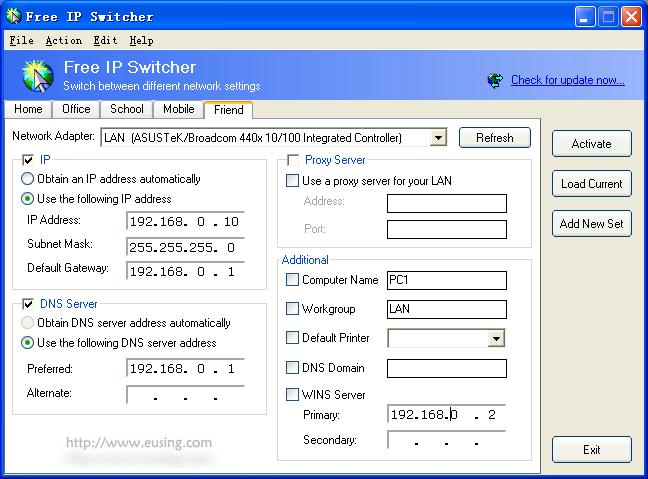
Key features
Change IP settings on the fly, with no restart
You pick a saved profile and the new IP address, subnet mask, default gateway, DNS server and WINS server are applied right away.
Switch proxy settings along with the network
The Internet Explorer proxy-server settings change with the profile, so your browser matches the network you're on.
Switch your default printer, computer name and workgroup
A profile can also carry your default printer, computer name, DNS domain and workgroup. Printing at the office and at home needs no manual changes.
Import your current settings as a starting profile
You can import the current network settings into a profile instead of typing them from scratch.
Tray icon, auto-start and command-line switching
The program has system-tray support and can start with Windows. Version 2.5 added a command line for switching.
Who it's for
It suits laptop users who move between a few fixed networks, such as home, office and a client site. It also helps IT staff who often move a machine between static configurations.
Pros and cons
- Pro: Free to use.
- Pro: No reboot needed to apply a profile.
- Pro: Covers more than the IP address: proxy, printer, computer name and workgroup.
- Pro: Still updated, with support for Windows 11.
- Con: The proxy switching is described for Internet Explorer only, so other browsers may not follow it.
- Con: You have to set up each profile yourself.
- Con: The vendor lists a donation option but no formal paid support.
FAQs
Is Free IP Switcher really free?
Yes. The vendor describes it as freeware that you can download and use for free. Donations are optional.
Do I need to restart after switching?
No. It switches between preconfigured network settings with a single click and without any reboot.
What can a profile contain?
A profile can hold the IP address, subnet mask, default gateway, DNS server, WINS server, computer name, DNS domain, workgroup, default printer, network domain and proxy settings.
Does it work on Windows 11?
Yes. The vendor lists Windows 2000, XP, 2003, Vista, 7, 8, 10 and 11.
System requirements
Windows 2000, XP, 2003, Vista, 7, 8, 10 or 11.