You have a shelf of audio CDs and no easy way to get the music onto your phone, your computer or a USB stick. Free CD to MP3 Converter from Eusing Software handles that job. It rips the tracks, names them from an online database and saves them in the format you pick, at no cost.
Quick facts
- Version: 5.6
- Platforms: Windows 9x/Me/NT/2000/XP/2003/Vista/7/8/10/11
- Price: Free. The vendor asks for optional contributions to fund development.
- Output formats: MP3, WAV, Ogg, WMA
- Previous name: CD to MP3 Freeware
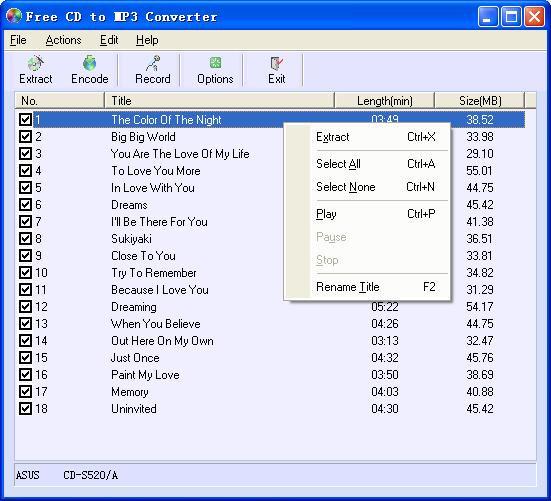
Key features
Rip selected tracks to MP3 or WAV in a few clicks
You pick the tracks you want and click Extract. You choose the output format in the options. The program uses the LAME encoder and supports additional LAME options if you want to tune the encoding.
Get track titles, artist, album and genre automatically
The program queries the freedb database for track titles, artist, album, year, genre and comments. It can also create album folders automatically while ripping. You can edit ID3 tags yourself as well.
Even out volume across tracks with normalization
Some CDs are recorded at different volume levels. Normalization puts all output MP3 or WAV files at the same level, so you don't keep reaching for the volume knob.
Convert files you already have
The program encodes WAV files to MP3, Ogg or WMA, and converts MP3 files back to WAV. It also supports ripping straight to Ogg or WMA.
Record from a microphone or line-in
You can record your voice or other audio from line-in and save it as WAV or MP3.
Playlists made for you
The program writes an .m3u playlist on extraction, listing only the tracks you selected. It can also clear the play lists of RealOne Player and Windows Media Player when those players aren't running.
Who it's for
It suits you if you want a plain, free ripper for converting a CD collection to MP3 or another common format. It also suits you if you want to rip with a few clicks and have the tags filled in for you. The interface is available in many languages, including Arabic, Chinese, Czech, French, German, Italian, Portuguese, Russian, Spanish and Turkish.
Pros and cons
Pros
- Free to use
- Four output formats: MP3, WAV, Ogg, WMA
- Automatic track info lookup, ID3 tag editing and normalization
- Extra LAME options for those who want them
- Many interface languages
Cons
- Its feature set is basic. It rips, converts and records, and the vendor lists no other formats.
- The lookup depends on the freedb database, so obscure discs may return no info.
- The vendor site looks dated.
FAQs
Is Free CD to MP3 Converter really free?
Yes. The vendor calls it a freeware product that you can download and use for free. Contributions are optional.
Which formats can it create?
It creates MP3, WAV, Ogg and WMA files from an audio CD. It can also convert WAV files to MP3, Ogg or WMA.
Does it fill in track names?
Yes. It can retrieve titles and other details from the freedb database. You can also rename tracks and edit ID3 tags yourself.
Can I record my own voice with it?
Yes. It records from a microphone or line-in and saves to WAV or MP3.
Has it had a different name?
Yes. The vendor lists the old name as CD to MP3 Freeware.
System requirements
The vendor lists support for Windows 9x/Me/NT/2000/XP/2003/Vista/7/8/10/11.