You switched to Outlook, but years of mail are still sitting in Thunderbird as .mbox files that Outlook can't open. Retyping, forwarding or dragging messages one by one isn't realistic. Move Thunderbird Emails to Outlook, sold as the Thunderbird Converter, is built for this job. It turns Thunderbird mail into PST files that Outlook reads.
Quick facts
- Converts: Thunderbird (.mbox) mail to Outlook (.pst)
- Other output formats: EML and MBOX
- Platforms: Windows 7, Vista, XP, 2003, 2000, 98, ME
- Demo: a demo version is available before you buy the full version
Key features
Get Thunderbird mail into a PST file Outlook can use
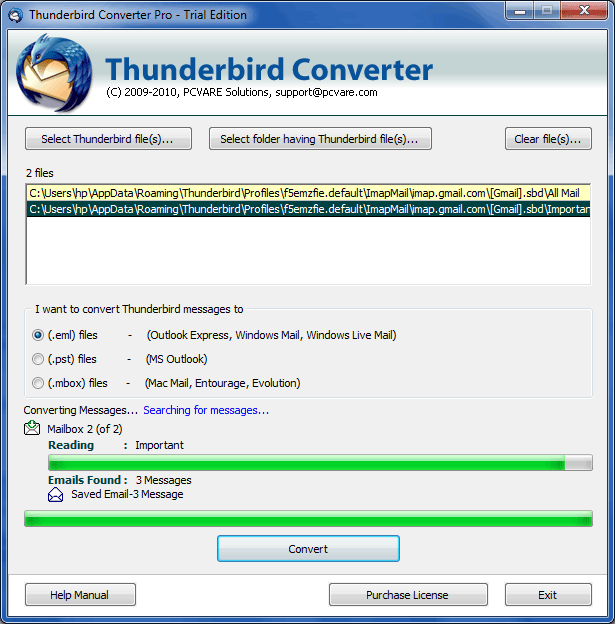
You pick your Thunderbird mail files, choose PST as the saving option and click Convert. The vendor describes the whole job as four steps.
Keep attachments, formatting and read status
The converter carries over attachments, formatting, read/unread status and message details such as to, cc, bcc, date and subject.
Convert many mailboxes in one run with batch mode
Batch conversion lets you process several Thunderbird mail files together instead of repeating the steps for each.
Save as EML or MBOX when PST isn't what you need
Besides PST, the tool can save Thunderbird email in EML and MBOX formats.
Who it's for
It suits you if you're leaving Thunderbird for Outlook and have a large mail archive to bring along. It also suits you if you want to avoid manual export and import. The vendor says even a novice can run the conversion.
Pros and cons
Pros
- Short process: install, select mail files, choose PST, convert
- Keeps attachments, formatting, read status and header details
- Batch conversion
- Demo available to try first
Cons
- Windows only
- Does one job: it moves mail, not contacts or calendars
- You need to locate your Thunderbird mail folder yourself; the vendor provides a guide for this
FAQs
What does it convert Thunderbird mail into?
PST for Outlook, plus EML and MBOX.
Is anything lost in the move?
The vendor says attachments, formatting, read/unread status and to, cc, bcc, date and subject details are converted.
Can I convert several folders at once?
Yes, batch conversion is supported.
Can I try it first?
Yes, a demo version is offered alongside the full version.
System requirements
Runs on Windows 7, Vista, XP, 2003, 2000, 98 and ME. Outlook is needed to open the resulting PST files.