Convert a video that won't play on your device
You have a video file that your phone, player or editor refuses to open, and you don't want to learn codec settings to fix it. OneClick Video Switch is a Windows video converter built for that job. You add your files, pick an output format or device, and convert.
Quick facts
- Platform: Windows
- Input: 300+ video formats
- Output: video formats such as AVI, MP4, FLV, SWF, WMV and MKV, plus audio formats such as MP3, WMA, M4A, AAC, OGG and FLAC
- Acceleration: CUDA and DXVA
Key features
Open almost any video file you already have
The converter accepts 300+ input video formats, so you don't need to check what a file is before you add it.
Pull the sound out of a video
You can extract the audio track from video files and save it as WMA, MP3, M4A, AAC, OGG or FLAC, handy for putting a music video on an MP3 player.
Pick a device instead of guessing settings
Output buttons are grouped under Video, Devices and Audio tabs. Each format has quality presets, and the device list covers iPod, iPhone, iPad, Apple TV, PSP, BlackBerry and mobile phones.
Convert a whole folder's worth in one batch
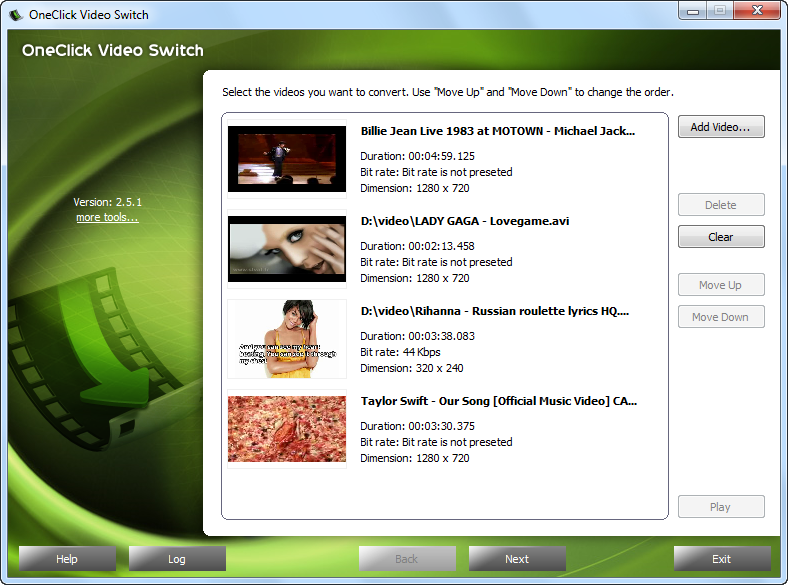
You can add multiple files, reorder them with Move Up and Move Down, remove the ones you don't want, and preview a selected file with your system's media player.
Faster conversion with a modern graphics card
The program supports CUDA and DXVA hardware acceleration for real-time conversion, so a capable graphics card can speed things up.
Who it's for
It suits you if you want a plain step-by-step converter for everyday jobs: making a clip playable on a phone or tablet, changing a format for an editor, or ripping the audio from a video.
Pros and cons
- Pro: very wide input format support.
- Pro: device presets mean little manual setup.
- Pro: converts video and extracts audio in one tool.
- Con: Windows only.
- Con: hardware acceleration depends on having a compatible graphics card.
FAQs
Can it convert video to MP3?
Yes. It extracts audio from video and saves it as MP3, WMA, M4A, AAC, OGG or FLAC.
Can I convert several files at once?
Yes. Files are added to a list and processed as a batch.
Does it have presets for phones and players?
Yes. The Devices tab covers iPod, iPhone, iPad, Apple TV, PSP, BlackBerry and mobile phones.
Does it use my graphics card?
It supports CUDA and DXVA acceleration, which uses a compatible graphics card to speed up conversion.