Printing hundreds of barcode labels without retyping each one
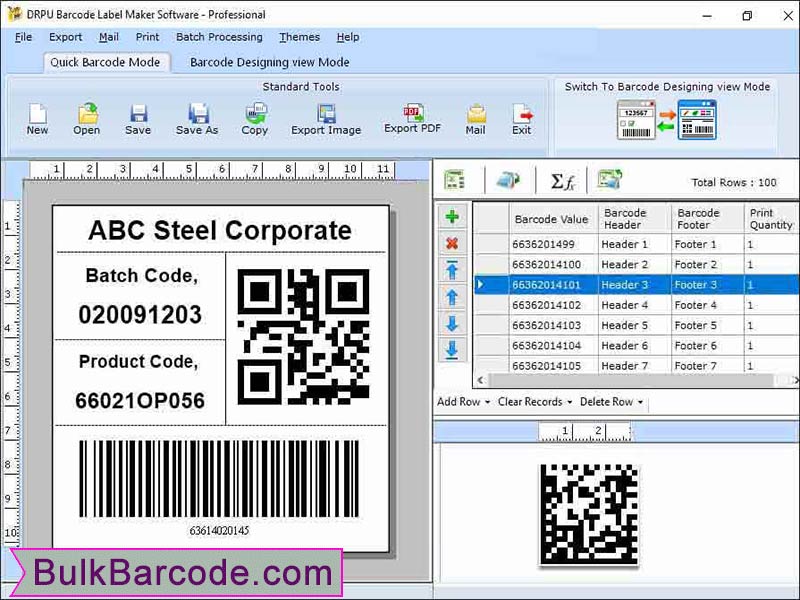
You need a sheet of asset tags, or a run of sequential labels, and you don't want to build each one by hand. Barcode Inventory is a Windows barcode label maker. It creates linear and 2D barcodes, lets you lay out the label, and prints several at once.
Quick facts
- Version: 7.3.0.1
- Platform: Windows (works with any printer Windows supports)
- Price: $69
- Trial: a demo version is available so you can test it before buying
Key features
Support for the major linear and 2D barcode standards
The vendor lists Telepen, Postnet, USPS Sack label, Codabar, Code 93, Planet, MICR, Databar, Maxicode and more. You choose the font, bar dimensions and other settings.
Number lists generated for you
You can build a barcode list as a random, constant value or sequential series. That suits numbered tags and stickers.
A label designer with drawing objects
Lay out each label with Text, Line, Pencil, Picture, Ellipse and Rectangle objects, so the barcode sits alongside your own text and artwork.
Print preview and multi-copy printing
Check the page with print preview before you print. You can also print several copies of the same label on one sheet.
Paste barcodes into other programs
Copy a barcode image and paste it into Word, Excel, Paint and other Windows applications.
Who it's for
Small businesses that label stock, shelves, parcels, library items or tickets will get the most from it. It is also a fit for postal and banking work, given the Postnet and Planet support. The vendor says no programming skills are needed.
Pros and cons
- Pro: a one-time $69 price.
- Pro: a wide range of barcode standards.
- Pro: a demo to try first.
- Con: it is Windows-only. The vendor sells a separate Mac edition.
- Con: it generates and prints labels. It is not a stock-tracking system.
FAQs
Can I try it first?
Yes. A demo version is offered so you can check the features before ordering the full version.
Can I print many labels at once?
Yes. You can print multiple copies of a label on one sheet and generate sequential series.
Does it work with my printer?
The vendor says it is compatible with any printer that Windows supports.
Can I add text and pictures to the label?
Yes. The designer includes Text, Line, Pencil, Picture, Ellipse and Rectangle objects.
System requirements
- 256 MB RAM
- 10 MB free disk space
- Windows 2000, XP, Vista or Windows 7