Audio crackling, clicks and dropouts, and no idea which driver is to blame
You bought a decent audio interface, set a sensible buffer size, and the sound still pops every few minutes. Windows gives you no obvious clue. LatencyMon is built for this situation. It checks whether your Windows PC can handle real-time audio and other time-sensitive work, and it points at the drivers and processes that get in the way.
Quick facts
- Latest version: 7.40
- Platforms: Windows 11, Windows 10, Windows 8.1, Windows 8, Windows 7 (32-bit and 64-bit), plus Windows Server 2012, 2016, 2019, 2022 and 2025
- Editions: a free Home edition, licensed for home use, and a Professional edition for commercial use
- Not for: Windows Vista. Support ended with version 6.
Why Windows audio drops out
Windows is not a real-time operating system. It handles requests on a best-effort basis. Audio software has to deliver buffers on a strict schedule, so a late buffer becomes an audible click or pop.
The usual culprits are ISRs (interrupt service routines) and DPCs (deferred procedure calls). They run ahead of normal threads, even high-priority audio threads. A driver that holds the processor too long delays your audio. Hard pagefaults, where Windows has to fetch memory from disk, can cause the same problem.
Key features
A plain-language verdict on whether your PC suits real-time audio
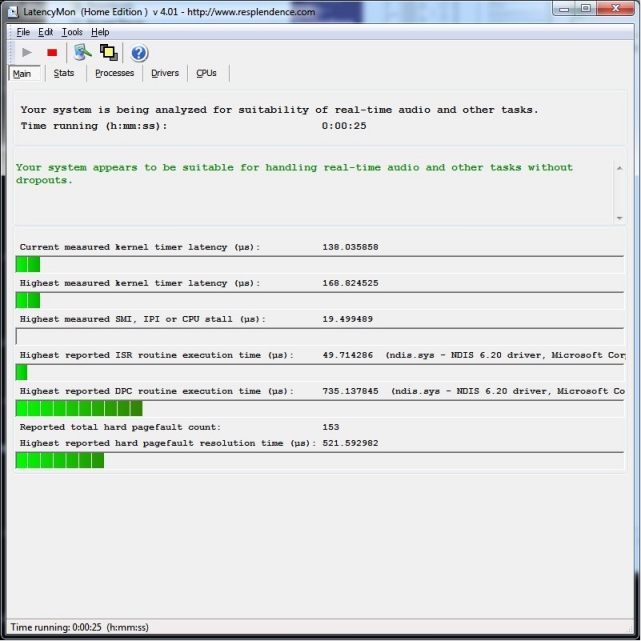
LatencyMon measures kernel timer latencies and watches DPC and ISR execution times. It then produces a report you can read without a kernel-debugging background.
The driver responsible for the longest ISR and DPC times
It shows the highest ISR and DPC execution times and, in most cases, resolves them to the drivers and processes behind them. You get a name to update, disable or replace.
Hard pagefault statistics per process
You can see which processes are being hit by hard pagefaults while you run audio work.
A per-CPU view and exportable data
Since version 4, a CPU view shows interrupts and DPCs for each processor. You can export the contents of views to a text file for closer analysis.
Interrupt-to-process latency measurement
Since version 5, the tool uses interrupt to user process latency to judge how well your system handles real-time work.
Professional extras: SMIs, IPIs and CPU stalls
The Professional edition adds the In-Depth Latency Test, which measures SMIs, IPIs and CPU stalls. It also adds interface customization and scaling, and a license for commercial use.
Who it's for
The vendor lists the target audience as power users, support engineers, system builders, OEMs, kernel developers and audio professionals. Novice users are marked as not the intended audience. If you record or perform on a Windows PC and can't explain your dropouts, it's worth running. Expect to read a technical report.
Pros and cons
Pros
- Names the drivers and processes behind latency spikes
- Free Home edition for personal use
- Covers ISRs, DPCs and hard pagefaults in one tool
- Actively updated, with Windows 11 support
Cons
- Aimed at technical users, not beginners
- On systems with more than 64 logical processors, only the first 64 are monitored
- Home edition license excludes commercial use
- In-Depth Latency Test, visual options and UI scaling are Professional only
- Windows Vista is no longer supported
FAQs
Does LatencyMon fix audio dropouts?
No. It finds the cause. It reports which drivers and processes show the worst latencies, and you then act on that.
Is it free?
The Home edition is free for use at home. The Professional edition is sold and is licensed for commercial environments.
Does it run on Windows 11?
Yes. Support for Windows 11 was added in version 7.20, and the current release covers Windows 7 through Windows 11.
Does it work on Windows Vista?
No. Version 6 and later require Windows 7 or greater.
System requirements
Windows 7 or greater, in 32-bit or 64-bit editions. Supported server editions are Windows Server 2012, 2016, 2019, 2022 and 2025.