Your PC restarts out of nowhere. There is no blue screen and no error message, and the screen just goes dark and the machine boots again. Most people blame the hardware at this point. Often the real cause is a misbehaving device driver or kernel module, and finding it normally takes debugging tools and some expertise. WhoCrashed does that analysis for you.
Quick facts
- Developer: Resplendence Software Projects
- Version: 7.10
- Platforms: Windows 11, 10, 8.1, 8, 7, Vista, XP and Windows Server 2022 down to 2003 (x86 and x64)
- Editions: a free Home Edition and a Professional Edition
- Professional price: USD 34.95 for a single system license
- Refund: 30-day return policy on purchases
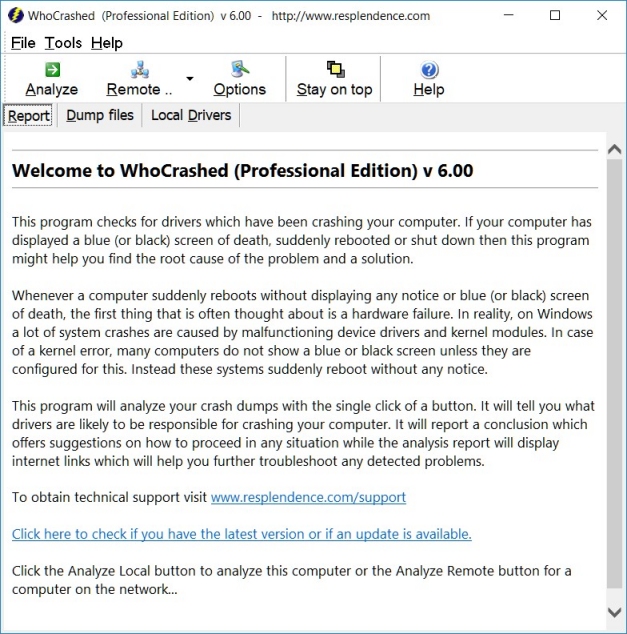
What WhoCrashed does
Windows can write crash dump files when the kernel hits an error. WhoCrashed reads the dumps on your computer and does post-mortem crash dump analysis. It then shows the drivers that have been crashing the system in a form you can read, with a single click.
Key features
Pinpoint the driver behind a crash without debugging skills
Normally you would need a set of debugging tools to work out which module caused a crash. WhoCrashed analyzes the dumps and names the responsible drivers, and in most cases it can pinpoint the offender.
Find out if crash dumps are even enabled
If your computer reset or shut down unexpectedly, WhoCrashed tells you whether crash dumps are enabled. If they aren't, it gives you suggestions on how to turn them on.
Guidance when the cause is hardware
If the crashes come from a hardware failure, WhoCrashed gives you guidance on tracing the root cause. The vendor also publishes articles on thermal issues, memory corruption, symbol resolution and Driver Verifier.
Works for crashes at boot, too
If your computer crashes during startup, the vendor suggests booting into safe mode and running WhoCrashed from there.
Who it's for
It suits you if you keep getting blue screens or sudden reboots and want to know which driver to update or remove, but you don't want to learn a debugger. The Professional Edition's license allows use at home and for professional purposes.
Pros and cons
- Pro: It gives a readable conclusion instead of raw dump data.
- Pro: A free Home Edition is available.
- Pro: It covers a wide range of Windows versions, old and new, in 32-bit and 64-bit.
- Con: It can't always be sure of the root cause. All kernel modules share the same address space, so one driver can corrupt another.
- Con: It is not guaranteed to identify the culprit in every scenario.
- Con: It is Windows-only.
FAQs
My PC restarts with no blue screen. Can WhoCrashed help?
Yes. Windows often reboots silently after a kernel error unless it is configured to show the blue screen. WhoCrashed checks whether crash dumps are enabled and suggests how to enable them if they aren't.
Do I need debugging experience?
No. You don't need any debugging skills to see which drivers are causing trouble.
Is there a free version?
Yes, a free Home Edition is offered. The Professional Edition is a paid license.
What does a license include?
It gives you full-featured use without limitations or nag screens. It also includes free major and minor updates for at least 3 years and free technical support.
System requirements
WhoCrashed runs on Windows 11, Windows 10, Windows 8.1, Windows 8, Windows 7, Windows Vista, Windows XP (x64 editions and SP3 32-bit), and Windows Server 2022, 2019, 2016, 2012, 2008 and 2003. Both x86 and x64 editions are supported. The installer is about 10.9 MB.