Video won't play on your phone, console or tablet? Convert it first
You have a movie in RMVB, MOV or some odd format, and your iPad, PSP or DVD player refuses to open it. Boilsoft Video Converter is a Windows program that turns those files into formats your device accepts, and it lets you trim, crop and add a watermark or subtitles along the way.
Quick facts
- Platform: Windows (98/ME/2000/XP/2003/Vista/Windows 7 listed)
- Price: $34.95
- Needs: Microsoft DirectX 8.1 or later runtime
- Output formats: AVI, MPEG, VCD, SVCD, DVD, 3GP, iPod MP4, PSP MP4, MP4, FLV, WMV
Key features
Convert popular video formats for TVs, phones and players
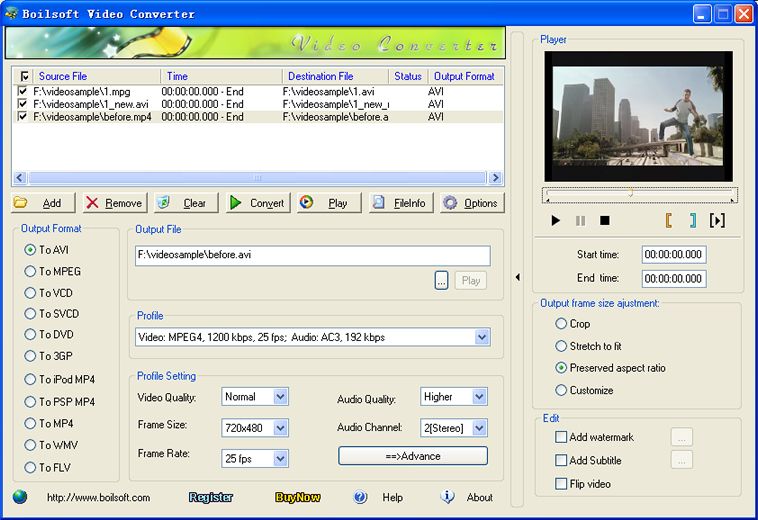
The program reads common formats such as AVI, MOV, MP4, FLV, MPEG, VOB, RM and WMV. It writes them out to AVI, MPEG, VCD, SVCD, DVD, 3GP, iPod MP4, PSP MP4, MP4, WMV and FLV. It can also produce RM and RMVB files, which is unusual.
Trim a clip and preview it before converting
You set a start and end point and convert only that segment. A built-in player lets you check the part you're cutting.
Add a watermark or subtitles, and flip the picture
You can add a watermark from an image file, including an animated GIF. Subtitles in .srt, .idx, .sub and .ssa formats are supported. A flip function turns the image vertically, and you can crop or resize the frame.
Convert a batch of files in one pass
Queue several videos and convert them in one go. You can also set the encoder, frame rate, sample rate, bitrate, aspect ratio and audio channel to tune the output.
Who it's for
It suits you if you have a folder of older videos to move onto an iPod, PSP, phone or DVD player. It also suits you if you need one simple Windows tool that cuts a clip, adds a watermark or subtitle and converts in the same step.
Pros and cons
- Pro: Many input and output formats in one program, including RM and RMVB.
- Pro: Trimming, cropping, watermark, subtitle and flip are built in.
- Pro: Batch conversion saves time on big collections.
- Con: Windows only. The vendor's Mac products are a joiner and a splitter, not this converter.
- Con: The requirements list dates from the Windows 7 era, so check it runs on your PC.
- Con: The device list covers older hardware such as the iPhone 4S and Zune.
FAQs
Can it convert to MP4 for my iPod or PSP?
Yes. It has dedicated iPod MP4 and PSP MP4 outputs, plus generic MP4 and 3GP.
Can I convert only part of a video?
Yes. Set a start and end point and convert just that segment. You can preview it first.
Can it add subtitles?
Yes. It accepts .srt, .idx, .sub and .ssa subtitle files.
Can it convert many files at once?
Yes. Batch conversion handles several files in one run.
System requirements
- Microsoft DirectX 8.1 or later runtime
- Microsoft Windows 98/ME/2000/XP/2003/Vista/Windows 7