Adolix Split and Merge PDF: Split, Combine and Interleave PDFs Offline on Windows
Adolix Split and Merge PDF is a small Windows program that splits PDFs into pages or ranges, merges many PDFs into one, and interleaves pages from two documents, all offline. The free version merges up to 5 files and splits up to 50 pages for personal use; the Professional Edition is a one-time $19.95 and removes those limits.
It's the kind of tool you reach for when you need to pull three pages out of a contract, glue a stack of invoices into one file for the accountant, or put a duplex scan back in order, and you'd rather not upload private documents to a website to do it.
Quick facts
- Version: 3.1.7 (installer signed November 16, 2026)
- Developer: Adolix (BST WEB SOLUTIONS SRL, Romania)
- Platform: Windows 11, 10, 8, 7 and XP, 32-bit and 64-bit; also in the Microsoft Store
- Price: free version, or Professional Edition $19.95 one-time per computer
- Free version limits: merges up to 5 documents, splits only the first 50 pages, personal use only
- Interface: 12 languages
- What we checked: the installer (5.5 MB, file version 3.1.7.8, signed by BST WEB SOLUTIONS SRL) and the Professional Edition at $19.95 on the order page on November 25, 2026. We didn't run it on a large document.
Before you buy
- The Professional license is for one computer; to move it, uninstall from the old PC first. The vendor's order page has volume pricing from 2 licenses up.
- It's a split/merge tool, not a PDF editor: it doesn't change text, compress files or run OCR.
- There's no Mac version.
Download Free VersionBuy Professional ($19.95)
Overview
Adolix has sold this utility since the late 2000s, and version 3 rewrote it with a tabbed window: Split, Merge, Mix and About. Each tab is one form with a file list, a few options and one button. Everything runs locally, so there's no upload, no file-size cap from a web service and nothing left on someone else's server.
Features
Split by pages, groups, every Nth page or ranges
Adolix Split and Merge PDF splits a document into files of N pages, into groups of N pages starting at a given page, takes each Nth page, or follows a page-range pattern such as 1-4,6,9-10;5,6;12;20-21,23 where semicolons start a new file. Output names use a base filename you set, in the source folder or another one.
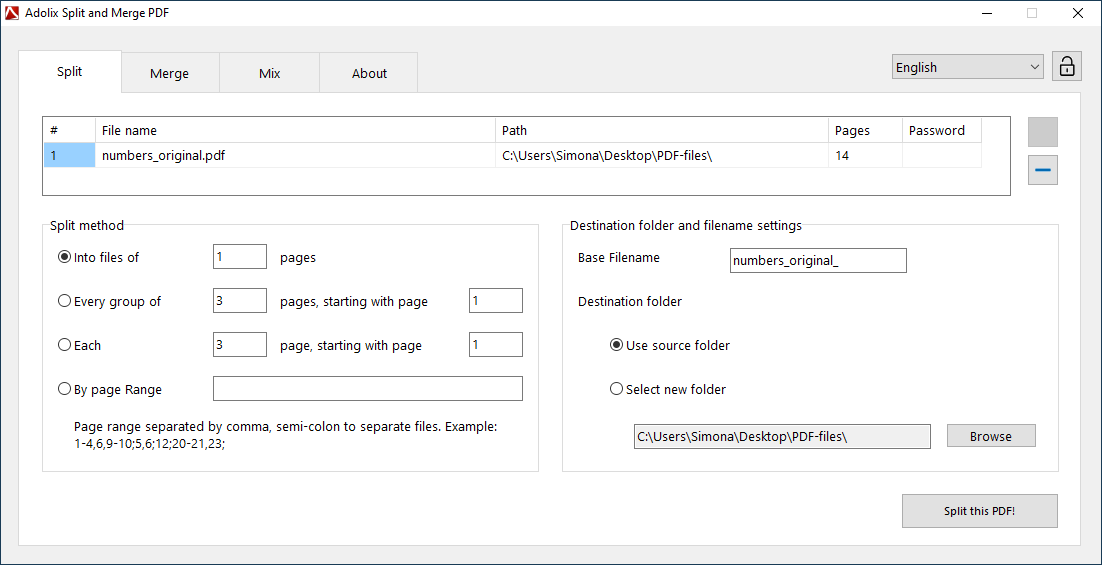
The Split tab: choose files of N pages, groups, every Nth page or a page-range pattern.
Merge PDFs in the order you choose
Adolix Split and Merge PDF combines any number of PDFs (five in the free version) into one file. Add them by button or drag and drop, move them up and down, and it shows each file's page count. Password-protected PDFs can be added after you enter the password.
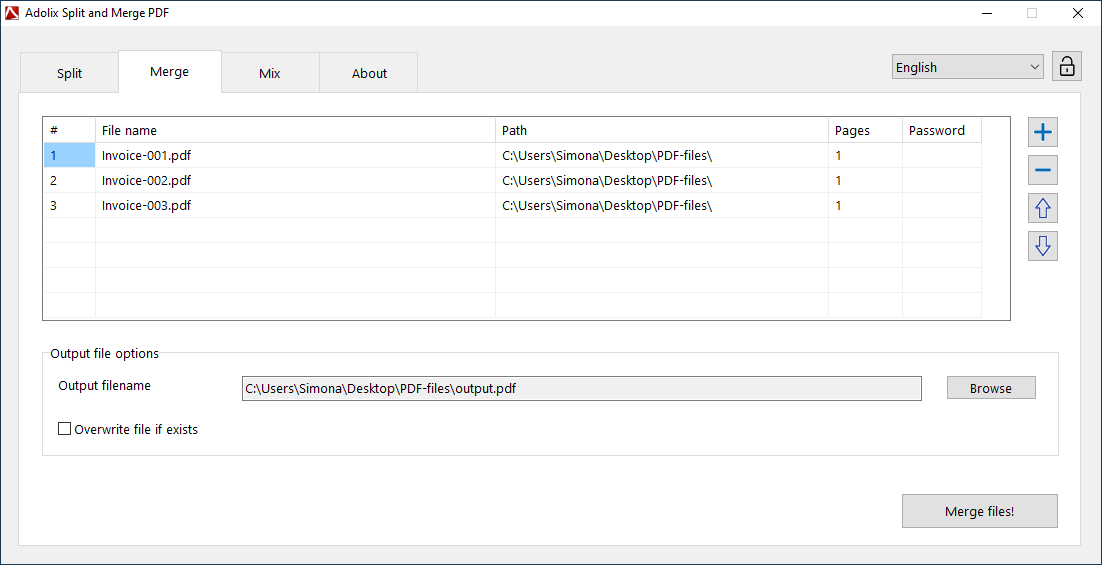
The Merge tab with three one-page invoices ready to combine into output.pdf.
Mix pages from two documents
The Mix tab interleaves two PDFs: take every group of N pages, or each Nth page, from the first file, then the same from the second. That's how you rebuild a document scanned as odd pages and even pages separately.
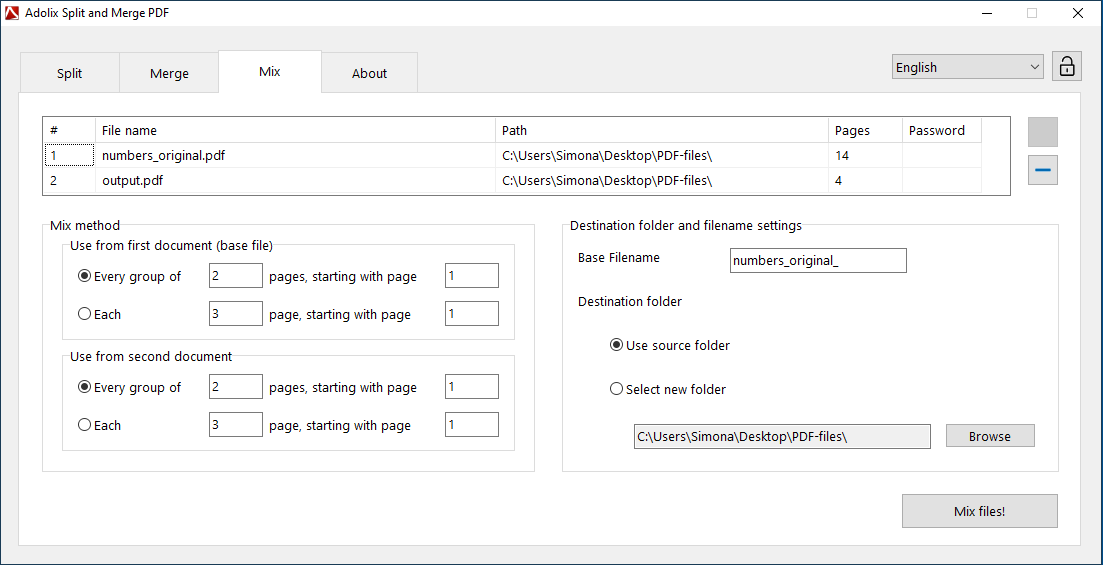
The Mix tab: pick the page pattern from each document.
Password and watermark on every output file
Adolix Split and Merge PDF can protect every file it creates with a password and stamp an image watermark (a transparent PNG works best) at an X,Y position you set.
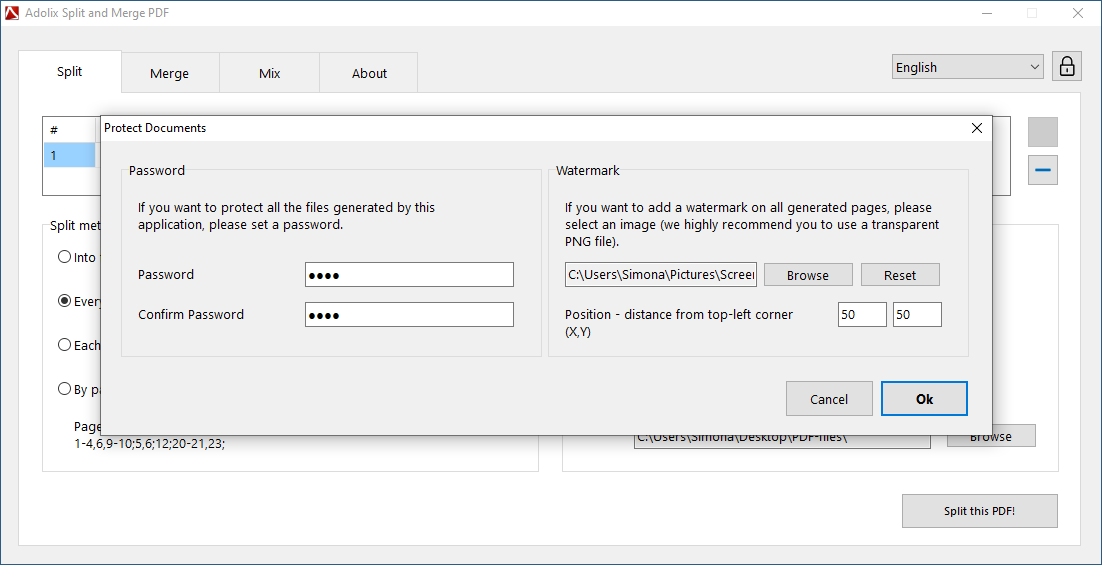
The Protect Documents dialog: a password for all generated files and an optional image watermark.
Command line for scripts
Adolix Split and Merge PDF also runs from the command line, including fully silent split and merge, so you can call it from a batch file or a scheduled task.
Who It's For, and Who Should Skip It
It suits office workers, bookkeepers and anyone handling contracts, statements or scans who splits and merges PDFs regularly and wants it done offline, for a one-time $19.95.
Skip it if you also need to edit text, fill forms, compress or OCR PDFs: a full PDF editor covers all of that. If you only merge a handful of files now and then, the free version, or the Print to PDF and merge features already in some PDF readers, may be enough. Mac users need another tool.
Usage Guide
- Download and install the free version from Adolix. To activate Professional, enter the registration name and key you receive by email after purchase.
- To split, open the Split tab, add a PDF, pick the split method, set the base filename and folder, and click Split this PDF!
- To merge, open the Merge tab, add or drag in the PDFs, reorder them with the arrows, set the output filename and click Merge files!
- To interleave, use the Mix tab with two PDFs and set the page pattern for each.
- Click the lock icon at the top right to set a password or watermark for the files it creates.
Where It Falls Short
- The free limits bite on real documents. A 50-page split cap rules out most reports and books, and a user on AlternativeTo moved to another tool for a 235-page file.
- The interface is plain and dated, and Softpedia noted there's no help file.
- No page previews. You work from page numbers and counts, not thumbnails.
- Single-purpose. No compression, OCR, rotation or editing.
What Users Say
Ratings
Adolix's product page shows an average of 4.61 out of 5 from 188 votes. On Snapfiles, three user reviews average 4 out of 5.
Customers quoted by Adolix
Hanno Spanninga, FoodResult (the Netherlands): "I have been using Adolix for many years because I regularly need to merge confidential multipage documents and want to keep that process locally rather than upload them to an online service. So, no privacy risk. Adolix is fast, simple, and reliable – it just works every time."
Bill Ho, Superfree Insurance (Hong Kong): "I have other more powerful tools, but they were large, with a complex interface and slow to start. With Adolix, it starts fast, runs fast and can address my most frequent needs."
Snapfiles user reviews
MyPCHelp (5 stars, 2009) said it was "exactly what I was looking for", used it daily for business, and had switched from Acrobat, which used far more computer resources. Wolfgang2 (3 stars, 2008) gave lower marks for interface and features but wrote: "For the price, this program can't be beat!"
Download sites
Softpedia's review found it simple enough for any experience level and stable in testing, with no crashes, but criticized the outdated interface and the missing help file.
Summary: people like that it's fast, light and offline, and that it does one job reliably. The complaints are the free version's limits and the old-fashioned look.
Editions and Pricing
| Edition | Price | Merge limit | Split limit | Use |
|---|
| Free | $0 | 5 documents | First 50 pages | Personal |
| Professional | $19.95 one-time | Unlimited | Unlimited | Personal and commercial, priority support |
Price checked on November 25, 2026 for one computer. Adolix discounts multiple licenses on its own order page, from 10% off at 2 licenses to 50% at 100.
FAQs
Is Adolix Split and Merge PDF really free?
Yes. Adolix Split and Merge PDF has a free version for personal use that merges up to 5 documents and splits up to 50 pages. The $19.95 Professional Edition removes those limits and adds commercial use.
Does Adolix Split and Merge PDF upload my files?
No. Adolix Split and Merge PDF processes everything on your own computer, so files never go to a server.
Can Adolix Split and Merge PDF open password-protected PDFs?
Yes. Adolix Split and Merge PDF can split and merge password-protected and encrypted PDFs once you supply the password.
Can I split a PDF into single pages with Adolix Split and Merge PDF?
Yes. Choose files of 1 page on the Split tab and it writes each page as its own PDF.
Does Adolix Split and Merge PDF run on Windows 11?
Yes. Adolix Split and Merge PDF runs on Windows 11, 10, 8, 7 and XP, 32-bit and 64-bit.
Is the Professional license a subscription?
No. Adolix Split and Merge PDF Professional is a one-time $19.95 payment for one computer.
System Requirements
- Windows 11, 10, 8, 7 or XP, 32-bit or 64-bit
- 5.5 MB installer
Conclusion
Adolix Split and Merge PDF is worth $19.95 if you split or merge PDFs every week and want it done offline without a subscription. It's quick, light and covers the odd jobs (interleaving scans, page-range patterns, command line) that simple tools skip.
It's not worth paying for if your files stay under 50 pages and you merge five or fewer at a time, since the free version does the same work, and it's the wrong tool if you need a PDF editor. Try the free version on your own documents first.
Download Free VersionBuy Professional ($19.95)