Adolix PDF Redactor: Remove Sensitive Text From PDFs for Good, Offline on Windows
Adolix PDF Redactor is a Windows 10/11 program that permanently deletes the text and areas you select from a PDF, instead of just drawing a black box over them, and it never uploads your file. The free version handles PDFs of up to 3 pages for personal use; Pro is a one-time $24.95 with no page limit and business use allowed.
Covering a Social Security number with a black rectangle in a PDF editor looks safe, but the text often stays underneath, where anyone can copy it out. A real redaction tool removes the text from the file itself.
Quick facts
- Version: 1.0.88 (installer signed November 23, 2026)
- Developer: Adolix (BST WEB SOLUTIONS SRL, Romania)
- Platform: Windows 11 and 10, 64-bit; also in the Microsoft Store
- Price: free version, or Pro $24.95 one-time per computer
- Free version: PDFs of up to 3 pages, personal use
- Works offline: files are processed on your PC only
- Interface: 12 languages
- What we checked: the installer (4 MB, file version 1.0.88, signed by BST WEB SOLUTIONS SRL) and the Pro license at $24.95 on the order page on November 25, 2026. We didn't test redacted files with forensic tools.
Before you buy
- Text-based PDFs only for true removal. On a scanned page (an image) it covers the area with a redaction mark, but there's no text layer to delete. Test with your own scans.
- Encrypted PDFs won't open. Adolix's workaround is to print the file to a new PDF from Chrome first.
- Pro activation needs an internet connection once. The license is for one computer.
- Windows 10/11 64-bit only; no Mac version.
Download Free VersionBuy Pro ($24.95)
Overview
Adolix PDF Redactor is a newer product from Adolix, a small Romanian developer that has made PDF utilities for Windows for many years. It does one job: open a PDF, mark what must go, apply, and save a copy in which that content no longer exists. Because it runs locally, it fits documents you shouldn't upload anywhere: client files, medical records, payroll and bank statements.
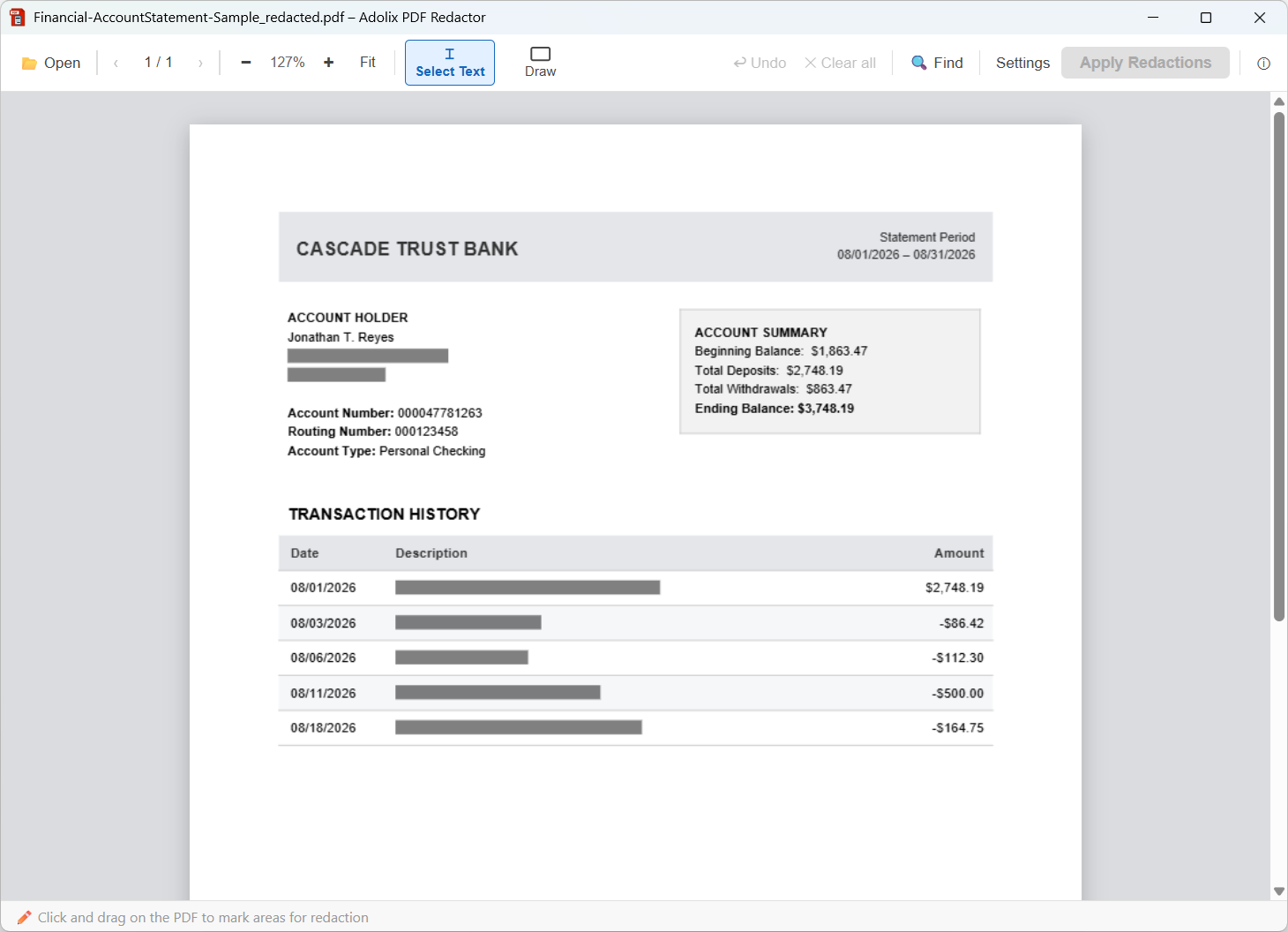
A bank statement after redaction: the account holder's address and every transaction description are gone, the amounts remain.
Features
Structural redaction, not a black box
Adolix PDF Redactor removes the selected text from the PDF's content stream, so copying, searching or removing the box reveals nothing. Both free and Pro use the same redaction engine.
Select text like a viewer, or draw boxes
Adolix PDF Redactor lets you select words with the Select Text tool, as in a PDF reader, or switch to Draw and drag a box over any region, including photos, signatures and scanned pages. Ctrl+A selects all text on a page, and you can mark areas across many pages before applying.
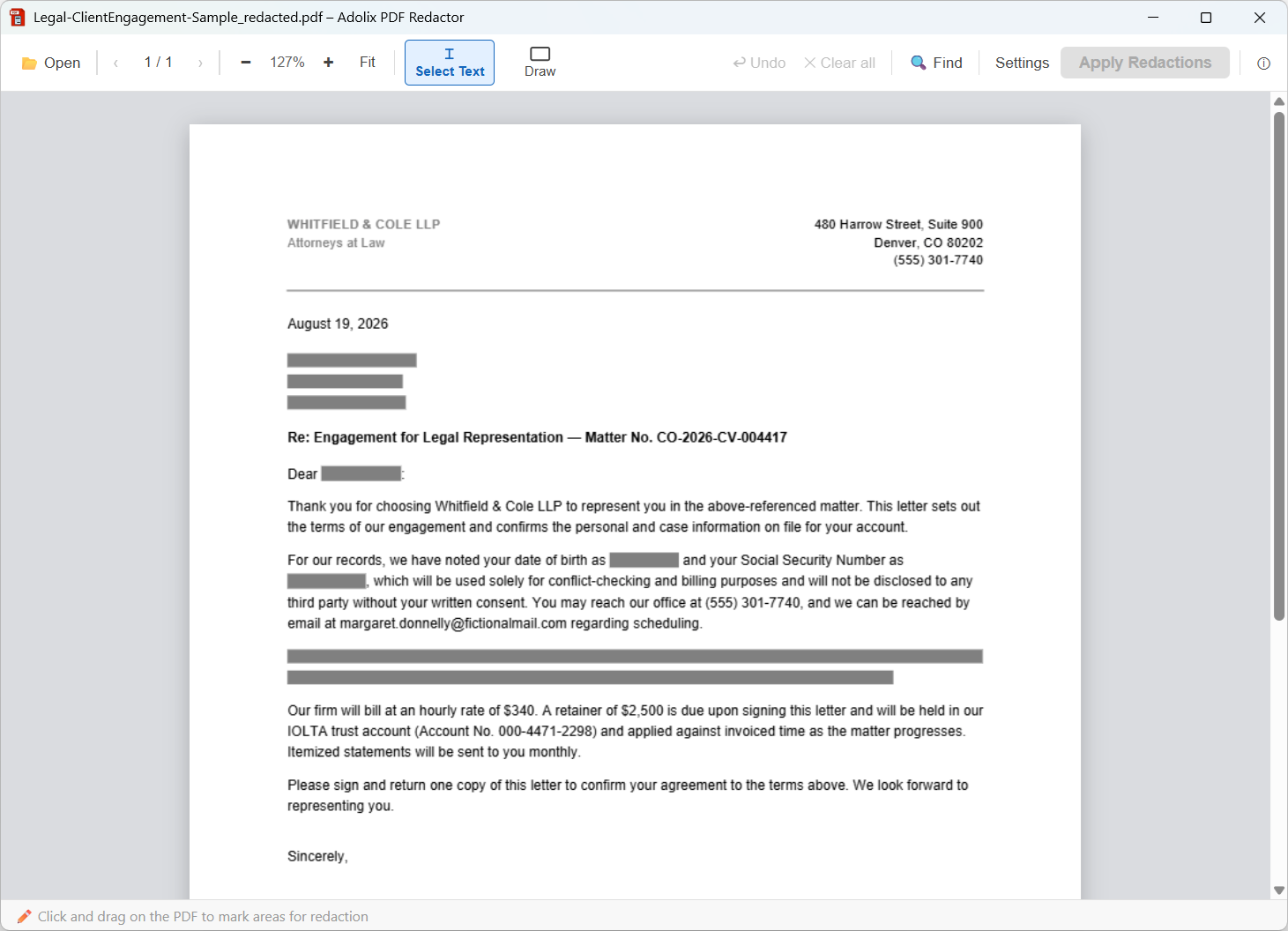
A client engagement letter with the client's name, address, date of birth and SSN redacted; the toolbar shows Select Text, Draw, Find and Apply Redactions.
Find, metadata stripping and print-friendly marks
Adolix PDF Redactor has a Find box to locate a name or number quickly, strips document metadata (author, creation date, producer) in the same save, and draws redactions as solid gray boxes or as white boxes with an outline, which use less toner when printed.
Who It's For, and Who Should Skip It
It suits small law offices, HR staff, bookkeepers, clinics, landlords and anyone who shares documents with personal data and wants a simple, offline redaction tool for a one-time $24.95.
Skip it if you need automatic pattern search (redact every SSN or email address in one go), redaction logs or batch processing across many files; enterprise PDF suites do that. If you only ever redact a page or two, the free version is enough. Mac users need another tool.
Usage Guide
- Install the free version from Adolix. After buying Pro, start the program and enter the name and key from your email in the activation dialog.
- Click Open and choose the PDF.
- Use Select Text to mark words, or Draw to box an area. Use Find to jump to a name or number.
- Pick the redaction style in Settings if you want white boxes.
- Click Apply Redactions and save the redacted copy; keep the original somewhere safe.
Where It Falls Short
- No automatic search-and-redact for patterns like SSNs or account numbers; you find and mark each item yourself.
- Scanned documents get a visual mark only, since there's no text to remove.
- Encrypted PDFs must be re-saved without encryption first.
- Few independent reviews yet, as it's a young product.
What Users Say
Ratings
Adolix PDF Redactor is new and has no independent reviews yet: AlternativeTo lists no comments, and we found no magazine tests. Adolix's own product page shows an average of 4.48 out of 5 from 31 votes. Adolix's older Split and Merge PDF, built the same way (offline, single-purpose), averages 4.61 from 188 votes there, and its users mainly praise speed and keeping files local.
Comparisons
Adolix PDF Redactor vs drawing a box in a PDF editor
A shape or highlight in an ordinary PDF editor hides text on screen only; the text can still be selected, searched and copied. Adolix PDF Redactor deletes it from the file.
Adolix PDF Redactor vs online redaction sites
Online tools are free and need no install, but you upload the very documents you're trying to protect. Adolix PDF Redactor keeps everything on your PC and has no file-size limit beyond the free version's 3 pages.
Editions and Pricing
| Edition | Price | Page limit | Use |
|---|
| Free | $0 | PDFs up to 3 pages | Personal |
| Pro | $24.95 one-time | None | Personal, business and commercial |
Price checked on November 25, 2026 for one computer. Adolix discounts several licenses on its own order page, from 10% off at 2 to 50% at 100.
FAQs
Can someone recover text redacted with Adolix PDF Redactor?
No, not from a text-based PDF. Adolix PDF Redactor removes the selected text from the PDF content stream, so there's nothing left under the mark to copy or uncover.
Does Adolix PDF Redactor work on scanned PDFs?
Partly. On scanned pages Adolix PDF Redactor covers the selected area with a redaction mark, but a scan has no text layer to remove, so check the result before sharing.
Does Adolix PDF Redactor upload my documents?
No. Adolix PDF Redactor processes every file locally on your computer; only Pro activation contacts the internet.
Is Adolix PDF Redactor Pro a subscription?
No. Adolix PDF Redactor Pro is a one-time $24.95 license for one computer.
Can Adolix PDF Redactor open password-protected PDFs?
No. Adolix PDF Redactor can't process encrypted PDFs; Adolix suggests opening the file in Chrome and printing it to a new PDF, then redacting that copy.
Does Adolix PDF Redactor make a business HIPAA compliant?
No software does that alone. Adolix PDF Redactor helps by keeping patient files offline while you remove identifiers.
System Requirements
- Windows 11 or 10, 64-bit
- 4 MB installer
- Internet connection once to activate Pro
Conclusion
Adolix PDF Redactor is worth $24.95 if you regularly share documents with personal data and want proper redaction without uploading files or paying for a full PDF suite. Real removal of text, offline, for a one-time price is the reason to buy it.
The reasons not to are the manual marking (no automatic pattern search), the visual-only result on scans, and how new it is. Try the free version on a 3-page sample of your own documents first.
Download Free VersionBuy Pro ($24.95)