Any Video Converter Pro for Mac: One-Time Video Conversion, DVD Burning and Screen Recording
Any Video Converter Pro for Mac is a Mac video converter that handles over 1,000 formats and adds saved presets, screen recording and DVD burning to the free edition. It costs $49.95 once at checkout. It's for Mac users who convert video regularly and want to set the output precisely.
The free Mac edition already converts, compresses and does basic editing. So the question is whether you need the extras enough to pay once and be done.
Quick facts
- Developer: Anvsoft Inc.
- Version: 9.2.5, released August 16, 2026
- Platform: macOS 12 or later, with a separate download for macOS 10.15 and 11
- Formats: 1,000+ video and audio formats, including ProRes, MOV and ALAC, with 4K, 8K and HDR support
- Price: $49.95 on the order page, a $30 discount from $79.95, one payment
- Free edition: the same download works free, and Pro features need a license
- Refunds: 30 days on permanent plans
- What we checked: the vendor's Mac download is a 9.6 MB DMG, version 9.2.5 is the latest on its Mac version history, and the order page charged $49.95 for AVC Pro for Mac with no renewal, on November 6, 2026. We didn't install it or run a conversion test on a Mac.
Before you buy
Use the free edition first. Unlimited format conversion and compression are free, and Anvsoft says conversion runs at the same speed as in the paid version. Many readers won't need Pro at all.
Pro isn't the AI edition. The site leads with AI video generation, but AI enhancement, speech to text and vocal splitting belong to the Ultimate level. Pro is for conversion, recording and DVDs. This license is also for the Mac edition only, and the Windows edition has its own checkout.
Download Free TrialBuy Now
Overview
Any Video Converter opens on a toolkit screen rather than a single converter window. Format Convert, Video Download and Compress Video sit at the top, with smaller cards below for trimming, merging, screen recording and AI tools. Anvsoft's Mac page uses the same picture as its Windows guide, and the screenshots below are from that guide.
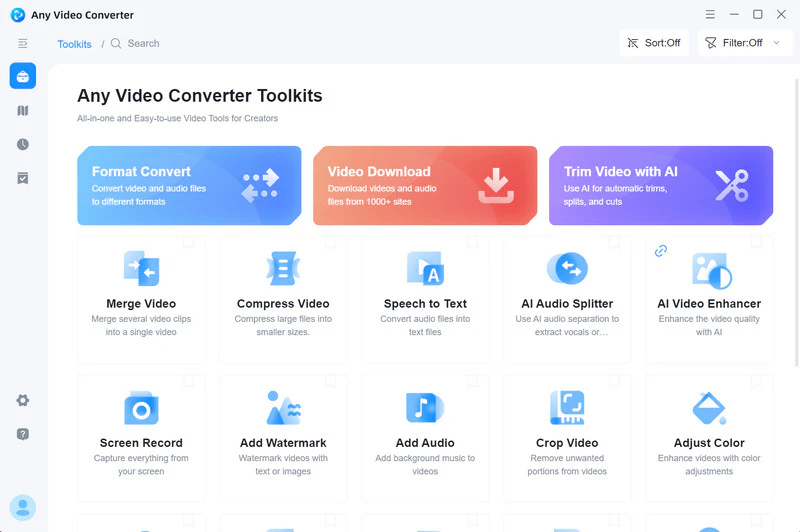
The toolkit screen. Some cards, such as the AI tools, go beyond the Pro edition.
Features
Any Video Converter Pro for Mac converts in batches
Any Video Converter Pro for Mac converts video and audio across more than 1,000 formats, and you can queue 50, 100 or more files at once. It handles 4K, 8K, HDR and high frame rate video. An "Auto (Match Source)" option added in version 9.2.4 speeds up jobs that don't need re-encoding.
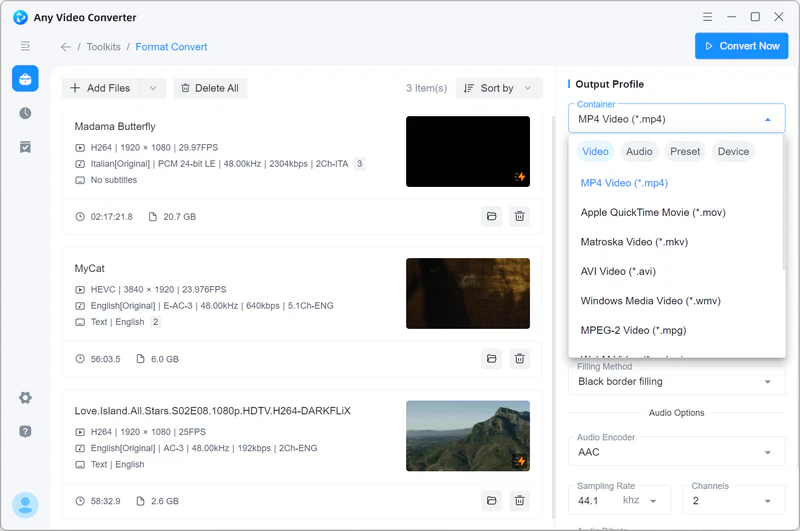
The Format Convert tool with files queued, shown on Windows.
Any Video Converter Pro for Mac handles Apple formats
Any Video Converter Pro for Mac converts Apple files such as ProRes, MOV and ALAC to H.264. That helps when a huge ProRes export from your Mac won't play on someone else's device or is too large to share. It also takes footage from GoPro, DJI and surveillance cameras.
Any Video Converter Pro for Mac saves your settings as presets
Any Video Converter Pro for Mac lets you save a format, resolution and bitrate as your own preset. If you always send clips to the same TV or editor, this alone saves real time.
Any Video Converter Pro for Mac gives you encoding control
Any Video Converter Pro for Mac exposes scan type, aspect ratio, scaling, bitrate, encoding passes, frame rate, denoising, deblocking, sharpening and color space. These matter most for old or broadcast footage, and you can ignore them for everyday jobs.
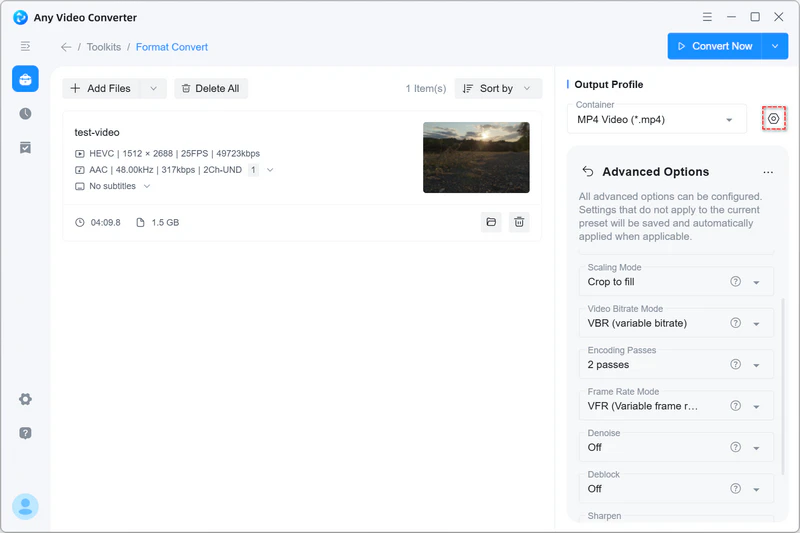
The Advanced Options panel, shown on Windows.
Any Video Converter Pro for Mac records your screen and burns DVDs
Any Video Converter Pro for Mac records your screen in HD or 4K, for meetings or teaching demos, and burns videos to DVD with templates. Version 9.2.0 also added DVD and CD import to the convert, compress and merge tools. You'll need an external drive on most current Macs.
Any Video Converter Pro for Mac compresses and merges
Any Video Converter Pro for Mac shrinks videos for sharing or storage and joins clips into one file, and version 9.2.4 added a clip merger with reordering and an audio merger. The compress tool lets you set the size as a percentage of the original.

The Compress Video tool, shown on Windows.
Benefits
- No subscription. At $49.95 once, the permanent license costs only $10 more than one year on the yearly plan.
- One app for several chores. Convert, record and burn without collecting separate Mac tools.
- Room to grow. Beginners can stick to presets, and experienced users can reach the encoding settings.
Real-World Uses
- Sharing a ProRes export: turn a large master into an H.264 MP4 that a client can open.
- Weekly channel videos: save your settings as a preset and batch-convert each week's clips.
- A family DVD: burn a wedding video for a relative who only has a DVD player.
- Freeing up disk space: compress old 4K phone footage in a batch.
Who it's for, and who should skip it
Buy it if you convert video on a Mac often and want presets and encoding control, or if you still burn DVDs. Skip it if you convert the occasional file: the free edition or the free HandBrake will do. Skip it too if you want AI enhancement or vocal removal, which need Ultimate at $69.95. If you edit professionally in Final Cut, its own export tools and Compressor fit your workflow better.
Usage Guide
- Download the DMG, open it and drag the app to Applications. It's a small downloader that fetches the program.
- Open Any Video Converter and choose Format Convert.
- Add your files, then pick an output profile on the right.
- Open the advanced settings if you need specific bitrate or frame rate values, and save them as a preset.
- Start the conversion, and find the results in the output folder.
- Activate Pro with the license details from your order email.
Where it falls short
- Thin Mac-specific feedback. Almost all reviews are of the Windows version, so test on your own Mac.
- Upsells. The app and website push AI credits and the Ultimate edition, and credit packs are non-refundable.
- Update bumps. Trustpilot's summary notes that some users hit problems after specific updates or a reinstall.
- No copy-protection promise. Commercial discs are a separate legal question in many countries.
What Users Say
We read these pages on November 6, 2026. Reviews here cover Any Video Converter as a whole, and none of the Trustpilot reviews we read mention the Mac edition.
Trustpilot: 4.8 out of 5 from 1,013 reviews
87% of reviews are five-star and 2% are one-star. Support gets the most praise.
- Wing Yew Tang, October 21, 2026 (5 stars): "I find it very user-friendly. It is very easy to navigate around the functions that I want."
- JustOurOpinion, October 7, 2026 (5 stars): "AVC has always been reliable over the long term"
- Myke Mitchell, September 15, 2026 (5 stars): "Any Video Converter has been a program I can't live without for several years now."
- Farooq Baddi, September 25, 2026 (5 stars): "Just perfect for visually impaired people like myself."
- Tom, September 17, 2026 (5 stars): "I have never had any problems contacting the support team and getting answers quick."
- YoBi Wan Kenobi, September 13, 2026 (1 star): "cant even make a 7 second clip"
Softpedia's Mac listing
Softpedia's Mac page for Any Video Converter Pro shows 2.9 out of 5 from only 9 votes, which is the one Mac-specific rating we found, and it's much lower than the Trustpilot score. With so few votes, it's a reason to test first rather than a verdict.
On Anvsoft's website
Vendor-chosen, but specific.
- JC Falconi: "Any Video Converter is by far the best video converter I've tried. User-friendly and easy to use. The software itself is straightforward, fast, and reliable for conversion, cropping, compressing, etc."
- Khuong Nguyen: "Your tool meets all these three criteria, on which 9/10 converters fail somehow."
- Seizan: "I am happy to tell that even the free version beats some paid video converters and editors I have seen (and regrettably, paid for!)."
The themes: users rate the program as easy and dependable, and they rate its support highly. The doubts are the thin Mac-specific record and the push toward AI add-ons.
Comparisons
Any Video Converter Pro vs HandBrake
HandBrake is free and open source, and it's excellent for converting to MP4 and MKV. Any Video Converter Pro covers far more formats, adds DVD burning and screen recording, and is easier to pick up.
Pro vs Ultimate
Ultimate costs $69.95 at Anvsoft's current price, against $49.95 for Pro. It adds AI enhancement, speech to text, vocal splitting and bonus AI credits. Pay the extra only if you'll use those.
Mac vs Windows edition
Each is sold separately. Anvsoft's Windows listing is for Windows 11 and 10 only, so buy the one for the computer you use.
Editions and Pricing
| Edition | Monthly | Yearly | Permanent |
|---|
| Free | $0 | $0 | $0 |
| Pro (this listing is permanent) | $19.95 | $39.95 | $49.95, down from $79.95 |
| Ultimate | $29.95 | $59.95 | $69.95, down from $89.95 |
FAQs
Does Any Video Converter Pro for Mac work on Apple Silicon?
Anvsoft's site checks for Apple Silicon when you download, but it doesn't state chip requirements in its Mac specs. The free edition is the same download, so check it on your Mac before paying.
Which macOS versions does Any Video Converter for Mac support?
Any Video Converter for Mac runs on macOS 12 and above from the main download. A separate DMG serves macOS 10.15 and 11.
How long is the refund period for Any Video Converter Pro for Mac?
Any Video Converter Pro for Mac has a 30-day money-back guarantee on permanent plans. Monthly and yearly plans get 5 days, and credit packs can't be refunded.
Can I move from a subscription to a permanent license?
Not as an upgrade. Anvsoft says you buy the permanent license separately and it refunds the subscription.
Does the free edition of Any Video Converter for Mac convert more slowly?
No, Anvsoft says it doesn't limit conversion speed for free users.
Can Any Video Converter for Mac convert YouTube videos?
Any Video Converter for Mac converts YouTube videos already saved on your computer through Format Convert. Check a site's terms before you download from it.
System Requirements
- macOS 12 or later for the main download
- macOS 10.15 or 11 with the separate DMG
- A DVD burner for disc features
Conclusion
Worth $49.95 for regular Mac converters. The permanent license is only $10 more than a single year, and it includes presets, encoding control, screen recording and DVD burning. The one reason to buy it is getting all of that for one payment. The main reason not to is that the free edition already does the core conversion, so try it first and upgrade only when you hit a limit.
Download Free TrialBuy Now