Any Video Converter Pro: One-Time Video Converter with DVD Burning for Windows
Any Video Converter Pro is a Windows video converter that handles over 1,000 formats, up to 4K and 8K, and adds saved presets, screen recording, DVD ripping and DVD burning to the free edition. It's for people who convert video regularly and want full control of the output. The order page charges $49.95 once for a permanent license.
The free version of AVC has been around for years and already does plenty. The Pro question is simple: do you need the presets, encoding controls, recorder and DVD tools enough to pay once and stop thinking about it?
Quick facts
- Version: 9.2.5, released August 10, 2026
- Developer: Anvsoft Inc.
- Platform: Windows 11 and 10 (64-bit). The Mac edition is sold separately, for macOS 10.15 and above.
- Formats: 1,000+ video and audio formats, MP4 output up to 4K and 8K
- Price: $49.95 on the order page, a $30 discount from $79.95, one-time payment for the Windows edition
- Free edition: the same download works free. Pro features need a license.
- Refunds: Anvsoft offers 30 days on permanent plans and 5 days on monthly and yearly plans
- What we checked: the download, a 7.4 MB downloader signed by Anvsoft Inc., version 9.2.5 on the vendor's What's New list, and the order page, which charged $49.95 for AVC Pro for Win with no renewal, on November 6, 2026. We didn't install it or run a conversion test.
Before you buy
Try the free edition first. Format conversion, compression and basic editing are in the free version, so many readers won't need Pro at all.
AI tools aren't the point of Pro. The site leads with AI video generation, but AI enhancement, speech to text and vocal splitting are listed at the Ultimate level. Pro is the conversion, recording and DVD edition.
Download Free TrialBuy Now
Overview
Any Video Converter opens on a toolkit screen rather than a single converter window. Format Convert, Video Download and Compress Video sit at the top, with smaller cards below for trimming, merging, screen recording, watermarks and AI tools. Each tool opens with a file list on the left and output settings on the right.
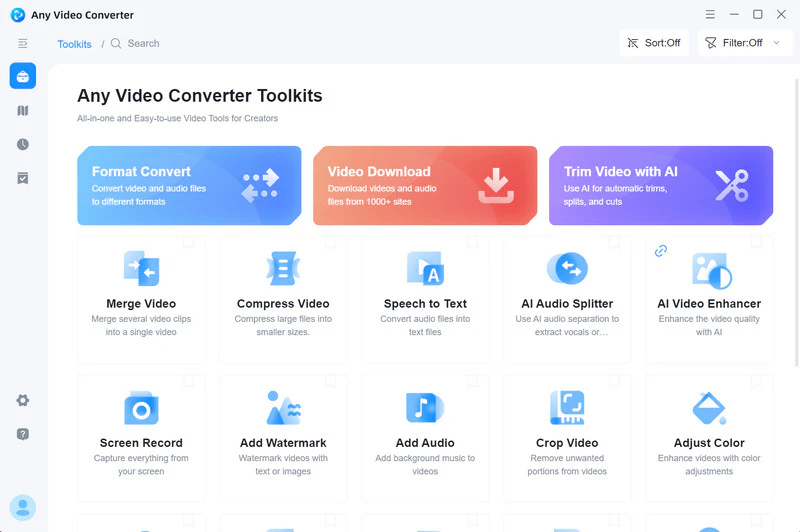
The toolkit screen. Some cards here, such as the AI tools, go beyond the Pro edition.
Features
Batch conversion across 1,000+ formats
Any Video Converter Pro converts video to video, audio to audio and video to audio in batches, with MP4 output up to 4K and 8K. Version 9.2.4 added a Speedy Conversion mode that matches the source encoding, which helps when a stream doesn't need re-encoding.
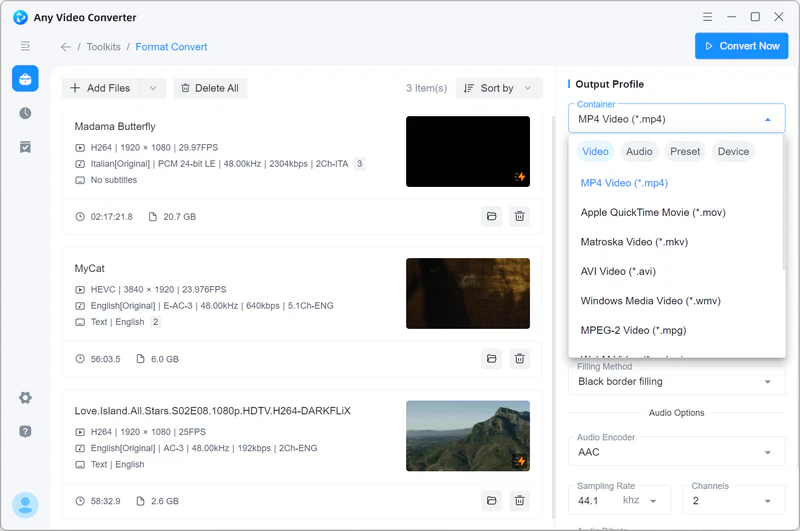
The Format Convert tool with three files queued and the Output Profile panel on the right.
Saved presets and a custom mode
Any Video Converter Pro lets you save a format, resolution and bitrate as your own preset so you don't set them again each time. If you always send clips to the same TV or editor, this alone saves real time.
Advanced encoding controls
Any Video Converter Pro exposes scan type for interlaced and telecined sources, aspect ratio, scaling mode, VBR or CBR bitrate, encoding passes, CFR or VFR frame rate, denoise, deblock and sharpen. These matter most for old DVD or broadcast footage, and you can ignore them for everyday jobs.
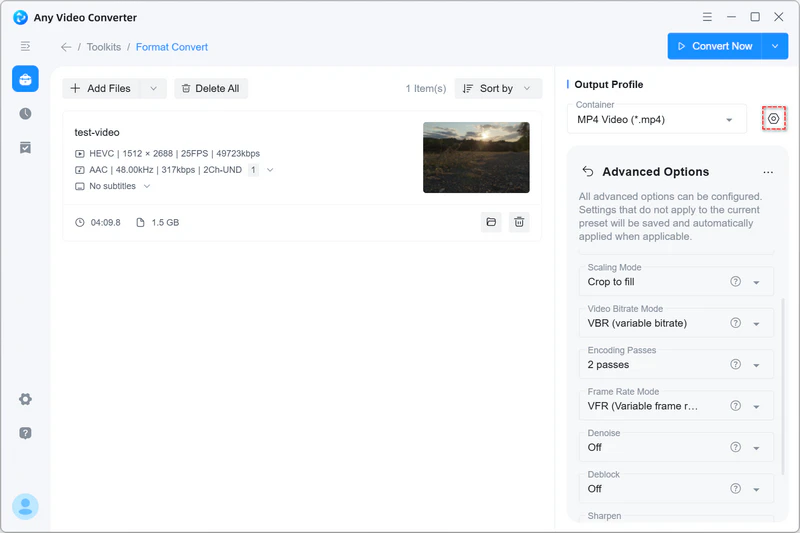
The Advanced Options panel, with scaling mode, bitrate mode, encoding passes, frame rate mode, denoise and deblock.
DVD ripping and burning
Any Video Converter Pro converts DVD discs and ISO files to MP4 and other formats, and burns videos to blank DVDs with customizable menus and templates. It's a rare combination in a program at this price, and useful if your family still has a shelf of discs. Copy-protected commercial discs are a separate legal question in many countries.
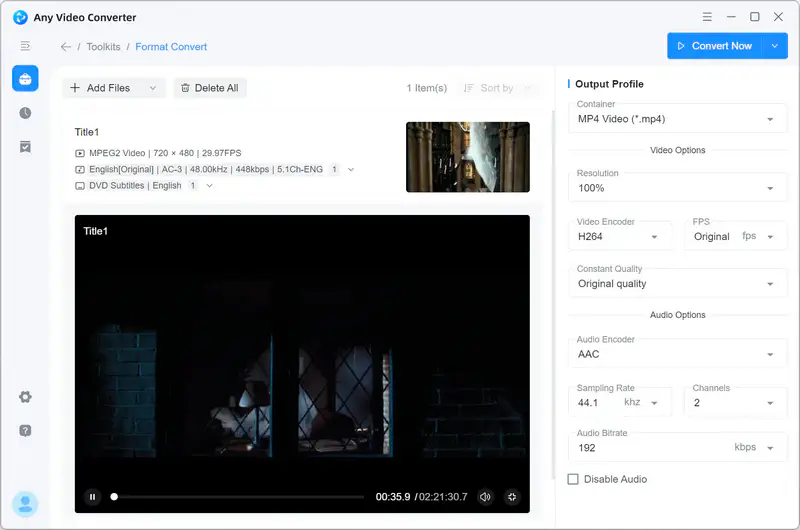
A DVD title loaded in the converter, with resolution, encoder and audio options on the right.
HD and 4K screen recording
Any Video Converter Pro records any selected screen area, including across multiple monitors, in HD or 4K. It's a convenience tool. Serious game capture is better served by a dedicated recorder.
Compress and merge
Any Video Converter Pro shrinks video to a percentage or a target size and joins clips into one file. The same version added clip reordering and an audio merger tool.

The Compress Video tool, with size set as a percentage of the original.
Benefits
- No subscription. The permanent license avoids monthly or yearly charges, and Anvsoft says updates are free.
- One program for several chores. Convert, record, rip and burn without collecting separate tools.
- Room to grow. Beginners can use presets, and experienced users can reach the encoding settings.
Real-World Uses
- Old DVDs to a hard drive. Rip home-movie discs to MP4 so they play on a phone or a NAS.
- A family video on disc. Burn a wedding or birthday compilation with a menu for a relative who only has a DVD player.
- Fixed output for a YouTube channel. Save your preferred settings as a preset and batch-convert each week's clips.
- Shrinking phone footage. Compress large clips by 50% for storage.
Who It's For, and Who Should Skip It
Any Video Converter Pro fits regular converters who dislike subscriptions, and people who still work with DVDs.
Skip it if you convert a file now and then, because the free edition or HandBrake is enough. Skip it if you want AI enhancement or transcription, which point to Ultimate at $69.95. Mac users need the separate Mac edition, and PCs on Windows 8 or 7 are outside the supported list.
Usage Guide
- Download the small installer, run it, and let it fetch the program.
- Open Format Convert and click Add Files.
- Pick a container under Output Profile, then set resolution and encoder if you need to.
- Click the gear icon for Advanced Options if you want finer control.
- Click Convert Now and follow progress in Task Queues.
- To activate Pro, enter the license code you receive after purchase.
Where it falls short
- The 7.4 MB download is only a downloader, so the full program comes down during setup and you need an internet connection.
- Upgrade prompts come up in the free version, and some Trustpilot reviewers object to how features are held behind Pro and Ultimate.
- Conversion is demanding on the CPU, a point a Capterra reviewer of the Ultimate edition also made.
- A few Trustpilot reviewers report install failures or slow answers on refunds, so test the free edition on your PC before buying.
What Users Say
Trustpilot gives Any Video Converter a high score, mostly for its support team, with a small share of angry reviews.
Trustpilot: positive reviews (4.8 out of 5, 1,013 reviews)
Tom (September 17, 2026): "The new version is very powerful and user friendly."
Mrs Alexander (September 2, 2026): "The software is rich in features, but not a large install."
Gordon Arras (September 26, 2026): "Customer support has been fantastic. They have answered my email questions within 24 hours."
Albert Worsham (October 15, 2026): "AVC was super quick to respond."
Trustpilot: negative reviews
YoBi Wan Kenobi (September 13, 2026): "I have tried to cut a 7 second clip from a 47 second video."
Himanshu Somani (October 3, 2025): "Then it did detect one simple video but hid it behind an upgrade window of pro and ultimate plans."
Sam Kashyap (February 28, 2024): "After downloading and installing the file the Software is not running and not showing any interface."
Zoltan Saleh (June 25, 2024): "I asked refund after 4 days but they are disappeared never answered to my request."
On the vendor's product page
These are chosen by the vendor.
Thomas: "Best product and customer service. I have used the product with satisfaction for years, and when I had a recent issue, their customer service could not have been faster and more professional."
John Kemp III: "Any Video Converter Professional is fantastic!! It has been a great tool for changing movie formats and saving videos. Being a user of AVC for many years, I won't consider using any other program."
Other sites and the overall picture
Capterra lists Any Video Converter Ultimate at 4.6 from 7 reviews, and Japan's ITreview gives the product 3.9 from 10 reviews. Long-time users are loyal, and support gets the most praise. Complaints center on upsells in the free edition, plus scattered install and refund problems.
Comparisons
Any Video Converter Pro vs Free vs Ultimate
The free edition covers conversion, compression and basic editing. Pro adds presets, custom mode, track and subtitle control, screen recording and DVD burning. Ultimate adds AI bonus credits and AI tools such as enhancement, speech to text and vocal splitting.
Any Video Converter Pro vs HandBrake
HandBrake is free with deep encoding options but only outputs MP4, MKV and WebM, and it has no DVD burner or screen recorder. Any Video Converter Pro is broader and friendlier. If you only want to convert files and you enjoy tuning settings, HandBrake may be all you need.
Editions and Pricing
| Edition | Monthly | Yearly | Permanent |
|---|
| Free | $0 | $0 | $0 |
| Pro | $19.95 | $39.95 | $49.95 (list $79.95) |
| Ultimate | $29.95 | $59.95 (list $69.95) | $69.95 (list $89.95) |
Prices are from the vendor's purchase page on November 6, 2026. Our Buy Now button goes to the $49.95 permanent Pro plan for Windows. The permanent plan costs only $10 more than one year of Pro, so the subscription rarely makes sense.
FAQs
Is Any Video Converter Pro a one-time purchase?
Yes, on the permanent plan. Any Video Converter Pro at $49.95 has no renewal on the order page, while Anvsoft's monthly and yearly plans do renew automatically.
Does Any Video Converter Pro work on Windows 7?
Anvsoft lists Windows 11 and 10 (64-bit) only for this version, so Any Video Converter Pro isn't a safe buy for a Windows 7 PC.
Does the Windows license of Any Video Converter Pro also work on a Mac?
No. The Windows and Mac editions have separate checkouts. Our Buy Now link is for the Windows edition.
How long is the refund period for Any Video Converter Pro?
Anvsoft offers 30 days on permanent plans and 5 days on monthly and yearly plans.
Can I move from a subscription to a permanent license?
Not as an upgrade. Anvsoft says you buy the permanent license separately and it refunds the subscription.
Can Any Video Converter Pro convert a DVD to MP4?
Yes. Any Video Converter Pro reads DVD discs and ISO files and writes MP4 and other formats.
Is it safe to look for a free Any Video Converter Pro key online?
No. Key sites and cracked installers are a common way to pick up malware. The free edition from the vendor is the safe no-cost route.
System Requirements
- Windows 11 or 10, 64-bit
- Internet connection during installation
- A DVD drive for ripping and burning
Conclusion
A good buy for regular converters who want to pay once, particularly anyone working with DVDs. At $49.95 it's only $10 above a single year of the same edition. The one reason to buy is getting presets, encoding control, a recorder and DVD burning in one permanent license. The main reason not to is that the free edition already covers everyday conversion, so try that first.
Download Free TrialBuy Now