Devart SSIS Data Flow Components for WordPress: WordPress Posts, Users and Comments in SSIS
Devart SSIS Data Flow Components for WordPress add a WordPress source, destination and lookup to SQL Server Integration Services 2012 to 2025, from $149.95 a year (Standard or Developer) or $379.95 a year for a Server license. You read posts, pages, users, comments and other site objects through the WordPress REST API with SQL in an SSIS data flow, and write changes back. It's for SQL Server teams that publish data to a WordPress site or report on its content.
WordPress sites often carry data that belongs elsewhere: product or project pages generated from a database, user lists that should match a CRM, comment activity a marketing team wants in its reports. Reading the site's MySQL database directly is often impossible on managed hosting. These components go through the WordPress REST API instead, from SSIS packages.
Quick facts
- Version: 5.2.145, released November 19, 2026 (one installer for all Devart SSIS components)
- Developer: Devart
- Works with: SQL Server Integration Services 2012, 2014, 2016, 2017, 2019, 2022 and 2025, in Visual Studio or SSDT
- Platforms: Windows Vista and later, 32-bit and 64-bit, .NET Framework 4.5
- Download: 616.24 MB, free Devart account required
- Sign-in: your site domain, a user name or email, and a WordPress application password
- Price: Standard or Developer $149.95 a year or $299.95 perpetual; Server $379.95 or $749.95; Site (10 to 100 devices) $499.95 or $999.95
- Trial: 30 days
- Refunds: Devart's ordering FAQ gives refunds within 30 days when a technical problem stops the product working and support can't fix it
What we checked: version 5.2.145 and the 616.24 MB installer on the download page, the supported SSIS versions on the compatibility page, the WordPress connection options in Devart's documentation, the revision history, where WordPress support dates from September 2021, and the order page, which charged $149.95 and $299.95 for Standard and for Developer, $379.95 and $749.95 for Server, $499.95 and $999.95 for Site (10 to 100 devices) and $2,499.95 and $4,999.95 for Site (100+ devices), 1-year subscription and perpetual, with no discount applied, on November 28, 2026. We didn't run a package against a live WordPress account.
Download Free TrialBuy Standard, 1 Year ($149.95)Buy Developer, 1 Year ($149.95)Buy Server, 1 Year ($379.95)
Overview
The Devart WordPress Connection Manager needs three values: the Domain the site runs on, a User name or email, and a Password, which must be a WordPress application password generated in the user's profile, not the normal login password. Because it works over the site's REST API, it doesn't need access to the site's database server.
The toolbox gains WordPress Source, WordPress Destination and WordPress Lookup. In the source editor, objects such as Posts list fields like Title, Link, Slug, Status, Type, Author, Categories, CreatedDate and UpdatedDate (with GMT versions), and you build a SELECT, for example published posts ordered by update date. Options include Readonly, SuppressExtendedRequests to skip extra API calls, a source time zone and UTC Dates.
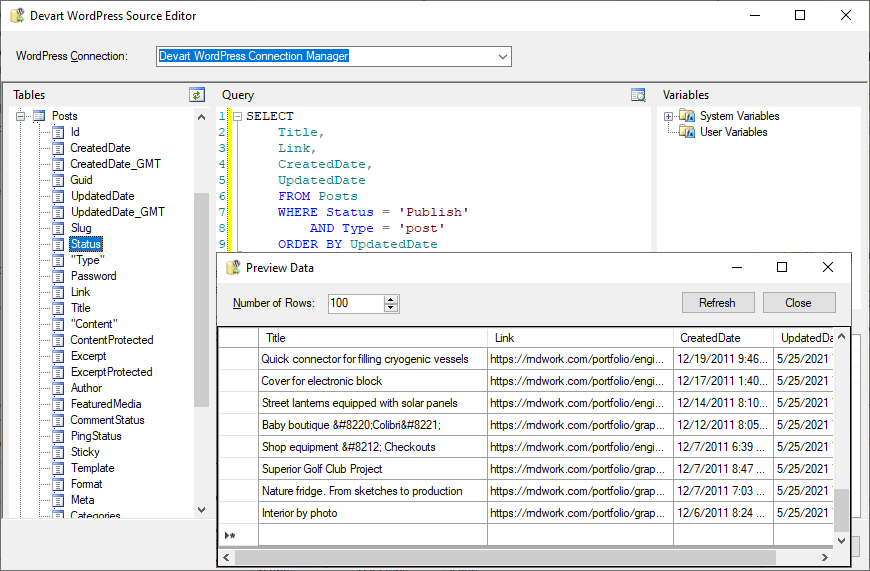
The Devart WordPress Source editor: the Posts table and its fields on the left, a SELECT of title, link and dates for published posts in the middle, and a preview of the returned rows.
Features
WordPress Source with SQL
Devart SSIS Data Flow Components for WordPress read posts, pages, users, comments, categories and other objects with SQL SELECT statements, with filters on fields such as Status and Type.
WordPress Destination
Devart SSIS Data Flow Components for WordPress create, update and delete WordPress objects from an SSIS data flow, for example to publish posts generated from SQL Server data.
WordPress Lookup
Devart SSIS Data Flow Components for WordPress include a lookup that checks several rows per request and caches results.
Application password sign-in
Devart SSIS Data Flow Components for WordPress sign in with a WordPress application password, which you can revoke on its own without changing the user's login.
Time zone handling
Devart SSIS Data Flow Components for WordPress expose both local and GMT date fields and have SourceTimeZoneInfo and UTC Dates options for consistent timestamps.
Benefits
- No database access needed. Works through the REST API, so it suits managed WordPress hosting.
- Publish from SQL Server. Turn rows into posts or update existing ones on a schedule.
- One ETL tool. WordPress joins the SSIS packages you already run.
- Safer credentials. An application password can be scoped to one user and revoked any time.
Real-World Uses
- A company publishes job openings stored in SQL Server as WordPress posts every night.
- A marketing team loads post titles, links and update dates into a reporting database to track content freshness.
- An admin syncs WordPress users with an HR or CRM table to remove leavers.
- A data team archives comments into SQL Server for moderation reports.
Who It's For, and Who Should Skip It
It's for SQL Server and SSIS teams that publish to or report on a WordPress site and want it in the same packages as their other data.
Skip it if you don't use SSIS: WordPress has free import plugins and a REST API any script can call, and Devart's ODBC Driver for WordPress covers Excel and BI tools. Skip it if you have direct access to the site's MySQL database and only need reads. And WordPress is a quietly maintained connector in Devart's line, so test the objects you need in the trial.
Usage Guide
- Download the installer (free Devart account needed) and run it on the machines with Visual Studio/SSDT and on the SSIS server.
- In WordPress, open the user's profile and create an application password.
- Add a Devart WordPress Connection Manager to the SSIS project and enter the domain, user and application password.
- Drag a Devart WordPress Source into a data flow, build a SELECT (for example, posts with Status = 'Publish') and preview the data.
- Map the output to a SQL Server destination, or use the WordPress Destination to write posts, then run or schedule the package.
- Activate the license before the 30-day trial ends: Developer for building, Server for production.
Before you buy
- Use an application password, not the account password; WordPress has supported them since version 5.6.
- Developer licenses don't cover production. A production SSIS server needs a Server ($379.95 a year) or Site license.
- The REST API must be reachable. Security plugins that block it will stop the connection.
- The installer is large (616 MB) because it holds every Devart SSIS component.
Where it falls short
- Little WordPress-specific development. The revision history shows no WordPress-specific change since support was added in September 2021.
- Plugin data may be missing. Custom post types and plugin fields appear only as far as the REST API exposes them.
- Learning curve. Reviewers of the line mention it for people new to SSIS.
- Two licenses for most teams. Developer plus Server, or a Site license.
What Users Say
We found no reviews of the WordPress components on their own. The reviews that exist cover Devart's SSIS Data Flow Components as a line, which share one installer, editor design and support team.
Capterra
Capterra rates Devart's SSIS Data Flow Components 4.6 out of 5 from 12 reviews, with ease of use and customer service each at 4.3. Praise centres on ease of use; criticism covers a learning curve for people new to SSIS.
G2
G2 rates Universal SSIS Components by Devart, the bundle that contains every connector, 4.5 out of 5 from 20 reviews. Reviewers like that the components behave like the built-in SSIS ones and handle large data volumes; the drawbacks they mention are the learning curve for beginners and limited usability for non-developers.
The shared release record shows regular builds of the whole line: January, March, June, August and November 2026, with SSIS 2025 support added in January.
Comparisons
vs. WordPress import plugins
Free plugins such as WP All Import load CSV or XML into WordPress from inside the site. The components fit when the data starts in SQL Server and the job should run in SSIS.
vs. Devart ODBC Driver for WordPress
The ODBC driver serves Excel, Power BI and other ODBC tools. The SSIS components add a native destination, lookup and WordPress-aware editor for packages.
vs. SSIS Universal Bundle
At $499.95 a year the bundle includes WordPress and 48+ other sources, a better buy if you need three or more.
Editions and Pricing
Devart's ordering page lists three licenses for Devart SSIS Data Flow Components for WordPress (Developer, Server and Site for 10 to 100 devices); the order page also offers Standard, which it selects by default, and a Site license for more than 100 devices. Each is sold as a 1-year subscription or a perpetual license. Each button opens the order page with that license and term selected; 2- or 3-year subscriptions and priority support can be chosen there.
| License | 1-year subscription | Perpetual | Covers | Buy |
|---|
| Standard | $149.95 | $299.95 | The license the order page selects by default, same price as Developer | Buy 1 year Buy perpetual |
| Developer | $149.95 | $299.95 | One developer, on one or more workstations, for development and testing | Buy 1 year Buy perpetual |
| Server | $379.95 | $749.95 | Deploying packages on one server, plus one developer's workstations | Buy 1 year Buy perpetual |
| Site (10 to 100 devices) | $499.95 | $999.95 | Unlimited computers in one company, 10 to 100 devices | Buy 1 year Buy perpetual |
| Site (100+ devices) | $2,499.95 | $4,999.95 | More than 100 devices in one company | Buy 1 year Buy perpetual |
All ten prices were read on the order page on November 28, 2026, with no discount applied. A Developer license covers building and testing packages; running them on a production SSIS server takes a Server or Site license.
FAQs
Which SSIS versions do Devart SSIS Data Flow Components for WordPress support?
Devart SSIS Data Flow Components for WordPress support SQL Server Integration Services 2012, 2014, 2016, 2017, 2019, 2022 and 2025.
What password do Devart SSIS Data Flow Components for WordPress need?
Devart SSIS Data Flow Components for WordPress need a WordPress application password created in the user's profile, not the account's login password.
Do Devart SSIS Data Flow Components for WordPress need access to the MySQL database?
No. Devart SSIS Data Flow Components for WordPress work through the site's REST API using the domain, user and application password.
Can Devart SSIS Data Flow Components for WordPress publish posts?
Yes. Devart SSIS Data Flow Components for WordPress include a destination that runs INSERT, UPDATE and DELETE against WordPress objects such as posts.
Is a read-only mode available in Devart SSIS Data Flow Components for WordPress?
Yes. Devart SSIS Data Flow Components for WordPress have a Readonly connection option that allows only SELECT statements.
Do I need a Server license for Devart SSIS Data Flow Components for WordPress?
Yes, to run packages on a production SSIS server. A Developer license of Devart SSIS Data Flow Components for WordPress covers building and testing on one developer's workstations.
System Requirements
- Windows Vista or later, 32-bit or 64-bit, with .NET Framework 4.5
- SQL Server Integration Services 2012 to 2025
- Visual Studio or SQL Server Data Tools with Integration Services projects
- A WordPress site with the REST API enabled and a user with an application password
Conclusion
Devart SSIS Data Flow Components for WordPress are worth $149.95 a year for development plus $379.95 for a server if your SSIS packages need to publish to or read from a WordPress site without database access. The one reason to buy them is WordPress as a SQL source and destination through the REST API. The main reasons not to are free import plugins for simple jobs and a connector that has seen no WordPress-specific updates since 2021.
Download Free TrialBuy Standard, 1 Year ($149.95)Buy Developer, 1 Year ($149.95)Buy Server, 1 Year ($379.95)