Excire Search 2026: AI Search and Culling Inside Lightroom Classic
Excire Search 2026 is a plugin for Adobe Lightroom Classic on Windows and Mac that adds AI search, automatic keywording and culling to your existing catalog: find photos by describing them, by face or by similarity, and let it group a shoot and pre-select the best frames. It's a one-time purchase at $229, with a 14-day free trial, and all analysis happens on your computer.
Lightroom Classic is a great catalog until you need a photo you never keyworded. If your catalog holds tens of thousands of images and your keywords stop at "2019 holiday", Excire Search fills the gap without moving you to another program.
Quick facts
- Version: 5.0.6 (Excire Search 2026, released September 17, 2025)
- Developer: Pattern Recognition Company GmbH (Excire), Germany
- Requires: Adobe Lightroom Classic on Windows 10 or 11 (64-bit) or macOS 11 or later
- Price: $229 one-time; license valid for Mac and Windows
- Trial: 14 days
- Languages: English, German, French, Italian and Spanish
- Privacy: local processing, no cloud
- What we checked: the US checkout price ($229, no discount) and the current version (5.0.6) on Excire's shop, on November 25, 2026. We didn't run it on a catalog ourselves.
Download Free TrialBuy Now
Overview
Excire Search lives inside Lightroom Classic's Library module. Once installed, it analyzes your catalog (the first run on a big catalog takes hours), then its search dialogs and the new Excire Search Panel let you query photos and video clips by content. Results land in a Lightroom collection, so you keep working with Lightroom's own tools, and the keywords it generates are written straight into the catalog.
The 2026 version added AI-assisted culling (grouping by scene, people, sequence or capture time, plus best-shot pre-selection), face-sharpness checks, video support and the Search Panel, which keeps the main tools one click away.
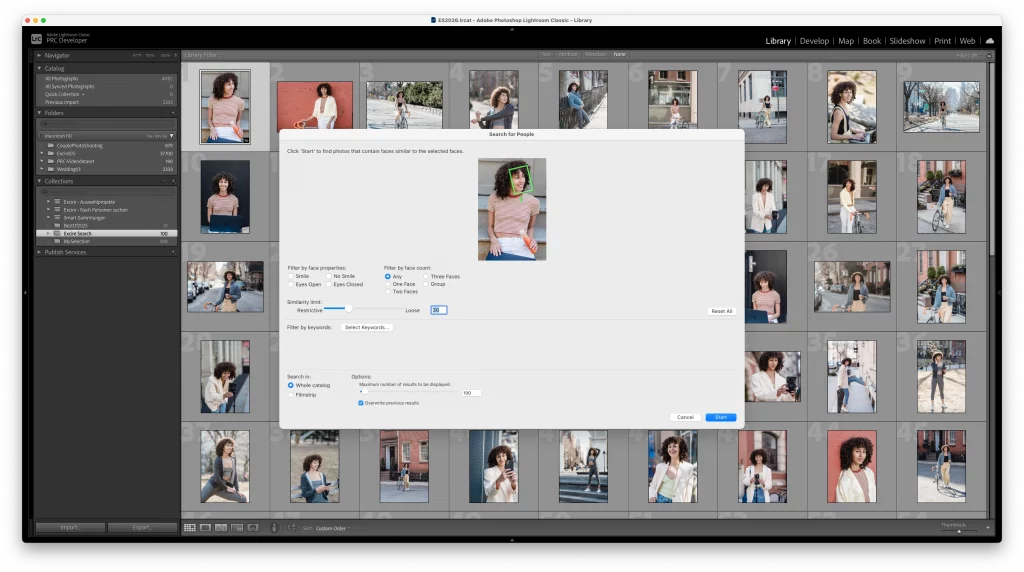
Search for People inside Lightroom Classic: a selected face, filters for smiles, open or closed eyes and number of faces, and a similarity slider.
Features
Prompt and similarity search
Excire Search 2026 finds photos and clips from a text description such as "backlit portrait" or "child in snow", or from an example image: pick one photo and it returns visually similar ones across the catalog.
People and face search
Excire Search finds a specific person without names or keywords, and its face search filters by number of faces, age group, smiles and more. For a wedding, that means every photo of the bride or of the parents in a few clicks.
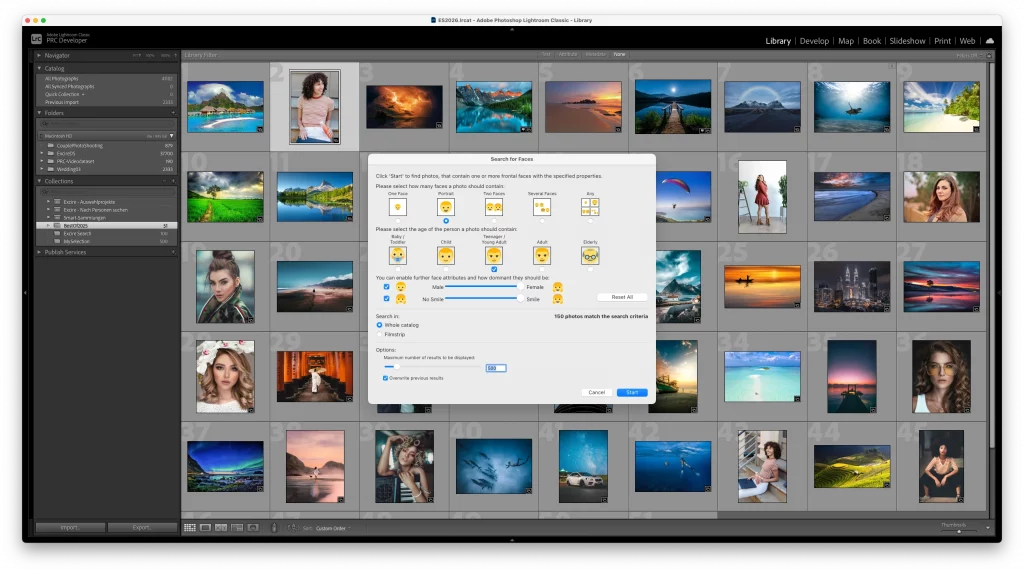
Search for Faces: choose how many faces, the age group and attributes like smiling, then search the whole catalog or the filmstrip.
Automatic keywords written to the catalog
Excire Search labels photos and videos with descriptive keywords and writes them into Lightroom's keyword fields, so they keep working in Lightroom's own filters and survive if you stop using the plugin. A duplicate finder spots duplicates and near-duplicates.
AI-assisted culling
Excire Search 2026 groups a shoot by scene, content, people, capture time or burst, rates sharpness, facial expressions and aesthetics, and pre-selects the best shot of each group. A focus check zooms in on faces so you can confirm sharpness in seconds.
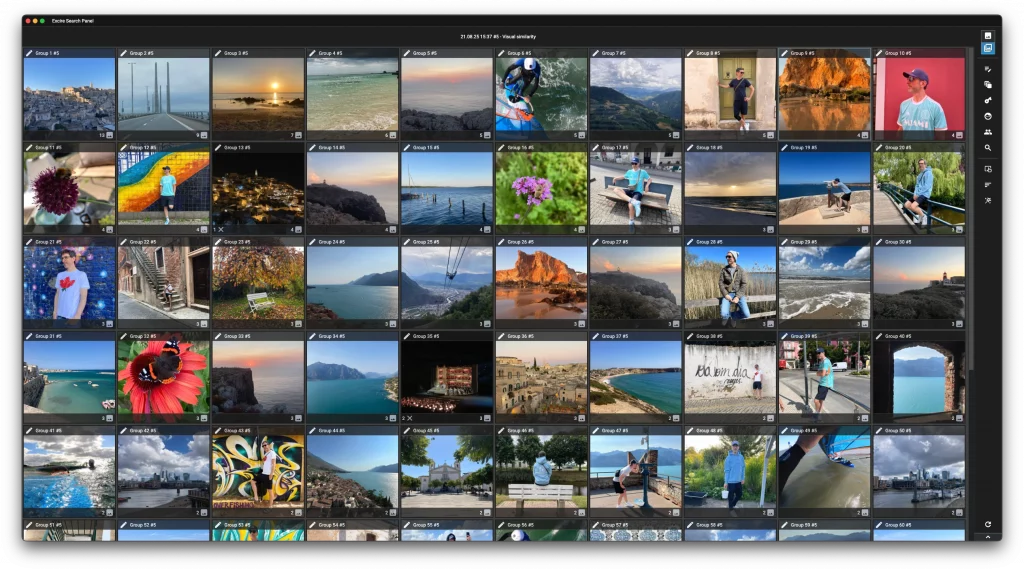
The Excire Search Panel with a shoot grouped by visual similarity; the tool icons on the right open search, people and culling functions.
Benefits
- No new catalog: your Lightroom workflow stays the same.
- Keywords for free: years of untagged photos become searchable.
- Faster client delivery: grouping and pre-selection shorten culling.
- Private: nothing is uploaded, which matters for client work.
Real-World Uses
- A wedding photographer pulls every photo of the couple's parents for a parents' album.
- A travel photographer with 6,000 new images groups them by scene and gets a shortlist in two days, as one Excire user describes on the trial page.
- A stock shooter lets the plugin keyword the backlog before uploading.
- A photo club member sorts by aesthetic rating to pick competition entries.
Who It's For, and Who Should Skip It
Excire Search suits Lightroom Classic users with large catalogs, especially wedding, event and travel photographers who cull thousands of frames, and anyone who never kept up with keywords.
Skip it if you don't use Lightroom Classic (Excire Foto 2027 is the standalone version), if you use the cloud-based Lightroom rather than Classic, or if your catalog is small. Also weigh the price: $229 is a lot for a plugin, so use the trial to make sure the search accuracy suits your photos.
Usage Guide
- Open the trial page with the download button and get the 14-day trial for PC or Mac.
- Install the plugin; it registers itself in Lightroom Classic.
- In Lightroom, start the Excire analysis of your catalog and let it run, overnight for a big one.
- Open the Excire Search Panel and try a text prompt or a face search; results appear as a collection.
- After each import, run the analysis on the new photos so they become searchable.
- For a new shoot, use the culling tools to group the images and accept the suggested picks.
Before you buy
- New imports have to be initialized by hand before Excire can search them.
- The Windows version isn't optimized for Snapdragon/ARM processors, and very old CPUs without AVX are not supported.
- Minor updates are free; major versions are discounted paid upgrades.
- If you'd also like a standalone organizer, the Excire Bundle 2027 (Search 2026 plus Foto 2027) costs $339 instead of $478.
Where it falls short
- First analysis is slow: Digital Camera World's 70,000-photo catalog took several hours.
- Not perfectly accurate: searches for a specific known photo sometimes return similar images instead.
- Price: expensive next to most Lightroom plugins.
- Culling is a bit fiddly compared with the search tools, according to reviewers.
What Users Say
Digital Camera World
James Abbott (April 27, 2026) scored it 5/5 for features, 4/5 for design and performance and 3/5 for value: "Excire search is a fantastic plugin that makes finding images in large Lightroom Classic catalogs easier than without." On price: "It's not the cheapest Lightroom plugin available, but it is a perpetual license." His cons were the cost, results that aren't 100% reliable, and having to initialize new imports by hand: "It's not the end of the world, but it would be better if Excire could do this automatically."
Trustpilot: 4.6 out of 5 from 132 reviews (all Excire products)
Margaret Bazura, "Excire Rocks" (April 23, 2026, 5 stars): "I am so pleased to use Excire Search 2026 for Lightroom Classic." Other reviewers on the same page praise the support, while two 3-star reviews of Excire's software say first-time users find tasks like duplicate cleanup more complex than they expected.
Photographers quoted on Excire's site
Werner Gstrein, a photographer from Austria who sorted 6,000 images from two months in Marseille: "after just two days I already have a manageable shortlist. It really is a very helpful tool for workflow." Conny Müller, a multi-award-winning photographer: "It is amazing how accurately the software can recognize objects, faces, and even moods in photos."
The pattern: photographers with big catalogs say it saves hours. The criticism is about price, the long first analysis and the occasional miss.
Comparisons
Excire Search vs Lightroom Classic's own search
According to Excire's comparison, Lightroom Classic on its own has no automatic tagging, prompt or similarity search, duplicate finder, aesthetic ratings, AI culling or automatic focus checks, and only limited people search. Excire Search adds all of these.
Excire Search 2026 vs Excire Foto 2027
Same AI engine, different home: Search works inside Lightroom Classic, Foto is a standalone organizer with its own catalog, map view and visible-text search. Lightroom users should pick Search.
Editions and Pricing
US prices at Excire's checkout on November 25, 2026. The Buy button opens Excire's shop, where each product has its own Buy Now.
| Product | Price | License | Includes |
|---|
| Excire Search 2026 | $229 | One-time, Mac and Windows | Lightroom Classic plugin, free minor updates |
| Excire Bundle 2027 | $339 | One-time | Excire Search 2026 plus Excire Foto 2027 ($478 list less $139) |
FAQs
Does Excire Search work with the cloud-based Lightroom app?
No. Excire Search 2026 is a plugin for Adobe Lightroom Classic only.
Does Excire Search change my Lightroom catalog?
Excire Search writes its keywords into the Lightroom catalog's keyword fields and returns search results as collections. Your photos themselves aren't changed.
Can Excire Search find videos?
Yes. Excire Search 2026 analyzes video clips in the catalog for content-based search alongside photos.
How long does the first Excire analysis take?
It depends on catalog size and hardware: Digital Camera World needed several hours for more than 70,000 photos. After that, only new imports need analyzing.
Can I upgrade from an older Excire Search?
Yes. Owners of a previous paid Excire Search version get an upgrade discount code through Excire's shop.
Is Excire Search a subscription?
No. Excire Search 2026 is a one-time purchase with free minor updates.
System Requirements
- Adobe Lightroom Classic
- Windows 10 or 11 (64-bit) or macOS 11 or later; Windows version not optimized for Snapdragon/ARM
- 64-bit multi-core processor with AVX (no Intel Core 2 Duo or older AMD Phenom II)
Conclusion
Excire Search 2026 gives Lightroom Classic the content search, face search, automatic keywording and culling help it lacks, without moving your photos anywhere. For photographers with large catalogs it can save hours every month, and the license is yours to keep. The main reason to hold back is the $229 price for a plugin, along with a slow first analysis and a manual step after each import. If you live in Lightroom Classic and struggle to find photos or cull big shoots, it's worth it; run the 14-day trial on your own catalog first.
Download Free TrialBuy Now