Excire Foto 2027: Find Any Photo by Describing It
Excire Foto 2027 is an AI photo and video organizer for Windows and Mac that lets you find pictures by typing what's in them ("a surfer riding a wave"), by face, by visible text or by similarity, then helps you cull a shoot down to the keepers. Everything runs on your own computer. It's a one-time purchase at $249 with a 14-day free trial, and it won the 2026-2027 EISA Award for photo software.
If you have tens of thousands of photos in dated folders and never got around to keywording them, Excire Foto is built for you: it does the tagging itself and makes the whole archive searchable in one pass.
Quick facts
- Version: 5.1.1 (Excire Foto 2027, released June 2026; free 5.1 update with video search in November 2026)
- Developer: Pattern Recognition Company GmbH (Excire), Germany
- Platforms: Windows 11 (64-bit) and macOS 12 or later; one license covers Mac and Windows
- Price: $249 lifetime license; upgrades $99 from Foto 2024, $79 from Foto 2025
- Trial: 14 days
- Privacy: AI analysis runs locally; no cloud upload
- Languages: English and German
- What we checked: the US checkout price ($249, no discount) and the current version (5.1.1) on Excire's shop, on November 25, 2026. We didn't index a library ourselves.
Download Free TrialBuy Now
Overview
Excire Foto is a catalog program, not an editor. You point it at your photo folders, it builds a database and analyzes every image, and from then on you can search the archive by content instead of by filename. It also covers the everyday catalog jobs: collections, star ratings, color labels, flags, metadata editing and GPS tagging. When you want to edit, it hands the photo to the editor you prefer with one click.
The 2027 version added visible-text search, an interactive map view, a smart filter bar with a timeline, a distraction-free Survey view for picking the best shots, and focus peaking. The free November 2026 update extended the AI search to video: it indexes frames inside each clip and jumps to the moment that matches your search.
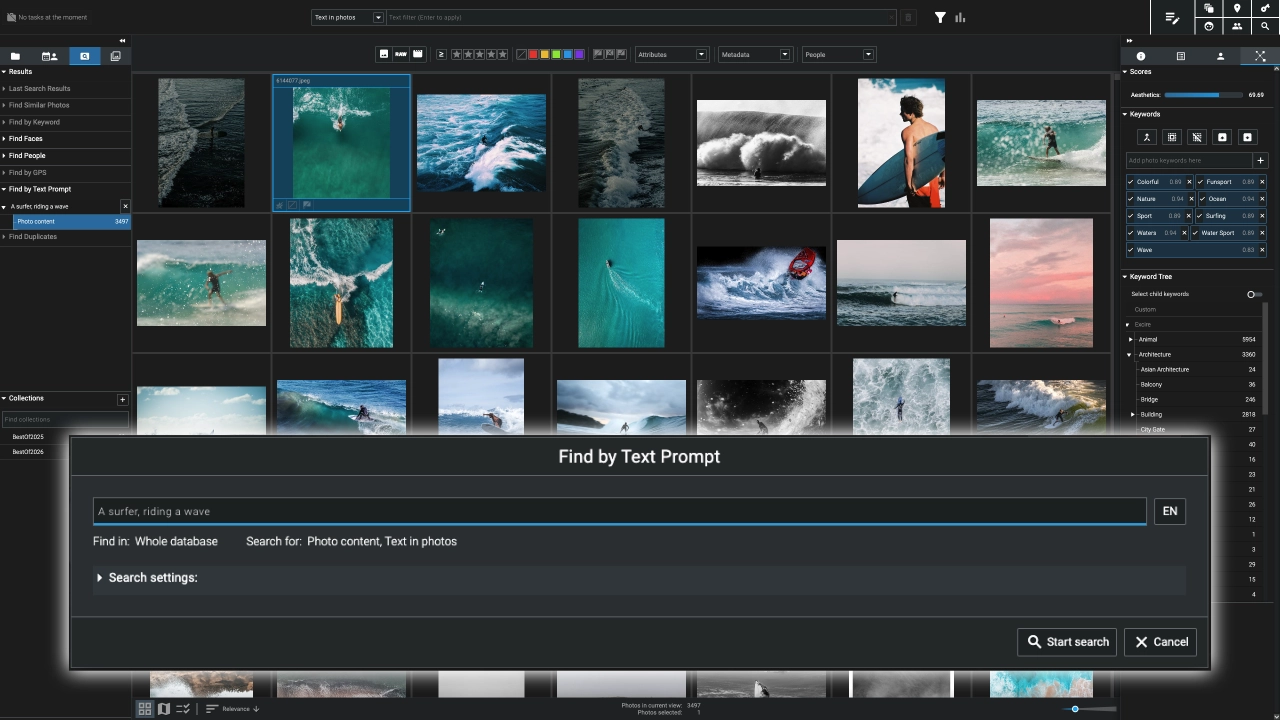
Find by Text Prompt: "A surfer, riding a wave" searched across the whole database, with the results grid behind and automatic keywords (Surfing, Ocean, Wave...) and an aesthetics score in the right panel.
Features
Search by description, face, text or similarity
Excire Foto 2027 finds photos from a plain-language description, from a face (including filters such as age group and expression), from words visible in the picture (street signs, race numbers, product labels), or from another photo you pick as an example. You can combine these with metadata such as camera, date and location to narrow results down.
Automatic keywords and duplicate search
Excire Foto tags every photo with keywords for objects, scenes, moods and activities, so a library becomes searchable without manual tagging. It can turn folder names into keywords, lets you hide AI keywords you don't want, and finds duplicates and near-duplicates to free up space.
Culling: grouping, sharpness and Smart selection
Excire Foto groups a shoot by people, scene, sequence, content or capture date, rates each frame on aesthetics, sharpness and facial expressions (closed eyes, for instance), and pre-selects the best shot of each group. Survey view and focus peaking make the final choice faster.
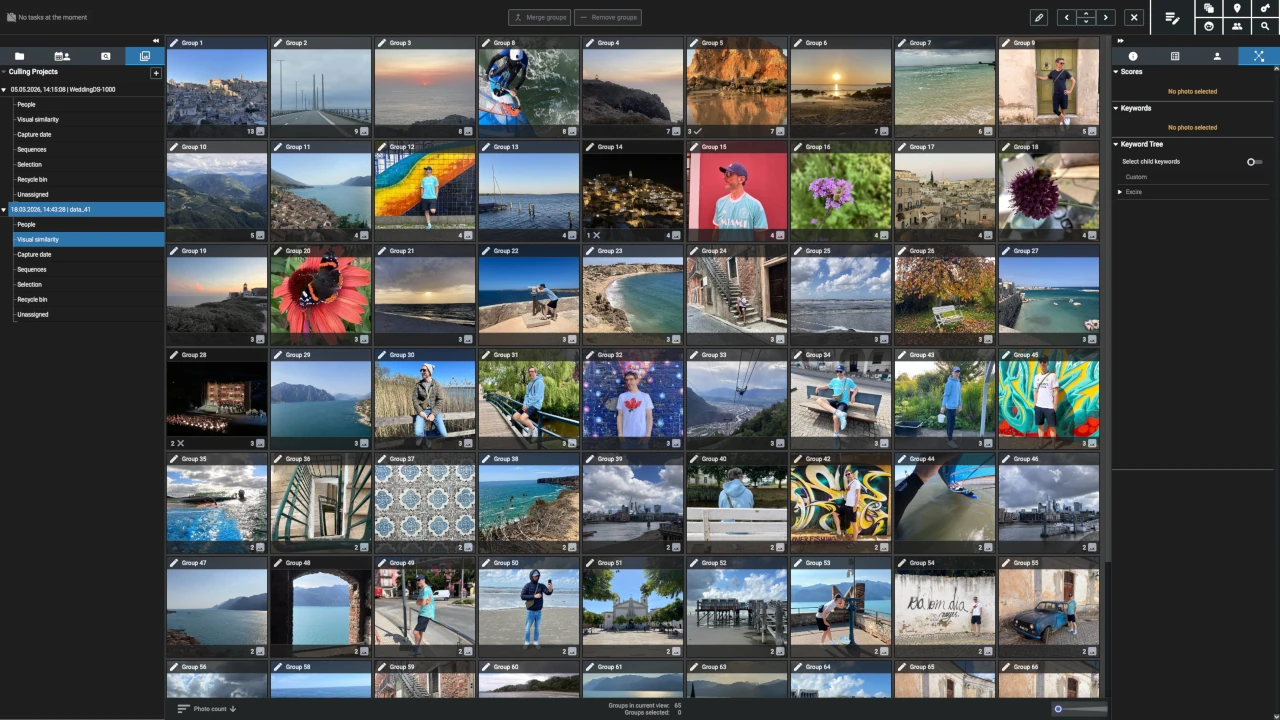
A culling project grouped by visual similarity: each tile is a group of near-identical shots with a count, and the left panel switches grouping to people, capture date or sequences.
Video search that jumps to the right moment
Since the free 5.1 update, Excire Foto 2027 indexes frames inside your video clips, so prompt, face, keyword, similarity and text searches find videos too, and opening a result takes you to the point in the clip where the match appears. Reverse geocoding came in the same update.
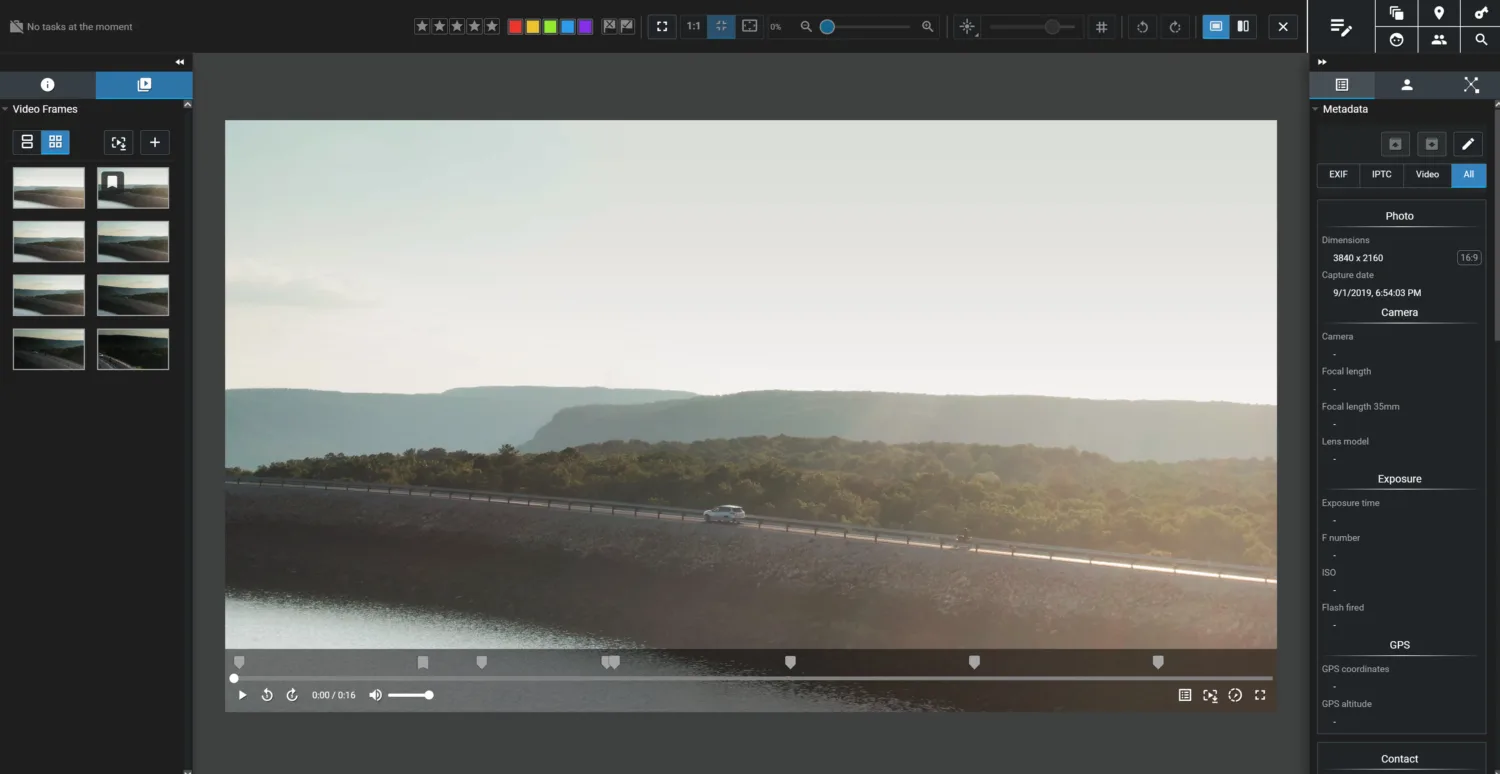
The video viewer: indexed frames on the left, markers on the timeline, and the clip's metadata on the right.
Map, timeline, sharing and analytics
Excire Foto shows geotagged photos on an interactive map, browses by date with a timeline graph, shares to Dropbox, Google Drive, OneDrive and Nextcloud, and includes an analytics view that shows which gear you use most often and what helps you take your best photos.
Benefits
- An archive you actually use: old photos become findable in seconds instead of lost in folders.
- No tagging marathon: the AI writes the keywords for you.
- Faster delivery after a shoot: grouping and pre-selection cut culling time.
- Privacy and no subscription: photos never leave your computer, and you pay once.
Real-World Uses
- A wedding photographer groups 3,000 frames by sequence, drops the closed-eye shots and delivers a shortlist the same evening.
- A family archivist searches for a grandparent's face across 20 years of scans and phone photos for an anniversary book.
- A sports shooter finds every photo of runner number 214 with visible-text search.
- A content creator searches the video library for "sunset over the mountains" and jumps straight to the clip.
Who It's For, and Who Should Skip It
Excire Foto suits enthusiasts and professionals with large, poorly tagged libraries who want a standalone, private, no-subscription organizer, and people leaving cloud photo services who want similar search on their own machine.
Skip it if you already live in Lightroom Classic: Excire Search 2026 brings the same AI into Lightroom as a plugin. Skip it too if you want editing in the same app (it has none), if you're on Windows 10 (Foto 2027 needs Windows 11), or if your library is small enough that folders work fine. On a Windows ARM laptop, expect it to run without ARM optimization.
Usage Guide
- Open the trial page with the download button and get the 14-day trial for PC or Mac through Excire's free trial order.
- Install it (Windows: run the .exe; Mac: unzip and open the DMG), create an Excire account and activate.
- Add your photo folders. Let the first analysis run, ideally overnight for a big library.
- Try a text prompt search, then a face search, to see what the AI found.
- For a new shoot, start a culling project, group by sequence and use Smart selection to pick the keepers.
- Open a photo in your editor with one click when you're ready to edit.
Before you buy
- Test the trial on your own files: some compressed RAW variants aren't supported, and Excire says so itself.
- On Windows, HEIC photos need Microsoft's HEIF and HEVC extensions (HEVC is paid).
- Plan disk space: the database needs about 900 MB per 100,000 photos, and full-quality previews can reach about 25 GB.
- Minor updates are free; major new versions are paid upgrades at a discount.
- If you also use Lightroom Classic, the bundle with Excire Search costs $339 instead of $478.
Where it falls short
- Slow first analysis: reviewers report several hours for 50,000 photos.
- Interface: new users on Trustpilot find simple tasks such as duplicate cleanup more complex than expected.
- No editing tools.
- Price: $249 is high next to basic organizers, though there's no subscription.
- You can't train the AI on your own subjects.
What Users Say
Trustpilot: 4.6 out of 5 from 132 reviews
- Fred, "Excire is excellent software" (September 17, 2026, 5 stars): "I downloaded Excire and was amazed at how good it is."
- Michele Hudson, "Family Photo Project turned easy!" (October 5, 2026, 5 stars): "Excire has made that SO. MUCH. EASIER."
- Steve C (July 26, 2026, 5 stars): "The excire representative helped to untangle several different problems over two weeks of conversations with me"
- Mark Heath (September 11, 2026, 3 stars): "Very powerful software BUT as a first time user it makes basic sorting/finding duplicat tasks far too complex and involved."
- Markus (November 16, 2026, 3 stars): "The interface is far from friendly and a simple task like finding duplicate pictures is proving to be an absolute pain."
PhotoWorkout: 4.5 out of 5
Andreas De Rosi's hands-on review (updated November 23, 2026): "Excire Foto 2027 is the best one-time-purchase AI organizer for photographers with large, messy libraries." His caveat: "Skip it if you want editing tools in the same app, because it has none." He found importing and analyzing 50,000 photos takes several hours, after which searching stays fast even past 100,000 images, and recommends an SSD and 16 GB of RAM.
Photographers quoted on Excire's site
Wesley Verhoeve, photographer and publisher of Process: "Excire Foto has earned its place in my workflow as a professional photographer." Sam Sciarrino, wedding photographer: "Its AI-driven features are incredibly accurate and efficient. I can now quickly locate any image I need."
The pattern: users and reviewers agree the search is impressive and the support helpful. The complaints are a learning curve for newcomers and a long first indexing run.
Comparisons
Excire Foto 2027 vs Excire Search 2026
Excire Foto is a standalone program with its own catalog, map, timeline and analytics. Excire Search is a plugin that adds the same kind of AI search, keywording and culling inside Adobe Lightroom Classic. Choose Foto if you don't use Lightroom; choose Search if Lightroom is your catalog already.
Excire Foto vs cloud photo services
Cloud photo apps offer similar "search by content" but upload your library and charge for storage. Excire Foto does the analysis locally and costs one payment, at the price of using your own computer's power and disk.
Editions and Pricing
US prices at Excire's checkout on November 25, 2026. The Buy button opens Excire's shop, where each product has its own Buy Now.
| Product | Price | License | Notes |
|---|
| Excire Foto 2027 | $249 | One-time, Mac and Windows | Upgrade $99 from Foto 2024, $79 from Foto 2025 |
| Excire Bundle 2027 (Foto 2027 + Search 2026) | $339 | One-time | $478 list less a $139 bundle discount |
| Excire Foto Office Edition | Per user, monthly or yearly | Subscription | For teams with network databases |
FAQs
Does Excire Foto upload my photos to the cloud?
No. Excire Foto analyzes photos on your own computer and, according to Excire, sends no data to third parties.
Can I use one Excire Foto license on Mac and Windows?
Yes. The Excire Foto 2027 license is valid for both Mac and Windows.
Does Excire Foto 2027 run on Windows 10?
No. Excire Foto 2027 lists Windows 11 (64-bit) or macOS 12 and later. Excire Search 2026 still supports Windows 10.
Which RAW formats does Excire Foto read?
Excire Foto reads the major RAW formats (CR2, CR3, NEF, ARW, RAF, ORF, RW2, DNG and more) plus JPEG, HEIC, TIFF, PSD, PNG and WebP. Some compressed RAW variants aren't supported, so test with your camera's files.
Do I need an account to use Excire Foto?
Yes. Excire Foto 2027 needs an Excire user account and a one-time activation with the code you get after purchase.
Are Excire Foto updates free?
Bug fixes and minor improvements are free, such as the November 2026 video search update. Major new versions are paid, with a discount for existing customers.
System Requirements
- Windows 11 (64-bit) or macOS 12 or later; Windows version not optimized for Snapdragon/ARM
- 64-bit multi-core processor with AVX (no Intel Core 2 Duo or older AMD Phenom II)
- 8 GB RAM minimum, 16 GB or more recommended
- About 900 MB of database per 100,000 photos, plus up to about 25 GB for full-quality previews
Conclusion
Excire Foto 2027 is one of the most capable private photo organizers you can buy: the content search, face and text search and culling tools really do turn a messy archive into something you can use, and the free video update adds even more. At $249 it's a serious purchase, and the first indexing run and the interface take some patience. If you have a big library, don't use Lightroom and want no subscription and no cloud, it's worth it; if you're a Lightroom Classic user, get Excire Search instead.
Download Free TrialBuy Now