AcePDF Converter & Editor: A Lifetime PDF Editor for Windows and Mac
AcePDF Converter & Editor is a desktop PDF editor and converter from AceThinker for Windows and Mac: edit text and images in a PDF, convert PDFs to and from Word, Excel and PowerPoint, OCR scanned pages, and merge, split, sign and protect files. This deal, sold on StackSocial, is a lifetime license for 2 devices for $23.97, one payment and no renewals. AceThinker's own lifetime license for one PC costs $49.95.
It's for the person who opens a contract, a form or a scanned letter a few times a week, needs to change a line or turn it into a Word file, and doesn't want to pay for Adobe Acrobat every month to do it.
Quick facts
- What you get: AcePDF Converter & Editor lifetime license, updates included, on up to 2 devices (Windows, Mac or one of each)
- Price: $23.97 one-time on StackSocial; AceThinker's own prices are $49.95 for a 1-PC lifetime license and $29.95 a year
- Developer: AceThinker, a software company founded in 2015 that also makes screen recorders and video tools
- Version: 1.4.5.5 for Windows (47.8 MB installer), 1.6.1.0 for Mac
- Runs on: Windows 11, 10, 8 and 7; macOS 10.13 or later, including Apple Silicon Macs (StackSocial's spec sheet says Windows 8 or later and macOS 12 or later)
- Internet: needed for the conversion functions
- Redemption: redeem your code within 30 days of purchase
- Refunds: an unredeemed license can be returned for StackSocial store credit within 30 days; once redeemed, all sales are final
- Free trial: the free download includes every function, but files you save carry a watermark
- What we checked: the deal price ($23.97), its terms and the 6 most recent of its 456 reviews on the StackSocial deal page, AceThinker's own price list, and the Windows installer from AceThinker's download link (AcePDF-1.4.5.5.exe, file version 1.4.5.5, 47.8 MB, digitally signed by Apowersoft Ltd), all on November 24, 2026. We didn't redeem a code or test the Mac version.
Before you buy
- Try the free version first. Every feature works in the trial, only with a watermark on saved files, so you can check the conversions and the OCR on your own documents before you pay. After you redeem the StackSocial code there are no refunds.
- "Lifetime" means the life of the product. StackSocial defines lifetime access as access for as long as the product is available. AceThinker was founded in 2015 and has moved its website from acethinker.com to acethinker.ai; a cheap lifetime license from any software company carries a real risk of ending one day. At $23.97 the risk is small in money, but it's there.
- It needs an internet connection. StackSocial's spec sheet says the conversion functions require an internet connection and lists one as a system requirement, so don't count on fully offline use or an air-gapped PC.
- Two devices, and moving them takes an email. Several buyers on Trustpilot needed AceThinker support to reset or move their activation after a new PC or a reinstall. Support answered quickly in those reviews, but it isn't self-service.
- The deal price is a sale price. StackSocial labels it an Early Black Friday price. AceThinker's own store also discounts its plans, so compare both on the day you buy.
Download Free TrialBuy Lifetime on StackSocial
Overview
AcePDF started as AceThinker's PDF converter and has grown into a full editor: StackSocial's change list for this release says the editing functions (annotation, changing text, adding and removing images) were merged into the converter, OCR in multiple languages and batch conversion were added, and every feature now works in both the Windows and Mac versions.
The window looks like a browser with tabs, and the top menu is split by task: Read, Comment, Edit, Form, Page, Protect, Convert and Batch. Pick a tab and its tools appear in a strip underneath. If you've used Word's ribbon, you'll find your way around in a few minutes. You can also set AcePDF as your default PDF reader.
Features
Edit PDF text and images in place
AcePDF lets you click into a paragraph of a PDF and type, the way you would in Word. You can change the font, size, color and style, add or delete images, insert or change links, and add watermarks, backgrounds, headers and footers. That covers the usual jobs: fixing a typo in a brochure, updating a date in a contract, swapping a logo.
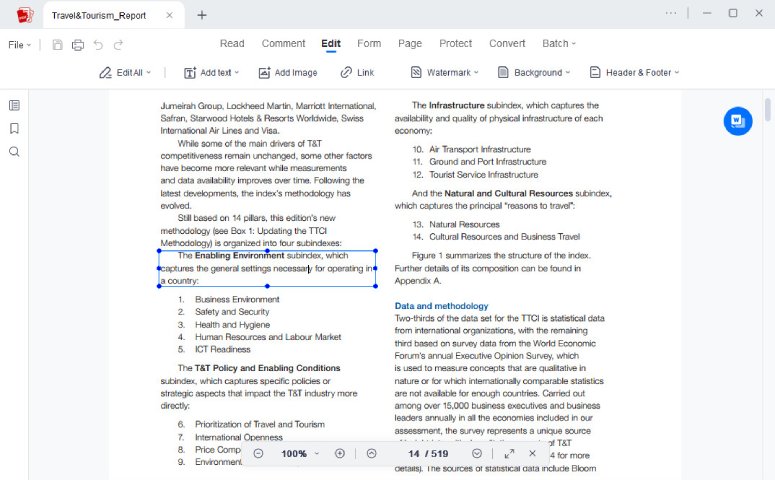
The Edit tab, with a paragraph selected and the Add text, Add Image, Link, Watermark, Background and Header & Footer tools above it.
Convert PDFs to Office files, and back
AcePDF converts PDFs to Word, Excel, PowerPoint, plain text, HTML, JPG and PNG, and creates PDFs from Word, Excel and PowerPoint files and images. It keeps the layout, images and hyperlinks, and you can add several files at once to convert them in a batch.
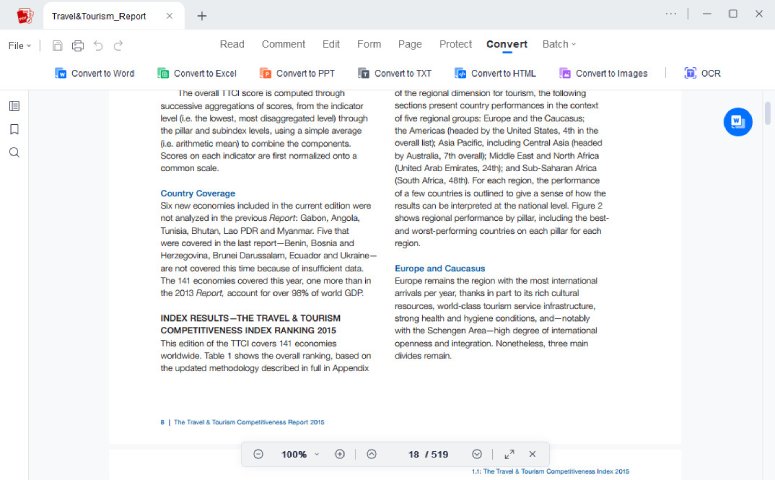
The Convert tab: Convert to Word, Excel, PPT, TXT, HTML and Images, plus OCR.
OCR for scanned documents in 20+ languages
AcePDF's OCR turns a scanned or photographed PDF into text you can search, copy and edit. It recognizes more than 20 languages, including English, French, German, Japanese and Korean, and you can run it on all pages, the current page or a page range, in standard or enhanced mode.
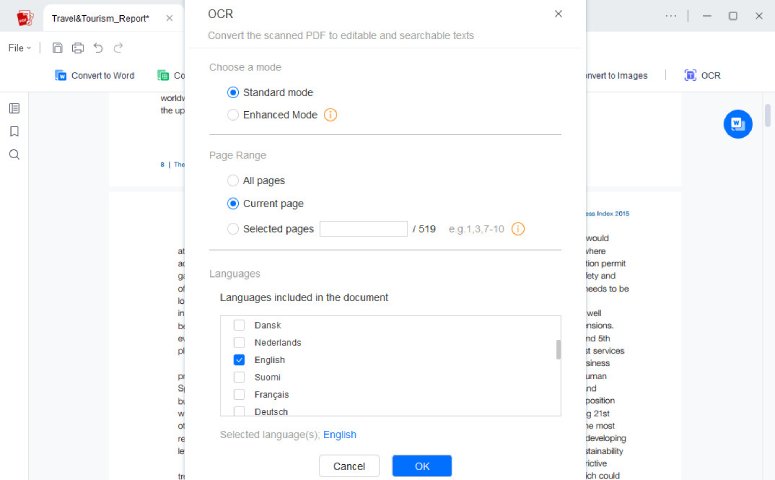
The OCR dialog: Standard or Enhanced mode, page range, and the languages in the document.
Organize, merge, split and compress pages
AcePDF's Page tab shows thumbnails of every page, where you can insert, delete, extract, replace, crop and rotate pages, split a file, or merge several PDFs into one. Compress shrinks a large PDF for email, and you can pull every JPG and PNG out of a PDF in one click.
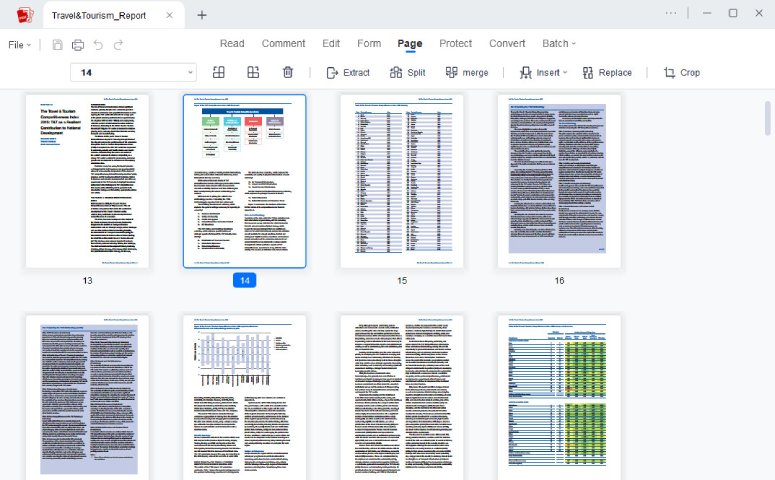
The Page tab: page thumbnails with Extract, Split, Merge, Insert, Replace and Crop.
Build and fill forms, comment and stamp
AcePDF can fill in an existing PDF form or build one from scratch with text fields, check boxes, radio buttons, combo boxes, list boxes, buttons and signature fields. The Comment tab adds highlights, underlines, strikethroughs, sticky notes, text boxes, callouts, stamps and drawn shapes, which makes it handy for marking up a document for a colleague.
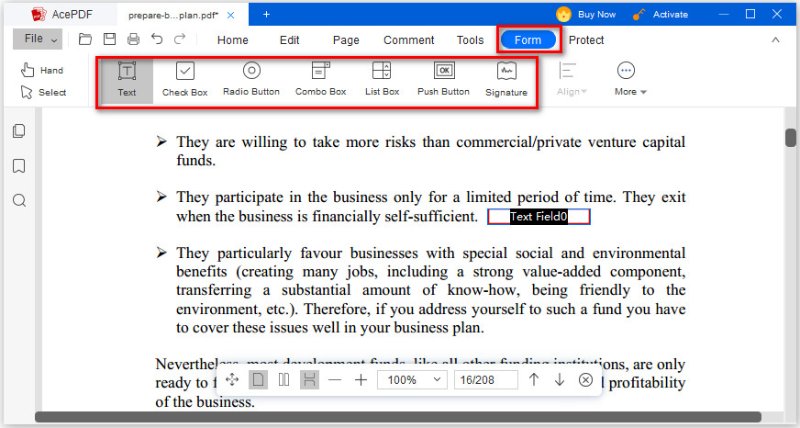
The Form tools (Text, Check Box, Radio Button, Combo Box, List Box, Push Button, Signature), shown in an older version of the AcePDF interface.
Passwords, redaction and signatures
AcePDF's Protect tab sets an open password and a permissions password (to block copying, editing or printing), removes a password you know, redacts sensitive text permanently, and adds digital or handwritten signatures with the date, reason and location.
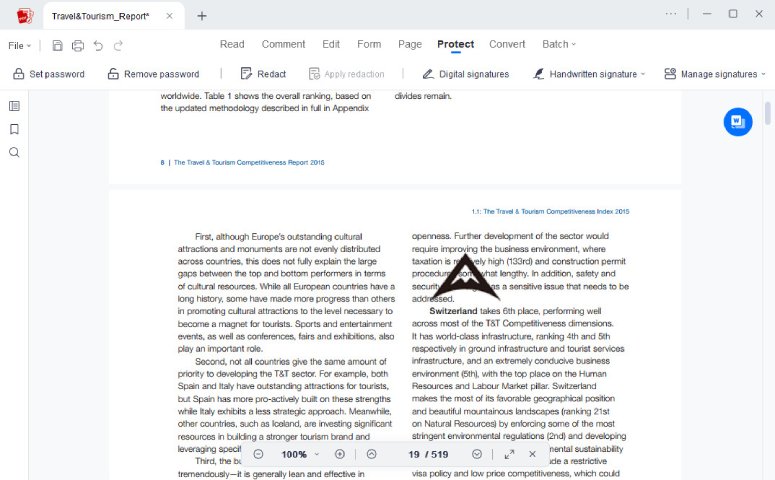
The Protect tab: Set password, Remove password, Redact, Digital signatures and Handwritten signature.
Benefits
- One payment instead of a subscription. For occasional PDF work, a monthly Acrobat bill is the thing most buyers want to stop paying, and several StackSocial reviewers say exactly that.
- Windows and Mac on one license. The 2 devices can be a work PC and a home Mac.
- A familiar layout. The tabbed, ribbon-style menu means little to learn if you already use Office.
- Batch work. Converting a folder of PDFs to Word, or OCRing a stack of scans, happens in one run rather than file by file.
Real-World Uses
- A landlord updating a lease: change the rent and dates in last year's PDF lease, add a signature field, and send it out.
- An office worker with scanned invoices: OCR a batch of scanned invoices so they can be searched, then export the tables to Excel.
- A teacher marking assignments: highlight, comment and stamp "Approved" on students' PDFs, then merge them into one file for the record.
- A small business sending quotes: combine a cover letter, a price sheet and photos into one compressed PDF and password-protect it.
Who It's For, and Who Should Skip It
It's a good fit for home users, freelancers and small offices who edit, convert or sign PDFs regularly and want a one-time price. At $23.97 for 2 devices, it costs less than a few months of most PDF subscriptions.
Skip it if your company needs a PDF tool with central license management, shared cloud workflows or an e-signature service that tracks signers: AcePDF is a single-user desktop app. Skip it too if you only need to merge or convert a PDF once in a while; a free online tool does that without a purchase. And if you need conversion on a PC that never goes online, look for a fully offline converter.
Usage Guide
- Install: download the installer from AceThinker, run it and follow the wizard, then launch AcePDF from the desktop shortcut.
- Activate: click Activate at the top of the window, paste the license code from your StackSocial redemption, and click OK. Until then you're using the trial, which watermarks saved files.
- Open a file: click Open or the "+" tab to load a PDF.
- Pick a task tab: Edit to change text and images, Convert to export, Page to reorganize, Protect to secure, Form to build fields.
- Save: press Ctrl+S, or use File > Save as to keep the original.
Where it falls short
- Conversion isn't perfect with every font. A Trustpilot reviewer reported that "coffee" in a PDF came out as "cofe fe" in Word, a ligature problem that shows up with some typefaces. Check converted files before you send them.
- The Mac version has had small bugs. One Mac buyer on Trustpilot noticed problems with some keyboard special characters a few months after buying.
- AceThinker's wider reputation is mixed. Its Trustpilot page is mostly 5-star reviews praising fast support, but the 1-star reviews from earlier years complain about other AceThinker products not working and about refunds, and one 2023 reviewer says a "lifetime" license stopped working after a year.
- Older Windows in doubt. AceThinker lists Windows 7 support, while StackSocial's spec sheet starts at Windows 8; on Windows 7, try the trial first.
What Users Say
StackSocial buyers (4.7 out of 5 from 456 reviews)
StackSocial says all its reviews come from verified purchasers. The most recent ones on the deal page:
rick campbell (5 stars, November 23, 2026): "I've only used it on one project so far, but it preformed as described. I needed to add & rearrange some pages in a pdf file I was working on without starting all over, saving me time and agravation. I had to play around a bit to get it to do what I wanted, but then most programs are like that. Honestly I haven't tried all the options yet, but I'm quit pleased with my purchase."
Eric Meixner (4 stars, November 22, 2026): "Seems to do what it claims to. Havent used it enough to say too much."
Nick Quigley (5 stars, November 14, 2026): "Good PDF editor and converter. It has all of the features that most people will need."
Manu Saraswat (5 stars, November 9, 2026): "I am so glad I found this PDF editor because I no longer have to waste a ton of money on Adobe. This software does exactly what it needs to do, runs perfectly, and is hands down the best product ever created for the price."
Mohamed E (November 3, 2026): "Very easy to use for converting, annotating, and editing PDFs. Fast setup, clean interface, and does exactly what it promises without recurring fees."
Chockalingam Ramiah (October 30, 2026): "Easy to use and supports editing PDF (form elements) and conversion from Mac."
Trustpilot (AceThinker, all products: 4.8 out of 5 from 308 reviews)
Trustpilot rates the company, not just AcePDF: about 89% of reviews are 5 stars and 5% are 1 star. The reviews about AcePDF:
Johnathon Hewko (5 stars, November 23, 2026): "I purchased the AcePDF software. It came with 2 users per licenese and a lifetime product."
Andre (5 stars, November 2, 2026, "Worth it !"): "Nice and fast to respond. Great PDF converter."
Jeff McCarroll (5 stars, October 21, 2026): "Have tried other adobe replacements, ended up ditching them for Ace instead. I like the interface and its abilities."
Ramon Venegas (5 stars, September 19, 2026): "Very quick, accurate and pleasant response and resolution helping me to re-activate my AcePDF license on a new computer."
Jim (5 stars, June 4, 2026): "I bought the AcePDF editor for MAC last fall. A few months ago I noticed bugs with some keyboard special characters..."
Tiet Pham (2 stars, December 26, 2025, "PDF to Word Conversion Issue and Unicode"): "1.1 The word "coffee" in PDF is converted to "cofe fe" in Word"
The critical side
The 1-star reviews on AceThinker's Trustpilot page are mostly about its video downloaders and older products, not AcePDF, but they say something about the company:
A Augliera (1 star, July 28, 2023, "Lifetime license is only good for 1 year. Don't be fooled!!"): "I paid for a lifetime license that worked for 1 year. Now I have nothing."
Patrick (1 star, November 16, 2024): "Only works about 50% of time no matter what settings you use. Also, support is non-existent."
Nathan Hartshorn (1 star, January 29, 2026, "Stay away from AI schills"): "I cannot seem to contact anyone at the company despite reaching out on Facebook and through their local support link."
What the reviews add up to
Buyers like that AcePDF replaces an Adobe subscription for a one-time price, that the interface is easy, and that it handles the everyday jobs: rearranging pages, converting, annotating, forms, on both Windows and Mac. The most common theme on Trustpilot is fast, friendly support, often for moving a license to a new computer. The complaints are about conversion glitches with certain fonts, small Mac bugs, and, across AceThinker's other products, licenses and refunds. Many StackSocial reviews are written after only a few days of use, and some Trustpilot reviews are marked as invited, so weigh the high averages accordingly.
StackSocial Deal vs AceThinker's Own Plans
Which license is the better buy?
The StackSocial lifetime license is the cheapest way to own AcePDF: $23.97 for 2 devices, against $49.95 for AceThinker's own 1-PC lifetime license. What you give up is the refund. AceThinker's store offers a 30-day money-back guarantee on its lifetime and yearly plans (7 days for monthly), while StackSocial only takes back an unredeemed code, for store credit. Use the free trial to settle any doubts, then the StackSocial deal is the better value. If you need 5 or 10 PCs, AceThinker's Family and Team licenses are the way to go.
Editions and Pricing
| License | Where | Price | Term | Devices |
|---|
| Lifetime License (Windows & Mac) | StackSocial | $23.97 | Lifetime, updates included | 2 |
| Personal - 1 Month | AceThinker | $14.95 | 1 month | 1 PC |
| Personal - 1 Year | AceThinker | $29.95 | 1 year | 1 PC |
| Personal - Lifetime | AceThinker | $49.95 | Lifetime | 1 PC |
| Family License | AceThinker | $199.95 | Lifetime | 5 PCs |
| Team License | AceThinker | $399.95 | Lifetime | 10 PCs |
All prices were checked on November 24, 2026. AceThinker's prices are its own discounted store prices that day, and every plan includes all features.
FAQs
Does the AcePDF StackSocial license work on both Windows and Mac?
Yes. The AcePDF lifetime license from StackSocial covers Windows and Mac, on up to 2 devices in total, and StackSocial says all features are now supported in both versions.
Can I move my AcePDF license to a new computer?
AcePDF licenses can be moved, but through AceThinker's support team rather than a button in the app. Several Trustpilot reviewers asked support to reset their activation after replacing a PC or reinstalling Windows and got it sorted quickly.
Does AcePDF work offline?
Not fully. StackSocial's spec sheet says AcePDF's conversion functions require an internet connection and lists an internet connection among the system requirements, so plan on being online when you use it.
Can I get a refund on the AcePDF StackSocial deal?
Only before you redeem it. StackSocial lets you return an unredeemed AcePDF license for store credit within 30 days of purchase; once the code is redeemed, the sale is final. AceThinker's own store has a 30-day money-back guarantee instead.
Does the AcePDF trial put a watermark on my files?
Yes. The AcePDF trial includes every function, but files you save carry a watermark until you enter a license code.
Is AcePDF a replacement for Adobe Acrobat?
AcePDF covers what most people use Acrobat for: editing text and images, converting to Office formats, OCR, page organizing, forms, comments, passwords, redaction and signatures. It doesn't offer Acrobat's cloud services, shared review workflows or managed business licensing.
What file formats can AcePDF convert?
AcePDF converts PDFs to Word, Excel, PowerPoint, TXT, HTML, JPG and PNG, and creates PDFs from Word (.doc, .docx), Excel (.xls, .xlsx), PowerPoint (.ppt, .pptx) and JPG or PNG images.
How long do I have to redeem the AcePDF code?
You must redeem the AcePDF license code within 30 days of buying it on StackSocial.
System Requirements
- Windows 11, 10, 8 or 7 (StackSocial lists Windows 8/10/11)
- macOS 10.13 or later per AceThinker, macOS 12 or later per StackSocial; Apple Silicon supported
- 1 GHz Intel processor or faster, 1 GB RAM
- 150 MB of free disk space
- Internet connection for conversion
Conclusion
At $23.97 for a lifetime license on 2 devices, AcePDF Converter & Editor is worth buying if you edit, convert or sign PDFs often enough to want something better than free online tools, and you'd rather pay once than rent Acrobat. It does the everyday jobs well on both Windows and Mac, and buyers consistently praise its support. The reason to hesitate is the company behind it: AceThinker's reviews outside AcePDF are mixed, and a "lifetime" license is only as good as the company's future. Run the free trial on your own documents first, especially scans and files with unusual fonts; if the results look right, the deal costs about half of AceThinker's own lifetime license.
Download Free TrialBuy Lifetime on StackSocial