SpeechPulse for Mac: Private, Offline Dictation for Apple Silicon
SpeechPulse for macOS is a $99 one-time-purchase dictation and transcription app for Apple silicon Macs (M-series, macOS 13 or later) that types what you say into any app using Whisper MLX and Parakeet speech models running on the Mac itself. It also transcribes recordings with speaker names, creates SRT and VTT subtitles, and transcribes calls and other audio playing on the Mac. One license covers up to 6 of your own Macs and includes all future updates.
Apple's built-in dictation is fine for a text message, and Dragon no longer sells a Mac edition. If you write long documents by voice, need confidential notes kept off the internet, or dictate in a language Apple handles poorly, SpeechPulse fills that gap.
Quick facts
- Developer: SpeechPulse (AVBEAM), Sri Lanka
- Version: 10.22.0 for macOS, released September 21, 2026
- Platform: Apple silicon Macs with macOS 13 or later. Intel Macs are not supported. A separate Windows edition exists
- Speech engines: offline Whisper MLX models tuned for M-series chips, Parakeet V3, or your own key for OpenAI, Groq or Azure speech APIs
- Languages: transcription in 99 languages, plus translation into English
- Price: $99 one-time (plus tax) for up to 6 Macs of one user; $159 for the Windows and macOS Bundle
- Trial: 30 days, free
- Refunds: none. All sales are final
- What we checked: the Mac download is a 2,357 MB DMG dated September 21, 2026, matching the 10.22.0 release notes, and the order page charged $99 for a lifetime macOS license on November 17, 2026. We didn't run it on a Mac or test its accuracy.
Before you buy
- Apple silicon only. SpeechPulse for macOS doesn't run on Intel Macs. Check "Apple menu, About This Mac" for an M1 or later chip.
- No refunds. The vendor's policy is that all sales are final, even if the app doesn't meet your expectations. Use the full 30-day trial.
- The download is large, about 2.4 GB, and extra models download inside the app. Leave several gigabytes free.
- Mac and Windows licenses are separate. A $99 macOS license doesn't cover a Windows PC. If you use both, the $159 bundle covers 6 Macs and 6 Windows PCs.
Download Free TrialBuy macOS LicenseBuy Windows + macOS Bundle
Overview
SpeechPulse began on Windows, and the Mac edition followed in March 2024 (the first macOS entry in the changelog is version 3.5.2 on March 15, 2024). Since then the two editions have shared version numbers and almost all features. The Mac edition had 19 releases in 2026 up to September, usually arriving a few days after the matching Windows build. The Windows releases of October and November 2026, including a new fast processing mode, hadn't reached the Mac yet on November 17, 2026.
On the Mac, SpeechPulse uses Whisper MLX models built for Apple silicon (added in version 10.8.0, May 2025), and trained-word detection runs on the Mac's GPU. Like the Windows edition, it has three modes: Live mode for dictating into any app, File mode for transcribing audio and video files, and System Audio mode for transcribing your mic and the Mac's audio output at the same time.
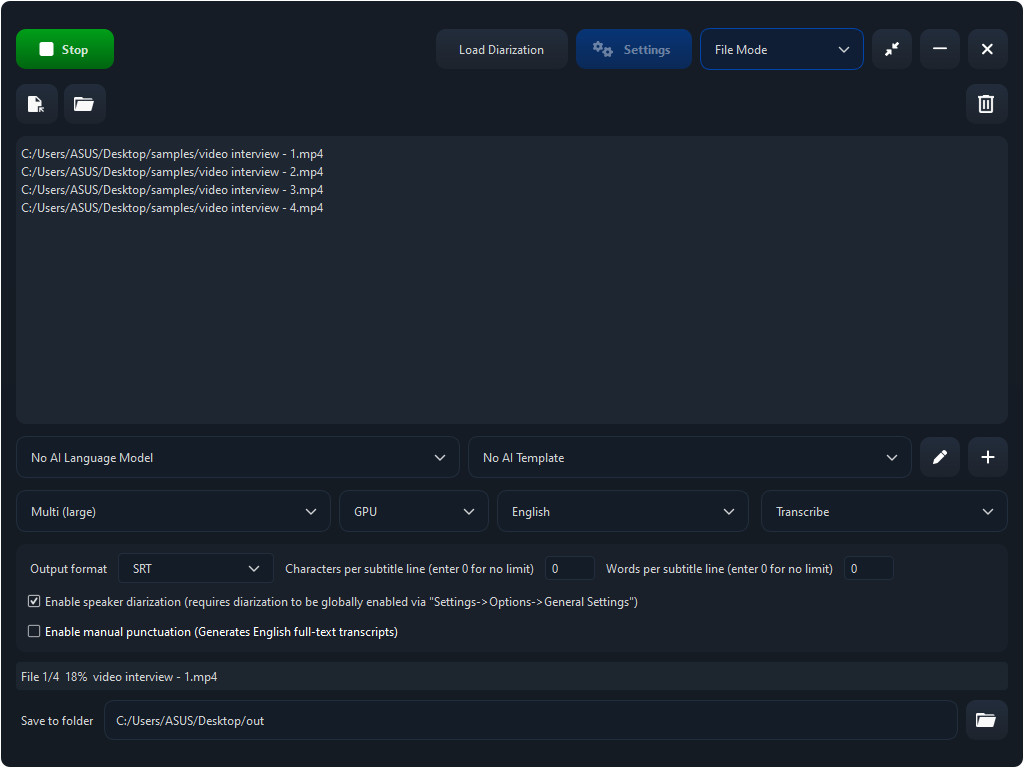
SpeechPulse File mode working through four interview videos with the Multi (large) model, SRT output and speaker diarization. The vendor's screenshots are taken on Windows; the Mac app has the same controls.
Features
Dictate into any Mac app
SpeechPulse for Mac puts text wherever your cursor is: Pages, Word, Mail, Safari or Chrome, Slack, Notes. It can start transcribing automatically when you pause, or only while you hold a push-to-talk hotkey (which also switches the mic on and off). A listening indicator follows the mouse and can show the active language, and a hotkey cycles between languages if you dictate in more than one.
Runs on the Mac, not in the cloud
SpeechPulse for Mac processes speech locally with Whisper MLX and Parakeet V3 models, so dictation works with Wi-Fi off and nothing is uploaded. If you'd rather use a cloud engine, it accepts any OpenAI-compatible speech API (OpenAI Whisper, GPT-4o Transcribe, gpt-transcribe, Groq, Azure), and you pay that provider directly.
Punctuation your way
SpeechPulse for Mac offers Auto punctuation, where the model adds periods, commas and question marks, and Manual punctuation, where you say them, along with spoken commands for capitalization, new lines, numbers, dates and currency. Manual punctuation covers 18 languages; Ukrainian was added in version 10.21.0 on September 1, 2026.
Train it on names and jargon
SpeechPulse for Mac learns new words through training (18 languages), takes custom vocabulary lists, and applies mappings that replace or delete words in the output, with regular-expression support. A speech profile makes it ignore voices other than yours. A backup option saves all of it, including trained models, so you can move to a new Mac.
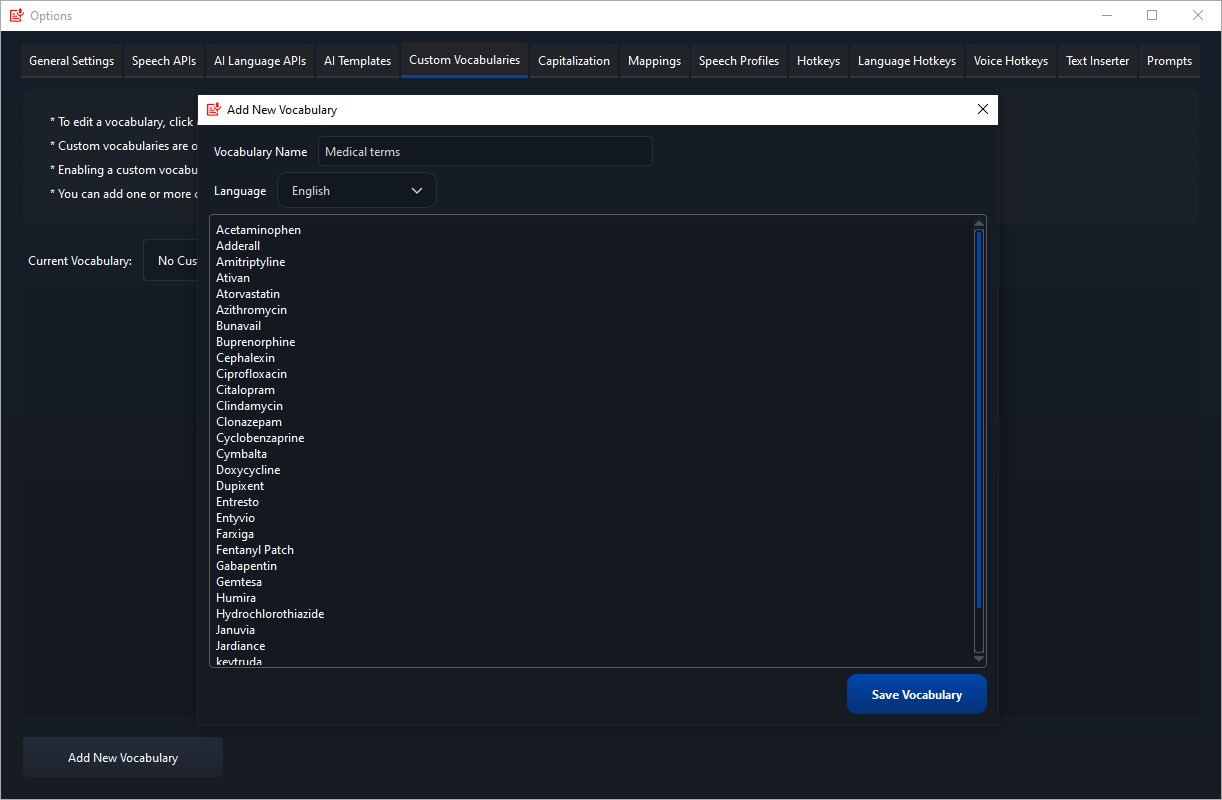
A "Medical terms" custom vocabulary being added in SpeechPulse's Options (Windows screenshot from the vendor).
AI templates rewrite your dictation
SpeechPulse for Mac can run what you said through a language model before it's typed: fix grammar, turn rambling speech into a tidy email, summarize, or write a spec. It can use an offline English language model for this, or connect to OpenAI-compatible LLMs, including a local Ollama server. Clipboard processing applies the same templates to text you've copied.
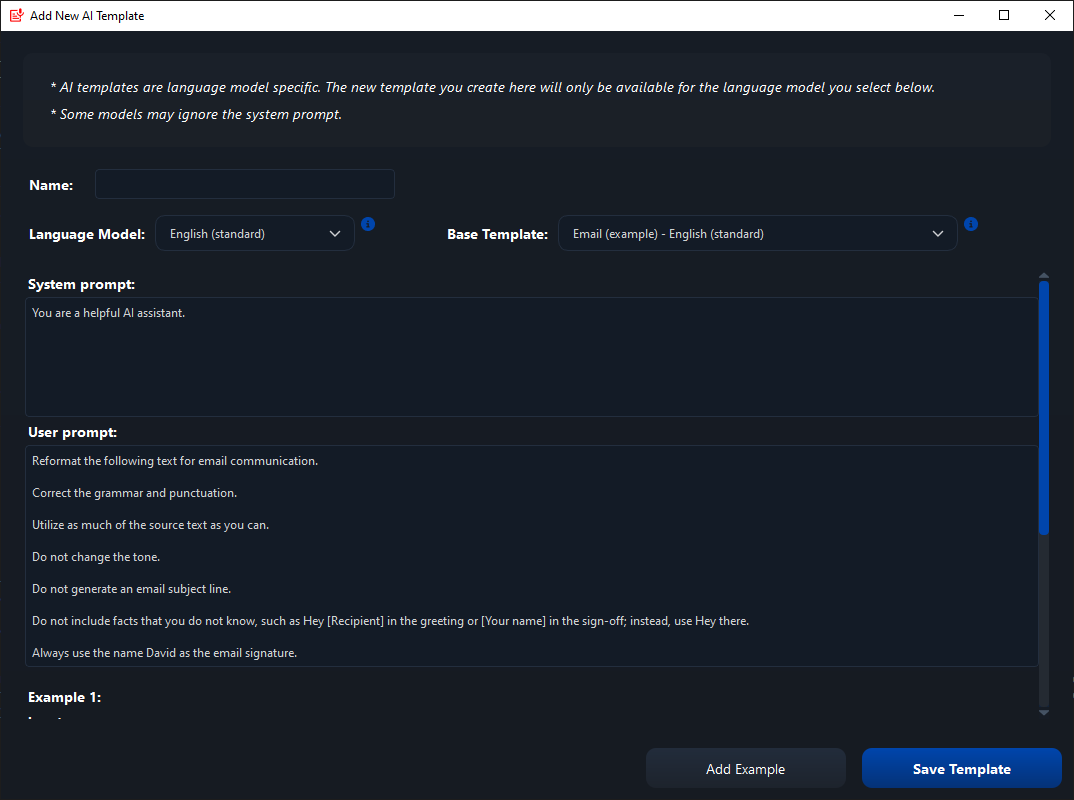
Building an AI template from the email example, with the system and user prompts (Windows screenshot from the vendor).
Transcripts with speakers, subtitles and meeting notes
SpeechPulse for Mac's File mode transcribes or translates audio and video (including Apple's .caf format) and labels speakers automatically, remembering names you've tagged before. It exports SRT and VTT subtitles with a per-line word or character limit, and its editor plays the audio in sync with the text. System Audio mode turns an online call into a live transcript of both sides, and can record both to WAV.
Benefits
- Your words stay on your Mac, which matters for client, patient and legal material.
- A single payment instead of the monthly fee most Mac AI dictation apps charge.
- Dictation, transcription and subtitles in one app, so you don't need a separate transcription subscription.
- Built for M-series chips: the MLX models use the hardware every Apple silicon Mac already has.
Real-World Uses
- Long-form writing: draft a report or chapter by voice in Pages or Word, with your character names trained in.
- Therapy, medical or legal notes: dictate offline, with a custom vocabulary for the terms you use.
- Podcast and interview transcripts: drop in the episode, get speaker-separated text, correct names in the editor.
- Video captions: export SRT for YouTube or Final Cut, or translate a non-English clip into English captions.
- Switching between Mac and PC: the bundle licenses the same app on both, so your workflow carries over.
Who It's For, and Who Should Skip It
SpeechPulse for Mac fits writers, students and professionals on an M-series Mac who dictate daily, want privacy, and dislike subscriptions, especially if they also transcribe recordings.
Skip it if you're on an Intel Mac (it won't run), if Apple's free dictation already does what you need, or if your Mac is short on memory: one reviewer found the Mac edition used far more RAM than a lighter Mac-only dictation app. If you only need quick dictation and never transcribe files, a smaller Mac-native tool may feel lighter.
Usage Guide
- Download the DMG (about 2.4 GB), open it and drag SpeechPulse to Applications.
- Launch it and grant the permissions macOS asks for, starting with the microphone.
- Open the Speech model drop-down and choose "add more models" to download a larger Whisper MLX or Parakeet model if the default isn't accurate enough.
- Pick Auto or Manual punctuation and Automatic or Push-to-talk input, and set the push-to-talk key in Settings, Options, Hotkeys.
- Click into a document, press Start, and speak in full sentences.
- Add vocabulary, mappings or training as you notice words it gets wrong.
Tips
- A headset mic beats the MacBook's built-in mics, which pick up distant voices that the model turns into phantom phrases.
- If you see invented text even while silent, add a speech profile so SpeechPulse reacts only to your voice, or use push-to-talk.
- On a base 8 GB Mac, stick to smaller models: the vendor improved memory use for M-series Macs with 8 GB in version 5.3.5, but large models still need RAM.
Where it falls short
- Memory use: the AlternativeTo reviewer quoted below says the Mac version "eats way more ram" than VoiceInk.
- The Mac trails Windows: new features usually land on Windows first; the November 2026 fast processing mode was Windows-only at the time of writing.
- Training runs on the CPU: training new words on the Mac edition uses the CPU; only trained-word detection moved to the Mac's GPU, in version 10.8.0.
- Hallucinations: Whisper models can invent words from background noise; the help page lists the fixes.
- Mode limits: custom vocabularies and prompts work only in Auto punctuation mode.
What Users Say
Reviews are scarce: Trustpilot, Capterra and Product Hunt show none for SpeechPulse yet. The independent feedback that exists is mostly from Windows users; the one Mac-specific comment is critical.
AlternativeTo (2 user reviews, both 5 stars)
superstickynotemealt, March 26, 2025, rates it highly on Windows ("Easily the best speech-to-text program I've used on windows thus far") but warns Mac users: "The Mac version of speechpulse just isn't as optimized and eats way more ram then voiceink." They suggest VoiceInk for Mac users who don't need SpeechPulse's word training.
tuva-hayabi, June 14, 2024, found "the result of speech to text is quite good to excellent, depending on the language model you use," with the caveat that it was slow on an Intel PC without an NVIDIA GPU.
Testimonials on the SpeechPulse website
Daniele: "it checked all the boxes I required: accurate, easy to use, versatile, and can be used to type in any program. And the dev has even been super responsive to my suggestions."
Max: "SpeechPulse has become my go-to voice dictation software which I use for hours every day."
John: "Best of all, it's all performed locally, so you don't need an internet connection, and you aren't sending your data anywhere. The addition of push-to-talk and the ability to easily switch between manual and automatic punctuation is a godsend. The one-time price can't be beat in this world of subscriptions."
Dr Michael Valos, Deakin University Australia, praised it as "good value and effective speech recognition in helping executives with productivity both in live dictation and converting vocal recordings to typed transcripts."
The pattern: people praise accuracy, offline processing, the depth of settings, the responsive developer and the one-time price. The criticisms are performance on weaker hardware and, on the Mac, memory use. The testimonials don't say which platform they used, and the vendor chose them, so treat your own trial as the real test.
Comparisons
SpeechPulse vs Apple Dictation
Apple Dictation is free and built in, and good for short messages. SpeechPulse adds Whisper-class accuracy for long dictation, manual punctuation commands, trained words and vocabularies, AI rewriting, and file and meeting transcription with speakers.
SpeechPulse vs lighter Mac dictation apps
The AlternativeTo reviewer above recommends VoiceInk to Mac users who don't need word training, because it uses less memory. SpeechPulse is the heavier app, but it adds word training, speaker-labelled transcripts, subtitles and a Windows version under one bundle.
Editions and Pricing
SpeechPulse is a one-time purchase with all current and future updates. Licenses are per named user and can't be shared or transferred.
| Edition | Price at checkout | License | Computers | Buy |
|---|
| SpeechPulse - macOS | $99 plus tax | Lifetime, all updates | Up to 6 Apple silicon Macs | Buy macOS |
| SpeechPulse - Windows and macOS Bundle | $159 plus tax | Lifetime, all updates | Up to 6 Macs and 6 Windows PCs | Buy Bundle |
The key is emailed right after payment, and the order page accepts cards and PayPal. The Windows edition on its own is also $99.
FAQs
Does SpeechPulse run on an Intel Mac?
No. SpeechPulse for macOS requires an Apple silicon Mac (M1 or later) with macOS 13 or newer.
Does SpeechPulse for Mac work offline?
Yes. SpeechPulse for Mac runs its Whisper MLX and Parakeet models on the Mac, so dictation and file transcription work without internet once models are downloaded. Cloud APIs are optional.
Can I use one SpeechPulse license on my Mac and my Windows PC?
No. SpeechPulse sells separate Mac and Windows licenses at $99 each. The Windows and macOS Bundle at $159 covers both, on up to 6 computers of each kind.
Can I get my money back if SpeechPulse doesn't suit me?
No. SpeechPulse's refund policy says all sales are final; only a non-working key is replaced. The 30-day trial is how you decide.
Is SpeechPulse a subscription?
No. SpeechPulse is paid once and includes all future updates. Only optional cloud APIs from OpenAI, Groq or Azure cost extra, billed by those companies.
Is SpeechPulse a replacement for Dragon on the Mac?
For dictation, largely yes: SpeechPulse offers continuous dictation into any app, spoken punctuation, custom vocabularies and trained words, all offline. It doesn't replicate Dragon's full voice control of the computer or its managed enterprise deployments.
How many languages does SpeechPulse support on the Mac?
SpeechPulse for Mac transcribes 99 languages and translates them into English. Spoken punctuation and word training each cover 18 languages, and the offline AI language model for rewriting is English-only.
System Requirements
- An Apple silicon Mac (M-series); Intel Macs are not supported
- macOS 13 or later
- About 2.4 GB for the download, plus room for any larger models
- Any built-in, USB or headset microphone (a headset works best)
Conclusion
SpeechPulse for Mac is worth $99 if you dictate seriously on an Apple silicon Mac and want everything processed locally without a subscription, and it's the stronger choice when you also need speaker-labelled transcripts or subtitles. The reason to hold back: it's heavier than Mac-only dictation apps, the Mac edition gets new features after Windows, and there are no refunds. Run the 30-day trial with your own mic and documents; if you also use Windows, the $159 bundle is the better buy.
Download Free TrialBuy macOS LicenseBuy Windows + macOS Bundle