SpeechPulse for Windows: Offline Whisper Dictation That Types Into Any App
SpeechPulse is a $99 one-time-purchase speech recognition app for Windows 10 and 11 that types what you say into any program (Word, Gmail in a browser, Notepad, chat apps) using Whisper and Parakeet AI models that run on your own PC. It also transcribes audio files with speaker names, makes SRT and VTT subtitles, and transcribes meetings or anything else playing on your computer. One license covers up to 6 of your own PCs, with all future updates.
If the dictation built into Windows keeps losing your words, or you don't want your voice sent to a cloud service, this is the kind of tool you are looking for. You press Start (or hold a hotkey), talk, and the text lands wherever your cursor is.
Quick facts
- Developer: SpeechPulse (AVBEAM), Sri Lanka
- Version: 10.24.1 for Windows, released November 16, 2026
- Platform: Windows 10 64-bit (version 1809 or later) and Windows 11. A separate macOS edition exists for Apple silicon Macs
- Speech engines: offline Whisper and Parakeet V3 models, or your own key for OpenAI, Groq or Azure speech APIs
- Languages: transcription in 99 languages, plus translation into English
- Price: $99 one-time (plus tax) for up to 6 Windows PCs of one user; $159 for the Windows and macOS Bundle
- Trial: 30 days, free
- Refunds: none. All sales are final, so use the trial first
- What we checked: the Windows installer is 1,643 MB (dated November 16, 2026, the same day as the 10.24.1 release notes), and the price on the order page was $99 for a lifetime license on November 17, 2026. We didn't install it or test dictation accuracy ourselves.
Before you buy
- There are no refunds. SpeechPulse's refund policy says all sales are final, including when the software doesn't meet your expectations. The 30-day trial is the only way to find out whether it suits your voice, microphone and PC.
- A GPU matters for the big models. The vendor recommends an NVIDIA GPU for the medium and large models in live dictation. Their own example: the Multi (large) model transcribes a short sentence in under 2 seconds on an RTX 3060, and in 16 seconds on an Intel Core i5-12400 CPU.
- It is a big download. The installer is about 1.6 GB, and it only includes the English base model. Larger and multi-language models download from inside the app.
Download Free TrialBuy Windows LicenseBuy Windows + macOS Bundle
Overview
SpeechPulse is a dictation tool built on OpenAI's open-source Whisper model whose public changelog goes back to version 2.0 in November 2023, and it has been updated at a remarkable pace since: the changelog shows 23 Windows releases in 2026, at least one every month, from Parakeet V3 support in March to a new fast processing mode on November 4 and a hotkey fix on November 16. It is the work of a small developer, and users mention that the developer answers bug reports and feature requests directly.
The app has three modes. Live mode is dictation: SpeechPulse listens, transcribes, and types or pastes the text into the window you're working in. File mode transcribes or translates audio and video files and can label who is speaking. System Audio mode transcribes your microphone and whatever your PC is playing (a Zoom call, a webinar, a YouTube video) into its own editor, without needing the cursor in a text box.
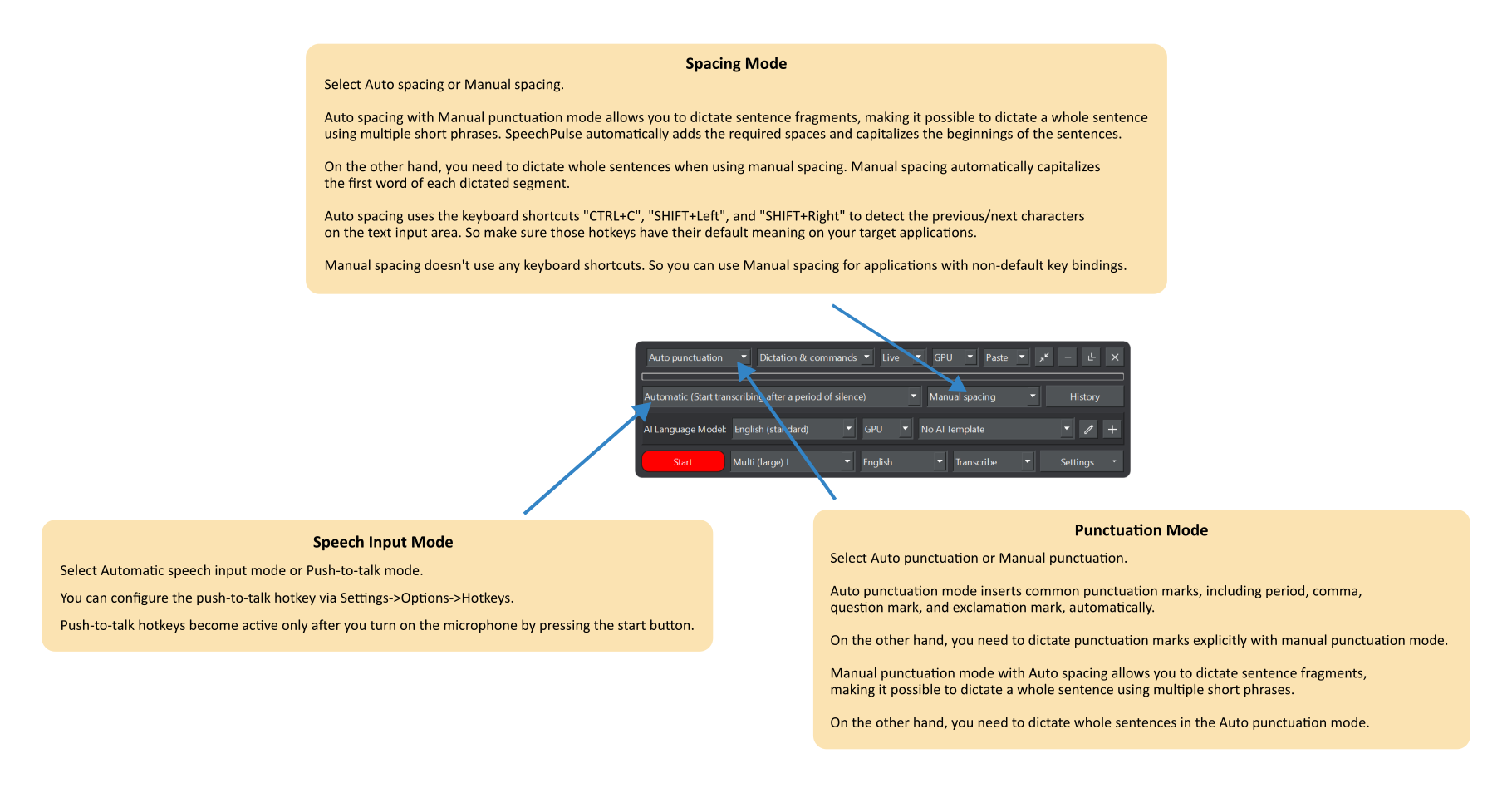
The SpeechPulse main window, with the vendor's notes on the punctuation mode, speech input mode and spacing mode drop-downs.
Features
Voice typing into any Windows program
SpeechPulse types into any text input area: office apps, web browsers, email clients, chat windows and text editors. It can insert text by typing it, pasting it, or in real time as you speak. You choose between automatic speech input, which starts transcribing when you stop talking, and push-to-talk with a hotkey you set, which lets you pause mid-thought without the app jumping in. An optional indicator next to the mouse cursor shows when it is listening.
Offline models, or a cloud API if you prefer
SpeechPulse runs Whisper and Parakeet V3 models locally, so your voice and text never leave the PC. A built-in downloader fetches larger models, and a second downloader gets the NVIDIA CUDA libraries for GPU mode. If you'd rather use a cloud engine, SpeechPulse accepts any OpenAI-compatible speech API, with settings given for OpenAI Whisper, GPT-4o Transcribe, gpt-transcribe, Groq Whisper Large V3 and Azure.
Two punctuation modes
In Auto punctuation mode, SpeechPulse adds periods, commas, question marks and exclamation marks itself. In Manual punctuation mode you say them ("comma", "new paragraph"), with voice commands for capitalization ("Cap", "No cap", "All cap") and for numbers, dates, currencies and percentages. Manual punctuation works in 18 languages, including English, German, French, Spanish, Italian, Dutch, Portuguese, Russian and Ukrainian.
Teach it your vocabulary
SpeechPulse has three ways to get names and jargon right. Custom vocabularies are word lists (a medical list of drug names, for example). Training teaches the app new words from your own recordings, in 18 languages, and can change how a word is pronounced so "gqw forty five mt" comes out as "GQw-45mT". Mappings replace whatever it writes with your own spelling, including regular-expression rules, and can delete words it keeps inventing.
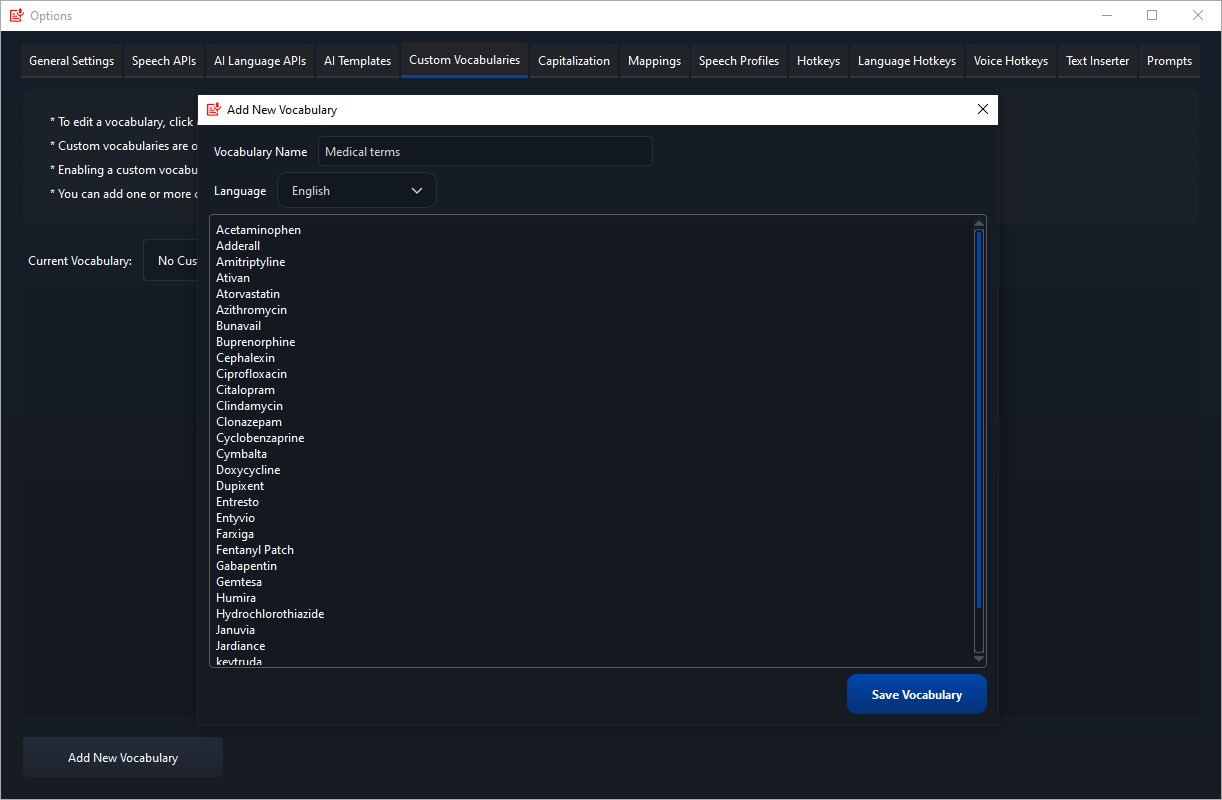
Adding a "Medical terms" custom vocabulary in the SpeechPulse Options window, which also shows the tabs for AI templates, mappings, speech profiles, hotkeys and the text inserter.
AI templates clean up or reshape what you said
SpeechPulse can pass your dictation through a language model before it is typed. AI templates are reusable prompts for grammar and punctuation fixes, email formatting, summaries, specifications or code. You can use an offline model or connect any OpenAI-compatible LLM (OpenAI, Groq, Google Gemini, Azure, or your own Ollama server). Clipboard processing runs the same templates on text you've copied, and a dynamic template takes the instruction from your voice ("correct grammar and spelling in the clipboard text").
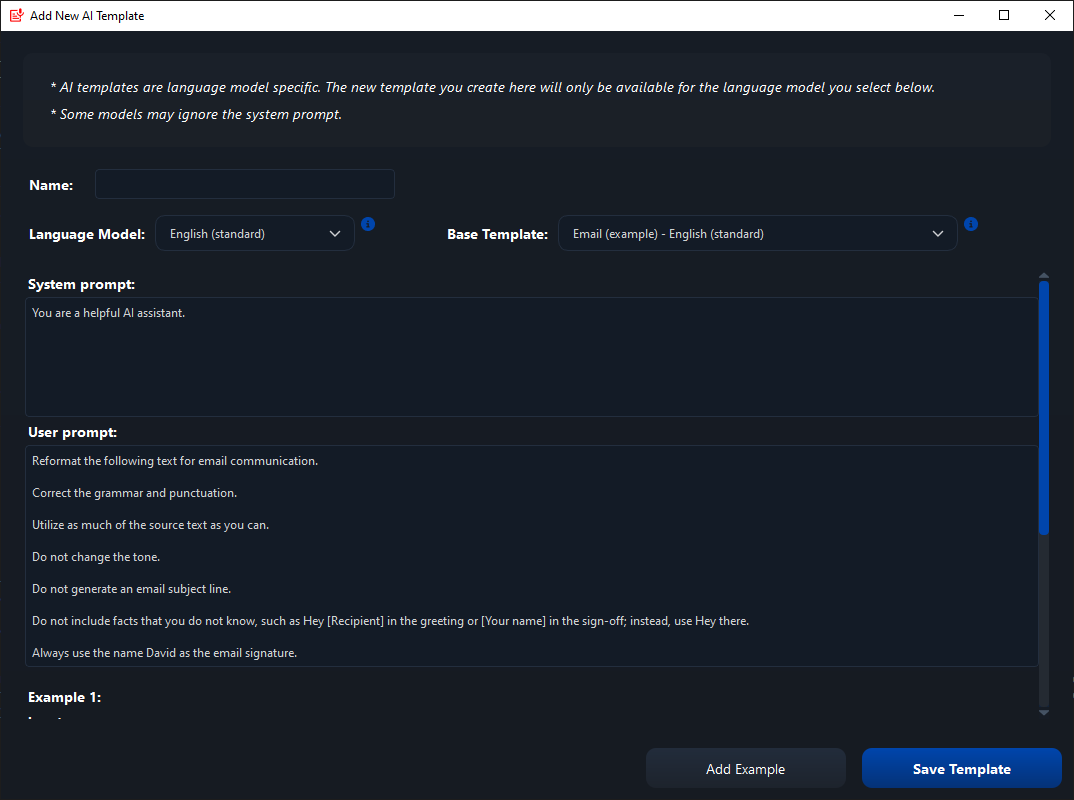
Creating an AI template from the built-in email example: a system prompt and user prompt that reformat dictated text for email.
Transcribe files and make subtitles
SpeechPulse's File mode transcribes or translates mp3, wav, m4a, flac, ogg, webm, Opus and other audio files, with automatic speaker diarization that splits the text by speaker and remembers speaker names. It writes SRT and VTT subtitles with timestamps, and its editors play the audio in sync with the text (the diarization editor highlights each word as it plays) and can re-transcribe a selected passage.
System Audio mode for meetings
SpeechPulse's System Audio mode transcribes your microphone and the PC's audio output side by side in real time, so you get a running transcript of an online meeting or interview, with speaker names when diarization is on. It can also record both streams to WAV files and pause and resume.
Shortcuts you trigger by voice
SpeechPulse's Voice Hotkeys fire a keyboard shortcut when you say a phrase, and the Text Inserter pastes a saved snippet (plain or rich text, with links) on a voice command. A Speech Profile makes the app respond only to your voice in a noisy room, and a separate profile per person helps when several people share one PC.
Benefits
- Privacy you can rely on: with an offline model, dictation works with no internet connection at all, which suits confidential notes, legal and medical drafts.
- No subscription: most AI dictation apps now charge monthly. SpeechPulse is $99 once, with updates included.
- One tool instead of three: voice typing, file transcription with speakers, and meeting transcripts all come in the same license.
- It adapts to you: training, vocabularies and mappings fix the words a general model always gets wrong.
Real-World Uses
- Writing with RSI or a disability: one user on the vendor's page types about 20 words per minute by hand and now writes emails and papers at speaking speed.
- Clinical or legal notes: dictate offline into your records system, with a custom vocabulary for drug names or case terms.
- Interviews and podcasts: drop the recording into File mode, get a transcript split by speaker, fix names in the synced editor, and export.
- Subtitling videos: generate an SRT or VTT file, in the original language or translated into English.
- Meeting minutes: run System Audio mode during a Teams or Zoom call, then pass the transcript through a summary template.
Who It's For, and Who Should Skip It
SpeechPulse suits people who write a lot on Windows and want accurate dictation without a subscription or a cloud service: writers, students, professionals with long email days, and anyone who types slowly or painfully. It is especially good value if you also transcribe recordings, since that is included.
Skip it if your PC is an older laptop with no NVIDIA GPU and you need the large multilingual models live: the vendor's own numbers show they are slow on a CPU (an AlternativeTo reviewer found it "a bit slow" on a Core i5). Skip it too if you only dictate occasionally, since Windows' built-in voice typing is free, and if you need Linux, which isn't supported. Mac users need the macOS edition or the bundle.
Usage Guide
- Download the trial installer (about 1.6 GB) and run it. If you're updating from version 4.x or older, the vendor says to uninstall and delete the old SpeechPulse folder first.
- Launch SpeechPulse. It comes with the English base model. For other languages or better accuracy, choose "add more models" in the Speech model drop-down to open the model downloader.
- If you have an NVIDIA GPU, switch the CPU/GPU drop-down to GPU and download the CUDA libraries it offers. Don't download them without an NVIDIA card.
- Pick Auto or Manual punctuation, and Automatic or Push-to-talk input (set the push-to-talk key under Settings, Options, Hotkeys).
- Click into your document, press Start and speak in complete sentences.
- Add custom vocabularies, mappings or a speech profile as you find words it gets wrong.
Tips for better accuracy
- Use a headset microphone. Laptop and desk mics pick up faint background voices, which the models turn into random phrases such as "Thank you."
- Turn off your microphone's noise cancellation if you see invented text: it can distort the signal.
- Speak in full sentences; short fragments confuse the models.
- In Auto punctuation mode, a prompt such as "Hello, welcome to my lecture." nudges the output toward proper punctuation, and a list of names in the prompt helps it spell them (prompts are limited to 200 tokens).
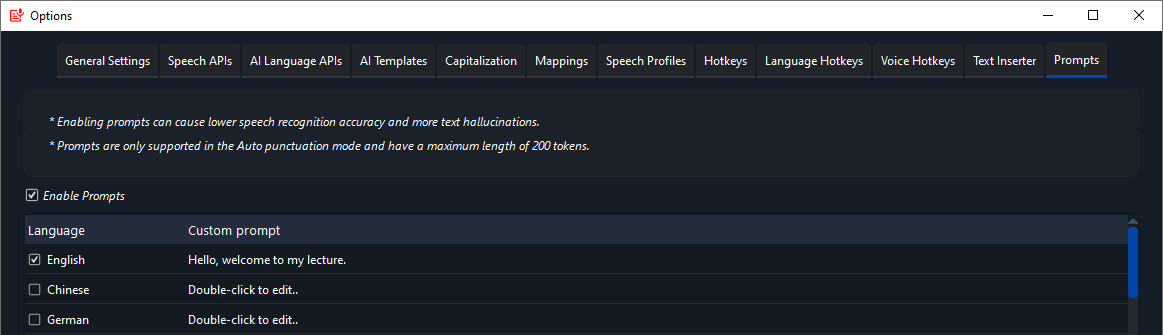
The Prompts tab in SpeechPulse's Options, with an English prompt enabled and the warning that prompts can lower accuracy.
Where it falls short
- Windows 11 Notepad: the real-time and Type insert modes don't work there; use Paste mode.
- Admin windows: SpeechPulse runs without administrator rights, so it can't type into programs running as administrator unless you run it as administrator too.
- Autocorrect clashes: spell-check and autocorrect in the target app can garble real-time mode output.
- Hallucinations: like every Whisper-based tool, it can invent words from background noise. The help page has a long fix list, and speech profiles and mappings help.
- Feature limits by mode: custom vocabularies and prompts only work in Auto punctuation mode, and prompts can lower accuracy.
- The interface: one AlternativeTo reviewer called it clunky compared with Mac dictation apps. There are many settings tabs to learn.
What Users Say
SpeechPulse has few independent reviews yet: Trustpilot, Capterra and Product Hunt list none. What exists is consistently positive about accuracy and the one-time price, with complaints about speed on CPU-only PCs and the interface.
AlternativeTo (2 user reviews, both 5 stars)
superstickynotemealt, March 26, 2025: "Easily the best speech-to-text program I've used on windows thus far." The same reviewer, a fantasy writer, credits the training feature for handling invented names, but adds: "The UI is clunky compared to mac options, but seems to be about par for windows options."
tuva-hayabi, June 14, 2024: "It's a bit slow on my Intel Core i5." They have no NVIDIA GPU, and still rate "the result of speech to text is quite good to excellent, depending on the language model you use."
Testimonials on the SpeechPulse website
Daniele: "There is no better way to dictate text to your computer, right now, than SpeechPulse. Period. I had to search a lot before even finding it, but it checked all the boxes I required: accurate, easy to use, versatile, and can be used to type in any program. And the dev has even been super responsive to my suggestions."
Max: "SpeechPulse is very regularly updated with new features and fixes; it has a huge amount of customization, configuration and tools built in not found in other voice dictation software, and most importantly of all: its voice dictation accuracy is excellent and is the best I've found."
Ahmed: "Due to my disability, if I have to type manually, I can only manage about 20 words per minute, which severely limits me. With SpeechPulse, I am able to type at a much higher rate since the speed of my typing matches the speed of my speaking."
John: "I am a fast typer—about 120 words per minute—but I don't type nearly as fast as I talk. It is accurate, convenient, and highly customizable—way better than what Windows ships with by default. Best of all, it's all performed locally, so you don't need an internet connection, and you aren't sending your data anywhere."
AI-Fan: "I use SpeechPulse around the clock every day, mainly for dictation. The most compelling aspect of it is that it works without a keyboard."
Dr Michael Valos, Deakin University Australia: "I wanted to congratulate SpeechPulse and founder Pasindu for being such good value and effective speech recognition in helping executives with productivity both in live dictation and converting vocal recordings to typed transcripts."
The pattern: users praise accuracy, local processing, the customization and a developer who responds to requests, and they like paying once. The complaints are about speed without an NVIDIA GPU and a busy, less polished interface. The vendor's testimonials are hand-picked, so weigh the AlternativeTo reviews and your own trial more heavily.
Comparisons
SpeechPulse vs Windows voice typing
Windows' own voice typing (Win+H) is free and fine for short replies. SpeechPulse adds offline Whisper models in 99 languages, manual punctuation, training and vocabularies, AI clean-up, file transcription and subtitles. In the vendor's testimonials, a user who types 120 words per minute calls it far better than the Windows default.
SpeechPulse vs subscription AI dictation apps
Cloud dictation services usually bill monthly and process your voice on their servers. SpeechPulse is a single $99 payment and can run entirely offline. The trade-off is that your PC does the work, so a fast GPU makes a real difference.
Editions and Pricing
SpeechPulse is a one-time purchase, not a subscription, and includes all current and future updates. Each license is for one named user and can't be shared or transferred.
| Edition | Price at checkout | License | Computers | Buy |
|---|
| SpeechPulse - Windows | $99 plus tax | Lifetime, all updates | Up to 6 Windows PCs | Buy Windows |
| SpeechPulse - Windows and macOS Bundle | $159 plus tax | Lifetime, all updates | Up to 6 Windows PCs and 6 Macs | Buy Bundle |
The activation key arrives by email right after payment. The order page takes cards and PayPal. The macOS edition alone is also $99.
FAQs
Does SpeechPulse work without an internet connection?
Yes. SpeechPulse runs its Whisper and Parakeet models locally, so dictation and file transcription work offline once the models are downloaded. You only need a connection to download models, or if you choose a cloud speech or language-model API.
Do I need an NVIDIA graphics card for SpeechPulse?
No, SpeechPulse runs on the CPU, but the vendor recommends an NVIDIA GPU for medium and large models in live dictation, with at least 4 GB of VRAM for the Multi (large) model. On a CPU, use a smaller model or a cloud API for quick results.
Can I get a refund on SpeechPulse if it doesn't work for me?
No. SpeechPulse's refund policy says all sales are final, and a license is only replaced if the key itself doesn't work. Run the 30-day trial on the PC and microphone you'll actually use before you buy.
How many computers can I install SpeechPulse on?
A SpeechPulse Windows license covers up to 6 computers for your own use. Other people need their own licenses. The Windows and macOS Bundle covers 6 Windows PCs and 6 Macs.
Is SpeechPulse a subscription?
No. SpeechPulse is a one-time purchase that includes all current and future updates. Only the optional cloud APIs (OpenAI, Groq, Azure) cost money from those providers, billed by them.
Which languages can SpeechPulse transcribe?
SpeechPulse transcribes 99 languages with the multilingual models and can translate into English. Manual punctuation and word training are available in a smaller set of 18 languages, which the help page lists.
Will my settings move to a new PC?
Yes. Since version 10.5, SpeechPulse can back up all its settings and data, including training profiles, trained models, dictation history and saved transcriptions, so you can restore them on another computer.
Does SpeechPulse run on Linux?
No. SpeechPulse is made for Windows 10/11 and for Apple silicon Macs only.
System Requirements
- Windows 10 64-bit (version 1809 or later) or Windows 11
- Any PC, USB, laptop or headset microphone (a headset works best)
- About 1.6 GB for the installer, plus space for any larger models you download
- Recommended for medium and large models: an NVIDIA GPU, 4 GB VRAM or more for Multi (large)
Conclusion
SpeechPulse is worth $99 if you dictate every day on Windows and want accuracy and privacy without a monthly bill. It is better than the free Windows tool at long-form writing, it doubles as a transcription and subtitle tool, and it is updated almost every month. The main reason to hesitate is that sales are final and the best models want an NVIDIA GPU, so try it for the full 30 days on your own hardware first. If you also use a Mac, the $159 bundle covers both.
Download Free TrialBuy Windows LicenseBuy Windows + macOS Bundle