AdGuard VPN: a low-cost VPN from the AdGuard ad-blocker team, with a free tier
AdGuard VPN is a VPN service for Windows, Mac, iPhone, Android, Linux, routers and browsers that hides your IP address and encrypts your traffic, from the company behind AdGuard Ad Blocker. It's free for 3 GB a month on 2 devices, and a paid subscription costs $47.88 a year ($3.99 a month), $71.76 for two years or $11.99 month to month, for up to 10 devices.
If you mainly want a VPN for public Wi-Fi, for watching shows from home while you travel, or for keeping certain apps out of the tunnel (your banking app, your Zoom calls), AdGuard VPN does those jobs cheaply. What it doesn't have is the track record of the big names: it runs on AdGuard's own protocol rather than WireGuard or OpenVPN, and no independent audit of its no-logs policy has been published.
Quick facts
- Developer: Adguard Software Limited (Cyprus)
- Windows version: 2.10.3, released November 12, 2026
- Platforms: Windows 11, 10, 8.1 and 8, macOS, iOS, Android, Android TV, Linux, routers, and Chrome, Edge, Firefox and Opera extensions
- Price: $47.88 for 1 year, $71.76 for 2 years, $11.99 for 1 month (plus local sales tax where it applies)
- Free version: 3 GB of traffic a month, 2 devices at a time, fewer locations
- Paid version: all 75+ locations, unlimited speed and traffic, up to 10 devices at once, AdGuard DNS Personal included
- Protocol and encryption: AdGuard's own TrustTunnel protocol over HTTP/2 or HTTP/3 (QUIC), AES-256, optional post-quantum encryption
- Refunds: 30-day money-back guarantee on 1- and 2-year plans bought on adguard-vpn.com; monthly plans aren't refundable
- What we checked: the Windows installer from adguard-vpn.com (file version 2.10.2326, 65.8 MB, signed by Adguard Software Limited) and the 1-month, 1-year and 2-year prices on the order page on November 15, 2026. We didn't run speed, leak or streaming tests ourselves
Before you buy
AdGuard VPN is fine for everyday privacy and geo-shifting, but it isn't the pick for high-risk use (journalism, activism, anything where a leak would hurt you). AdGuard was founded in Moscow in 2009 and is now headquartered in Cyprus; its VPN uses a protocol of its own design that was only open-sourced in early 2026, and while its Android app passed an independent app security review (the App Defense Alliance's MASA assessment, March 2025), no independent audit of the no-logs policy or the protocol has been published. Tom's Guide also found DNS leaks in a 2023 test when the Windows and Mac apps ran alongside AdGuard Ad Blocker. Start on the free 3 GB, and if you buy, choose the 1-year plan: it costs about a third of paying monthly and comes with the 30-day refund.
Download FreeBuy Now
Overview
AdGuard is best known for its ad blocker, and AdGuard VPN is its separate VPN service, sold on its own or bundled. You install the app, pick a city, and click Connect: your traffic then leaves the internet from that server, so websites and your ISP's neighbors on public Wi-Fi see the VPN's address instead of yours. One AdGuard account covers every platform, and a paid plan lets 10 devices connect at the same time.
Two things set it apart from most cheap VPNs. Its exclusions work per website and per app on every platform, including iPhone, where split tunneling is rare. And it runs on AdGuard's own protocol, built to look like ordinary HTTPS traffic so that networks trying to block VPNs have a harder time spotting it. That second point is both its strength in restrictive countries and the main reason privacy reviewers hold back.
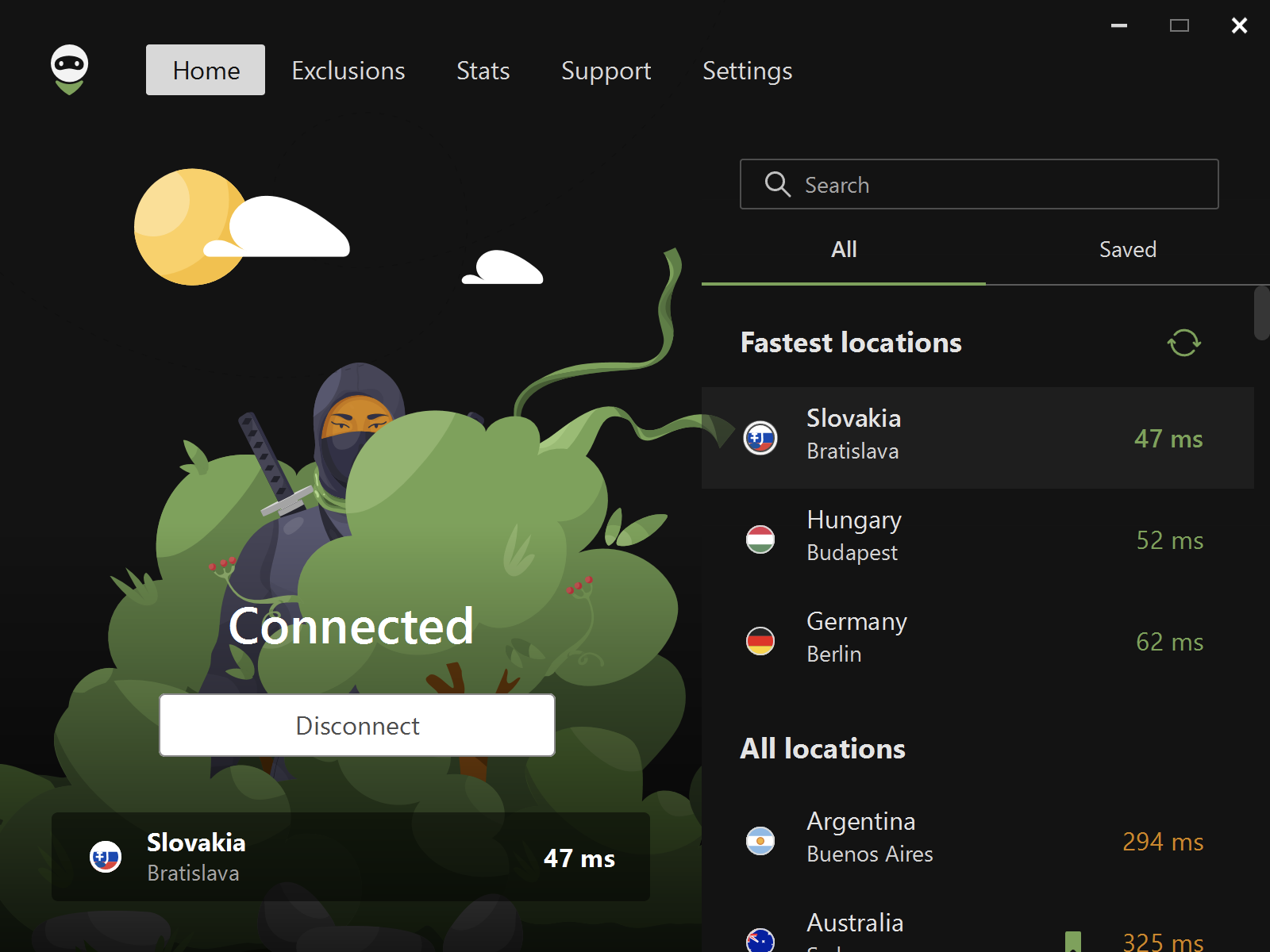
AdGuard VPN for Windows, Home tab: connected to Bratislava, Slovakia (47 ms), with the Fastest locations and All locations lists and their ping times on the right.
Features
One-click connection to 75+ locations
AdGuard VPN lists its locations with live ping times and puts the fastest ones at the top, so choosing a server is a matter of clicking the lowest number. You can bookmark favorite cities into a Saved tab, refresh the list if a location goes offline, and set the app to start and connect with Windows.
Split tunneling by website and by app
AdGuard VPN can run everywhere except the sites and apps you exclude, or only for the ones you list, and keeps the two lists separately. Adding google.com covers its subdomains, and a ready-made list groups popular services (social networks, messengers, streaming, games, shopping, search, work tools) with all their domains. On Windows you can export and import the lists as a zip file to copy them to another PC.
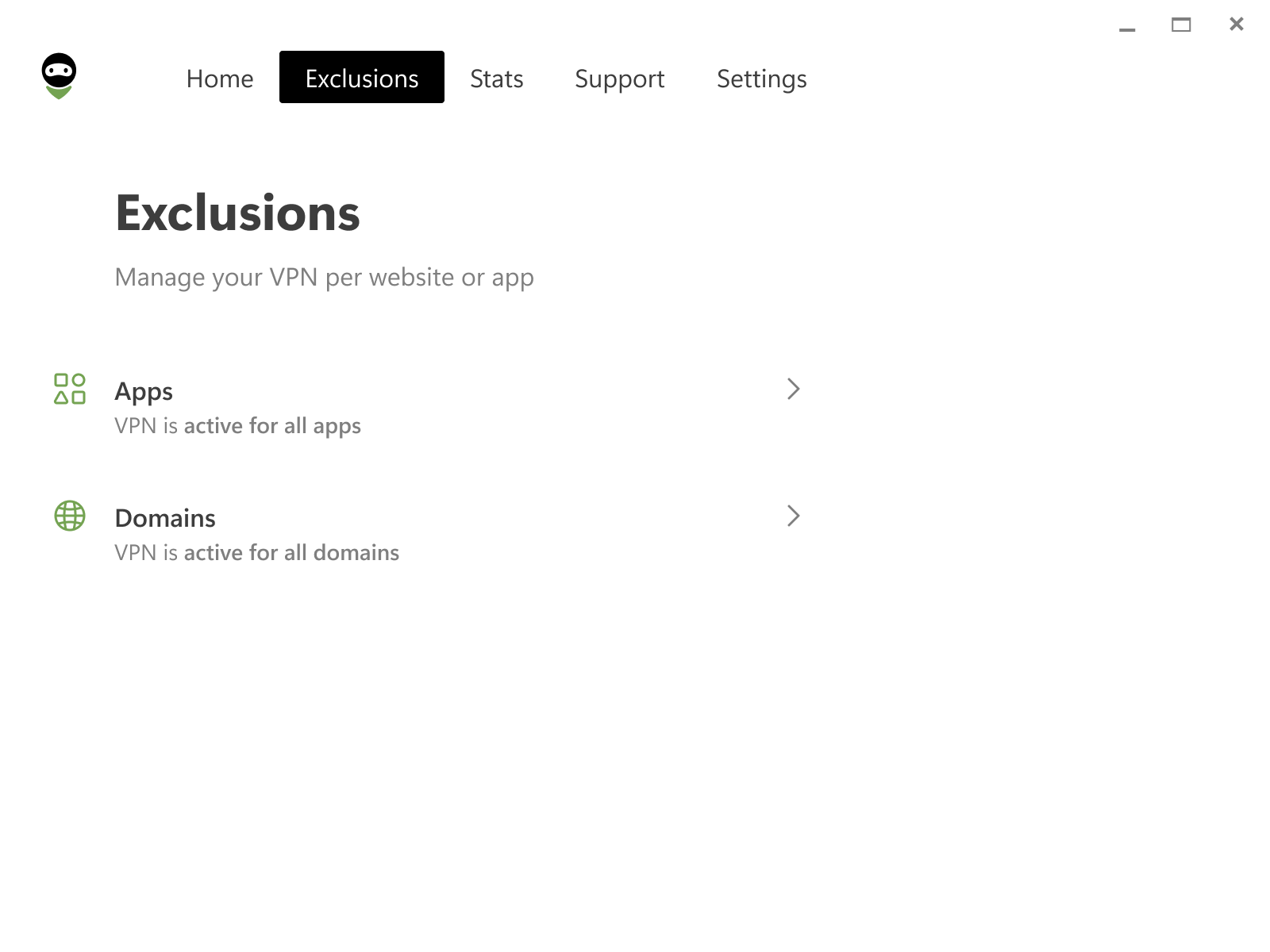
The Exclusions tab in AdGuard VPN for Windows: separate Apps and Domains lists, both showing "VPN is active for all".
Kill switch
AdGuard VPN's kill switch cuts off all network access the moment the VPN server becomes unreachable, so your real address isn't exposed if the connection drops on public Wi-Fi or mobile data. You switch it on in the App settings section.
A protocol built to blend in
AdGuard VPN uses TrustTunnel, AdGuard's own protocol, which carries traffic over HTTP/2 or HTTP/3 (QUIC) so it looks like regular HTTPS browsing to network filters. By default the app picks whichever of the two is faster on your network; you can force either one. Traffic is encrypted with AES-256, and an optional post-quantum mode adds encryption meant to resist future quantum computers. AdGuard released TrustTunnel as open source in January 2026.
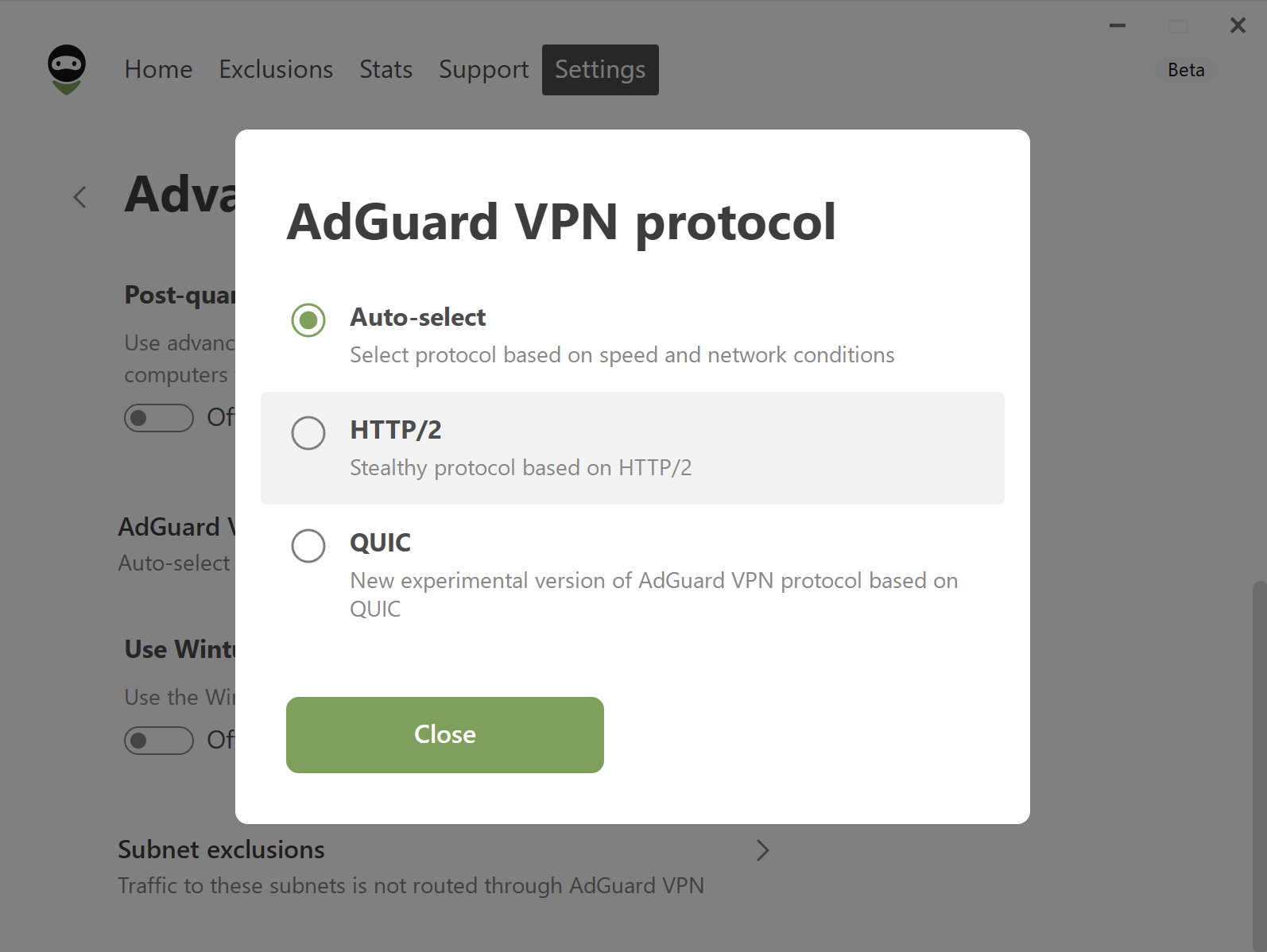
The AdGuard VPN protocol dialog in the Windows app's Advanced settings (from a beta build of version 2.7): Auto-select, HTTP/2 and QUIC.
DNS filtering and extra settings
AdGuard VPN lets you choose the DNS server used through the tunnel, from a list or by hand; picking AdGuard DNS blocks many ads, trackers and phishing domains (paid plans include AdGuard DNS Personal). Advanced settings add a SOCKS5 proxy mode for individual apps, subnet exclusions, an IPv6 switch for services that misbehave over the VPN, and the WinTun driver. Paid users also get a local statistics screen with data usage by location and app.
Benefits
- Cheap for a whole household. $47.88 a year covers 10 devices connected at the same time.
- Keep the VPN on all the time. Excluding the banking app or streaming service that blocks VPNs means you don't have to keep switching it off.
- Built for networks that block VPNs. AdGuard designed its protocol to look like normal HTTPS so that filters aimed at known VPN protocols are less likely to stop it.
- A real free tier. 3 GB a month is enough to protect email and browsing on hotel Wi-Fi, without a trial clock running.
Real-World Uses
- Coffee-shop and airport Wi-Fi: turn on the kill switch and auto-connect, and every app on the laptop is covered the moment it joins a network.
- Watching home content abroad: connect to a city back home to reach your usual streaming catalog while you travel.
- A family plan in all but name: one account on two laptops, three phones, a tablet and the living-room Android TV, still under the 10-device limit.
- Working with a VPN-hostile app: run AdGuard VPN only for your browser, or exclude your bank and work VPN client, so nothing breaks.
Who it's for, and who should skip it
Good fit: everyday users who want a simple, inexpensive VPN for public Wi-Fi, location changes and light streaming, and AdGuard Ad Blocker users who want both from one account. People in countries that throttle standard VPN protocols may find its HTTPS-like protocol connects where others don't.
Skip it if your safety depends on the VPN: choose a provider using audited WireGuard or OpenVPN with an independently audited no-logs policy. Skip it too if you need live chat support (AdGuard answers by email and in-app tickets), or if you want a VPN that also blocks ads inside apps on its own: for that you'd still need AdGuard Ad Blocker or a VPN with a built-in blocker.
Usage Guide
- Download and install AdGuard VPN for Windows from adguard-vpn.com and run the installer (Windows 8 or later).
- Sign in or create an AdGuard account; the free plan starts right away.
- Connect: on the Home tab, pick a location from Fastest locations (or search for a city) and click Connect.
- Set exclusions: open Exclusions, choose Apps or Domains, and add what should bypass the VPN (or switch to "only these" mode).
- Turn on protection: in Settings > App settings enable Kill Switch, Launch at Windows startup and Auto-connect.
- Pick a DNS server in Settings > DNS servers, for example AdGuard DNS for ad and tracker blocking.
- Upgrade from your AdGuard account when 3 GB isn't enough; the same login turns on the paid features on all your devices.
Tips
- If YouTube, Gemini or another Google service stops working over the VPN, turn off the IPv6 interface switch in Advanced settings (added in version 2.10.2).
- Leave the protocol on Auto-select unless a particular network keeps failing; then try HTTP/2 alone.
- To keep a subscription longer than two years, buy another term on the same account and it's added to the end of the current one.
- Discounts on a first purchase don't carry over to renewals, so check the renewal price in your AdGuard account before it renews.
Where it falls short
- No no-logs audit. No outside firm has published an audit of the no-logs policy or the protocol, which Tom's Guide and Comparitech both count against it. The Google Play "independent security review" badge covers the Android app's security, not logging.
- Speed and stability vary. TechRadar called its speed and performance disappointing, while Comparitech measured fast speeds; App Store and Trustpilot users report dropped connections and slow servers in some regions.
- Mail apps over the VPN. AdGuard told one App Store reviewer that sending email through Apple Mail with the VPN on was temporarily restricted to stop spam from its servers.
- Support by ticket only. There's no live chat or phone support, and some App Store reviewers describe slow or unhelpful replies (others on Trustpilot praise fast, tailored answers).
- Free tier is small. 3 GB a month covers browsing, not video.
What Users Say
AdGuard VPN scores well in the app stores: 4.6 out of 5 from 14K ratings on the US App Store and 4.3 from 188K reviews on Google Play (10M+ downloads). Tech sites are cooler, mostly because of the protocol and the missing audit. Trustpilot currently shows no score at all for AdGuard VPN: its page says the rating is unavailable due to a breach of Trustpilot's guidelines, with 290 reviews listed.
Tech press
TechRadar (Aloysius Valentine, 3.5 out of 5, updated November 2023): "AdGuard VPN is a great choice for those looking for a VPN with a lot of features. However, there are also some drawbacks to using AdGuard VPN, including speed issues." Reasons to buy include "Works with streaming platforms", "Reasonable pricing" and "Split-tunneling"; reasons to avoid are "Limited features", "No live chat" and "No free trial".
Tom's Guide (River Hart, 2.5 out of 5, August 2023): "AdGuard VPN isn't a show-stopper, due to a questionable privacy policy and poor unblocking results, but it has a few perks that could make it worth trying. You'll get a reliable performance, a good range of server locations, and apps for virtually all devices." The reviewer also found "a number of DNS leaks when I ran them in integrated mode alongside the ad-blocking AdGuard solution."
Comparitech (Marc Dahan, 3.5 out of 5, September 2023) lists "Fantastic speeds", "Well-designed apps" and "Allows up to ten simultaneous connections" as pros, and "Uses in-house VPN protocol", "Doesn’t work in China" and "Poor customer support" as cons: "It has an excellent privacy policy and works well without much of a fuss. However, it does have one rather significant drawback: It uses a homegrown VPN protocol."
Tom's Guide (George Phillips, January 22, 2026) reported on the protocol going open source: "AdGuard VPN has publicly released its TrustTunnel protocol. It's now open-source and free to explore, audit, and build upon." The 2023 reviews above predate that change.
App Store (4.6 out of 5, 14K ratings)
nruble, "Most functional vpn on iOS" (04/15/2024): "It's fast, easy to configure and as far as I've seen it's literally the only vpn on iPhone that has split tunneling. It works a little different than normal split tunneling but it still makes it possible to run this 24/7 without getting locked out of your banking apps, etc that normally block vpn connections."
BurnOutNotFadeAway, "I don’t recommend this." (06/14/2023): "TLDR: connection drops often and reveals your IP. The connection and reconnection will alert your ISP that you are using a VPN."
Shawn MacApple, "Lousy Customer Support": "Customer support was slow and was of absolutely no help." AdGuard replied: "There is a temporary issue with sending emails via Apple Mail when VPN is active - we’re working on a fix."
Why do u caree?, "Terrible VPN, horrible speeds, pathetic customer support": "I am sitting on a gigabyte connection and I’m getting no more than 30 Mbps." AdGuard's reply: "Replies in Russian to a user expecting English support are not how this should work, and we’d like to check what went wrong."
Trustpilot (no score shown, 290 reviews)
- Paros Air (5 stars, September 27, 2026), "Excellent support": "The reply was not a generic template but a clear and practical solution tailored to my specific situation."
- Randy (5 stars, August 20, 2026): "In less than 1 hour I had a very quick and very good email reply from them!!"
- Ana Novak (4 stars, June 25, 2026): "The connection stays steady enough and it does not slow down my regular internet speeds."
- AnthonyG (2 stars, March 12, 2026): "The main problem with Adguard VPN is the browser extension"
- Mascot Ben (1 star, March 12, 2026): "extremely slow and keep disconnecting"
The pattern
Users like the price, the clean apps, the 10-device limit and above all the per-app exclusions, which let them leave the VPN on all day. The complaints are about dropped connections and uneven speeds on some servers, plus support that ranges from very good to frustrating. Reviewers who care most about privacy stop short of recommending it because of the in-house protocol and the lack of an audit.
Comparisons
AdGuard VPN free vs. paid
The free version gives you the same apps and protocol but caps you at 3 GB a month, 2 devices at a time and fewer locations. Paid adds all 75+ locations, unlimited speed and traffic, 10 devices, the statistics screen and AdGuard DNS Personal.
AdGuard VPN vs. AdGuard Ad Blocker
They're different products. AdGuard VPN changes your IP address and encrypts traffic; its DNS option can block some ads and trackers but, in AdGuard's own words, "cannot guarantee the same level of filtering as a full-fledged ad blocker." AdGuard Ad Blocker filters ads, trackers and dangerous sites inside browsers and apps. The two can run together.
Editions and Pricing
Every paid plan has the same features; only the term differs. Prices from the adguard-vpn.com order page on November 15, 2026, before local sales tax:
| Plan |
Price |
Per month |
Devices |
Refund |
| Free |
$0 (3 GB a month) |
$0 |
2 |
Not applicable |
| 1 month |
$11.99 |
$11.99 |
10 |
Non-refundable |
| 1 year |
$47.88 |
$3.99 |
10 |
30-day money-back guarantee |
| 2 years |
$71.76 |
$2.99 |
10 |
30-day money-back guarantee |
Plans renew automatically at the end of each term. You can pay by card, PayPal or cryptocurrency; licenses paid with crypto don't auto-renew.
FAQs
Does AdGuard VPN keep logs?
AdGuard VPN says it doesn't store activity or connection logs and only collects minimal usage information to troubleshoot technical problems, which it says can't be tied to your activity. No independent audit of that policy has been published.
Does AdGuard VPN support WireGuard or OpenVPN?
No. AdGuard VPN only uses its own TrustTunnel protocol over HTTP/2 or HTTP/3 (QUIC). You can't connect to its servers with a WireGuard or OpenVPN client.
Does AdGuard VPN still work on Windows 7?
Only an old version. AdGuard VPN 2.4 was the last release for Windows 7; current versions need Windows 8 or later, and a Windows 7 reinstall gets v2.4, which no longer receives updates.
How do I get a refund on AdGuard VPN?
For a 1-year or 2-year AdGuard VPN plan bought on adguard-vpn.com, email support@adguard-vpn.com within 30 days and the refund is granted whatever the reason; the subscription stops when it's issued, and the money usually arrives in 5 to 10 business days. Monthly plans aren't refundable, and plans bought through the App Store or another reseller follow that store's refund rules.
Can I use AdGuard VPN on more than 10 devices?
Not on one subscription. AdGuard VPN allows 10 simultaneous connections per paid account; for more you need a second subscription on another email address, or you disconnect one of your devices to free a slot.
Is AdGuard a Russian company?
AdGuard was started in Moscow in 2009 and is now registered and headquartered in Cyprus as Adguard Software Limited, an EU country covered by GDPR. Tom's Guide notes the company says it doesn't host data in Russia or on Russian-owned servers.
Does the AdGuard VPN price go up at renewal?
The order page lists the same renewal price as the first payment for each regular plan ($47.88 a year, $71.76 for two years), but AdGuard's FAQ says discounts applied to a first purchase, such as holiday sale prices, don't carry over to renewals.
System Requirements
- Windows: Windows 11, 10, 8.1 or 8 (version 2.4 is the last for Windows 7); installer about 66 MB
- Other apps: macOS, iOS, Android, Android TV and Linux, plus Chrome, Edge, Firefox and Opera extensions and router setup
- Account: a free AdGuard account; one paid subscription covers 10 devices across platforms
Conclusion
AdGuard VPN is worth $47.88 a year if you want an inexpensive, easy VPN for everyday privacy, public Wi-Fi and location changes across a lot of devices, especially if you already use AdGuard's ad blocker. The one reason to pick it over similar budget VPNs is its split tunneling by app and by site on every platform, iPhone included. The main reason not to is trust: an in-house protocol and an unaudited no-logs policy make it the wrong choice when privacy really matters. Try the free 3 GB first; if it holds up on your network, the 1-year plan with its 30-day refund is the sensible buy.
Download FreeBuy Now