AdGuard Ad Blocker: System-Wide Ad and Tracker Blocking for Your PC, Mac and Phone
AdGuard Ad Blocker is a paid ad blocker that runs as an app on Windows, not as a browser extension, so it strips ads, trackers and phishing sites from every browser and every program on the PC. One license, from $29.88 a year for 3 devices or $79.99 for life, also covers AdGuard for Mac, Android and iOS.
Browser extensions only see the browser they're installed in. Your PDF reader, music player, game launcher and messenger keep sending telemetry and showing ads, and a second browser starts from zero. AdGuard sits underneath all of them and filters the PC's network traffic in one place. Version 8.0, released in August 2026, rebuilt the Windows app around that idea with a new interface, per-app control and a statistics view that shows which apps talk to which companies.
Quick facts
- Windows version: AdGuard for Windows 8.0.4, released November 5, 2026 (8.0.0 arrived on August 20, 2026)
- Developer: Adguard Software Limited (Limassol, Cyprus), making AdGuard for Windows since 2009
- What the license covers: AdGuard for Windows, Mac, Android and iOS, on any mix of devices: Personal up to 3, Family up to 9
- Price: Personal $29.88 a year or $79.99 lifetime; Family $65.88 a year or $169.99 lifetime
- Trial: 14 days for the Windows and Mac apps, 7 days on Android
- Windows requirements: Windows 10 or 11, 6 GB RAM, 4 GB free disk space
- What we checked: the offline installer for AdGuard for Windows (setup-8.0.5595.exe, 100.3 MB, file version 8.0.5595.0, digitally signed by Adguard Software Limited) downloaded on November 8, 2026, and all four licenses on the order page on November 8, 2026: Personal 1 year $29.88 (renews every 12 months), Personal Lifetime $79.99, Family 1 year $65.88 and Family Lifetime $169.99 (both lifetime licenses one-time). We didn't install it and measure blocking ourselves.
Download Free TrialBuy Now
Overview
AdGuard Ad Blocker is the paid side of AdGuard's lineup. The free browser extensions block ads in one browser; the apps for Windows, Mac and Android filter the whole device, and the license turns on the premium features of AdGuard for iOS. This page focuses on the Windows app, which AdGuard itself treats as its flagship, but you buy one license and install it wherever you need it.
On Windows, AdGuard installs a network driver and routes each app's traffic through its filters. It blocks requests to ad and tracker servers, removes ad elements from pages, and, with HTTPS filtering, looks inside encrypted connections so it can remove ads served from the same domain as the content (YouTube and Facebook are the textbook cases). It also includes phishing and malware protection, DNS filtering, cookie-notice blocking and parental control.
Don't confuse it with AdGuard VPN (which hides your location) or AdGuard DNS (a DNS service that blocks ads at the network level). Those are separate products with separate subscriptions.
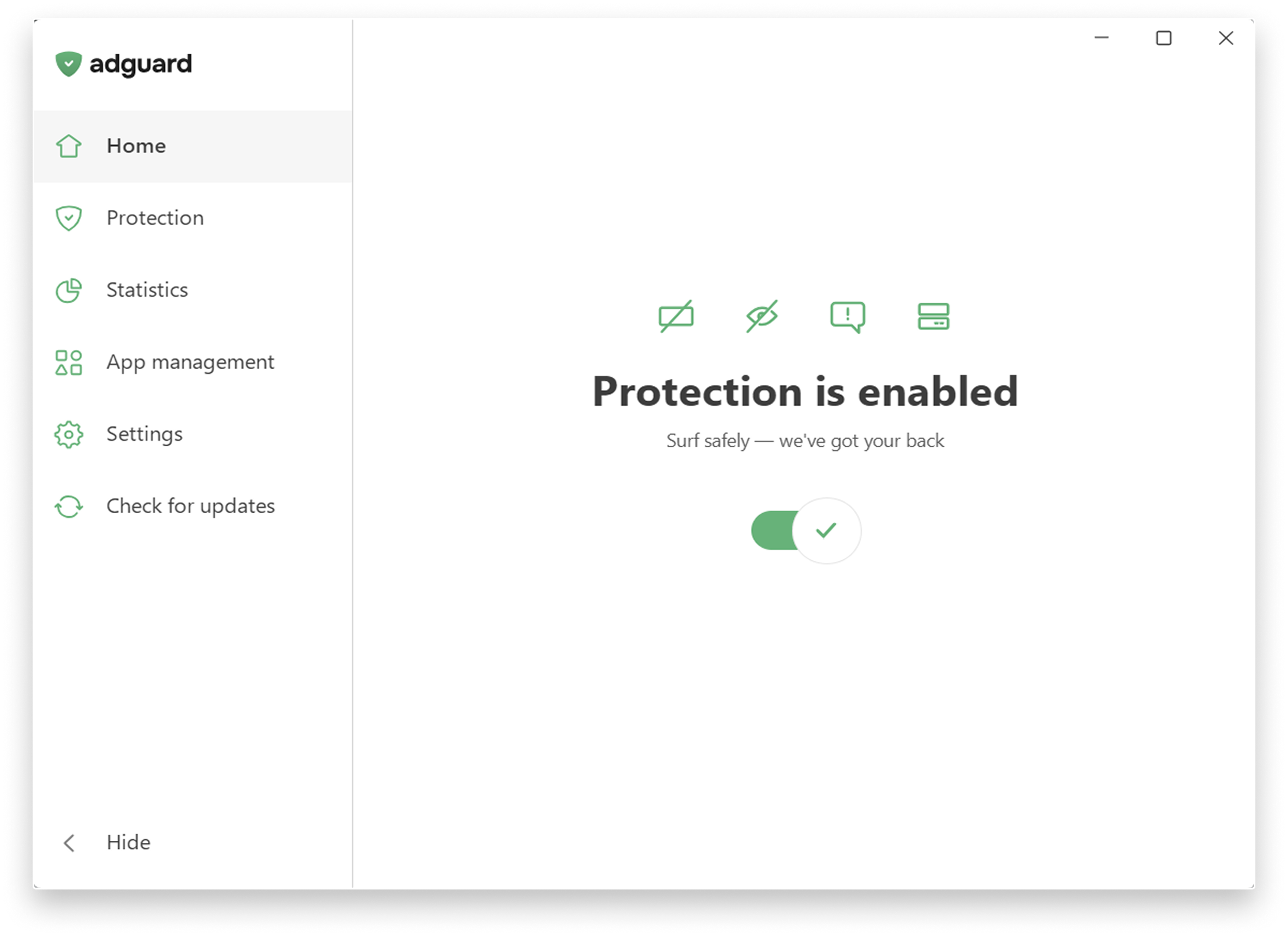
The AdGuard for Windows 8.0 home screen: one switch turns protection on, and the four icons above it toggle ad blocking, tracking protection, annoyance blocking and DNS protection.
Features
Ad blocking in every browser and app
AdGuard for Windows removes popups, banners, video ads and the ads Windows itself shows, in Chrome, Firefox, Edge, Brave, Opera and any other browser at once, plus desktop programs. Because the filtering happens below the browser, there's nothing to reinstall when you switch browsers, and pages load without the ad scripts. Annoyance blocking also hides cookie notices and in-page popups, and an Extensions switch lets you add userscripts and userstyles.
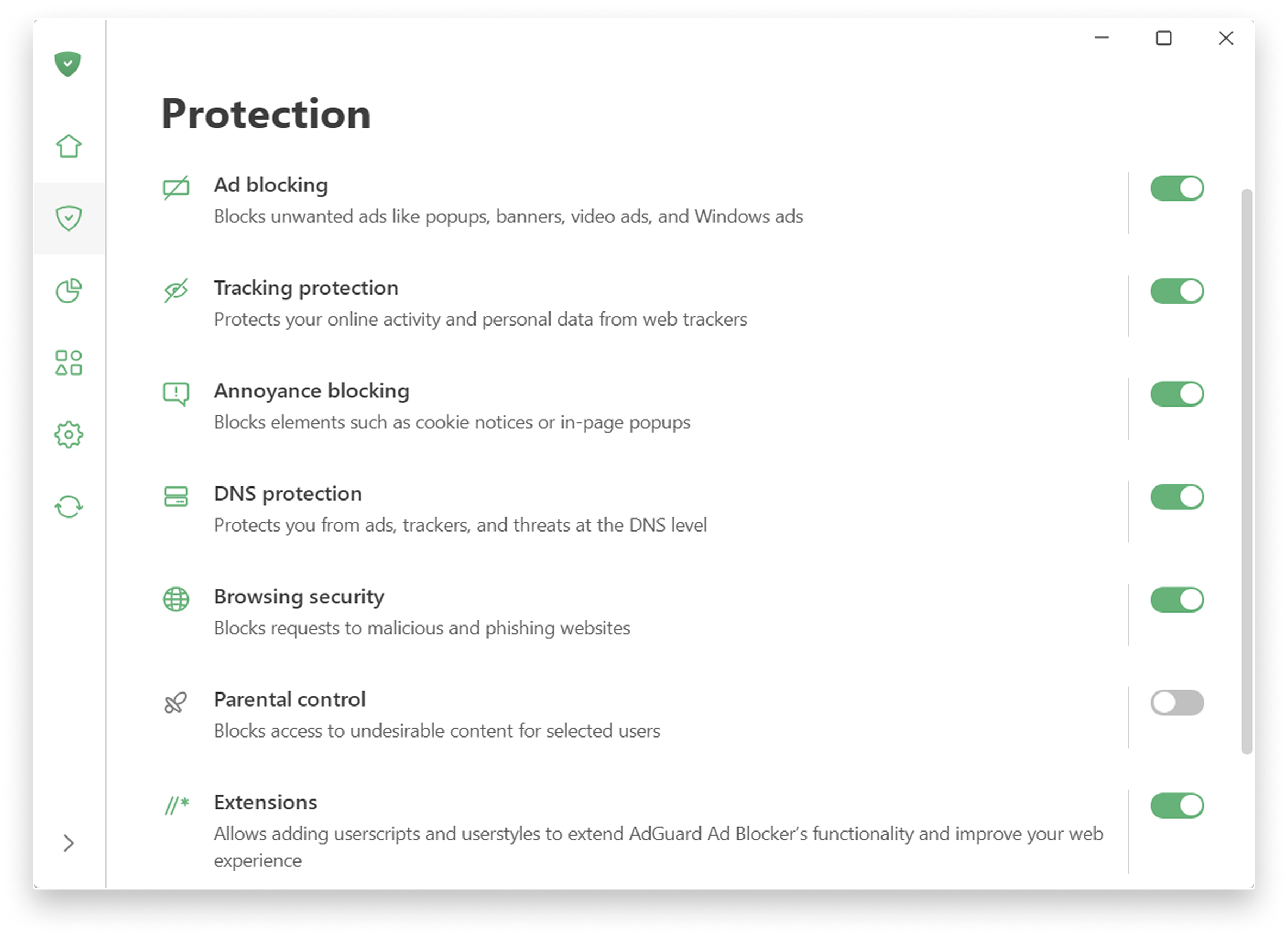
AdGuard for Windows' Protection section: separate switches for ad blocking, tracking protection, annoyance blocking, DNS protection, browsing security, parental control (off here) and extensions.
Tracking protection with levels you choose
AdGuard's tracking protection blocks trackers and web analytics and comes in levels, from a comfortable default to a stricter mode that also deletes cookies. The Custom level lets you pick each method yourself: remove tracking parameters from links, hide your search queries from the sites you click through to, send Global Privacy Control and Do Not Track signals, delete third-party cookies, block website notifications and turn on anti-DPI protection.
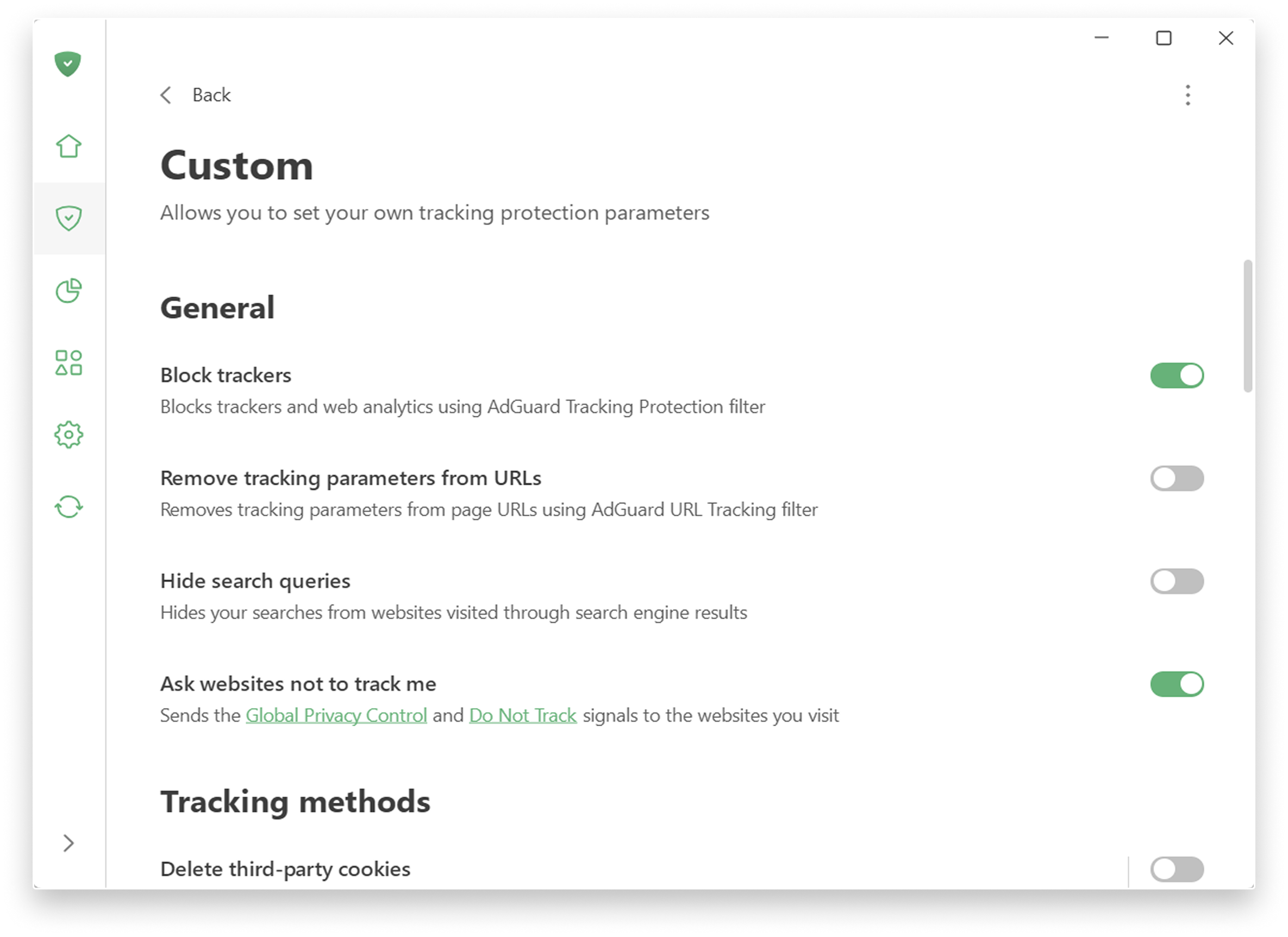
The Custom tracking protection level in AdGuard for Windows: switches for blocking trackers, removing tracking parameters from URLs, hiding search queries, asking sites not to track you and deleting third-party cookies.
App management: decide how each program is filtered
AdGuard 8.0 lists every app that goes online in App management. For each one you choose whether its traffic goes through AdGuard, whether ads and trackers are blocked, and whether its HTTPS traffic is filtered. HTTPS filtering is on for browsers by default and off for most other apps, to avoid breaking them; you can switch it on for, say, a messenger that's chatty with trackers.
A Filter unknown apps setting handles programs AdGuard hasn't seen before: their unencrypted traffic is filtered, and HTTPS interception stays off until you decide otherwise.
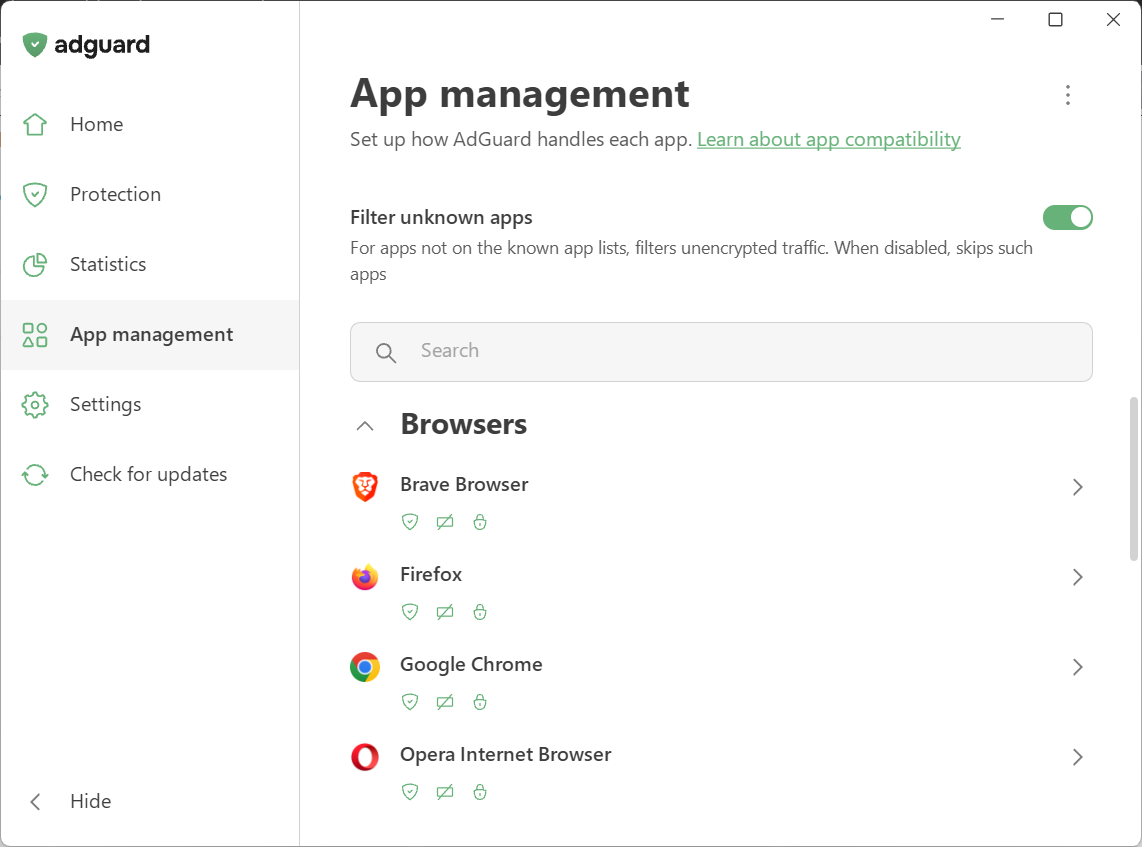
App management in AdGuard for Windows 8.0: the Filter unknown apps switch and the browsers it found, each with icons for routing, ad blocking and HTTPS filtering.
Statistics that show who your apps talk to
AdGuard's Statistics section counts ads, trackers and total requests, broken down by app, by domain, by DNS request and by company. It answers questions you couldn't easily answer before: which program sends the most tracking requests, and to whom. AdGuard's own research on popular Windows software found telemetry and ad requests coming from messengers, game launchers, media players and PDF readers, not only from websites, which is the case for filtering the whole PC.
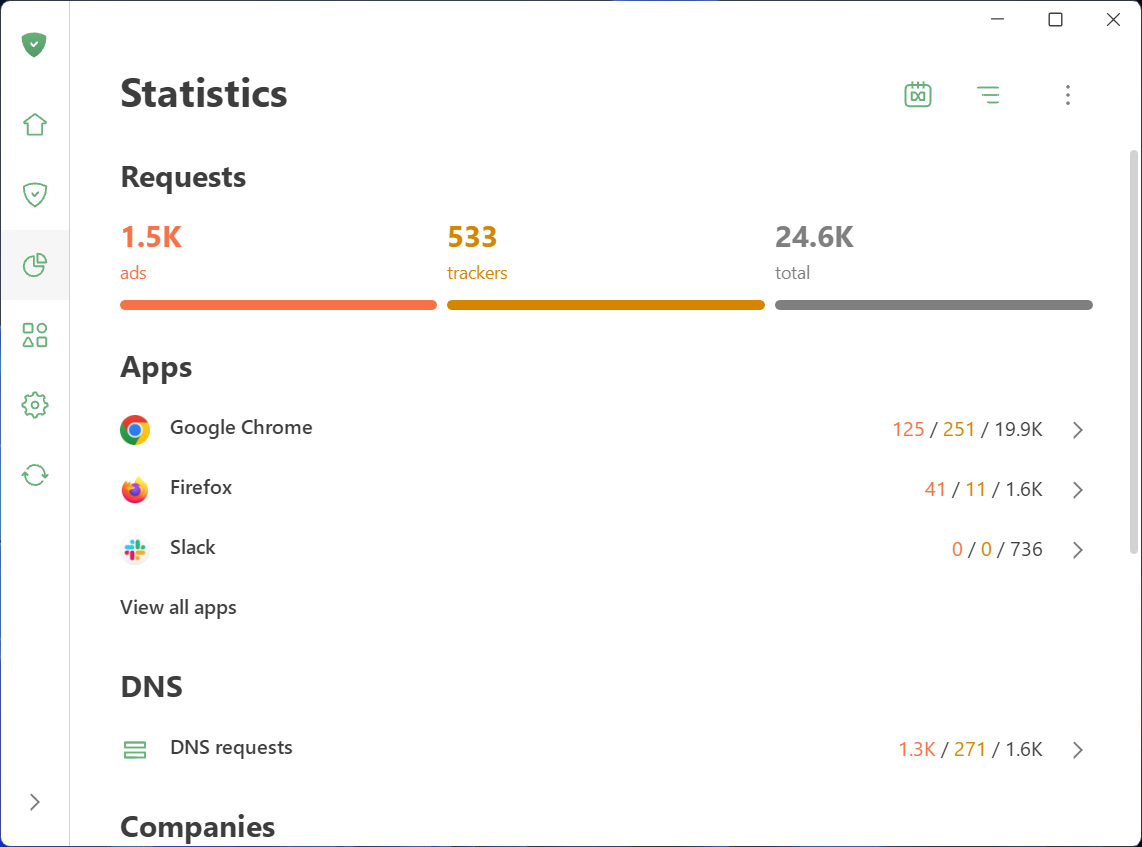
AdGuard for Windows Statistics: 1.5K ads and 533 trackers out of 24.6K requests, with per-app counts for Chrome, Firefox and Slack and a separate line for DNS requests.
Browsing security, DNS protection and parental control
- Browsing security checks the sites you visit against AdGuard's database and blocks phishing and malware pages.
- DNS protection lets you pick a DNS server and filter ads, trackers and threats at the DNS level as an extra layer.
- Parental control blocks adult and other unwanted content for selected Windows users, hides inappropriate sites from search results and takes your own blocklists.
Benefits
- One setup for the whole PC. Every browser, every user profile and the desktop apps share the same filters.
- Privacy beyond the browser. Desktop software that phones home gets the same treatment as websites, and you can see it happening.
- One purchase for the family's devices. A Family license puts the full apps on up to 9 Windows PCs, Macs and phones, mixed however you like.
- A lifetime option. If you'd rather not subscribe, $79.99 once covers 3 devices for good, which pays for itself against the yearly plan in under three years.
Real-World Uses
- A shared family PC. Turn on parental control for the kids' Windows account while your own account stays unrestricted, and block ads in whatever browser each person likes.
- Quieting chatty software. Open Statistics, see which app sends hundreds of tracking requests, then turn on HTTPS filtering for that app in App management.
- Video sites without the pre-rolls. HTTPS filtering is what lets AdGuard remove ads that come from the same domain as the video.
- A laptop, an Android phone and an iPhone on one license. The Personal license covers all three.
Who It's For, and Who Should Skip It
AdGuard Ad Blocker suits people who want ads and tracking gone everywhere on the PC, not only in one browser, families who want one license for several devices and platforms, and privacy-minded users who want to see what their apps send.
Skip it if you only use one browser and only care about web ads: a free extension (AdGuard's own or uBlock Origin) does that well at no cost. Skip it on an older or low-memory PC, too: AdGuard for Windows 8.0 needs Windows 10 or 11 and lists 6 GB of RAM, and Windows 7, 8 and 8.1 are limited to older AdGuard versions. If the idea of an app installing its own root certificate to read your HTTPS traffic bothers you, a DNS-level blocker is the gentler option. And if you mostly need ad blocking on an iPhone, know that Apple's rules limit any iOS blocker to Safari and DNS filtering.
Usage Guide
- Download AdGuard for Windows from adguard.com and run adguardInstaller.exe. Accept the User Account Control prompt, choose the install folder and click Install.
- On first launch, accept the privacy documents and pick your protection settings. The 14-day trial starts right away.
- On the Home screen, make sure the main switch reads Protection is enabled and the four icons (ads, tracking, annoyances, DNS) are on.
- Open Protection to choose a tracking protection level and switch on browsing security or parental control.
- Visit a few sites, then open Statistics to see what was blocked and which apps send the most requests.
- In App management, turn on HTTPS filtering for any app you want filtered more deeply, or exclude an app that misbehaves.
- After buying, log in to the app with the email you used at checkout (or enter the license key) under Settings. Repeat on your other devices.
Before you buy
- The 1-year licenses renew automatically. The order page shows the Personal and Family 1-year plans renewing every 12 months. Cancel in your AdGuard account if you don't want that; the license stays valid until it expires.
- Lifetime is the better deal if you'll keep it. Personal Lifetime costs as much as about 2.7 years of the yearly plan.
- Use the trial on your own sites. Check the video sites and apps you use most during the 14 days, since that's where ad blockers differ.
- Refunds: AdGuard's purchase FAQ promises a 30-day money-back guarantee; refunds are requested at support@adguard.com.
Download Free TrialBuy Now
Where it falls short
- YouTube and Twitch are a moving target. The most common complaint in user reviews is ads slipping through on these sites for a while, sometimes on PC but not on mobile or the other way round.
- Anti-adblock walls can still spot it. AdBlock Tester's review lists "Can't dodge detection" as a con.
- HTTPS filtering has a trade-off. To read encrypted traffic AdGuard installs its own root certificate, so your browser sees AdGuard's certificate instead of the site's real one. AdGuard skips banks, payment systems and thousands of other sensitive sites by default and can skip all sites with Extended Validation certificates, but some users won't accept the principle.
- Some apps break. Filtering all traffic means the occasional desktop program misbehaves; AdGuard asks users to report those for hotfixes, and you can exclude the app meanwhile.
- Support is by email only. There's no live chat, and several critical reviews complain about slow or missing replies.
What Users Say
AdGuard has one of the biggest review footprints of any ad blocker, and it's mostly very positive. The criticism clusters around streaming-site ads and support.
Trustpilot: 4.7 out of 5 from 9,815 reviews
About 86% of AdGuard's Trustpilot reviews give 5 stars and 3% give 1 star. A few recent ones:
- "Best adblocking experience by far in terms of effectiveness and consistency." (Alberto Sanchez Acero, 5 stars, August 4, 2026)
- "It worked very well. Two days before the trial version expired I bought a license." (Anton, 5 stars, September 4, 2026)
- "some ads bypass on pc not on mobile and vice versa on both twitch and youtube, but overall great" (Awkward, 4 stars, October 25, 2026)
- "Block ads efectively, but it isn't very stable on Firefox yet" (Tan Phan, 4 stars, October 31, 2026)
On the critical side, Coral Hull (1 star, July 27, 2026) wrote: "They do not inform potential customers that their product only works on YouTube intermittently, or not at all." She says she reported it to support repeatedly and wasn't refunded. Layla Song (1 star, September 8, 2026) says the Android app stayed greyed out on her new phone and her support messages went unanswered.
Independent reviews
PCRisk (Karolis Liucveikis, score 4.5, updated November 15, 2025)
Pros: "Excellent ad-blocking: Blocks nearly all ads, including YouTube and in-app ads, for a much cleaner browsing experience." and "Cross-platform support: One subscription covers all major platforms (Windows, macOS, Android, iOS) with dedicated apps." Cons: "Needs tweaking: Extra filters or settings may be needed for best results." and "iOS limitations: Can't block ads in all apps due to Apple restrictions; mainly limited to Safari or DNS filtering." Verdict: "AdGuard is definitely worth the investment."
AdBlock Tester (Nikolai Altman, updated October 27, 2026)
AdGuard passed all 22 of the site's tests for a 100/100 score. "AdGuard is one of those apps I can recommend without hesitation." Its cons were "Can't dodge detection." and "No 24/7 live chat support.", and the reviewer waited more than 24 hours for a human email reply. The site earns commissions from its links, so read it with that in mind.
App stores and AdGuard's own site
- Capterra: 4.6 out of 5 from 56 reviews. The critical notes there mention AdGuard occasionally blocking a pop-up window that was actually needed, and slowing Windows startup.
- Microsoft Store: the Store edition of AdGuard averages 4.1 out of 5 from 19 ratings.
- AdGuard's website: 4.7 out of 5 from 20,497 app reviews collected on adguard.com. One Windows user there, Miguel, points out: "Parental control is only on windows".
The themes
People praise how thoroughly AdGuard blocks ads, that it works in apps as well as browsers, and that one license covers phones and computers. The complaints repeat too: YouTube and Twitch ads getting through between filter updates, slow email support, and the odd app or browser that misbehaves with filtering on. We found no pattern of billing problems or data-handling concerns in the reviews we read.
Comparisons
AdGuard Ad Blocker vs. browser extensions (uBlock Origin, AdGuard's free extension)
Extensions are free and excellent in the browser they live in. AdGuard's app adds what an extension can't reach: other browsers, desktop apps, Windows' own ads, and a per-app view of tracking. If you live in one browser and don't care about app telemetry, an extension is enough.
AdGuard Ad Blocker vs. DNS blockers (AdGuard DNS, Pi-hole)
DNS blocking works for every device on a network with no software installed, but it can only allow or block a whole domain. When an app serves content and tracking from the same domain, DNS has to choose between breaking the app and letting the tracking through. AdGuard's app filters by full address, so it can block only the tracking request. Many people use both.
Editions and Pricing
Every license covers the same apps; you choose the number of devices and whether to subscribe or pay once. Prices are what the order page showed on November 8, 2026.
| License |
Devices |
Price |
Term |
| Personal, 1 year | 3 | $29.88 | Renews every 12 months |
| Personal, Lifetime | 3 | $79.99 | One-time payment |
| Family, 1 year | 9 | $65.88 | Renews every 12 months |
| Family, Lifetime | 9 | $169.99 | One-time payment |
The Buy Now button on this page is for the Personal 1-year license; the lifetime and Family licenses are on AdGuard's license page. You can also upgrade a Personal license to Family later from your AdGuard account.
FAQs
Does one AdGuard license work on Windows, Mac, Android and iPhone?
Yes. AdGuard Ad Blocker licenses are universal: a Personal license covers any 3 devices and a Family license any 9, across Windows, macOS, Android and iOS. On iOS you log in to the AdGuard app with your account to turn on its premium features.
Does AdGuard for Windows still run on Windows 7 or 8.1?
Not the current version. AdGuard for Windows 8.0 and later need Windows 10 or 11, and Windows 8 and 8.1 support ended with 8.0. AdGuard says users of older Windows can keep using the last version that supports their system.
How do I move my AdGuard license to a new computer?
AdGuard lets you free up a device slot: remove the license from the old device in the app's License section or in your AdGuard account, then activate it on the new one.
Is AdGuard's HTTPS filtering safe for online banking?
AdGuard doesn't filter banks, payment systems and other sites with sensitive personal data by default, using a list of thousands of exclusions, and your connection to every site stays encrypted. You can also exclude all sites with Extended Validation certificates.
Is AdGuard Ad Blocker the same as AdGuard VPN?
No. AdGuard Ad Blocker blocks ads, trackers and dangerous sites; AdGuard VPN hides your IP address and location. They're bought separately.
What happens if I lose my AdGuard activation code?
AdGuard keeps every license bound to your email address in your AdGuard account, so you can see your activation codes there at any time.
Can I protect more than 9 devices with AdGuard?
Yes, either by buying more than one license or by contacting AdGuard's sales team at sales@adguard.com for a larger license.
System Requirements
- AdGuard for Windows: Windows 10 or 11, 2-core 2.0 GHz processor, at least 6 GB RAM, at least 4 GB free disk space; the offline installer is about 100 MB
- Also covered by the license: AdGuard for Mac, AdGuard for Android (installed from AdGuard's site as an APK or from the Samsung, Xiaomi and Huawei stores) and AdGuard for iOS
Conclusion
AdGuard Ad Blocker is worth it if you want ads and tracking blocked across the whole PC and your other devices, not just in one browser. Independent tests rate its blocking at or near the top, version 8.0 adds real per-app control and visibility, and $29.88 a year for three devices (or $79.99 once) is fair for what you get.
The main reason not to buy: if you use one browser on one computer and only mind web ads, a free extension already does most of this. And be ready to wait on email support if YouTube ads sneak back in.
Download Free TrialBuy Now