AeroAdmin Business: Help Desk Remote Support with Unlimited Sessions and Billable Session Reports
AeroAdmin Business is the help desk license for AeroAdmin, a portable Windows remote desktop program that runs from one 2.6 MB file with no installation. It costs $159.90 on the order page for one operator computer and lifts AeroAdmin's limits on simultaneous sessions, adds session reports you can bill clients from, 100 SOS support requests a month and priority support. It's built for small IT support businesses and in-house help desks that work on Windows PCs.
The step up from Pro is about volume and paperwork: if you're juggling several clients' screens at once and then reconstructing your hours from memory at the end of the month, Business is the license that handles both.
Quick facts
- Version: AeroAdmin 4.93 (build 3828), released September 15, 2026
- Developer: AeroAdmin LLC
- Platform: Windows XP SP3 through Windows 11 and Windows Server 2003 to 2016, 32- and 64-bit. Mac and Linux only as the controlling computer under WINE. No Android or iOS app
- License: one operator computer, unlimited remote computers. Only the controlling side needs a license
- Price: $159.90 for AeroAdmin Business - 1 PC on the order page. AeroAdmin's own buy page lists Business at $189.90 a year
- Adds over Pro: unlimited simultaneous sessions (Pro: 3), session reports, 100 SOS messages a month (Pro: 30), priority support
- Free version: the same program, limited to about 17 hours and 20 endpoints a month by ID
- Guarantee: 10-day money-back guarantee
- What we checked: the AeroAdmin.exe we downloaded from aeroadmin.com is version 4.93, 2.63 MB, digitally signed by Aeroadmin LLC; the order page showed AeroAdmin Business - 1 PC at $159.90, with no license term stated, on November 8, 2026. We didn't buy a license or generate a session report ourselves.
Buy NowDownload Free Trial
Overview
AeroAdmin is one small program for both ends of a connection. Your client runs it and reads you an ID; you type the ID into your copy and take control once they accept, or connect without anyone present if you've set up unattended access. AeroAdmin's servers get the connection through NAT and firewalls, and you can also connect directly by IP on a local network.
Business isn't a separate download. You buy the license, add your operator computer's AeroAdmin ID in the AeroAdmin account portal, restart the connection, and the window header switches to BUSINESS. Your clients keep the free copy, so rolling it out costs nothing on their side.

The AeroAdmin main window (version 4.7, shown with a Corporate license; a Business license looks the same apart from the header).
What Business Adds
Session reports for billing clients
AeroAdmin Business generates session reports in your AeroAdmin user account for any period you choose. Each line lists the operator's ID and name, the remote client's ID and name, the session start and end date and time, and the duration in minutes. Reports download as a CSV file for Excel, and version 4.91 added XLS. AeroAdmin pitches it plainly: use it to bill clients by your support rates. Neither the free version nor Pro has reports.
Unlimited simultaneous sessions
AeroAdmin Business lets one operator computer control as many remote computers at the same time as you can manage, where Pro stops at three and the free version at two. That matters when you leave a long update running on one client while you work on another, or watch several screens during a rollout.
100 SOS requests a month and priority support
AeroAdmin Business raises the SOS message allowance to 100 a month. Your users press the SOS button in AeroAdmin, type their problem, and you get an email ticket with their ID and computer name, ready to connect. Business also moves your own tickets with AeroAdmin into priority support.
Everything in Pro
AeroAdmin Business keeps all of Pro: no monthly connection-time cap by ID, file transfer that resumes after a dropped connection, a contact book you can share between operator PCs as a file, unattended access through the AeroAdmin service, remote reboot into normal or safe mode, clipboard and file copy-paste, multi-monitor support, voice chat and screen recording, all encrypted with AES and RSA.
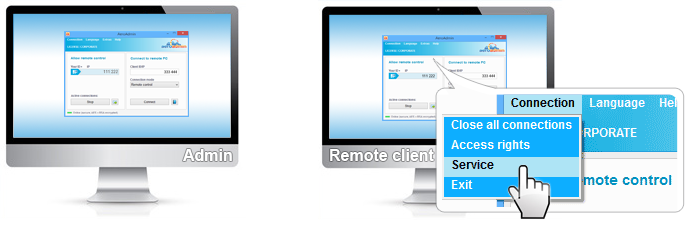
Installing AeroAdmin as a service on the remote client (Connection, Service) for unattended access.
Real-World Uses
- Pay-per-hour IT support: export the month's session report and invoice each client from the durations instead of a hand-kept log.
- Small MSP: run maintenance on several unattended client PCs at once without hitting a session limit.
- In-house help desk: staff send SOS requests from AeroAdmin, and the reports show management how much remote time each department takes.
Who It's For, and Who Should Skip It
AeroAdmin Business fits a technician or small support team that charges for time, or regularly works on more than three Windows PCs at once.
Skip it if you don't bill by the session and rarely run more than three connections: AeroAdmin Pro does the same remote work for less. Skip AeroAdmin altogether if you need to control Macs, Linux machines or phones. And if you want your own branded AeroAdmin exe, MSI deployment through Active Directory or central control of access rights, those are Corporate-only features.
Before you buy
- Check the license term. AeroAdmin sells 1-, 2- and 3-year licenses only, with no lifetime option. The AeroAdmin Business - 1 PC order item doesn't state its term, so check your license email or ask AeroAdmin's sales team if the term matters to you.
- One seat per working technician. Each operator computer that's in use at the same time needs its own seat, and a license can be moved to another computer only once a week.
- Test on the free version first. AeroAdmin doesn't do paid trials, and the guarantee is 10 days, so check speed and stability on your clients' real connections before you buy.
- Company details: the website lists a San Jose, California address, while the installer's code-signing certificate is issued to Aeroadmin LLC in Moscow, Russia. Organizations with vendor-origin rules for remote access tools should check this first.
Where it falls short
- Stability: TechRadar saw brief drop-outs every 10 to 15 minutes on a steady 25 Mbps line, and users mention lag compared with TeamViewer and AnyDesk. Unlimited sessions only help if each one holds.
- Windows only on the remote side, and the interface looks dated.
- Reports are basic: times, durations and IDs, with no notes or ticket integration.
- Older refund complaints: two 2019 Trustpilot reviewers describe drawn-out refund disputes over premium licenses.
What Users Say
Reviews cover AeroAdmin as a whole rather than one license, and there aren't many. The praise is for simplicity and price; the complaints are about lag and stability.
TechRadar
Michael Graw (April 2020, 4.5 out of 5): "AeroAdmin is an extremely affordable software solution for remote computer access. It's particularly useful for IT helpdesks thanks to the contact book and quick connection features."
His main reservation: "AeroAdmin's performance was the biggest issue we found with this software. Even on a 25 Mbps connection with no interruptions, the remote desktop connection dropped out briefly once every 10 to 15 minutes."
SaaSworthy (4.3 out of 5 from 23 ratings)
Kalidaspandian R (September 2024, 5 stars), admin for 24 data entry centers: "I will use AeroAdmin to rectify those issues and also it's easy to record those sessions. It saves my time, money and effort." He'd like it "faster and stable like Teamviewer."
Scott F (February 2019, 5 stars), who built a maintenance service on it: "Remote client access and support including unattended access. I've begun building a subscription system with it for unattended monthly computer maintenance for customers, too!" He also wished "it was a bit more advanced in the area of unattended access."
Ganesh S (August 2024): "Compared to other alternatives it is very slow & buggy".
Trustpilot (3.9 out of 5 from 3 reviews)
Caitlin (September 2022, 5 stars) uses it daily and calls the support "very reliable and helpful", while Nicolle Evans (October 2019, 1 star) found that "the support process was long and tedious with no actual resolution."
Editions and Pricing
Order page prices on November 8, 2026, for AeroAdmin Business. For comparison, AeroAdmin Pro for one operator PC is $99.99 for a year, and AeroAdmin's buy page lists Corporate at $239.90 a year.
| License |
Operator PCs |
Price |
Per seat |
| AeroAdmin Business - 1 PC | 1 | $159.90 | $159.90 |
| AeroAdmin Business - 2 PC | 2 | $220.00 | $110.00 |
| AeroAdmin Business - 5 PC | 5 | $395.00 | $79.00 |
| AeroAdmin Business - 10 PC | 10 | $517.90 | $51.79 |
Buy Business, 1 PC ($159.90)Buy Business for 2 PCs ($220.00)Buy Business for 5 PCs ($395.00)
FAQs
Do my clients need AeroAdmin Business too?
No. AeroAdmin Business is only needed on the operator computer that starts the connections. Your clients run the free AeroAdmin, and there's no limit on how many of them you support.
Can I upgrade from AeroAdmin Pro to Business later?
AeroAdmin Business uses the same program as Pro, so nothing needs reinstalling: the license attached to your operator ID in the account portal decides which features you get. Ask AeroAdmin's sales team how they credit a Pro license you already paid for.
What's in an AeroAdmin session report?
An AeroAdmin Business session report lists, for the period you choose, the operator ID and name, the remote client ID and name, the start and end date and time, and the duration in minutes, as a CSV or XLS file.
Does AeroAdmin Business include branding?
No. A branded AeroAdmin exe with your logo, company name, phone number and preset access rights is a Corporate feature, along with SOCKS proxy support and MSI deployment through Active Directory.
Can two technicians share one AeroAdmin Business license?
Not at the same time. Each operator computer working simultaneously needs its own seat, which is what the 2-PC to 10-PC orders are for.
Can AeroAdmin Business control Mac or Linux computers?
No. AeroAdmin controls Windows computers only. A Mac or Linux machine can act as the operator by running AeroAdmin under WINE.
System Requirements
- Windows XP SP3, Vista, 7, 8, 10 or 11; Windows Server 2003, 2008 R2, 2012 R2 or 2016; 32- or 64-bit
- About 2.6 MB for the program file; no installation needed
- Internet for connections by ID, or a local network for connections by IP
Conclusion
AeroAdmin Business is worth it for a support business that bills by time: the session reports alone can replace a manual time log, and unlimited simultaneous sessions remove Pro's three-screen ceiling, for $159.90 per operator seat and far less per seat in the 5- and 10-PC packs.
If you don't bill by session and rarely juggle more than three screens, AeroAdmin Pro is the better buy. And whichever license you pick, test the free version on your clients' real connections first, because stability is the complaint reviewers raise most.
Buy NowDownload Free Trial