AeroAdmin Pro: Portable Remote Desktop for Windows Support, Without the Free Version's Time Cap
AeroAdmin Pro is the $99.99-a-year license for AeroAdmin, a tiny Windows remote desktop program that runs from a single 2.6 MB file with no installation. Pro covers one operator computer, removes the free version's monthly connection-time limit, and adds file transfer, a contact book and up to three remote sessions at once. It's aimed at freelancers, small IT shops and the family "computer person" who supports other people's Windows PCs.
The free AeroAdmin is generous enough to try, but it stops you at roughly 17 hours a month of connections by ID. If you've ever been halfway through fixing someone's printer driver when a remote tool decided you'd used up your free minutes, that limit is the reason Pro exists.
Quick facts
- Version: 4.93 (build 3828), released September 15, 2026
- Developer: AeroAdmin LLC
- Platform: Windows XP SP3 through Windows 11 and Windows Server 2003 to 2016, 32- and 64-bit. A Mac or Linux computer can control a Windows PC by running AeroAdmin under WINE, but can't be controlled. No Android or iOS app
- Installation: none. The same small exe works on both the controlling (operator) PC and the remote (client) PC
- License: one operator computer, unlimited remote computers (endpoints). Only the controlling side needs a license
- Price: $99.99 for 1 year on the order page. No lifetime license is offered
- Free version: commercial use allowed, but limited to about 17 hours and 20 endpoints a month for connections by ID, with no file transfer or contact book
- Guarantee: 10-day money-back guarantee
- What we checked: the AeroAdmin.exe we downloaded from aeroadmin.com is version 4.93, 2.63 MB, digitally signed by Aeroadmin LLC; the order page showed AeroAdmin Pro - 1 PC - 1 year(s) at $99.99 on November 8, 2026. We didn't run a remote session or test connection speed ourselves.
Buy NowDownload Free Trial
Overview
AeroAdmin works on the ID-and-PIN model that TeamViewer and AnyDesk made familiar. The person who needs help downloads AeroAdmin, runs it, and reads you their ID number. You type that ID into your own copy, they click accept, and you're looking at their desktop. AeroAdmin's servers handle the connection through routers, NAT and firewalls, so neither side has to forward ports. If both computers are on the same network, you can also connect straight to an IP address, and that works without Internet access at all.
Every copy of AeroAdmin is the same program. What changes is the license attached to the operator's AeroAdmin ID: you buy Pro, log in to the AeroAdmin account portal, add your controlling PC's ID, restart the connection, and the window's header changes from FREE to PRO. The people you support keep running the free copy.

The AeroAdmin main window (shown here as version 4.7 with a Corporate license): your own ID and PIN on the left, the field for the remote computer's ID or IP on the right.
Features
No connection-time cap for connections by ID
AeroAdmin Pro removes the free license's monthly limits on connections by ID: roughly 17 hours of connection time and 20 different remote computers a month. AeroAdmin says the free limits can change without notice, so the free version is fine for occasional help but not something to build a support routine on. Pro also drops the free version's ads and splash screens.
File transfer that resumes after a dropped connection
AeroAdmin Pro adds a two-pane file manager that copies files and folders to and from the remote computer over the encrypted channel, and it can resume an upload or download if the connection drops. Version 4.93 also added plain copy and paste of files (Ctrl+C / Ctrl+V) between the local and remote computer, which covers the quick "send me that PDF" jobs.

The file manager: local drive on the left, remote drive on the right, with progress bars for the current file and the whole batch.
A contact book for the computers you support
AeroAdmin Pro's contact book stores remote computers' IDs or IPs with names and notes, grouped into folders such as clients, home and server room, so a connection is one double-click instead of a phone call to read out a nine-digit ID. The contact book is a file, so you can keep it on a USB stick or in a synced cloud folder and share it between operator PCs.

The Contacts window, with computers grouped under Client Company Office, Home, Office and Server room.
Unattended access to PCs and servers
AeroAdmin can be installed as a service that starts with Windows, so you can reach a computer or server when nobody is sitting at it. On the remote PC you add the operator's AeroAdmin ID and a password under Access rights, and from then on that operator connects without anyone clicking Accept. You can log off or switch users and reboot the remote PC in normal or safe mode, and AeroAdmin reconnects afterwards. Unattended access works for connections by ID, and it's available in every license, including the free one.

Setting up unattended access: the admin's ID is entered in the remote PC's "Add new admin" dialog together with a password.
SOS messages from the people you support
AeroAdmin's SOS button lets a user send you a support request from inside AeroAdmin. It arrives in your email as a ticket with their AeroAdmin ID and computer name, so you can connect straight away. AeroAdmin Pro allows 30 SOS messages a month (the free license allows 10).
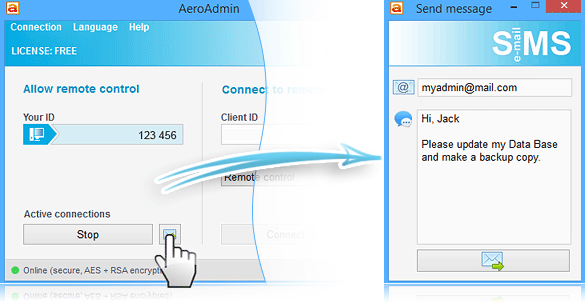
The SOS message window, opened from the button next to Stop in the main window (shown on a free license).
The everyday remote-control tools
- Up to three simultaneous sessions on a Pro license (two on the free one)
- Clipboard sync, Ctrl+Alt+Del and other system keys, multi-monitor support and auto-scaling
- Voice chat, and screen recording, which since version 4.93 downloads its recording component automatically
- Remote Windows lock, screenshots during a session, and automatic image quality balancing for slow connections
- AES and RSA encryption of all session traffic, and an interface in more than 15 languages
Benefits
The main draw is speed of getting started. There's no installer to walk a confused relative or client through and no account to create on their side. A 2.6 MB download finishes before you've finished explaining what to click.
The second is price. Pro is licensed per operator computer, not per remote device, so supporting fifty PCs costs the same as supporting five. For a one-person IT service, that keeps the remote tool a small line item.
Real-World Uses
- Freelance PC support: keep each client's office PCs in a contact book folder, connect by double-click, and move log files back with the file manager.
- Family tech support: set up unattended access on a parent's laptop once, then fix things without asking them to read out an ID every time.
- Small-office admin: reboot a Windows server into safe mode from home and reconnect when it comes back.
- Branch PCs: one reviewer below looks after the computers of 24 data entry centers from a single operator PC.
Who It's For, and Who Should Skip It
AeroAdmin Pro fits one person who regularly supports Windows PCs, has outgrown the free version's monthly hours, and wants file transfer and a contact book without paying TeamViewer-level prices.
Skip it if you need to control Macs, Linux machines or phones: AeroAdmin can only control Windows computers. Skip it too if two or more technicians need to work at the same time (each operator PC needs its own seat, and the Business license makes more sense once session reports matter), or if you only help someone a few times a month, since the free version already covers that.
Usage Guide
- Download and run AeroAdmin.exe on your computer. There's no setup; the main window opens with your ID.
- Have the other person do the same and read you the ID shown under "Allow remote control".
- Type their ID under "Connect to remote PC", keep the connection mode on Remote control and click Connect. They click Accept on their side.
- Activate Pro after buying: log in at the AeroAdmin account portal, add your controlling computer's AeroAdmin ID, then choose Connection, Restart in AeroAdmin. The header changes from FREE to PRO.
- For unattended access, on the remote PC open Connection, Access rights, add your ID with a password, then install the AeroAdmin service from Connection, Service.
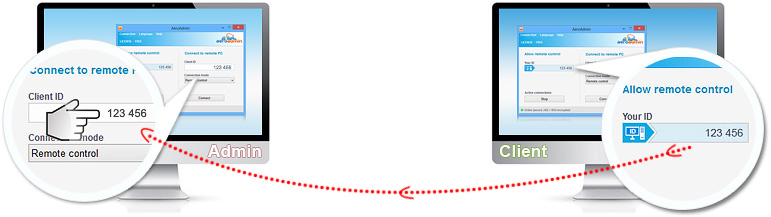
AeroAdmin's how-to diagram: the client reads out the ID from "Allow remote control" and the admin types it into "Client ID".
Before you buy
- It's a yearly license. AeroAdmin doesn't sell a lifetime license; you buy 1, 2 or 3 years at a time.
- Try the free version first. AeroAdmin doesn't offer paid trials. The free version runs the same program, so test speed and stability on your own connection before paying. After that, the 10-day money-back guarantee is the safety net.
- One license, one operator PC. You can move the license to another computer in the account portal, but only once a week. Two technicians working at once need a second seat.
- Windows Server sessions: AeroAdmin controls a server's console session only, so other users have to be logged off first.
- Company details: the website lists a San Jose, California address, while the installer's code-signing certificate is issued to Aeroadmin LLC in Moscow, Russia. Organizations with vendor-origin rules for remote access tools should check this before rolling it out.
Where it falls short
- Connection stability: TechRadar's tester saw the connection drop briefly every 10 to 15 minutes on a steady 25 Mbps line, and a file transfer had to restart when it did. Several users mention lag or slowness compared with TeamViewer and AnyDesk.
- Windows only on the remote side: no way to control a Mac, Linux PC or phone, and no native Mac app for the operator either.
- Dated interface: the window design hasn't changed much in years, and the file manager doesn't look like Windows Explorer.
- Thin help pages: support is by ticket (24/7), and the knowledge base answers are short.
- Refund complaints: two 2019 Trustpilot reviews describe long refund disputes over premium licenses that didn't work for them.
What Users Say
AeroAdmin has a small review footprint for a tool from a company founded in 2012. The picture is consistent across sites: people like how fast it is to start and how little it costs, and the complaints are about speed, stability and, in a few older cases, refunds.
TechRadar
Michael Graw reviewed AeroAdmin for TechRadar in April 2020 and gave it 4.5 out of 5. His verdict: "AeroAdmin is an extremely affordable software solution for remote computer access. It's particularly useful for IT helpdesks thanks to the contact book and quick connection features."
On performance he was blunt: "AeroAdmin's performance was the biggest issue we found with this software. Even on a 25 Mbps connection with no interruptions, the remote desktop connection dropped out briefly once every 10 to 15 minutes."
He also wrote that "the only major thing it's missing is voice over IP support" and that "there are few remote desktop solutions that offer so much functionality for such little cost." AeroAdmin has since added voice chat, and the prices he quoted are from 2020.
SaaSworthy (4.3 out of 5 from 23 ratings)
Kalidaspandian R (September 2024, 5 stars), who supports 24 data entry centers: "Unlike Anydesk and Teamviewer. Aero admin has a user friendly interface that make us easy to connect to the remote desktop that needs support." His one complaint: "sometimes it lags in resolution of the screen. They have to make AeroAdmin faster and stable like Teamviewer."
Ganesh S (August 2024) liked that it's "Easy to use without any installation just download & good to connect with the other user also it has the free version", but added: "Compared to other alternatives it is very slow & buggy".
Tim Y (January 2025, 4 stars), "Remote Access without breaking the bank": "I can instantly access a user's computer and fix their problem, without having to be there in person." His dislike: "There is a slight learning curve to be able to manipulate things if you are using dual or more monitors."
Scott F (February 2019, 5 stars): "Even the most expensive subscription they have is VERY affordable, and the level of customization offered with that package is amazing when it comes to branding and integration." He also wrote: "I think it could use a bit of a face-lift to make it LOOK more modern, and I wish it was a bit more advanced in the area of unattended access."
A. M. P (September 2020, 5 stars): "I like that AeroAdmin does not need any installation. You just have to download, run the program, input the ID and you are already connected." The downside: "AeroAdmin lacks the native MAC file though they do have a workaround by running it via WINE. Also as of now, they don't support mobiles such as iOS or Android."
Russell A (September 2018), who helps older clients: "For elderly clients who need help, or the technically impaired, it is a real time saver." He didn't like "That I can't reconnect automatically after a reboot, but it's free, so I understand there are limitations."
Trustpilot (3.9 out of 5 from 3 reviews)
Trustpilot's page has only three reviews, none from the last 12 months, and they split sharply. Caitlin (September 2022, 5 stars): "I have been using AeroAdmin in my work daily for the last year (since April 2022) and I am very pleased with the experience. The installation happens within seconds."
Nicolle Evans (October 2019, 1 star), "Waste of money": "You can't access a computer unattended due to the app not being able to launch until the initial log in screen has been dismissed." She added that "the support process was long and tedious with no actual resolution."
Liam Diamond (March 2019, 1 star) wrote that the premium version "did not work as promised" and that "After lots of arguing they gave a partial refund."
The common threads: users praise the no-install start, the small download and the low price, and several use it daily for real support work. The recurring complaints are lag and occasional drop-outs compared with TeamViewer and AnyDesk, the Windows-only reach, and an interface that looks its age. The unattended-access complaint is from 2019, and later versions list several unattended-access and auto-reconnect fixes. Most of these reviews are a few years old, so testing the free version on your own connection matters more than usual.
Comparisons
AeroAdmin Pro vs the free AeroAdmin
Same program, same download. Free gives you about 17 hours and 20 remote computers a month by ID (unlimited by IP), two sessions at once and 10 SOS messages, with splash screens and no file transfer or contact book. Pro lifts the monthly caps, adds file transfer and the contact book, allows three sessions and 30 SOS messages, and drops the ads.
AeroAdmin Pro vs Business and Corporate
AeroAdmin Business removes the limit on simultaneous remote sessions and adds session reports (who connected to which PC and for how long, for billing), 100 SOS messages a month and priority support. Corporate adds unlimited SOS messages, your own branded AeroAdmin exe with preset access rights, SOCKS proxy support, MSI deployment through Active Directory, a private router and central management of access rights. If you bill clients by the hour, Business's session reports are the reason to step up.
AeroAdmin vs TeamViewer and AnyDesk
TeamViewer and AnyDesk cover more platforms (Mac, Linux, iOS, Android) and feel smoother on slow connections, and TeamViewer adds remote printing. AeroAdmin's case is cost and simplicity: a per-operator yearly license with unlimited endpoints, and nothing to install on either side. TechRadar's 2020 review noted TeamViewer plans then started at $49 a month for one concurrent session.
Editions and Pricing
Prices on the order page on November 8, 2026. AeroAdmin's own buy page lists yearly prices (Pro $149.90, Business $189.90, Corporate $239.90 for one operator seat) and often runs a time-limited discount on them.
| License |
Operator PCs |
Price |
Notes |
| AeroAdmin Free | 1 | $0 | About 17 hours and 20 endpoints a month by ID |
| AeroAdmin Pro, 1 year | 1 | $99.99 | The license this page covers |
| AeroAdmin Pro - 2 PC | 2 | $168.90 | Multi-seat order item |
| AeroAdmin Pro - 5 PC | 5 | $295.00 | Multi-seat order item |
| AeroAdmin Pro - 10 PC | 10 | $498.00 | Multi-seat order item |
The multi-seat order items don't state a license term on the order page; AeroAdmin sells only 1-, 2- and 3-year licenses, so check the term in your license email or ask AeroAdmin's sales team before ordering several seats.
Buy Pro, 1 Year ($99.99)Buy Pro for 2 PCs ($168.90)Buy Pro for 5 PCs ($295.00)
FAQs
Does the remote computer need an AeroAdmin Pro license too?
No. AeroAdmin Pro is only needed on the operator (controlling) computer. The people you connect to run the free AeroAdmin, and one Pro license can reach an unlimited number of remote computers.
Is there a lifetime AeroAdmin license?
No. AeroAdmin sells licenses for 1, 2 or 3 years only, and the Pro license on this page is the 1-year one.
Can I use one AeroAdmin Pro license on my desktop and my laptop?
Not at the same time. Each operator computer needs its own seat. You can move AeroAdmin Pro from one computer to another in the account portal, but only once a week.
Can I use AeroAdmin from a Mac?
AeroAdmin can run on a Mac or Linux computer under the free WINE compatibility layer and control a remote Windows PC from there. It can't control a Mac or Linux machine, and there's no Android or iOS version.
Can I use the free AeroAdmin for work?
Yes. The free AeroAdmin license allows commercial use, but connections by ID are limited to about 17 hours and 20 remote computers a month. Connections by IP address on your own network aren't limited.
I bought AeroAdmin Pro but it still says FREE. What now?
AeroAdmin Pro is tied to your computer's AeroAdmin ID, not entered as a key in the program. Log in to the account portal at account.aeroadmin.com, add your controlling computer's ID with a description and save, then choose Connection, Restart in AeroAdmin.
Does AeroAdmin work on Windows Server?
Yes, from Windows Server 2003 on. AeroAdmin controls one session on the server, so other users must be logged off before you connect. You can also run AeroAdmin on a server to connect out from several user sessions.
Is AeroAdmin traffic encrypted?
Yes. AeroAdmin encrypts everything sent between the admin and the client end to end with AES and RSA, and its anti-brute-force system applies progressively longer timeouts after failed authentication attempts.
System Requirements
- Windows XP SP3, Vista, 7, 8, 10 or 11; Windows Server 2003, 2008 R2, 2012 R2 or 2016; 32- or 64-bit
- About 2.6 MB for the program file; no installation needed
- An Internet connection for connections by ID, or a local network for connections by IP
- Mac OS or Linux only as the controlling computer, under WINE
Conclusion
AeroAdmin Pro is worth $99.99 a year if you support Windows PCs regularly on your own and the free version's monthly hours keep running out. You get unlimited remote computers, file transfer and a contact book for less than many rivals charge per quarter, and nothing to install on either end.
The reason not to buy is reliability: reviewers keep mentioning lag and short drop-outs, and it can only control Windows. Run the free version on your real connections for a week first. If it holds up, Pro is one of the cheapest ways to make it a full-time tool; if it doesn't, the 10-day guarantee won't help much.
Buy NowDownload Free Trial