Tansee Android Message Transfer: Save and Print Your Android Texts and WhatsApp Chats on a PC
Tansee Android Message Transfer is a $19.95-a-year Windows program that copies the messages on an Android phone to your PC: SMS, MMS and RCS texts, WhatsApp and WhatsApp Business chats and Facebook Messenger conversations, with their photos and videos, saved as PDF or printed the way they look on the phone.
The usual reason people look for it is concrete: a lawyer wants a text thread printed with dates, a parent wants to keep years of messages before trading in a phone, or someone needs the WhatsApp chat with a landlord as evidence. Screenshots of 400 messages don't cut it. Tansee pulls the whole conversation onto your computer and lays it out as a document.
Quick facts
- Version: 2.9.4 for Windows
- Developer: Tansee, a maker of phone message tools for more than 20 years
- Runs on: Windows 7 or later, including Windows on Arm. The Mac version is a separate product.
- Phones: Android 8 to Android 17, with the free Tansee Message Transfer app installed on the phone
- Connection: the same Wi-Fi network, the phone's mobile hotspot, or USB tethering
- Price: $19.95 for 1 year, or $29.95 for 3 years. One computer, unlimited Android phones. It doesn't renew automatically.
- Free version: copies and prints only 10 messages of each contact
- Guarantee: 30-day money-back
What we checked: the 1-year license on the order page at $19.95 (version 2.9), and the 151 MB installer from tansee.org, file version 2.9.4.0, on October 26, 2026. We didn't connect a phone or run a transfer ourselves.
Download Free TrialBuy Now ($19.95/year)
Overview
Tansee comes in two halves. On the PC you install Tansee Android Message Transfer. On the phone you install the Tansee Message Transfer app from tansee.com or the Samsung Galaxy Store. The app reads the messages on the phone and sends them to the PC over your local network, so nothing goes through a cloud service: the messages end up only on your computer.
Once they arrive, the PC program shows your conversations in a list and each thread as chat bubbles, much as they look on the phone. From there you save, search and print.
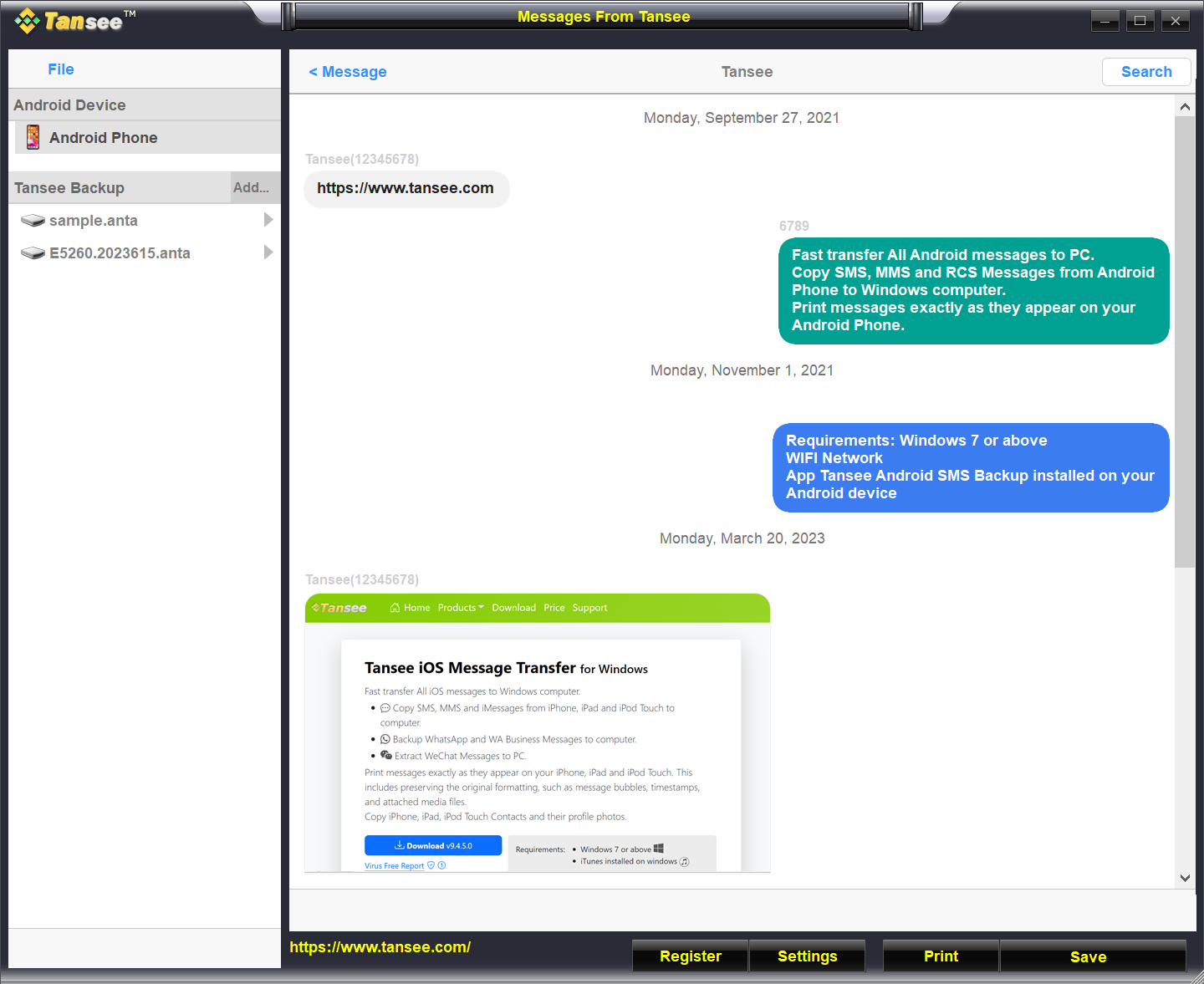
A transferred SMS conversation in Tansee Android Message Transfer: messages as bubbles under their dates, with Register, Settings, Print and Save along the bottom and saved ANTA files on the left.
Features
Texts, picture messages and RCS chats
Tansee Android Message Transfer copies SMS, MMS and RCS messages, including Google RCS and Samsung Advanced Messaging, along with group messages and dual-SIM phones. Photos, videos, audio, contacts, locations and links in the messages come across too, and you can save the attachments as separate image, video and audio files.
WhatsApp, WhatsApp Business and Facebook Messenger
Tansee Android Message Transfer reads WhatsApp and WhatsApp Business chats from a local WhatsApp backup on the phone that's encrypted with a 64-digit key (not a password), so you may need to create a new backup that way first. It can also extract chats from a WhatsApp backup file, and save Facebook Messenger conversations with their attachments as PDF files.
Save as PDF, HTML, text or images
Tansee Android Message Transfer saves conversations as PDF, HTML, JPG or plain text, or as Tansee's own ANTA files, which can be password-protected and opened again later in the program. Contacts, with their profile photos, can be exported one at a time or all together as .vcf files.
Print conversations the way they look on the phone
Tansee Android Message Transfer prints whole conversations, or just the messages you find with search, keeping the message bubbles, timestamps and attached photos. Options let you leave out images and videos, and add or leave off the Tansee logo watermark.

Step 1 of printing: Print is selected, with Advanced Options to add the Tansee logo watermark or skip printing MMS images and videos.
Benefits
The value is in the output. Android can back messages up to Google, but that backup isn't something you can read, print or hand to someone. Tansee turns a conversation into a dated, readable document with the pictures in place, which is what a court, an insurer or a family archive actually wants. And because the copies live only on your PC, you keep them after you switch phones or delete the app.
Real-World Uses
- Legal evidence: print the text thread with a former partner or employer, with dates and photos, for a solicitor.
- Before trading in a phone: save every SMS and WhatsApp chat to the PC as PDF, then wipe the phone.
- Keepsakes: save years of messages with a parent who has died as one document you can keep and print.
- Small business records: archive the WhatsApp Business chats with customers alongside the orders they relate to.
- A family of Android users: one license covers unlimited phones, so you can save everyone's messages on the family PC.
Who It's For, and Who Should Skip It
Tansee Android Message Transfer is for Android users with a Windows PC who need their messages as documents: for evidence, for an archive, or simply to read and search them on a big screen.
Skip it if you only want to move messages from one phone to another: Google's own backup or your phone maker's transfer tool does that free. Skip it if your phone runs Android 7 or older, or if you have an iPhone (Tansee sells a separate iPhone Message Transfer). Mac users need the Mac version, which is a different purchase. And if you only need a handful of messages, the free version (10 per contact) may already be enough.
Usage Guide
- Install and launch on the PC. Download Tansee Android Message Transfer for Windows (about 151 MB), install it and open it.
- Install the phone app. On the Android phone, open tansee.com/get in the browser (or scan the QR code the PC program shows) and install Tansee Message Transfer, or get it from the Galaxy Store.
- Connect. Put the phone and PC on the same Wi-Fi, or use the phone's mobile hotspot or USB tethering. Enter the connection code from the phone into the PC program and click Connect. On the same Wi-Fi, Tansee can connect automatically.
- Read the messages. On the phone, tap Read SMS, MMS & RCS messages (or the WhatsApp option), grant the permissions, and temporarily make Tansee the default SMS app, which it needs to read all messages. It prompts you to switch back afterwards.
- Send them to the computer. Choose the messages and tap Send Messages To Computer. Keep the phone's screen on during the transfer.
- Save or print. On the PC, click Save and choose a file type, or click Print and Start Print.
- Register. Click Register and enter the email and license code you received to remove the 10-message limit.

The connection screen: install the app from tansee.com or the Galaxy Store, then connect by WLAN, mobile hotspot or USB tethering by entering the code the phone shows.
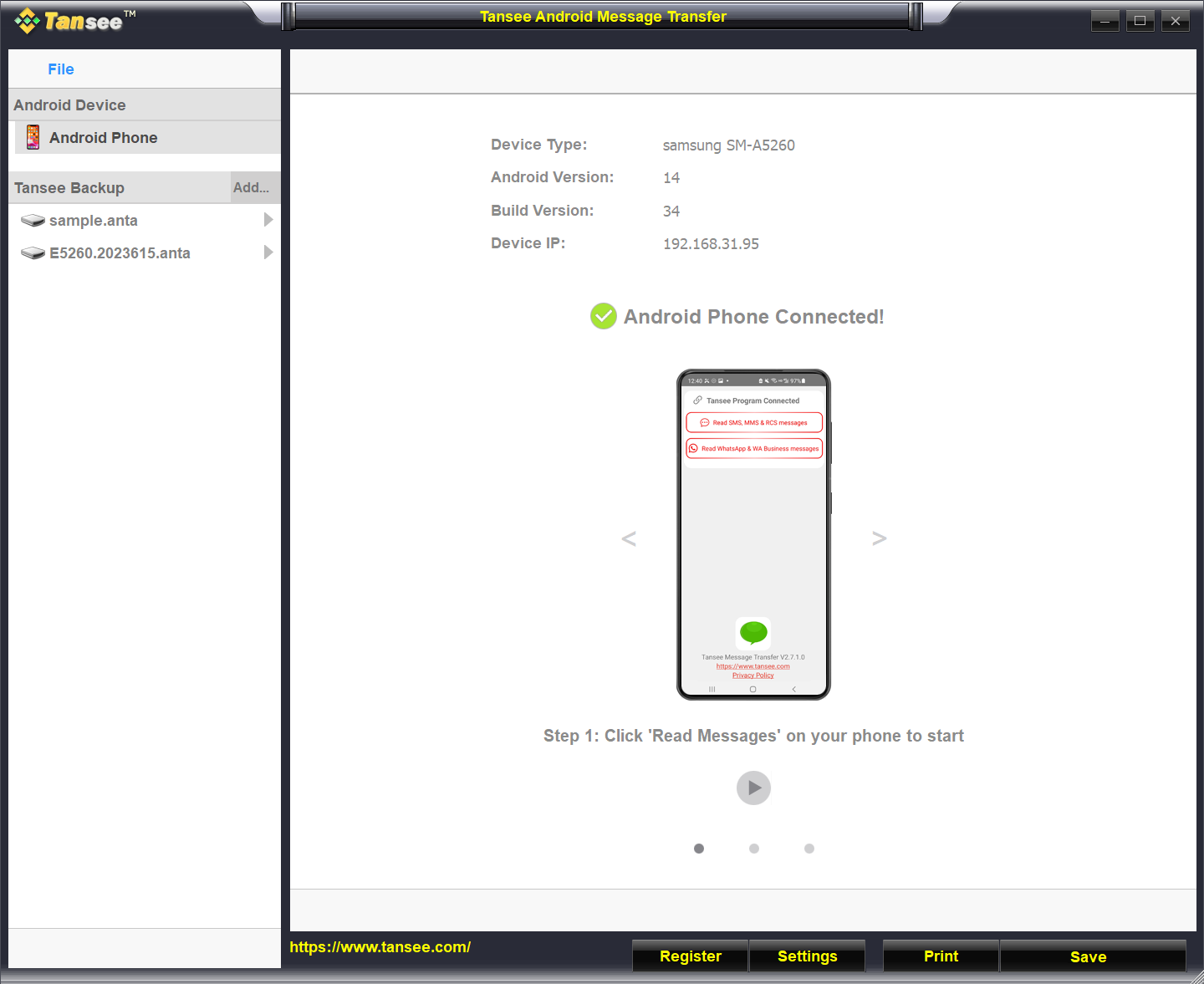
Connected: a Samsung SM-A5260 on Android 14, with the phone app's Read SMS, MMS & RCS messages and Read WhatsApp & WA Business messages buttons.
Before you buy
- Test it on your phone first. The free version transfers and prints up to 10 messages per contact, enough to check that your phone connects and your message types come across.
- Windows and Mac are separate products. A Windows license won't register the Mac version, and switching platforms means buying the other one.
- The license is for one computer. To move it to a new PC, uninstall it from the old one and email Tansee to reset the code.
- It doesn't renew on its own. When the year ends, you choose whether to buy again.
Where it falls short
- Connection trouble is the most common problem. Tansee's own troubleshooting page covers a PC that can't find the phone: reinstall the latest versions, restart both devices, and turn off the phone's Data Saver. Some phones grey out USB tethering and hotspot, which has its own help page.
- WhatsApp takes extra steps. You need a local backup encrypted with a 64-digit key, not the usual password-protected backup.
- Swapping the default SMS app during the transfer makes some people nervous, though Tansee prompts you to switch back.
- No independent reviews yet. The Android version hasn't been reviewed by any magazine, so the free version is the best way to judge it.
What Users Say
Customer comments on Tansee's site
Tansee Android Message Transfer has no ratings yet on its Microsoft Store listing, and no independent reviews we could find. Tansee's own review page shows customer comments with the names masked, so they can't be checked:
"The ability to selectively transfer messages with Tansee Android Message Transfer for Windows is a game-changer. I can choose which conversations to backup and which to exclude." (R****** A*******)
"I appreciate the ability to preview messages before transferring them with Tansee Android Message Transfer for Windows. It allows me to ensure I am selecting the correct conversations." (R****** B********)
"I have been using Tansee Android Message Transfer for Windows for a while now, and it has never crashed or caused any issues. It is a stable and reliable software." (M******* E****)
Treat these as the vendor's selection rather than a balanced picture. The best evidence you can get is your own: the free version shows you exactly how your conversations come out before you pay.
Comparisons
Tansee vs Google's backup and Messages for web
Google backs up your texts so they can be restored to a new Android phone, and Messages for web lets you read and send texts from a browser. Neither saves a conversation as a PDF or prints it with dates and pictures, and neither covers WhatsApp. That document output is what you pay Tansee for.
Windows vs Mac version
Tansee sells Android Message Transfer for Windows (this license) and a separate macOS version with its own licenses. They don't share license codes, so buy the one for the computer you'll use.
Editions and Pricing
| License |
Price |
Term |
Computers and phones |
| Free version |
Free |
No limit |
10 messages of each contact |
| 1-year license (this one) |
$19.95 |
1 year, renewed manually |
1 computer, unlimited Android phones |
| 3-year license |
$29.95 |
3 years, renewed manually |
1 computer, unlimited Android phones |
Tansee shows these as sale prices against $29.95 and $45. Both licenses include updates and a 30-day money-back guarantee. A separate Business License is available from Tansee.
FAQs
Does Tansee Android Message Transfer work with my Samsung phone?
Yes, if it runs Android 8 or later. Tansee Android Message Transfer supports Android 8 to Android 17, including Samsung Advanced Messaging, and the phone app is also in the Samsung Galaxy Store.
Do I need a USB cable for Tansee Android Message Transfer?
No. Tansee Android Message Transfer connects over the same Wi-Fi network or the phone's mobile hotspot. A USB cable is only needed for the USB tethering option.
Are my messages uploaded to Tansee's servers?
No. Tansee isn't connected to any cloud storage: the messages, photos and other files you transfer are stored only on your own computer.
What happens when my Tansee license year ends?
Tansee Android Message Transfer licenses don't renew automatically. When the term ends, you decide whether to buy another year. Tansee doesn't state what the program does after expiry, so save what you need while the license is active.
Can I move my Tansee license to a new computer?
Yes. Uninstall Tansee Android Message Transfer from the old computer, then email Tansee support, who reset the license code so you can register it on the new one.
I bought the Mac or iPhone version by mistake. Can I switch?
Yes. Buy the correct Tansee product, then email both order IDs to Tansee and ask for a refund of the wrong order or a switch.
Can Tansee open WhatsApp chats if I only have a Google Drive backup?
Tansee Android Message Transfer reads WhatsApp from a local backup on the phone encrypted with a 64-digit key. Tansee has a guide to creating that kind of backup in WhatsApp's settings.
System Requirements
- Computer: Windows 7 or later, including Windows on Arm (the Microsoft Store version needs Windows 10 or later)
- Disk: about 151 MB for the installer, plus space for your messages and attachments
- Phone: Android 8 to Android 17 with the Tansee Message Transfer app
- Connection: the same Wi-Fi network, the phone's mobile hotspot, or USB tethering
Conclusion
Tansee Android Message Transfer is worth $19.95 if you need your Android messages as documents: printed or saved as PDF with dates and photos, for evidence or for keeps. It covers texts, RCS, WhatsApp and Messenger in one program, keeps everything on your own PC, and one license covers every Android phone in the house. The main reason to hesitate is that there are no independent reviews yet, and connecting the phone can take some fiddling. The free version answers both: transfer 10 messages from your own phone and look at the result before you pay.
Download Free TrialBuy Now ($19.95/year)