vMix 4K: A Full Live Production Studio on One Windows PC
vMix 4K is a $700 lifetime license for vMix, the Windows live production and streaming software, in the edition that adds 4K output, PTZ camera control, 4 remote video-call guests, instant replay and scripting. It's for churches, schools, event crews, podcasters and sports streamers who want a broadcast-style switcher without buying broadcast hardware.
Picture a Sunday service or a local basketball game: four cameras, a laptop with slides, a guest joining from home, lower-third titles and a stream going to YouTube and Facebook at the same time. vMix runs all of that from one PC, and this bundle from Virtual Set Works adds a ready-made virtual set and some training videos on top.
Quick facts
- Version: vMix 29 (29.0.0.49, August 15, 2026)
- Developer: StudioCoast Pty Ltd (vMix). This bundle is sold by Virtual Set Works.
- Runs on: Windows 10 and 11 only. There's no Mac or Linux version.
- Resolution: up to 4096 x 2160, with up to 1000 inputs and 8 overlay channels
- Price: $700 USD once (lifetime license), free version updates for the first 12 months
- Bundle extras: Studio 200 virtual set for vMix, HTTP Matrix 1.0 automation scheduler, 4 introductory training videos
- Free trial: 60 days for new users
- Download size: about 459 MB (one installer with vMix, vMix Social, GT Title Designer and vMix Desktop Capture)
What we checked: the vMix 4K price of $700.00 at checkout and the bundle's contents on the order page, the 4K column of vMix's edition comparison table, and the vMix 29.0.0.49 installer (481.7 million bytes) on vmix.com, on October 26, 2026. We didn't run a live production with it.
Download Free TrialBuy Now
Overview
vMix turns a Windows PC into a video switcher, graphics system, audio mixer, recorder and streaming encoder in one window. Inputs (cameras, capture cards, NDI sources, video files, PowerPoint, web pages, remote callers) appear as tiles along the bottom. You line up the next shot in Preview, pick a transition, and send it to Output, while titles and picture-in-picture sit on overlay channels above.
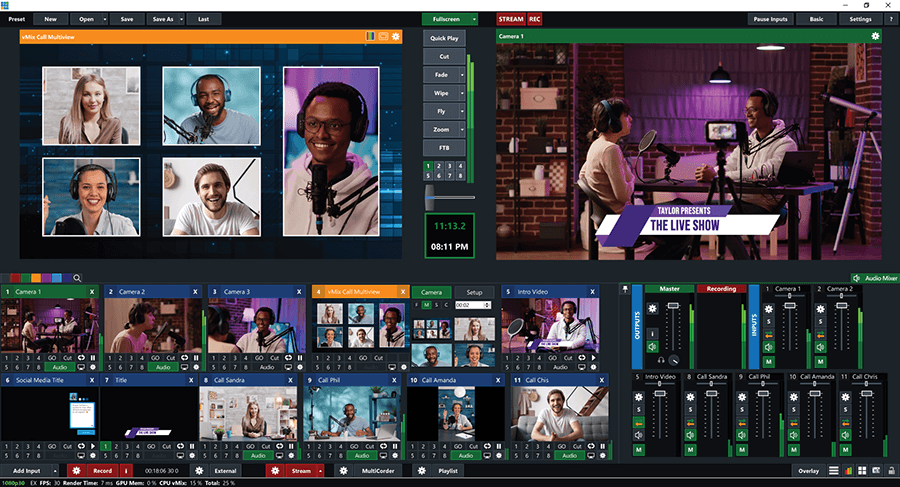
The vMix main window: a vMix Call multiview in Preview, the live Output with a lower-third title, transition buttons in the middle, input tiles below, and the audio mixer on the right.
vMix uses full 3D acceleration and Nvidia hardware encoding for recording, streaming and SRT, which is why it can run a multi-camera HD show on a fairly ordinary gaming-class PC. The 4K edition is the step where vMix stops being a simple switcher and becomes a production system: 4K resolution, PTZ control, replay, more video-call guests and more outputs.
Features
Mix almost any source, up to 4K
vMix 4K accepts up to 1000 inputs at up to 4096 x 2160: 4K, HD and SD cameras, webcams and capture cards, NDI sources on your network, video files (MP4, H264, MOV, MXF, AVI, MPEG-2, WMV), audio interfaces including ASIO, playlists, PowerPoint, photos, RTSP streams and a full web browser with audio and HTML5 video. Desktop Capture brings in screens from other PCs on your network.
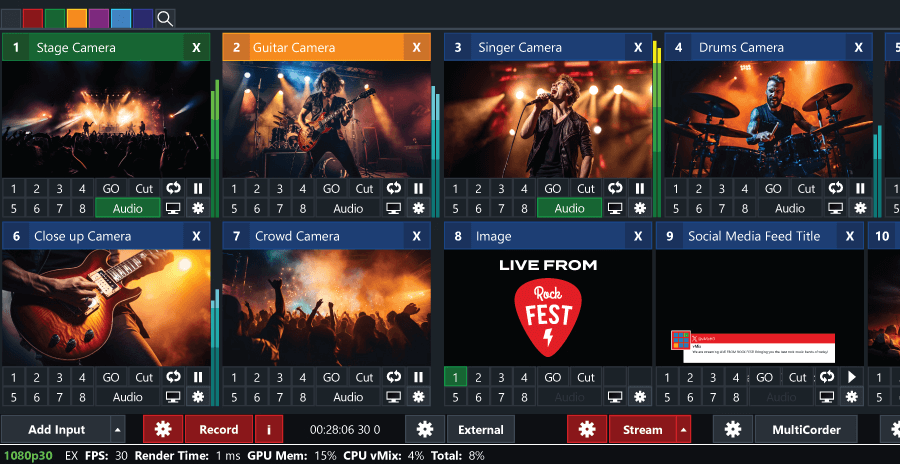
vMix input tiles for a concert: stage, guitar, singer, drums and crowd cameras, a logo image and a social media title, with Record, External, Stream and MultiCorder buttons along the bottom.
Stream, record and output at the same time
vMix 4K streams to up to 5 destinations at once (YouTube, Facebook Live, Twitch and others), records with 2 recorders, and records each camera separately with MultiCorder for editing later. It outputs through AJA, Blackmagic and Bluefish cards, offers four external, two fullscreen and four virtual outputs, and up to 4 SRT outputs (other editions get 1). A virtual camera feeds your show into Zoom, Teams or Skype.
Remote guests with vMix Call and Zoom
vMix 4K includes vMix Call for up to 4 remote guests, who join from a web browser and webcam with nothing to install. vMix can also join a Zoom meeting and bring in the raw feeds of multiple participants as separate inputs in up to 1080p (with a paid Zoom plan).
Animated titles, including your own designs
vMix comes with 100+ animated titles, scoreboards and tickers. The 4K edition includes GT Designer Advanced, so you can build custom animated titles and import layered Photoshop PSD files, not just edit the built-in ones. Up to 8 stinger transitions can use GT titles, image sequences or videos with alpha.
Instant replay for one camera
vMix 4K includes slow-motion instant replay for 1 camera, with Mark In/Mark Out and 5, 10 and 20 second buttons for marking events. Full 8-camera replay with highlight reels needs the Pro edition.
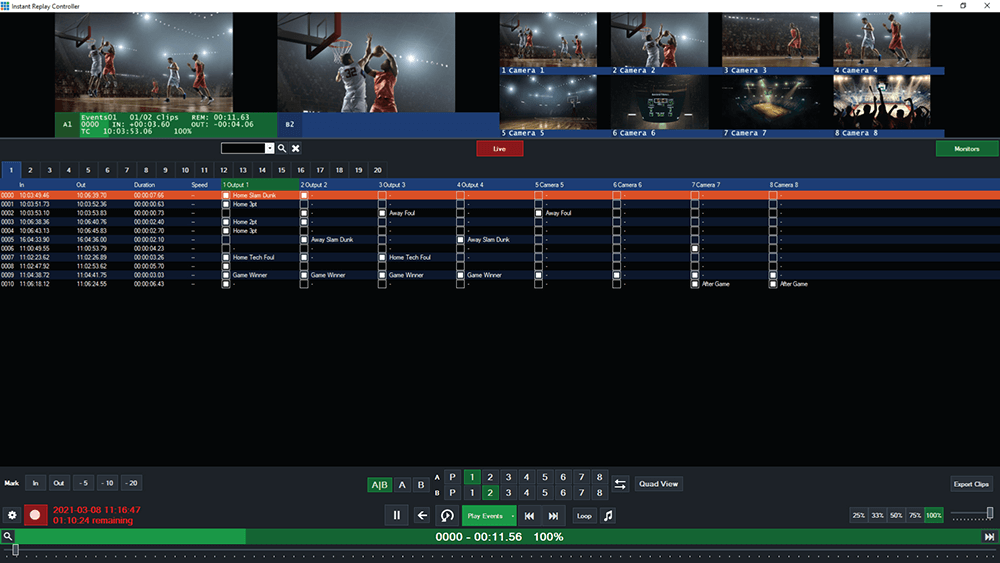
The vMix Instant Replay Controller with eight basketball camera angles and a list of marked events. This 8-camera view is the Pro edition; vMix 4K replays 1 camera.
PTZ control, scripting and a browser telestrator
vMix 4K controls PTZ cameras from inside the software, runs scripts to automate repetitive production steps, and turns any modern browser on an iPad, phone or tablet into a telestrator for drawing over the picture. The built-in web controller lets a second operator run vMix remotely.
Pro-level audio and colour tools
vMix's audio mixer has mute, auto-mixing (Follow), delay, EQ, a compressor and a noise gate for every source. Every input gets lift/gamma/gain colour correction with waveform and vectorscope monitors, processed in 4:4:4 32-bit colour.
Benefits
The real saving is hardware. A hardware switcher, graphics system, replay box and streaming encoder each cost more than this license. vMix 4K replaces them with software on one PC, and the lifetime license means you pay once instead of renewing a subscription every year.
It also grows with you. Start with a webcam and a slide deck, then add PTZ cameras, NDI sources and remote guests without changing software. If you outgrow 4K, you can upgrade to Pro by paying only the price difference.
Real-World Uses
- Church services: PTZ cameras on presets, song lyrics and scripture from PowerPoint, and a stream to Facebook and the church website at once.
- School and local sports: several cameras, a scoreboard title, and 1-camera slow-motion replay of the big play.
- Podcasts and talk shows: up to 4 remote guests by vMix Call, lower thirds with names, and an ISO recording of every camera for the edit.
- Corporate events and webinars: presenter cameras, slides, a Zoom panel brought in as separate inputs, and the program fed back to Teams by virtual camera.
- 4K concerts: UHD cameras mixed and streamed, with MultiCorder keeping clean camera recordings.
Who It's For, and Who Should Skip It
vMix 4K suits churches, schools, event and AV companies, sports streamers and serious podcasters who run multi-camera shows on Windows and need PTZ control, remote guests or 4K. It's the sweet spot for most growing productions.
Skip it if you're on a Mac (vMix is Windows-only), if you only stream yourself with one webcam (free OBS Studio or the $60 Basic HD edition is enough), or if you only need HD and 1 remote guest (vMix HD at $350 covers that). Full sports productions that need 8-camera replay or 8 remote guests should go straight to vMix Pro ($1200).
Usage Guide
- Install vMix. Download the installer (about 459 MB) from vmix.com and run it. It installs vMix, vMix Social, GT Title Designer and Desktop Capture together.
- Activate. New users get a 60-day trial. Enter your vMix 4K registration key to activate the full edition.
- Add inputs. Click Add Input and choose cameras, capture cards, NDI sources, video files, PowerPoint, a browser or vMix Call guests.
- Build the show. Add titles from the built-in library or GT Designer, set up overlays, and arrange multiviews and layers.
- Set outputs. Configure Stream (up to 5 destinations), Record, MultiCorder and External or virtual camera outputs.
- Go live. Cue shots in Preview, switch with Cut or a transition, and use the audio mixer to keep levels in check.
Before you buy
- Use the 60-day trial on your own PC first. vMix's performance depends heavily on the GPU. vMix recommends an Intel Core i7 at 3 GHz or faster, 8 GB of RAM, an SSD and a dedicated Nvidia card with 2 GB or more.
- Updates are free for 12 months. After that the software keeps working, and a further year of version updates costs $60.
- This is a reseller bundle. The price is the same $700 vMix charges directly, and Virtual Set Works adds the Studio 200 virtual set, HTTP Matrix 1.0 and 4 training videos.
Where it falls short
- Learning curve. vMix has a huge number of options, and teams that rely on volunteers report a steep learning curve.
- Windows only. There's no Mac or Linux version.
- PowerPoint and PDF limits. Users report that imported PowerPoint slides lose their transitions and animations, and PDFs can't be imported directly.
- GeForce encoding limit. GPU encoding of SRT streams is limited to 2 streams on GeForce cards, with CPU fallback beyond that.
- Replay is 1 camera only in this edition.
What Users Say
Ratings
vMix holds 4.7 out of 5 from 23 reviews on Capterra (ease of use 4.2, customer service 4.3) and 4.3 out of 5 from 31 reviews on G2. These are small samples, mostly from churches, event producers and media teams.
Summary of what reviewers say
Praise: reviewers on Capterra and G2 most often point to vMix's stability during live shows, its depth of features, streaming to several platforms at once (churches mention Facebook and their own website together), and how well it works with NDI and other network sources. Several also find the interface easy to use once it's set up.
Complaints: the recurring ones are a steep learning curve, especially for teams that rely on volunteers, prices that climb quickly from edition to edition, the lack of a Linux or Mac version, and PowerPoint slides losing their transitions and animations on import, with no direct PDF import.
In short, people trust vMix for live work and like how much it can do, and the complaints are about how much there is to learn and what the higher editions cost.
Editions and Pricing
| Edition |
Price |
Max resolution / inputs |
vMix Call / Replay |
What it adds |
| Basic HD | $60 lifetime | 1080p / 4 inputs (3 cameras) | None / None | Streaming, recording, 1 overlay |
| HD | $350 lifetime | 1080p / 1000 inputs | 1 caller / None | 8 overlays, Video List, Zoom (1 input) |
| 4K (this bundle) | $700 lifetime | 4096 x 2160 / 1000 inputs | 4 callers / 1 camera | PTZ, MultiCorder, scripting, GT Designer Advanced, 4 SRT outputs, telestrator |
| Pro | $1200 lifetime | 4096 x 2160 / 1000 inputs | 8 callers / 8 cameras | Everything in 4K, plus full replay and more guests |
| MAX | $50 per month | 4096 x 2160 / 1000 inputs | 8 callers / 8 cameras | Pro features as a subscription, updates while subscribed |
All lifetime editions include free version updates for the first 12 months. This Virtual Set Works listing costs the same $700 as buying vMix 4K from vMix, and adds the Studio 200 virtual set for vMix, the HTTP Matrix 1.0 automation scheduler and 4 introductory training videos from the Udemy "vMix Basic to Amazing" course.
Comparisons
vMix 4K vs vMix HD
vMix 4K costs $350 more than vMix HD and adds 4K output, PTZ control, 4 remote guests instead of 1, 1-camera replay, MultiCorder, scripting, custom animated titles, extra outputs and the telestrator. If you only stream in HD with one guest, HD is enough. If you have PTZ cameras or regular remote guests, 4K pays for itself.
vMix 4K vs vMix Pro
vMix Pro ($1200) adds 8-camera replay and 8 vMix Call guests. Sports producers who need multi-angle replay should buy Pro, and everyone else gets the same switching, graphics and outputs in 4K.
FAQs
Is vMix 4K a one-time purchase or a subscription?
vMix 4K is a one-time $700 lifetime license. Version updates are free for the first 12 months, then $60 buys another year of updates. Only the MAX edition is a subscription.
Can vMix 4K run on a Mac?
No. vMix 4K runs on Windows 10 and 11 only. Mac users would need to run it on a separate Windows PC.
Can I upgrade from vMix 4K to Pro later?
Yes. vMix lets you upgrade an existing registration key by paying only the difference between your edition and the one you move to, so 4K to Pro costs the $500 difference.
What PC do I need for vMix 4K?
vMix 4K needs Windows 10 or 11, at least a 2 GHz quad-core CPU, 4 GB of RAM and a dedicated DirectX 10.1 graphics card. For real productions vMix recommends an Intel Core i7 at 3 GHz or faster, 8 GB of RAM, an SSD and an Nvidia card with 2 GB or more.
Does vMix 4K work with Zoom and Microsoft Teams?
Yes. vMix 4K can join a Zoom meeting and bring in multiple participants as separate inputs, and its virtual camera sends your finished program into Zoom, Teams or Skype.
How long is the vMix 4K free trial?
vMix offers new users a free 60-day trial in the same download as the paid editions, so you can test vMix with your own cameras and PC before buying the 4K license.
What do I get from Virtual Set Works on top of vMix 4K?
This bundle adds the Studio 200 virtual set for vMix (a background set for green-screen presenters), the HTTP Matrix 1.0 automation scheduler, and 4 introductory training videos, at the same $700 price as vMix 4K alone.
System Requirements
- Operating system: Windows 10 or Windows 11
- Processor: 2 GHz quad-core minimum, Intel Core i7 3 GHz+ recommended
- Memory: 4 GB DDR4 minimum, 8 GB DDR4 recommended
- Storage: 7200 RPM hard drive for recordings, SSD recommended
- Graphics: dedicated DirectX 10.1 graphics card, Nvidia with 2 GB+ memory recommended
- Screen: 1920 x 1080
Conclusion
vMix 4K is worth its $700 for anyone running regular multi-camera shows on Windows. It's the edition where PTZ control, remote guests, replay and custom graphics all arrive, and it replaces hardware that would cost far more, for a one-time price. The one reason to buy it: a full production studio on one PC with no subscription. The main reason not to: it's Windows-only and takes real time to learn, so a solo streamer with one camera should start with a cheaper edition. Run the 60-day trial on your own hardware first, and if your PC keeps up, this bundle gets you vMix 4K plus a virtual set and training at no extra cost.
Download Free TrialBuy Now