Short answer: buy vMix 4K ($700 once) if you run a multi-camera show with PTZ cameras, remote guests, 4K or vertical video, or you want each camera recorded separately for editing. Buy vMix HD ($350) only if your show is HD, needs at most one remote guest and your cameras are steered by hand. Buy vMix Pro ($1,200) only if you need instant replay from more than one camera or more than 4 remote guests, which in practice means sports and large talk shows. vMix Basic HD ($60) is for a solo streamer with up to 3 cameras and 4 inputs in total.
At a glance
| Fact |
Basic HD |
HD |
4K |
Pro |
| Price (lifetime license) | $60 | $350 | $700 | $1,200 |
| Total inputs / camera inputs | 4 / 3 | 1000 / 1000 | 1000 / 1000 | 1000 / 1000 |
| Maximum resolution | 1920 x 1080 | 1920 x 1080 | 4096 x 2160 | 4096 x 2160 |
| Overlay channels | 1 | 8 | 8 | 8 |
| vMix Call remote guests | ✗ | 1 | 4 | 8 |
| Instant replay | ✗ | ✗ | 1 camera | 8 cameras |
| PTZ camera control | ✗ | ✗ | ✓ | ✓ |
| MultiCorder (record each camera) | ✗ | ✗ | ✓ | ✓ |
| Recording (recorders) / SRT outputs | ✓ / 1 | ✓ / 1 | 2 / 4 | 2 / 4 |
| Zoom meeting inputs | ✗ | 1 | Multiple | Multiple |
| Vertical HD (1920p), scripting, telestrator, custom GT titles | ✗ | ✗ | ✓ | ✓ |
| Free version updates | First 12 months | First 12 months | First 12 months | First 12 months |
All four editions are the same Windows program, vMix 29, with the same streaming to 5 destinations at once, fullscreen and external output, 100+ built-in animated titles, playlists and colour correction. The edition only changes which limits your registration key turns on. A fifth option, vMix MAX, is a $50-a-month subscription with everything in Pro.
How we compared the editions
- Read every row of the edition comparison table on vMix's purchase page, including the ✓ and ✗ cells, and vMix's own knowledge base articles on choosing an edition, inputs and subscriptions.
- Read the upgrade price list, the PTZ camera support list and the reference PC specifications on vmix.com.
- Opened the order page for vMix 4K and read its price and bundle contents.
- Checked the current vMix download and its release notes.
- Read the vMix user forums for buyers deciding between editions.
What we checked: the vMix 4K price of $700.00 at checkout and the bundle's contents on the order page, the edition table and upgrade prices on vmix.com, and the vMix 29.0.0.49 installer (481.7 million bytes) on the download page, on November 2, 2026. We compared features, prices and upgrade paths, and didn't run a live production or benchmark the editions on our own hardware.
vMix 4K: the edition most growing productions need
- Price: $700 once at checkout, with free version updates for the first 12 months
- Runs on: Windows 10 and 11 (no Mac or Linux version)
- Adds over HD: 4K, PTZ control, 4 remote guests, 1-camera replay, MultiCorder, 2 recorders, 4 SRT outputs, vertical HD, scripting, telestrator, custom animated titles
- Bundle extras on this order page: Studio 200 virtual set for vMix, the HTTP Matrix 1.0 automation scheduler and 4 introductory training videos, at the same $700 vMix charges for 4K alone
- Best for: churches, schools, event crews and podcasts with several cameras and remote guests
vMix 4K is the edition where vMix stops being a simple switcher and becomes a production system. The name undersells it. Plenty of people buy 4K without ever sending a 4K picture, because almost every feature that makes a volunteer crew's life easier arrives at this step: PTZ camera presets, up to 4 remote guests by browser, a clean recording of every camera for the edit, a second recorder, and scripts that automate a whole sequence of button presses.
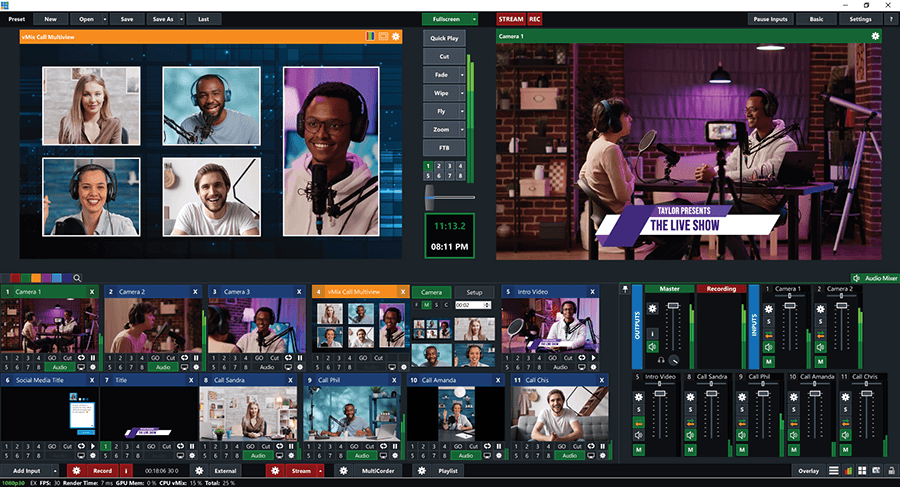
The vMix main window: a vMix Call multiview in Preview, the live Output with a lower-third title, four vMix Call inputs (Sandra, Phil, Amanda and Chis) among the input tiles, and the audio mixer on the right. Four callers is the vMix 4K limit.
PTZ control is the feature that pushes most churches and schools to 4K. vMix's PTZ Control is available only in 4K, Pro and MAX. With it, you store camera positions as presets inside vMix and recall them with the shot, instead of steering each camera from its own web page or a separate joystick. Note the camera list: vMix controls cameras over the network (Panasonic CGI, VISCA over IP and VISCA UDP, PTZOptics and others, plus UVC PTZ cameras over USB), not cameras with serial-only control, and not CCTV cameras that only speak ONVIF.
vMix 4K also needs 4K for 4K inputs, not just 4K output. HD can't load a 4K camera at all. That matters if you plan to shoot one wide 4K shot and crop "virtual" close-ups from it for an HD stream, a common trick for small crews with one good camera.

The vMix telestrator running in a web browser: yellow arrows and highlight markers drawn over football players, with drawing tools and ReplayFW, ReplayBW, Fade and Title buttons along the bottom. The telestrator comes with 4K and up.
What we like
- PTZ presets, 4 remote guests and MultiCorder in one step up
- 4K inputs and output, plus vertical HD for Reels, Shorts and TikTok
- 4 SRT outputs instead of 1, for sending feeds to other sites
- Custom animated titles and PSD import in GT Designer Advanced
- Pay once; Pro later costs only the $500 difference
Watch out for
- Double the price of HD, for features a single-camera show won't use
- Instant replay covers 1 camera only
- Windows only, and a real 4K show needs a strong Nvidia PC
- Updates after the first year cost $60 per extra year
What vMix users say about choosing 4K
On the vMix forums, the reason people give for moving up to 4K is usually PTZ, not resolution. One user who asked whether 4K needs a stronger PC got this answer from mjgraves (January 2023): "Yes, no problem. I upgraded from HD to 4K on the same hardware. At the time I wanted PTZ control, which was only in the 4k version."
The forum user rjmurdock, who sets up vMix for clients, asked vMix in a June 2020 feature request to add PTZ to HD: "I'm working with several clients who want to take advantage of utilizing PTZ control and presets within vMix for their 1080p PTZ cameras, but don't need all the additional features of the vMix 4K to get this feature." The edition table still puts PTZ in 4K and above.
On review sites, vMix as a whole holds 4.7 out of 5 from 23 reviews on Capterra and 4.3 out of 5 from 31 reviews on G2. Reviewers praise its stability in live shows and its NDI and multi-platform streaming, and complain about the learning curve for volunteer teams and how quickly the price climbs from edition to edition.
Download vMix Free TrialBuy vMix 4K
vMix HD: enough for a hand-operated HD show
vMix HD ($350) is the full vMix switcher in HD, with every input limit lifted but none of the production extras. You get 1000 inputs, 8 overlay channels, the Video List input, one vMix Call guest and one Zoom input. Basic HD's 4-input cap disappears, so cameras, slides, videos, titles and a browser source can all sit in one project.

Two vMix title inputs, a social media comment title and a "The Live Show" lower third, each with overlay buttons 1 to 8 under it. HD and up have 8 overlay channels; Basic HD has 1.
vMix HD is the right buy when your cameras are moved by hand or stay fixed, your show is 1080p, and you never have more than one remote guest. A lecture capture with two fixed cameras and slides, a weekly webinar with one guest, or a game stream with a webcam overlay all fit. What you give up: no PTZ presets, no separate recording of each camera, one recorder, one SRT output and no replay. The vMix forum user BM528TI ran exactly this kind of setup: "I have vMix HD version running on a machine with 5 IP cameras and using 49 inputs for a 24/7 YouTube livestream. It runs without a problem" (January 2023), before asking about 4K for its extra features.
vMix HD isn't sold on this site. Buy it from vMix directly, and if you later need 4K, the upgrade costs the $350 difference, so starting with HD costs you nothing extra.
vMix Pro: for multi-camera replay and big guest panels
vMix Pro ($1,200) adds exactly two things over vMix 4K: instant replay from up to 8 cameras instead of 1, and up to 8 vMix Call guests instead of 4. Everything else (4K, PTZ, MultiCorder, outputs, scripting, titles) is identical. That makes the choice simple: if you don't need multi-angle replay or a fifth remote guest, Pro's extra $500 buys you nothing.
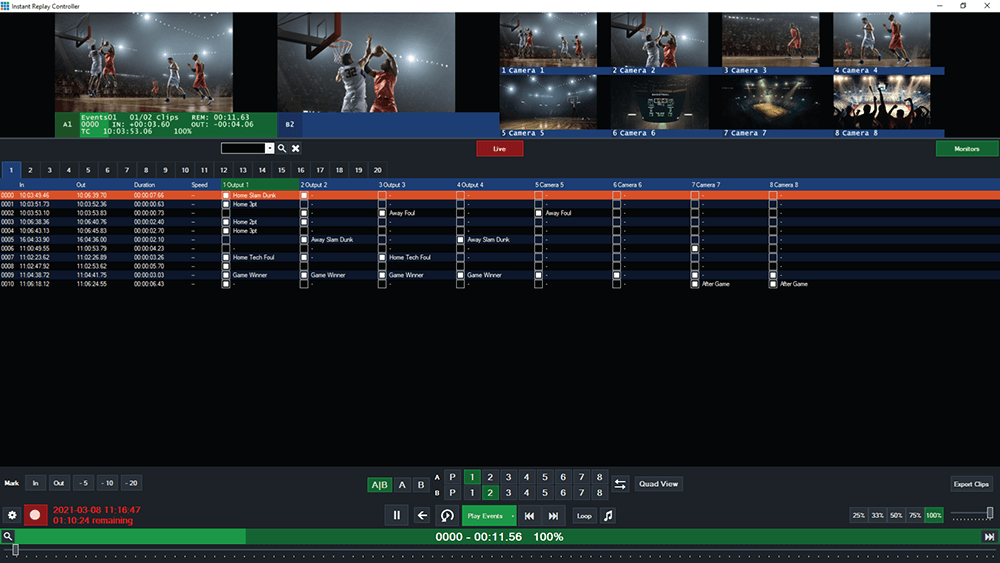
The vMix Instant Replay Controller with eight basketball camera angles and a list of marked events such as "Home Slam Dunk" and "Game Winner". Eight-camera replay needs Pro or MAX; vMix 4K replays one camera.
vMix Pro is the right buy for sports. One-camera replay in 4K is fine for re-showing the main angle, but a basketball or football production wants the same play from the end-zone, sideline and wide cameras, and that's Pro. Be ready for the hardware too: vMix's reference PC for 8-camera replay (Topaz) uses an Intel Core Ultra 7, 64 GB of RAM, an RTX 5070 Ti and two NVMe SSDs, and even it handles replay for 8 HD cameras or only 2 cameras in 4K.
Basic HD and MAX: the two edges
vMix Basic HD ($60) is a real, permanent vMix license with a hard cap of 4 inputs, 3 of them cameras. The cap counts everything you add: two cameras, one video and one title already fill it. There's 1 overlay channel, no vMix Call and no Zoom input. It suits a solo streamer or a small home production, and vMix's knowledge base sends you to HD as soon as you need more than 4 inputs, more than 3 cameras, the List input or more than one overlay.
vMix MAX ($50 a month) is vMix Pro as a subscription. Updates come while you subscribe, you can cancel at any time and keep using it until the end of the paid month, and there are no pro-rata refunds. MAX makes sense for a short project, such as one sports season or a single conference, or when Pro's features are needed but $1,200 up front isn't available. Kept for 14 months, MAX has cost as much as 4K; kept for 24 months, as much as Pro.
Price and licensing
Every vMix edition except MAX is a one-time lifetime license, and the price doubles at almost every step. The charts below use the prices on vmix.com and, for 4K, the price at checkout on this site, all checked on November 2, 2026.
One-time price per edition (USD)
vMix MAX, one year of subscription ($50 a month)$600
Prices checked on November 2, 2026.
Remote guests by vMix Call, per edition
From vMix's edition comparison table, November 2, 2026.
Upgrading later costs only the difference, so you never lose money by starting low. vMix's upgrade page lists these prices for an existing registration key (the free trial key can't be upgraded):
| Upgrade from |
To HD |
To 4K |
To Pro |
| Basic HD | $290 | $640 | Not listed |
| HD | - | $350 | $850 |
| 4K | - | - | $500 |
Each lifetime license includes 12 months of free version updates. After that, vMix keeps working on the version you have, for as long as you like. A further year of updates costs $60, whatever your edition. Even vMix Pro owners pay the same $60, so the yearly cost of staying current is small next to the license itself.
Remote guests and Zoom
vMix 4K is the cheapest edition for a panel show: it brings in up to 4 remote guests by vMix Call and multiple Zoom participants as separate inputs. vMix Call guests join from a web browser with nothing to install. HD allows one caller and a single Zoom input (the Zoom meeting as one picture), and Basic HD has neither.

vMix's Zoom Manager joined to a meeting with 2 participants, with the meeting chat in the middle, a local camera as input 1 and a Zoom participant as input 2.
Zoom picture quality depends on the Zoom account as well as the vMix edition: free Zoom accounts send up to 360p per participant, and 720p or 1080p needs a paid Zoom plan.
Which should you choose?
For most people comparing HD and 4K, the answer is vMix 4K, because PTZ presets, more than one remote guest and separate camera recordings are what growing productions ask for within a year. Commit to HD only if you're sure you need none of them.
| Your situation |
Pick |
Why |
| Church or school with network PTZ cameras | vMix 4K | PTZ presets start at 4K; volunteers recall shots with one click |
| Podcast or talk show with 2-4 remote guests | vMix 4K | 4 vMix Call guests, and MultiCorder records every camera for the edit |
| Vertical streams for Shorts, Reels or TikTok | vMix 4K | Vertical HD (1920p) isn't in HD or Basic HD |
| Fixed cameras, HD only, at most one guest | vMix HD | Same switcher and 1000 inputs for half the price |
| Sports with replays from several angles | vMix Pro | 8-camera replay; 4K replays 1 camera |
| One season or one event with Pro features | vMix MAX | $50 a month, cheaper than Pro for anything under 24 months |
| Solo streamer, one or two cameras | vMix Basic HD | $60, as long as 4 inputs in total are enough |
| Mac user | None of them | vMix is Windows-only; you'd need a separate Windows PC |
Who should skip each edition:
- Skip vMix 4K if you run fixed HD cameras with one guest at most: HD does that for $350 less.
- Skip vMix HD if you own or plan to buy network PTZ cameras, or have regular panels of remote guests: you'll pay the $350 upgrade within months.
- Skip vMix Pro unless you need replay from more than one camera or more than 4 remote guests: the other features match 4K exactly.
- Skip Basic HD if your show has slides, a video, a title and more than one camera at once: that's already past 4 inputs.
What commonly goes wrong
- Buying for features, then finding the PC can't keep up. vMix's minimum is a 2 GHz quad-core CPU, 4 GB of RAM and a DirectX 10.1 graphics card, but vMix recommends an Intel Core i7 at 3 GHz or faster, 8 GB of RAM, an SSD and a dedicated Nvidia card with 2 GB or more. 4K and replay need much more. Run the free 60-day trial on the PC you'll actually use.
- Assuming any PTZ camera will work. vMix's PTZ Control works with network-controlled cameras on its supported list. Serial-only cameras and ONVIF-only CCTV cameras aren't supported, so check your camera's control protocol before paying for 4K for PTZ alone.
- Thinking HD can take a 4K camera. HD and Basic HD can't load 4K camera inputs at all, even for an HD stream.
- Counting inputs wrong on Basic HD. Videos, images and titles count toward the 4-input limit, not just cameras.
- Underestimating the learning curve. All editions share the same deep interface, and reviewers from volunteer-run churches mention a steep learning curve whichever edition they bought.
- Expecting a Mac version. vMix runs on Windows 10 and 11 only.
FAQs
Do I need vMix 4K if I only stream in 1080p?
Often yes. vMix 4K is the first edition with PTZ control, more than one remote guest, MultiCorder, a second recorder, vertical HD, scripting and 4K camera inputs, and none of those need a 4K output. If you need none of them, vMix HD covers a 1080p show.
What's the difference between vMix 4K and vMix Pro?
vMix Pro adds instant replay from up to 8 cameras (4K has 1) and up to 8 vMix Call guests (4K has 4). Everything else is the same. Pro costs $1,200 against $700 for 4K, and 4K owners can upgrade to Pro for the $500 difference.
Is vMix a subscription or a one-time purchase?
vMix Basic HD, HD, 4K and Pro are one-time lifetime licenses with 12 months of free version updates. After that, vMix keeps working, and $60 buys another year of updates. Only vMix MAX is a subscription, at $50 a month.
Can I upgrade from vMix HD to 4K later?
Yes. vMix upgrades an existing registration key for the price difference: HD to 4K costs $350 and HD to Pro $850. A vMix forum user who upgraded HD to 4K on the same PC for PTZ control reported no problems.
Does the vMix free trial include every feature?
Yes. vMix describes its 60-day trial for new users as fully functional, so you can test PTZ, vMix Call and replay before choosing. vMix's own advice is to use the trial, note which features you actually used, and match them to the edition table.
Is there a free vMix license for churches?
Sometimes. vMix runs a vMix for Churches program that gives a limited number of free vMix HD licenses to churches that apply with a church website, a church email address, a trial key and a live stream made with vMix. Only accepted applicants hear back, within 7 days. It covers HD only, so churches that want PTZ control still need 4K.
What do I get with vMix 4K on this site's order page?
The vMix 4K order page sells the full vMix 4K license for $700, the same price vMix charges, and adds the Studio 200 virtual set for vMix, the HTTP Matrix 1.0 automation scheduler and 4 introductory training videos from the "vMix Basic to Amazing" course.
Can vMix run on a Mac?
No. Every vMix edition runs on Windows 10 and 11 only. Mac users need a separate Windows PC for vMix.
For other video software on the site, see the Video Tools category.
Conclusion
vMix 4K is the edition to buy for most multi-camera shows. It's where PTZ presets, 4 remote guests, separate camera recordings, vertical video and scripting arrive, for a one-time $700, and it's the only step in the vMix range that changes how a crew works, not just a limit. Choose vMix HD to save $350 if your show is HD with fixed cameras and one guest at most, and step up to Pro only for multi-camera sports replay or more than 4 guests. Whatever you pick, run the 60-day trial on your own PC first: the edition sets the features, but your graphics card sets what you can actually run.
Download vMix Free TrialBuy vMix 4K