Elby CloneBD & CloneDVD Lifetime Bundle: One License for Your Blu-rays and DVDs
You have a shelf of discs and a laptop with no disc drive. Or a 50 GB Blu-ray you want to fit on a 25 GB blank. Or a stack of old DVDs you'd rather keep as files before the discs scratch. Each job wants a different tool, and most of those tools sell yearly subscriptions.
This bundle from Elaborate Bytes (Elby), the company behind Virtual CloneDrive, pairs two long-running disc tools under one lifetime license. CloneBD copies, compresses and converts Blu-rays, including UltraHD and 3D discs. CloneDVD 2 copies and shrinks DVDs. You pay once and get free updates for life for both.
Quick facts
- What's included: CloneBD (version 1.3.2.1a) and CloneDVD 2 (version 2.9.3.8)
- Developer: Elaborate Bytes AG (Elby)
- Runs on: Windows 11, 10, 8, 7 and Vista (CloneDVD also runs on XP64)
- Price: $124.49 USD at checkout
- Updates: free updates for life for both programs
- Trial: CloneBD is free to use with no time limit but watermarks compressed video. CloneDVD runs for 21 days.
- Languages: 30 interface languages
- Discs: unprotected Blu-rays (all regions, UHD and 3D) and DVDs
Before you buy
Elby describes CloneBD as a tool for unprotected Blu-rays, and neither program is sold as a way to remove copy protection. Think of it as the tool for your own recordings, AVCHD camcorder discs, home-made Blu-rays and unprotected discs. You also need a Blu-ray drive to read Blu-rays and a writer to burn them. Both programs have free trials, so test them with your own discs and drive first.
Overview
The two programs look and work differently, but share a step-by-step approach. CloneBD walks you through Source, Copy Mode, Selection and Target. You pick a disc, ISO or folder, decide whether you want a disc copy or a file, choose titles and languages, and set the output. CloneDVD 2 uses a "Filmstrip" assistant with Back and Next buttons that takes you from choosing what to copy to the final output method.
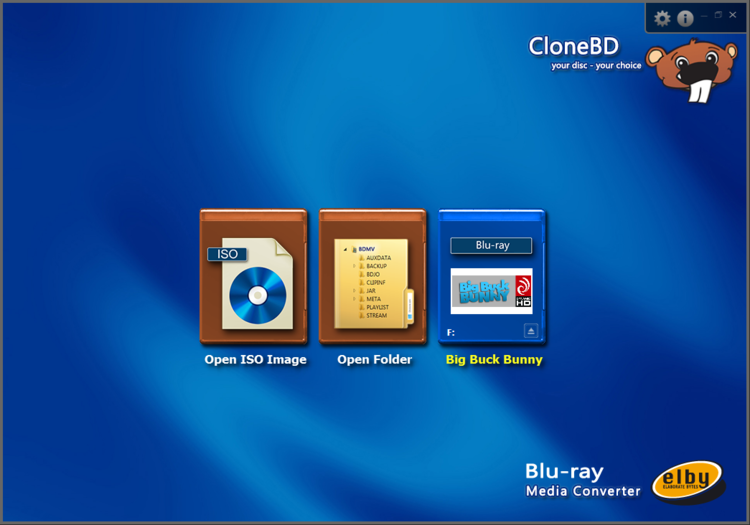
CloneBD's start screen: open an ISO image, open a Blu-ray folder, or pick the disc in your drive.
Features
CloneBD: complete or partial Blu-ray copies
Choose Complete Copy for a 1:1 clone, or Partial Copy to keep only what you want: just the main movie, chosen bonus titles, and only the audio and subtitle languages you actually use. Save the result as a Blu-ray folder or ISO, or burn it to a BD-R or BD-RE. CloneBD reads discs, ISO files and Blu-ray folders on your hard drive, works with all regions (A, B and C), and includes its own UDF 2.50 parser, so there's no extra driver to install.
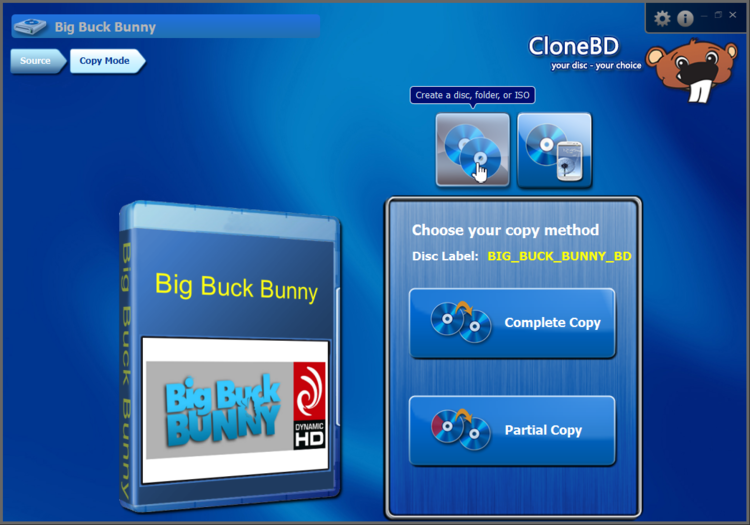
Copy Mode: create a disc, folder or ISO, then choose between a complete and a partial copy.
CloneBD: fit a BD-50 onto a single BD-25
Dual-layer Blu-rays hold up to 50 GB. CloneBD compresses them onto a single BD-25, or even a BD-9 or BD-5 (Blu-ray content on DVD media). Audio can be compressed to DTS, AAC or AC3 to save more space. With a license, this works without a watermark.
CloneBD: pick titles with a built-in preview player
Every title on the disc is listed with its length, codec, resolution and a strip of thumbnails, so you can tell the feature from the trailers at a glance. Play any title in the integrated preview player and trim parts off the beginning or end before you copy.
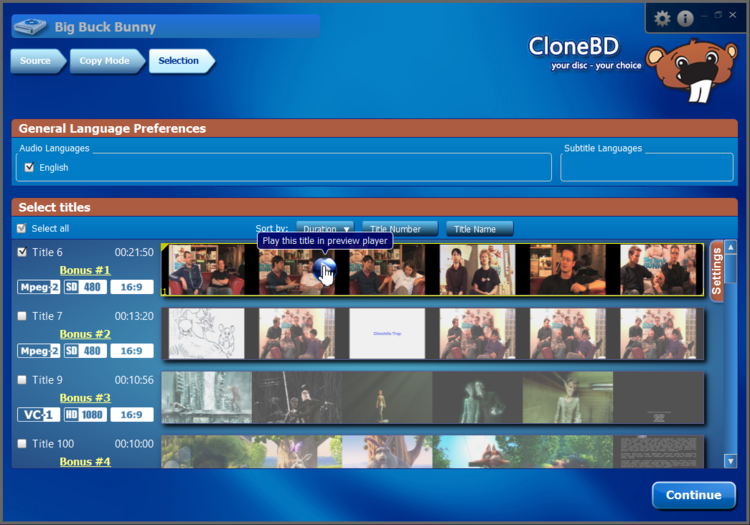
The Selection step: audio and subtitle language preferences at the top, and each title with its duration, format and thumbnails below.
CloneBD: convert Blu-rays to MKV, MP4 or device presets
Turn a Blu-ray title into an MKV or MP4 file, or pick a ready-made profile for an iPhone, iPad, Android device or smart TV. You choose the resulting file size, audio channels and output resolution. Subtitles can be kept as tracks or burned permanently into the picture.
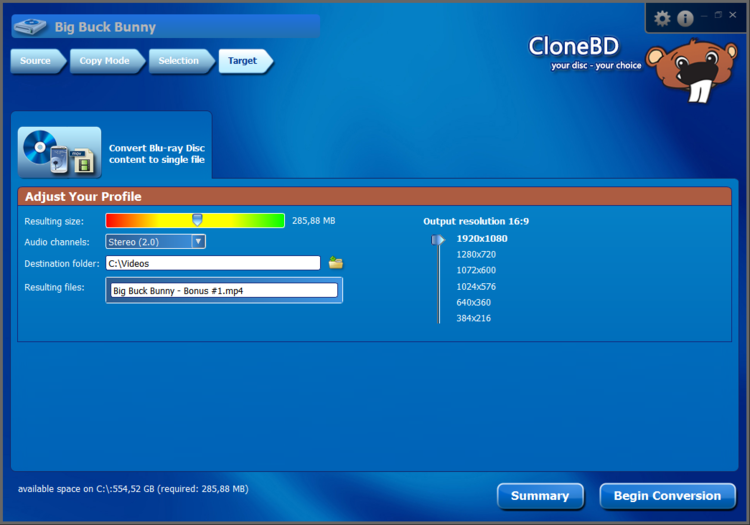
Converting a title to a single MP4 file: a size slider, stereo audio, destination folder and output resolutions from 1920x1080 down to 384x216.
CloneBD: UltraHD, HDR and 3D
CloneBD handles UltraHD Blu-ray with HEVC 10-bit HDR in and out, can convert an HDR source to an SDR Blu-ray for older players and TVs, and turns 3D Blu-rays into MKV files using H.265/HEVC. It uses multi-core CPUs and hardware acceleration to keep this heavy work moving.
CloneDVD 2: copy titles or the whole DVD, menus included
The welcome screen offers three jobs: Copy DVD Titles (one or more titles), Clone DVD (every title plus the menus) and Write Existing Data (burn DVD files or ISO/UDF images you already have). You can keep or drop the original menu, and include special features or just the main movie.
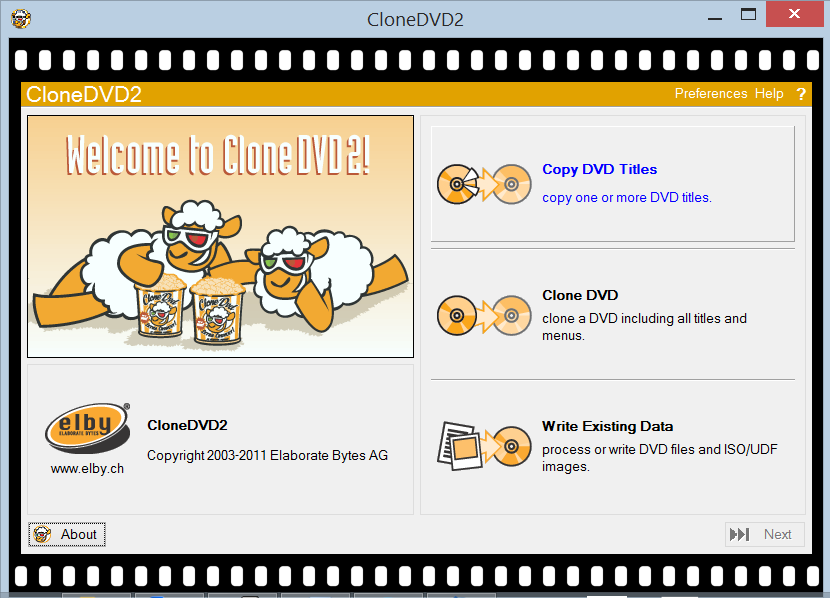
CloneDVD 2's welcome screen and its three main tasks.
CloneDVD 2: shrink long movies to the size you choose
CloneDVD's transcoder squeezes long footage onto a single-layer disc and is tuned for picture quality at high reduction rates. Pick a target (DVD-5, DVD+/-R DL, Mini DVD, DVD-RAM, CD-R or a custom size) and a quality bar shows how your choices of titles, audio tracks and subtitles affect the final picture. You can trim or split chapters too.
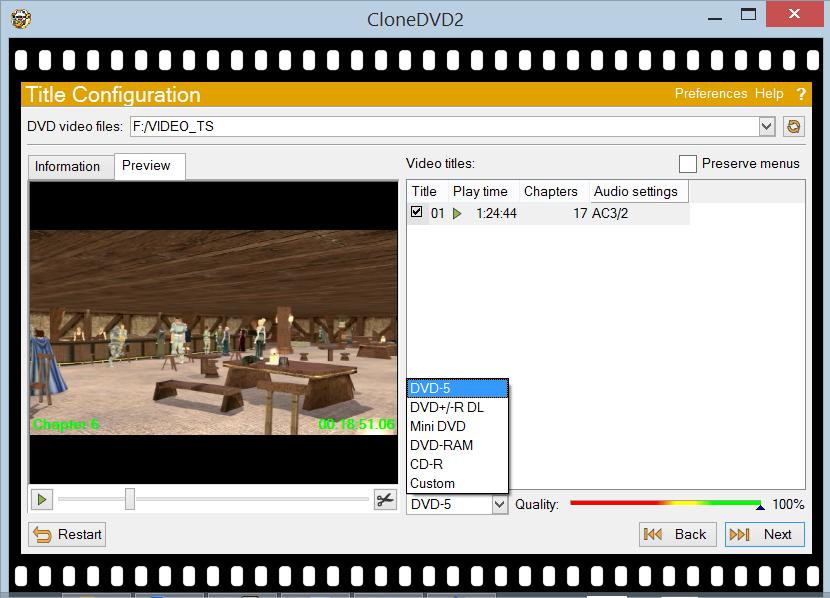
Title Configuration: a preview of the movie, the target size list open on DVD-5, and the quality bar at 100%.
CloneDVD 2: write to disc, folder or ISO
Finish by writing DVD files to a folder, an ISO/UDF image, or straight to a DVD writer (DVD-R/RW and DVD+R/RW). While it works you get picture snapshots, real-time bitrate statistics and a live preview, plus an option to shut the computer down when done.
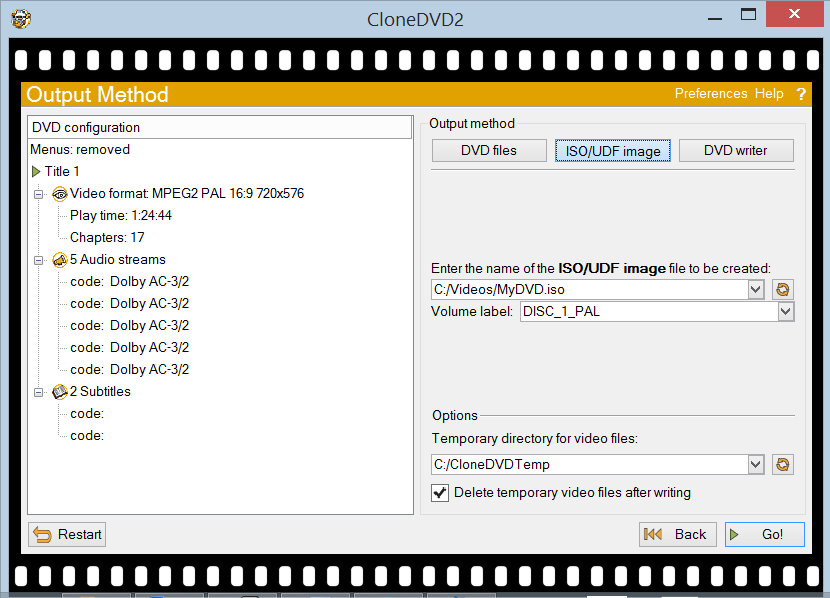
Output Method: a summary of the copy on the left and the choice of DVD files, ISO/UDF image or DVD writer on the right.
Benefits
One payment, no renewals
The bundle includes free updates for life for both programs, so there's no yearly fee to keep them current.
Blu-ray and DVD from one vendor
Two focused tools from the same company, instead of one oversized suite. Each does its own disc type well.
Your collection, off the shelf and onto your drive
Copies and files mean you can watch on a laptop with no drive, a phone or a media server, and keep the originals safe.
Mature, long-maintained software
CloneDVD's changelog goes back well over a decade, and both programs received fixes in their latest releases.
Real-World Uses
Archiving camcorder Blu-rays
Your AVCHD camcorder discs of the kids' early years are piling up. CloneBD reads them, and turns each one into an MP4 you can put on the family NAS or a phone.
Making a playable copy for the car or the kids' room
Copy just the main movie and one language onto a cheap BD-25 or a DVD, and the original stays safely in its case.
Watching on a 4K-less setup
A UHD HDR disc looks washed out on an older SDR TV. Convert it to an SDR Blu-ray or an MKV file and it plays properly.
Rescuing an old DVD collection
Wedding videos and home recordings on aging DVDs: use CloneDVD to make ISO images of each disc, then burn fresh copies whenever you need them.
Who it's for
- Home video keepers with camcorder and home-burned discs
- Collectors of unprotected Blu-rays and DVDs who want backups and files
- Anyone who'd rather pay once than subscribe to a disc suite
- Windows users only: there's no Mac version
Usage Guide
- Install both programs. CloneBD and CloneDVD have separate installers. You need administrator rights, and Windows may ask you to reboot afterwards.
- Enter your license keys to remove CloneBD's watermark and CloneDVD's 21-day limit.
- For a Blu-ray: open CloneBD, choose the disc, an ISO image or a folder, then pick a copy mode (disc/folder/ISO, or a file or device).
- Select titles and languages, preview them, and trim the start or end if you want.
- Set the target: disc size, or for files the size, audio channels, resolution and destination folder. Then click Begin Conversion.
- For a DVD: open CloneDVD, choose Copy DVD Titles or Clone DVD, follow the Filmstrip steps through titles, audio and subtitles, then pick DVD files, an ISO/UDF image or your writer and click Go!
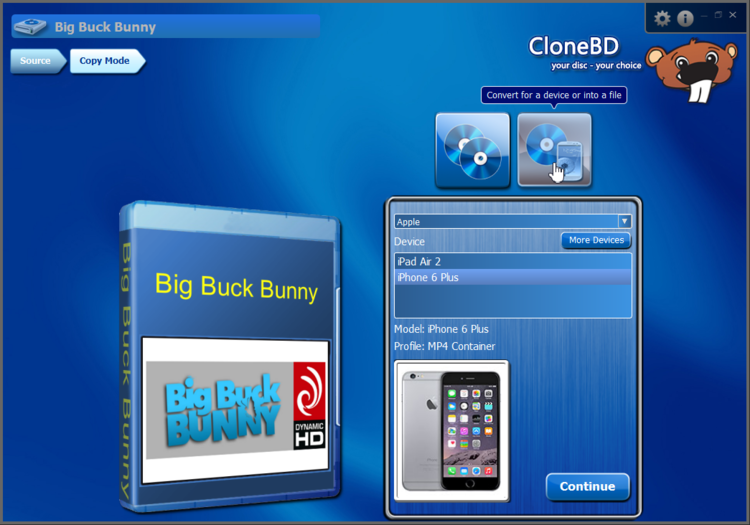
Converting for a device in CloneBD: choose the maker and model, and the matching profile (here MP4 for an iPhone 6 Plus) is picked for you.
Tips
- Clear disk space first. CloneBD needs about 50 to 100 GB of free temporary space for a Blu-ray, and CloneDVD about 5 GB for a DVD.
- Install the newest versions. The latest releases of both programs update Elby's ElbyCDIO.sys driver to fix a privilege escalation vulnerability, so don't keep an old installer around.
- Try the free CloneBD first. Uncompressed copies and MKV/MP4 files without compression work without a watermark, so you can test your drive and discs at no cost.
What Users Say
On VideoHelp, a long-running video software directory, users rate CloneDVD 8.7 out of 10 (87 votes) and CloneBD 7.1 out of 10 (21 votes).
CloneBD (10 out of 10)
"The best software for editing Bluray discs. Very easy to use and fast compression."
BlackBox (VideoHelp)
CloneDVD (10 out of 10)
"CloneDVD has none of these problems and has become a very useful tool as it is dead easy to strip out menus and unwanted audio tracks/junk with it, but I wouldn't compress to more than 60% of the main video to be on the safe side."
F.H (VideoHelp)
CloneDVD (7 out of 10)
"Thought I would try this after reading the reviews, But when I did a test between clonedvd and dvd shrink, dvd shrink was about 3 minutes faster, For an old program shrink is hard to beat, and it sure works great."
tarzan54 (VideoHelp)
Comparisons
Bundle vs. buying separately
From Elby's own store, CloneBD with lifetime updates is 99 EUR and CloneDVD is 39 EUR, or 138 EUR together. The bundle is 119 EUR, so you save 19 EUR. If you only have Blu-rays, CloneBD alone is cheaper. If you only have DVDs, CloneDVD alone is far cheaper.
Free CloneBD vs. licensed CloneBD
Both have every feature. The free version adds a visible watermark whenever the video is compressed: fitting a BD-50 on a BD-25, compressed MKV or MP4 output, HDR to SDR conversion, and burned-in subtitles. Straight 1:1 copies, partial copies without compression and uncompressed MKV/MP4 files carry no watermark.
Lifetime vs. 2-year CloneBD
Elby also sells CloneBD with 2 years of updates (69 EUR). With that license, support and updates stop after two years unless you renew. The bundle avoids that with lifetime updates for both programs.
Editions and Pricing
- CloneBD & CloneDVD, free updates for life (this bundle): $124.49 USD at checkout
- CloneBD, free updates for life: 99 EUR
- CloneBD, free updates for 2 years: 69 EUR (renewal 49 EUR, or 89 EUR to upgrade to lifetime)
- CloneDVD, free updates for life: 39 EUR
Technical support and updates last as long as your update subscription, which for this bundle is for life.
FAQs
Does it work on a Mac?
No. Both programs are Windows only.
Can it copy commercial Blu-rays?
Elby describes CloneBD as copying unprotected Blu-rays. It isn't sold as a tool for removing copy protection.
Do I need a Blu-ray burner?
Only to burn discs. To make ISO images, folders or MKV/MP4 files you just need a drive that reads Blu-rays, and you can work from ISO files or Blu-ray folders without any drive at all.
Does it handle region-locked Blu-rays?
CloneBD supports all regions (A, B and C).
I own a boxed CloneDVD. Can I use the download version?
Yes. Elby exchanges a retail box serial number for an online license key free of charge.
Is Virtual CloneDrive part of the bundle?
No, but it doesn't need to be. Elby's Virtual CloneDrive is a separate program and it's freeware.
Is there a 32-bit version of CloneBD?
The current CloneBD release, 1.3.2.1a, is 64-bit. Elby's 32-bit CloneBD installer is the older 1.3.1.0a.
What does "free updates for life" cover?
New versions of both programs and technical support, for as long as Elby releases them, with no renewal fee.
System Requirements
- CloneBD: Windows Vista, 7, 8, 10 or 11 (the current release is 64-bit), 2 GHz processor, 2 GB RAM, a Blu-ray reader or writer, and about 50 to 100 GB of free temporary disk space
- CloneDVD 2: Windows XP64, Vista, 7, 8, 10 or 11, 1 GHz processor, 1 GB RAM, a DVD reader (preferably a DVD writer), and about 5 GB of free temporary disk space
- Both: administrator rights to install
Conclusion
The Elby bundle is a sensible buy if you have both Blu-rays and DVDs to look after and don't want another subscription. CloneBD brings real depth for Blu-ray work, from BD-50 to BD-25 squeezes to UHD HDR and 3D handling. CloneDVD is a proven, easy-to-follow DVD copier. The limits are clear: Windows only, and built for unprotected discs. Run the free CloneBD and the 21-day CloneDVD trial on your own drive and discs, and if they handle your collection, one payment covers both for good.