Browser Password Recovery Tool: Back Up Every Saved Browser Login Before You Reinstall Windows
Browser Password Recovery Tool is a $19.95 Windows utility from PC Trek that finds the passwords saved in Chrome, Edge, Firefox, Opera, Brave, Vivaldi and other browsers and exports them to a CSV, TXT or HTML file in one go. It's for anyone about to reinstall Windows, replace a drive or move to a new PC who doesn't want to reset dozens of accounts afterwards.
Browsers encrypt saved logins with keys tied to your Windows user profile. Wipe that profile and the passwords are gone, even if you copied the browser's files. Chrome and Edge can export their own passwords, one browser at a time; Firefox has no CSV export at all. This tool reads them all from disk and gives you one backup file.
Quick facts
- Version: 3.3.0 (installer dated October 17, 2026)
- Developer: PC Trek
- Platform: Windows Vista, 7, 8, 8.1, 10 and 11
- Browsers: Chrome, Edge (Chromium and Legacy), Firefox, Opera, Brave, Vivaldi, Epic Privacy Browser and other Chromium- or Firefox-based browsers
- Exports: CSV, TXT and HTML
- Price: $19.95 Basic (1 PC), $39.95 Pro (up to 5 PCs), $249.95 Business (up to 99 PCs), all lifetime licenses with no subscription
- Trial: free, no time limit; passwords are partly masked and export is locked
- Refunds: only for a defective product, not for change of mind
- What we checked: bprt_setup.exe, file version 3.3.0 (4.2 MB), downloaded from pctrek.com on November 8, 2026, with a valid digital signature, and the prices of all three licenses on the order page on November 8, 2026. We didn't run a recovery on a test PC.
Before you buy: run the trial first
- The trial shows what it finds. It scans fully and lists every site and username, with the passwords partly masked. If your logins show up, the paid version exports them; if the trial finds nothing, PC Trek itself says not to buy.
- Do it before you format. The tool decrypts with your current Windows profile. After a reinstall, the old profile's keys are gone and nothing can read those passwords.
- No refunds for change of mind. PC Trek's policy makes all software non-refundable unless it's defective, which is another reason to test with the trial.
- Need Wi-Fi keys or license keys too? Advanced Password Recovery Suite ($24.95) includes everything here plus Wi-Fi, email, FTP, product keys and BitLocker keys, for $5 more.
Download Free TrialBuy Now
Overview
Browser Password Recovery Tool is a small, single-purpose program: one window, two recovery modes and a results table. Quick Recovery detects your installed browsers and reads every saved login. Custom Recovery lets you point it at a browser profile folder it doesn't find on its own, such as a portable or less common Chromium browser.

The start screen of version 3.3.0: choose Quick Recovery or Custom Recovery, then press Recover Passwords.
It has been updated steadily as browsers changed their encryption. Version 3.0.0 added support for the app-bound encryption Chrome, Brave and Edge introduced, and versions 3.1.0 and 3.2.0 kept up with Firefox 144 and Chrome 144. Version 3.3.0 brought a refreshed interface. Everything runs offline and read-only: it never changes your browser files and sends nothing over the internet.
Features
All your browsers in one scan
Browser Password Recovery Tool reads saved logins from Chrome, Edge (both the Chromium version and Legacy Edge), Firefox, Opera, Brave, Vivaldi, Epic Privacy Browser and Internet Explorer in a single pass. The results table shows the browser, the site URL, the username, the password and the date each login was saved, with a search box to find one account fast.
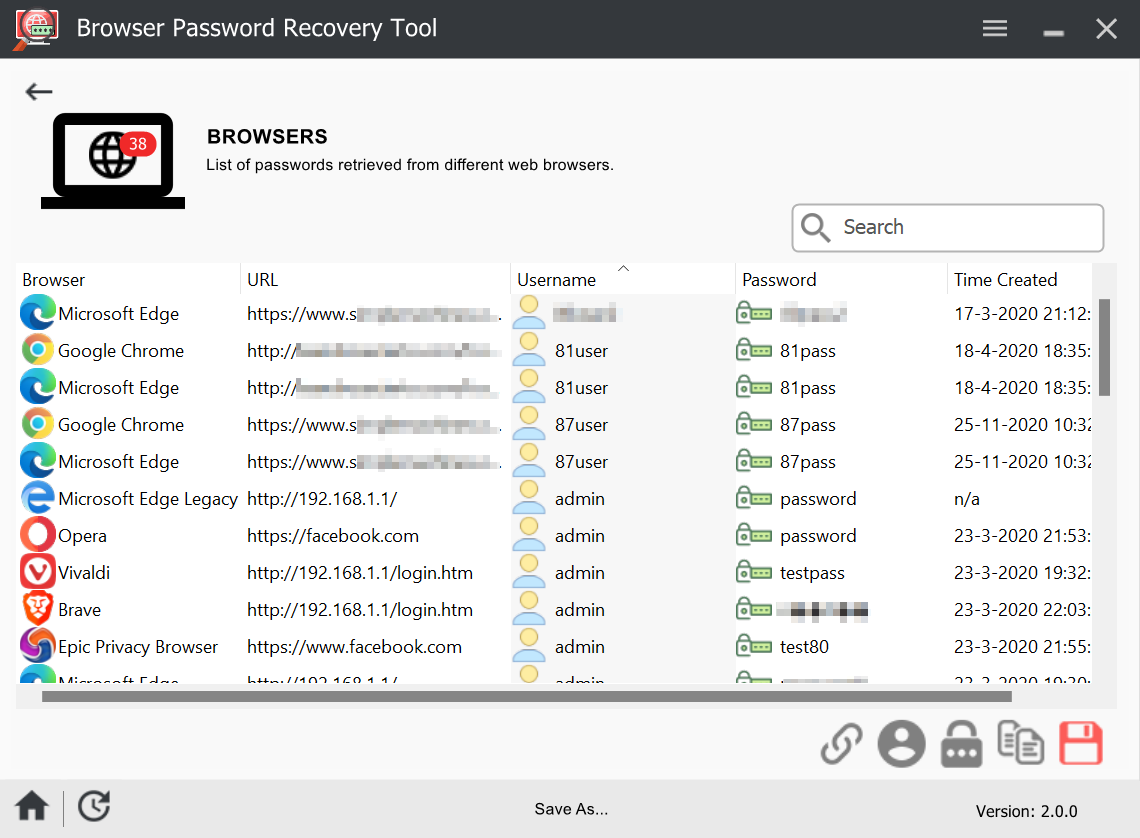
The results table after a scan: 87 saved logins from Edge, Chrome, Firefox, Vivaldi and Epic Privacy Browser, with export buttons at the bottom right.
Firefox export that Firefox doesn't offer
Browser Password Recovery Tool exports Firefox's saved logins to a standard CSV file, which Firefox itself can't do. That's the main reason to use it even if you only run Chrome and Firefox: one backup covers both.
Custom Recovery for any Chromium or Firefox profile
Browser Password Recovery Tool's Custom Recovery mode takes a browser type (Chromium or Firefox) and a profile folder, checks that the folder contains the "Login Data" file, and recovers from it. PC Trek says this extends support to more than 70 Chromium- and Firefox-based browsers, including portable copies and second profiles.

The Custom Recovery dialog: pick Chromium or Firefox, browse to the profile folder, and tick the box if the profile is signed in to an online account.
Exports you can import straight back
Browser Password Recovery Tool saves results as CSV, TXT or HTML. The CSV imports directly into Chrome (Settings, Autofill, Password Manager, Import) or Edge on the new installation, and the TXT or HTML copy works as an offline reference. The browsers don't need to be open during the scan.
Benefits
- No account resets after a reinstall. One file restores your logins instead of an evening of "forgot password" emails.
- One backup instead of one per browser. Mixed households and developers with three browsers get everything in one step.
- Your passwords never leave the PC. No cloud sync account is needed, and nothing is uploaded.
- Pay once. Every license is lifetime, with no subscription.
Real-World Uses
- Before a clean Windows 11 install, you export every saved login from Chrome, Edge and Firefox to a USB stick, then import the CSV into Chrome on the fresh system.
- You're switching from Firefox to Chrome and want your Firefox passwords in a format Chrome can import.
- A PC technician with the Pro or Business license backs up a client's browser logins before replacing the SSD.
- You use a portable Chromium browser from a USB drive and point Custom Recovery at its profile folder to list what it has saved.
Who It's For, and Who Should Skip It
Browser Password Recovery Tool suits Windows users who keep their logins in the browser itself and are about to reinstall, upgrade or change PCs, and technicians who do that for others.
Skip it if you already use a password manager or browser sync (your passwords are in your account, not just on the PC), if you only use Chrome or Edge and are happy with their built-in export, or if you're on a Mac. If you also want Wi-Fi keys and software license keys before a reinstall, buy Advanced Password Recovery Suite instead; it includes this tool's browser recovery.
Usage Guide
- Install and launch. Download the 4.2 MB installer from PC Trek and run it with an administrator account.
- Scan. Leave Quick Recovery selected and press Recover Passwords, or choose Custom Recovery and browse to a profile folder.
- Review. Check the results table; the trial masks part of each password.
- Activate. Click Activate Now, paste the code from your purchase email and restart the program.
- Export and copy. Export to CSV, TXT or HTML and copy the file to a USB drive or another disk before you format. Delete it once you've imported it, since it holds your passwords in plain text.
Where it falls short
- Antivirus software may block it. PC Trek's FAQ says some antivirus programs treat password recovery as suspicious and close the program; its fix is to disable the antivirus temporarily. The installer is digitally signed, so download it only from pctrek.com.
- It can't help after the fact. Once Windows has been reinstalled, the old profile's encryption keys are gone and the passwords can't be recovered.
- Odd errors on some regional settings. The FAQ lists a "Parsing Error" caused by Windows regional formats, fixed by switching the format or the digit grouping symbol.
- The export file is unprotected. A CSV of every password is a risk if it's left on a shared drive or in a cloud folder.
What Users Say
Browser Password Recovery Tool comes from a small developer, and independent reviews are scarce: we found no Trustpilot or Capterra listing, and download sites mostly repeat the vendor's description.
On PC Trek's own page
PC Trek shows 4.8 out of 5 "based on 142 verified reviews", with testimonials we can't check independently. Claire W., a marketing manager: "Had hundreds of saved logins in Chrome and Edge. Exported everything to CSV in two minutes before formatting. Imported straight back into Chrome on the new PC. Perfect."
Ryan B., a developer: "The Firefox support is what sold me — Chrome and Edge have built-in export but Firefox doesn't. This tool handled all three at once and the CSV was clean and importable."
Lisa M., a freelance designer, gave four stars: "Used the custom recovery mode to get passwords from Brave. Works exactly as described. Saved me from resetting dozens of accounts after my SSD was replaced."
The pattern: the praise is about speed, Firefox export and the importable CSV. We found no security warnings or malware reports about PC Trek or this tool, but password recovery tools are a category antivirus programs watch closely, which PC Trek's FAQ addresses.
Comparisons
Browser Password Recovery Tool vs Advanced Password Recovery Suite
Both recover the same browser passwords. Advanced Password Recovery Suite ($24.95) adds Wi-Fi keys, email and FTP logins, Windows Credential Manager entries, software license keys and BitLocker recovery keys. For a full pre-reinstall backup the suite is better value; for browser logins alone, this tool is enough.
Browser Password Recovery Tool vs the browsers' own export
Chrome and Edge can export their passwords to CSV for free, one browser at a time, and they need to be running. Browser Password Recovery Tool does all browsers at once, adds Firefox and less common Chromium browsers, and works on profile folders directly. If you only use Chrome, the built-in export does the job.
Editions and Pricing
| License |
Price |
PCs |
Term |
Extras |
| Basic | $19.95 | 1 | Lifetime | Full export, free updates |
| Pro | $39.95 | Up to 5 | Lifetime | Priority support |
| Business | $249.95 | Up to 99 | Lifetime | For IT departments and technicians |
Buy Basic ($19.95)Buy Pro, 5 PCs ($39.95)Buy Business, 99 PCs ($249.95)
FAQs
Can Browser Password Recovery Tool recover passwords after I've reinstalled Windows?
No. Browser Password Recovery Tool decrypts saved logins with the current Windows profile's keys, which a reinstall destroys. Run it on the old installation before you format.
Does Browser Password Recovery Tool work with Chrome's new app-bound encryption?
Yes. Browser Password Recovery Tool added support for app-bound encryption in Chrome, Brave and Edge in version 3.0.0, and later versions were updated for Chrome 144 and Firefox 144.
Can Browser Password Recovery Tool get passwords from my Google or Firefox account?
No. Browser Password Recovery Tool only reads logins already stored on the PC by your browser. It can't access online accounts or sign in to any service, and it's meant for computers you own or are allowed to work on.
Why are the Firefox usernames and passwords blank?
Blank Firefox fields usually mean an old version of Browser Password Recovery Tool against 64-bit Firefox, which uses a different decryption method. PC Trek's fix is to use version 3.x or newer.
How do I get the activation code for Browser Password Recovery Tool?
Browser Password Recovery Tool's activation code arrives by email right after purchase; check the spam folder if it doesn't show up. If the program still says "Not Activated" after you enter it, it needs administrator rights to write the activation to the registry.
Does one Browser Password Recovery Tool license cover several PCs?
The Basic license of Browser Password Recovery Tool activates on one PC. The Pro license covers up to 5 PCs and the Business license up to 99, both lifetime.
System Requirements
- Windows Vista, 7, 8, 8.1, 10 or 11
- 256 MB RAM and 20 MB free disk space
- Administrator rights
Conclusion
Browser Password Recovery Tool is worth $19.95 if your logins live in more than one browser, or in Firefox, and you're about to wipe Windows: it turns them into one importable file in minutes. The one reason to buy it is the all-browsers-at-once export, Firefox included. The main reason not to: if you only use Chrome or Edge, their free built-in export does the same job, and if you want Wi-Fi and license keys as well, Advanced Password Recovery Suite is the better buy for $5 more. Run the free trial first, since refunds are only for defects.
Download Free TrialBuy Now