Advanced Password Recovery Suite: Save Every Password and License Key Before You Reinstall Windows
Advanced Password Recovery Suite is a $24.95 Windows tool (lifetime license, 1 PC) from PC Trek that finds the passwords, Wi-Fi keys, software license keys and BitLocker recovery keys stored on your PC and exports them to a file, so you can put them back after a clean Windows install or on a new computer.
A clean reinstall wipes your user profile, and with it the keys Windows uses to decrypt everything your browsers, mail program and Wi-Fi settings have saved. The registry, where most programs keep their activation codes, goes too. If you didn't write those down, you find out the hard way when Photoshop asks for a serial number or the office Wi-Fi asks for a password nobody remembers. This program does the writing-down for you, in one scan, before you format.
Quick facts
- Version: 4.0.0, which added the BitLocker recovery key finder
- Developer: PC Trek (in business since 2018)
- Platform: Windows Vista, 7, 8, 8.1, 10 and 11
- Finds: license keys for Windows, Office, Adobe and 10,000+ programs and games, browser passwords, Wi-Fi keys, e-mail and FTP logins, Windows Credential Manager entries, local BitLocker recovery keys
- Export: CSV, TXT or HTML report, or copy to the clipboard
- Price: $24.95 Basic (1 PC), $49.95 Pro (5 PCs), $299.95 Business (99 PCs), all lifetime licenses with free updates
- Trial: no time limit; shows everything it finds with passwords and keys partly masked, export locked
- Refunds: none except for a defective product
- What we checked: installer aprs_setup.exe version 4.0.0 (4.3 MB), with a valid Microsoft-issued code signature, downloaded from pctrek.com on November 8, 2026; order page prices $24.95 Basic, $49.95 Pro and $299.95 Business, one-time with no auto-renewal, on November 8, 2026. We didn't run a scan on a PC.
Before you buy: run the trial first
PC Trek doesn't give refunds unless the software is defective, so use the free trial as your test. It has no time limit and runs the full scan; it only masks part of each password and key and locks saving. If the trial lists the items you need, the paid version will export them. If it finds nothing, PC Trek's own advice is not to buy.
Run it before you format. Once Windows is reinstalled, the old browser and Wi-Fi passwords can't be decrypted any more, and no tool can bring them back. Your antivirus may also flag or stop the browser-password scan, because password recovery looks suspicious to security software; the program is code-signed, and PC Trek's FAQ suggests pausing the antivirus while it runs. Use it only on PCs you own or are allowed to work on.
Download Free TrialBuy Now
Overview
Advanced Password Recovery Suite (APRS) is the all-in-one member of PC Trek's three-tool family. Product Key Recovery Tool only finds license keys, and Browser Password Recovery Tool only finds browser logins; APRS does both, plus Wi-Fi, mail, FTP, Credential Manager and BitLocker, for $5 more than the key finder. It works offline, reads data without changing anything, and doesn't install background services or drivers.
The program is actively updated. Recent versions kept up with Chrome's app-bound encryption (version 3.0.0), Firefox 144 and Chrome 144 (versions 3.1.0 and 3.2.0), and version 4.0.0 added the BitLocker finder and a redesigned interface.

The start screen of version 4.0.0: one Quick Recovery button, and a sidebar with a tab for each kind of credential.
Features
Software license keys, even from a dead drive
Advanced Password Recovery Suite reads the activation keys that Windows, Microsoft Office, Adobe products, AutoCAD, VMware, WinZip and over 10,000 other programs and games store in the registry, including the Windows key held in the PC's BIOS. If the quick scan misses a program, a deep registry scan looks for keys that aren't in its database. The Select External Drive button scans the Windows folder of another disk, such as the drive from a PC that no longer boots, connected by USB.
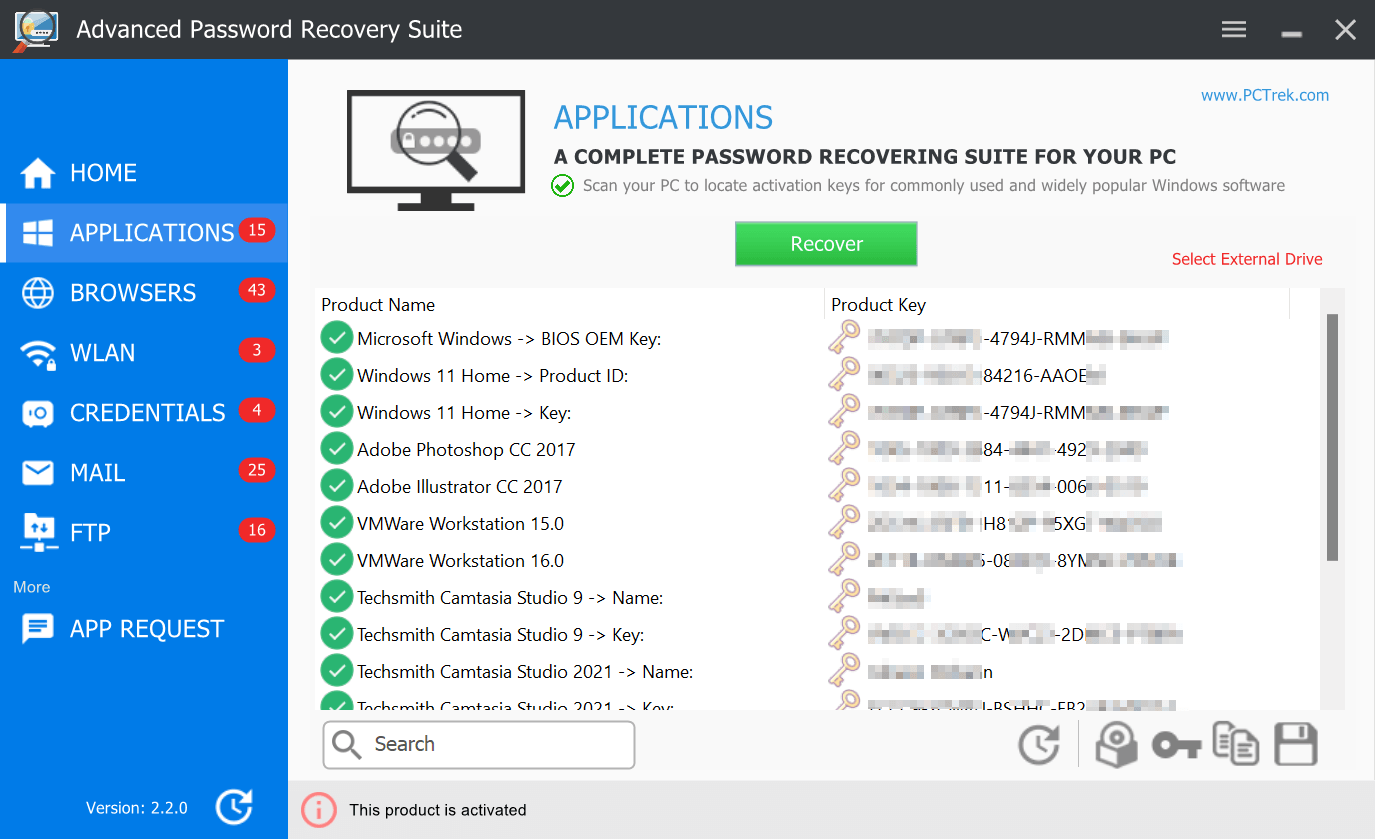
The License Keys tab with 15 items found: the BIOS OEM key, Windows 11 Home, Photoshop and Illustrator CC 2017, VMware Workstation, Camtasia and Snagit, keys blurred by the vendor.
Browser passwords from Chrome, Edge, Firefox and 70+ others
Advanced Password Recovery Suite lists every login saved in Chrome, Edge, Firefox, Opera, Brave, Vivaldi, Epic and other Chromium-based browsers, with the site, user name, password and the date it was saved, and exports them to CSV. A Customize option points it at a portable browser's profile folder. It handles Chrome's newer app-bound encryption and Firefox passwords protected by a master password.

Browser Passwords: 87 saved logins from Chrome, Brave, Edge, Firefox and Epic Privacy Browser, with URL, user name and creation date (details blurred).
E-mail and FTP logins
Advanced Password Recovery Suite recovers account passwords and server settings from Outlook, Thunderbird, the Windows Mail app, Windows Live Mail 2012, Opera Mail, Eudora, PocoMail, The Bat!, IncrediMail and Becky!, and saved server logins from FileZilla, WinSCP, SmartFTP, Total Commander, FlashFXP, CuteFTP, CoreFTP, FTP Commander, Dreamweaver and Bullet Proof FTP. That's useful when you've forgotten the IMAP password your mail program has typed for you for years.

Mail Passwords: 30 accounts from Outlook 2016/2019, Thunderbird, Windows Mail, The Bat!, Eudora, PocoMail and Opera Mail, with e-mail address, server, user name and password.
Wi-Fi keys and Windows Credential Manager
Advanced Password Recovery Suite lists the WPA, WPA2 and WPA3 password of every wireless network the PC has ever joined, read from Windows with no router access. It also exports Windows Credential Manager entries: saved Remote Desktop logins, network share passwords and other stored Windows authentication.
BitLocker recovery keys (new in 4.0.0)
Advanced Password Recovery Suite 4.0.0 finds the BitLocker recovery key for any drive that's currently unlocked, when the key is stored on the PC, and exports it with the rest. It can't unlock a locked drive, and it can't fetch a key that's kept only in your Microsoft account or your company's Active Directory; you get those from the account or the administrator.
Benefits
- One file instead of an afternoon of resets. After the reinstall you open the export and re-enter logins and serials, instead of resetting passwords site by site and digging through old e-mails for license codes.
- A safety net for old software. Programs bought years ago, from vendors without online accounts, often can't be reactivated without the original key. Saving the registry key may be the only way to keep them.
- Nothing leaves your PC. It runs offline and read-only, which matters for a tool that sees every password you have.
Real-World Uses
- Before a clean install of Windows 11. Run a full scan, export everything to a USB stick, then format.
- Moving to a new laptop. Take the old PC's browser logins, Wi-Fi keys and software serials with you in one file.
- The old PC won't boot. Put its drive in a USB enclosure and scan it from another computer for the Windows and Office keys.
- A PC repair shop or IT desk. Back up a customer's or employee's keys before a reinstall; the Pro license covers 5 PCs and the Business license 99.
- A forgotten mail or FTP password. Read it from the program that remembers it, without resetting the account.
Who It's For, and Who Should Skip It
It's for Windows users and technicians who are about to reinstall, replace or repair a PC and want every saved credential and license key in one export, with a simple interface and no command line.
Skip it if:
- you only need software keys. PC Trek's Product Key Recovery Tool does that for $19.95.
- your passwords already live in a password manager or sync with your Google, Microsoft or Firefox account. They come back when you sign in on the new PC.
- you want to open a locked BitLocker drive or crack a password you never saved. This tool only reads credentials that are stored and readable on the PC.
- you use a Mac. It's Windows-only.
- you're comfortable with free single-purpose utilities. Free tools exist for reading product keys and browser passwords; what you pay for here is all categories in one scan and one export.
Usage Guide
- Install and launch. Run aprs_setup.exe (4.3 MB) and start the program as administrator; it needs admin rights to read the registry and to save the activation.
- Run Quick Recovery from the start screen, or pick one category in the sidebar (Applications, Browsers, Wi-Fi, Mail, FTP, Credentials, BitLocker) and click Recover.
- Run the deep scan if a program's key is missing: open the Applications section and answer Yes when it offers a deeper registry scan.
- Scan an old drive with Select External Drive and pick the Windows drive of the connected disk.
- Activate. Click Activate Now, paste the code from your order e-mail, then close and reopen the program.
- Export. Save each tab to CSV, TXT or an HTML report, and copy the files somewhere that survives the format, such as a USB drive.
Where it falls short
- Not every key is in the registry. Software activated through an online account (Microsoft 365, Adobe Creative Cloud, Steam) has no key to find, and a Windows digital license tied to your Microsoft account shows no product key; both reactivate when you sign in.
- Antivirus interference. PC Trek's FAQ says some antivirus programs block or close it during the browser scan, and that the program may fail to open until the antivirus is paused.
- Regional settings errors. A "Parsing Error" or "network_time_mapping" error comes from the Windows number format; the fix is switching the regional format to English or changing the digit grouping symbol.
- Activation can fail on locked-down PCs. If the registry key's permissions were changed, the program stays "Not Activated" until you give your admin account full control of its registry key.
- Display scaling. At non-standard scaling or with custom themes the window can look misaligned; setting scale to 100% fixes it.
- No refunds for change of mind. Only a defective product is refunded, and you give up the license when it is.
What Users Say
Advanced Password Recovery Suite is a small developer's product with little independent coverage: no Trustpilot or Capterra listing, and most of its press came from license giveaways in European computer magazines.
Softpedia
Softpedia's listing for version 4.0.0 shows a user rating of 4.0 out of 5 from 31 votes. Its reviewer, Catalin Chelariu, wrote: "On the whole, Advanced Password Recovery Suite is a great choice if you need a simple way to retrieve product keys or passwords. It sports an intuitive user interface and is suitable even for complete novices."
The same review describes the workflow: "Essentially, you only have to launch a quick recovery operation from the Overview tab without modifying any settings. Once the recovery process has been completed, you can navigate through the various tabs to find the keys you are interested in." (Softpedia blocks automated reading, so these quotes came to us through a search summary.)
On PC Trek's own page
PC Trek shows a rating of 4.8 out of 5 "based on 124 verified reviews" with testimonials we can't check independently, such as Michael R., a graphic designer: "Saved me from losing hundreds in software. Extracted my Office and Adobe keys in under a minute before formatting."
David K., an IT administrator: "We deploy this before every Windows upgrade in the office. The business license is great value. FTP and email credential recovery are a huge plus for IT work."
Press
Computer Bild (Germany), CHIP (Czech Republic) and Komputer Świat (Poland) have offered Advanced Password Recovery Suite to their readers as a free full version, and Japan's Vector download portal has covered it. Those articles aren't in English, so we don't quote them here.
The pattern: the praise is about simplicity, one click and everything in tabs. We found no security warnings or malware reports about PC Trek; the only recurring problem in its own support pages is antivirus software objecting to a password-recovery tool, which is common for this kind of program.
Comparisons
Advanced Password Recovery Suite vs Product Key Recovery Tool
Both come from PC Trek and share the license-key scanner, the deep registry scan, external-drive scanning and the BitLocker finder. Product Key Recovery Tool ($19.95) stops there. Advanced Password Recovery Suite ($24.95) adds browser passwords, Wi-Fi keys, mail, FTP and Credential Manager. For a full pre-format backup the extra $5 is worth it.
Advanced Password Recovery Suite vs free single-purpose tools
Free utilities can read product keys or browser passwords one category at a time, usually with less polish and separate exports. Advanced Password Recovery Suite puts all the categories, the dead-drive scan and BitLocker keys in one window and one report, with a signed installer and updates that follow browser encryption changes. If you only need one Wi-Fi password, a free tool will do; for a full backup before a reinstall, the convenience is what you're paying for.
Editions and Pricing
| License | Price | PCs | Term | Extras |
|---|
| Basic | $24.95 | 1 | Lifetime | All features, free updates, standard support |
| Pro | $49.95 | Up to 5 | Lifetime | Priority support |
| Business | $299.95 | Up to 99 | Lifetime | For IT departments and repair shops |
Prices are what the order page showed on November 8, 2026: one-time payments, no subscription. The activation code arrives by e-mail right after purchase.
Buy Basic ($24.95)Buy Pro, 5 PCs ($49.95)Buy Business, 99 PCs ($299.95)
FAQs
Can Advanced Password Recovery Suite recover passwords after I've already reinstalled Windows?
No. After a clean install the encryption keys that protected the old browser, mail and Wi-Fi passwords are gone, so Advanced Password Recovery Suite has to run on the old installation before you format. License keys are different: if the old drive still exists, its registry can be scanned with Select External Drive.
Does Advanced Password Recovery Suite send my passwords anywhere?
No. Advanced Password Recovery Suite works offline and read-only; according to PC Trek, no passwords, scan results or usage data are transmitted. Keep the export file safe, because it holds every password in plain text.
Will it find my Windows 11 product key?
Yes, if there is one. Advanced Password Recovery Suite shows the 25-character key for retail, volume and OEM installs, including a key stored in the BIOS. Many Windows 10 and 11 PCs use a digital license linked to your Microsoft account instead, which reactivates by itself after a reinstall.
Why are the Firefox or Thunderbird passwords blank?
Blank fields for 64-bit Firefox or Thunderbird come from older versions of the program. PC Trek says versions 3.x and newer read them; the current version is 4.0.0.
Does one Advanced Password Recovery Suite license cover several PCs?
No, the Basic License is a lifetime activation for one PC. If you need Advanced Password Recovery Suite on more machines, the Pro License covers up to 5 PCs and the Business License up to 99.
Do I get updates?
Yes. Every Advanced Password Recovery Suite license includes free updates, which matters because browsers change how they encrypt saved passwords; versions 3.0 to 3.2 were released to keep up with Chrome and Firefox.
Is there a portable version?
PC Trek offers the trial both as an installer and as a .zip download. The program can also read the profiles of portable mail and FTP programs through the Customize button.
System Requirements
- Windows Vista, 7, 8, 8.1, 10 or 11
- 400 MHz or faster CPU, 256 MB RAM, 20 MB free disk space
- Administrator rights
Conclusion
Advanced Password Recovery Suite is worth $24.95 if you're about to reinstall Windows or retire a PC and want every saved password, Wi-Fi key and license key in one export first. It's simple, current with the latest browser encryption, and a one-time purchase. The one reason to buy it: one scan covers every category, including keys on a drive that no longer boots. The main reason not to: there are no refunds for change of mind, and if your passwords already sync to an account or you only need one key, a free tool or PC Trek's cheaper key finder may be enough. Run the free trial first: it shows exactly what it will save before you pay.
Download Free TrialBuy Now