Softaken OST to PST Converter: Get Mail Out of an Orphaned or Corrupt OST File
Softaken OST to PST Converter (sold as Softaken OST File Exporter) opens Outlook .ost files without Outlook or the Exchange server they came from, and exports the mail, contacts and calendars to PST, MBOX, EML, PDF, Office 365, Gmail and about 20 other formats. It's for IT staff and users stuck with an OST from a deleted account, a dead server or a broken profile. A Personal license is $49 for a year on one PC; a lifetime Home license for 2 to 10 PCs is $69. Windows, Mac and Linux.
An OST is Outlook's local copy of an Exchange or Microsoft 365 mailbox, tied to the profile that created it. When the account is removed, the employee leaves or the server goes, Outlook can't open it, and there's no built-in way to turn it into a PST. That's the gap this tool fills.
Quick facts
- Developer: Softaken Software
- Version: 16.0
- Platforms: Windows 11, 10, 8.1, 8, 7 (32/64-bit); macOS 10.15 and later; Ubuntu 18.04+, Debian 9+, CentOS 7+
- Input: ANSI and Unicode OST files from Outlook 2003 to 2024 and Microsoft 365, including encrypted and password-protected ones; Outlook doesn't need to be installed
- Price: Personal $49 (1 PC, 1 year), Home $69 (2-10 PCs, lifetime), Business $199 (10-50 PCs, lifetime); one-time payments, no auto-renewal
- Trial: 30 days, full preview, exports 10 items
- Guarantee: 30-day money-back
- What we checked: the Windows trial installer from softaken.com on November 22, 2026: 18.4 MB, product version 16.0, digitally signed by DataVare Software and Services LLP; and the order page prices on November 22, 2026: Personal $49.00, Home $69.00 and Business $199.00, none marked auto-renewal. We didn't convert an OST file ourselves.
Before you buy
- Pick Home over Personal for home use. Personal ($49) expires after one year and covers one PC. Home ($69) is a lifetime license for 2 to 10 PCs. Both are for non-commercial use only; any office use needs Business or Enterprise.
- Try first on your own file. The trial previews the whole mailbox, so you can confirm your OST opens before paying.
- If you still have the account, you may not need this. If the Exchange or Microsoft 365 mailbox still exists, Outlook re-downloads it into a new profile, and Outlook's own Export can write a PST.
- Refunds within 30 days, per Softaken's buy page.
Download Free TrialBuy Personal ($49)Buy Home ($69)Buy Business ($199)
Overview
The window is laid out like Outlook: a toolbar (Add, Export, Buy, Support, Live Chat, Activate License, Change Language), a folder tree on the left, a message list in the middle and a preview pane on the right with Message, Internet Headers, Attachments and HTML Source tabs. You add one OST file, several, or a whole folder of them, the tool scans them, and every folder (Inbox, Sent, Calendar, Contacts, Tasks, Notes, Journal, even Conversation History) appears with item counts.
From there you tick the folders you want, click Export, choose a format and options, and Convert Now. The OST itself is read only, never changed.
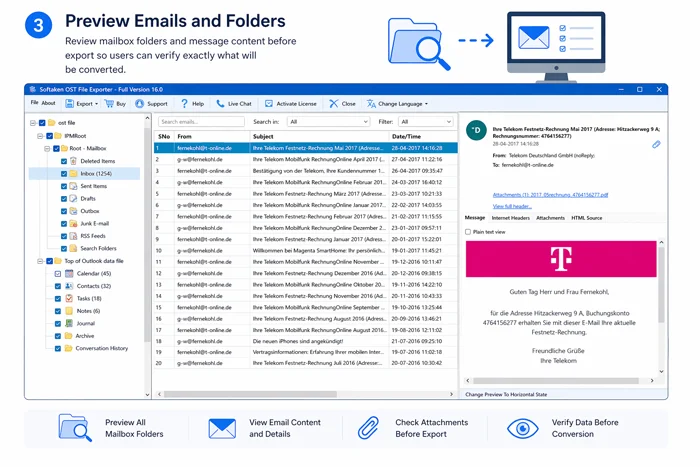
OST File Exporter Full Version 16.0 previewing a mailbox: the folder tree with an Inbox of 1,254 items, the message list and an email in the preview pane (shown on the vendor's step 3 banner).
Features
Opens orphaned, corrupt and encrypted OST files
Softaken OST to PST Converter reads OST files without Outlook installed and without a connection to Exchange, so it works on a file from a deleted profile or a server that's offline. Softaken says its deep scan parses damaged files sector by sector, handles compressed, encrypted and password-protected OSTs, and has been tested on files over 150 GB.
PST and 20-plus other outputs
Softaken OST to PST Converter exports to Outlook PST (Unicode), MSG, EML, EMLX, MBOX, PDF, HTML, MHT, Lotus Notes NSF and Zimbra TGZ; contacts to vCard, CSV or MSG; calendars to ICS or MSG; and straight into Office 365, Gmail, Yahoo or any IMAP account. Folder structure and message details (to, cc, bcc, subject, formatting, attachments) are kept.
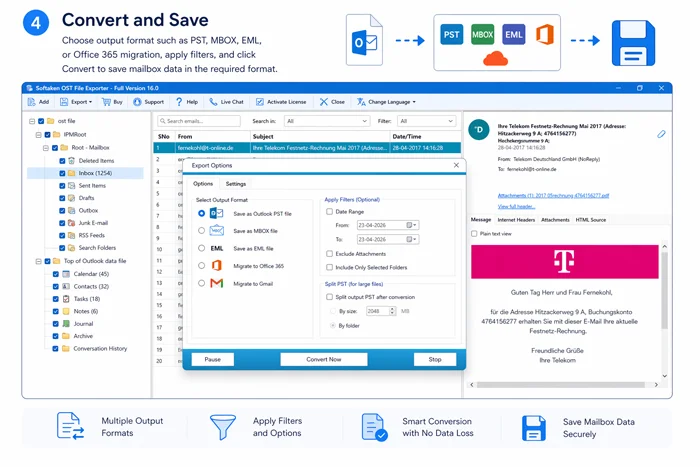
The Export Options dialog: save as PST, MBOX or EML, or migrate to Office 365 or Gmail, with a date-range filter, attachment exclusion, selected-folders-only and splitting the output PST by size or by folder.
Filters, split and batch mode
Softaken OST to PST Converter exports only a date range if you set one, can skip attachments or empty folders, and can split a large output PST by size or by folder so older Outlook versions open it. Folder mode converts many OST files in one run.
Attachment and address extraction
Softaken OST to PST Converter can pull every attachment out of one or many OST files into a folder, and extract the email addresses from the To, CC and BCC fields into a text file per OST, skipping duplicates.
Real-World Uses
- An employee left and the mailbox was deleted: the OST on their old laptop is the only copy; convert it to PST and archive it.
- Exchange server crash: keep users working from PSTs made from their local OSTs while the server is rebuilt.
- Leaving Outlook: send the old mailbox straight to Gmail, or to MBOX for Thunderbird or Apple Mail.
- Legal hold or audit: export a date range to PDF for review, with attachments saved separately.
Who It's For, and Who Should Skip It
It's for IT admins and consultants recovering mail from OSTs they can't reconnect, and home users with an old work or Outlook.com OST they need to read.
Skip it if the mailbox still exists on the server: sign in with a new Outlook profile and the mail comes back for free. Skip it too if your file is already a PST (you need a PST repair or converter, not this), and if you only need a handful of messages, the trial's 10-item export may cover it.
Usage Guide
- Install the trial and launch it. Close Outlook first if the OST is over 50 GB, as Softaken recommends.
- Add a single OST, several files, or a folder of OST files.
- Scan and preview: check the folders and open a few messages to confirm the data is there.
- Export: tick the folders, choose PST (or another format), set filters and the output location.
- Convert Now, then import the PST into Outlook with File > Open & Export.
Where it falls short
- Big files take time. Softaken quotes about 1 GB a minute, and a Capterra reviewer noted that large files take a while to convert.
- Few independent reviews. There's very little user feedback to judge it by, so lean on the trial.
- Confusing licensing. The cheapest Personal license expires after a year while Home is lifetime, and Home and Personal can't be used at work.
What Users Say
G2, Capterra and others
Softaken OST to PST Converter has a 4.8 average on G2 from 2 reviews and 5.0 on Capterra from 2. Reviewers praise the straightforward interface and say their data was kept intact after conversion; the one complaint is that large files take some time. With four reviews in total, that's a small sample, and Softaken's own page cites a 4-star rating on Download.com.
The pattern
The few people who reviewed it found it easy and accurate. OST conversion tools mostly succeed or fail on your specific file, so the free preview is the test that matters: if your folders and messages show up in it, the export will contain them.
Editions and Pricing
Prices are what the order page showed on November 22, 2026. Each Buy button orders that license.
| License | Price | PCs | Validity and updates | Buy |
|---|
| Personal (non-commercial) | $49 | 1 | One year | Buy Personal |
| Home (non-commercial) | $69 | 2-10 | Lifetime | Buy Home |
| Business | $199 | 10-50 | Lifetime | Buy Business |
All three include email and chat support for the license's term. Softaken also sells an Enterprise license for 50+ PCs and any business, government or academic use from its own site.
FAQs
Do I need Outlook installed to use Softaken OST to PST Converter?
No. Softaken OST to PST Converter reads OST files on its own. You only need Outlook afterwards to open the PST it creates.
Can it convert an OST from a deleted Microsoft 365 account?
Yes. Softaken OST to PST Converter works offline on orphaned OST files, with no connection to Exchange or Microsoft 365 needed, as long as the file itself is readable.
What does the free trial let me do?
The Softaken OST to PST Converter trial runs for 30 days, previews the whole mailbox and exports up to 10 items, enough to prove your file opens and the output looks right.
Is there a Mac version?
Yes. Softaken lists macOS 10.15 Catalina and later, and Linux distributions such as Ubuntu 18.04+, Debian 9+ and CentOS 7+, alongside Windows 11 to 7.
Can it handle a very large OST?
Softaken says it has no file-size limit and has been tested on OST files over 150 GB. It can split the output PST by size or by folder so older Outlook versions can open it.
Does the license renew automatically?
No. Softaken's licenses are one-time payments on the order page. The Personal license simply stops after a year; Home and Business are lifetime.
System Requirements
- Windows 11, 10, 8.1, 8 or 7 (32 or 64-bit), Intel, AMD or compatible processor
- macOS 10.15 Catalina or later
- Linux: Ubuntu 18.04+, Debian 9+, CentOS 7+ (GNOME, KDE, XFCE or similar)
- About 18 MB for the Windows installer; Outlook not required
Conclusion
Softaken OST to PST Converter is worth buying when an OST is the only copy of a mailbox and Outlook can't open it: it reads the file offline and gives you a PST, or a dozen other formats, with folders intact. For home use, the $69 lifetime Home license is the better buy than the one-year Personal one. The reason to hesitate is the thin pool of independent reviews, which the free 30-day preview answers: if your mail shows up there, buy; if it doesn't, you've lost nothing.
Download Free TrialBuy Personal ($49)Buy Home ($69)Buy Business ($199)