Softaken PST Password Removal: Open an Outlook PST When You've Forgotten Its Password
Softaken PST Password Removal removes or resets the password on Outlook PST data files, one at a time or a whole folder at once, without Outlook installed. It's for the archive you protected years ago and can no longer open. A Personal license is $29 for a year on one PC; Business is $99 and Enterprise $299, both lifetime. Windows only.
Outlook asks for the PST password every time you open a protected data file, and Microsoft has no recovery option. If the password is lost, the mail inside is stuck. This tool clears or replaces it so Outlook opens the file normally.
Quick facts
- Developer: Softaken Software
- Version: 1.2 (installer; the product page lists 3.0)
- Platform: Windows 11, 10, 8.1, 8, 7 (32/64-bit) only
- Input: ANSI and Unicode PST files from Outlook 2003 to 2024
- Actions: remove the password, or reset it to a new one; batch mode
- Price: Personal $29 (1 PC, 1 year), Business $99 (10-50 PCs, lifetime), Enterprise $299 (50+ PCs, lifetime)
- Demo: runs every step but can't save the unlocked files
- Guarantee: 30-day money-back
- What we checked: the demo installer from softaken.com on November 22, 2026: 2.2 MB, product version 1.2, digitally signed by DataVare Software and Services LLP; and the order page prices on November 22, 2026: Personal $29.00, Business $99.00 and Enterprise $299.00, none marked auto-renewal. We didn't unlock a PST ourselves.
Before you buy
- Personal expires after a year and covers one PC for non-commercial use. Office use needs Business or Enterprise, which are lifetime. Softaken also sells a lifetime Home license (2-10 PCs, non-commercial) on its own site.
- Only for your own files. Use it on PSTs you own or are authorized to open.
- Work on a copy of the PST, so the original stays as it was if anything goes wrong.
- Refunds within 30 days, per Softaken's buy page.
Download Free DemoBuy Personal ($29)Buy Business ($99)Buy Enterprise ($299)
Overview
PST Password Removal is a two-screen wizard. On the first, choose Browse PST File or Browse Folder and tick the files to process. On the second, the list shows each file's password status as an open or closed padlock; choose Remove Password or Reset Password (typing the new one), and click Process.
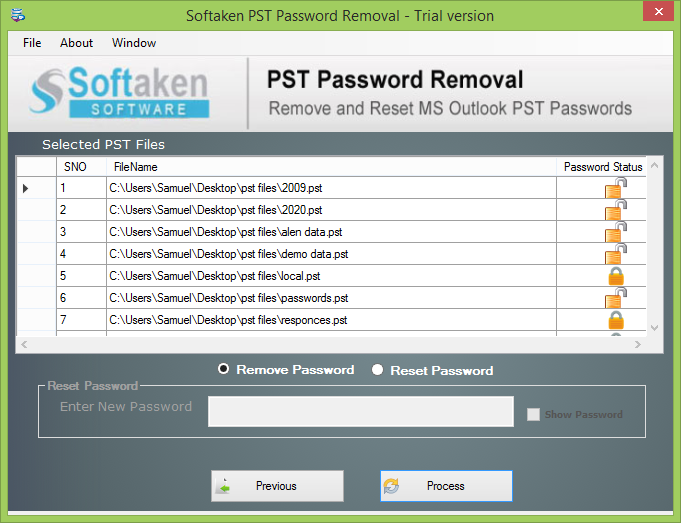
The second screen of PST Password Removal (trial): seven selected PST files with padlock icons for their password status, Remove Password and Reset Password options, and Process.
Features
Remove or reset
Softaken PST Password Removal either strips the password so the PST opens without one, or replaces it with a new password you choose.
Batch unlock
Softaken PST Password Removal takes a single PST or a whole folder and processes every selected file in one pass, showing which ones are locked.
ANSI and Unicode, Outlook 2003 to 2024
Softaken PST Password Removal handles both PST formats from Outlook 2003 through Outlook 2024, and doesn't need Outlook installed.
Real-World Uses
- An old archive.pst protected a decade ago with a forgotten password.
- A former employee's PSTs the company needs to open, with authorization.
- Resetting a weak old password to a new one before archiving.
Who It's For, and Who Should Skip It
It's for Outlook users and IT staff who need to open their own password-protected PST files.
Skip it if the PST isn't password protected but won't open: that's corruption, and you need a PST repair tool. There's also no Mac version.
Usage Guide
- Copy the PST somewhere safe, then install and launch the tool.
- Browse PST File or Browse Folder, tick the files and click Next.
- Choose Remove Password, or Reset Password and type the new one.
- Click Process, then open the PST in Outlook.
Where it falls short
- The demo can't save results, so you only learn it worked on your file after buying (the 30-day refund covers you).
- Version numbers disagree: the installer reports 1.2 while the product page says 3.0.
- Windows only.
What Users Say
Independent reviews
We found no independent reviews of this specific Softaken tool on G2, Capterra or Trustpilot. Softaken's related OST to PST Converter averages 4.8 on G2 (2 reviews) and 5.0 on Capterra (2 reviews), praised for a simple interface and intact data, with one note that large files take time. That's too little to rate the product, so the free demo is the real test.
Editions and Pricing
Prices are what the order page showed on November 22, 2026. Each Buy button orders that license.
Softaken's own site also sells a Home license (2-10 PCs, lifetime, non-commercial).
FAQs
Can Softaken PST Password Removal recover the old password?
No. Softaken PST Password Removal removes the password or sets a new one; it doesn't show you the old password.
Does it work without Outlook?
Yes. Softaken PST Password Removal works on the PST files directly, with no Outlook installation needed.
Which Outlook versions are supported?
Softaken PST Password Removal supports ANSI and Unicode PST files from Outlook 2003, 2007, 2010, 2013, 2016, 2019, 2021 and 2024.
What can I do with the free demo?
The Softaken PST Password Removal demo runs the remove and reset steps so you can see the workflow, but it can't save the unlocked files.
Is there a Mac version?
No. Softaken PST Password Removal is Windows only.
System Requirements
- Windows 11, 10, 8.1, 8 or 7 (32 or 64-bit)
- 1 GHz processor or faster
- About 2.2 MB for the installer; Outlook not required
Conclusion
Softaken PST Password Removal is a cheap, focused fix for a locked Outlook archive: $29 removes or resets PST passwords, in batches, without Outlook. Buy it when the password is truly lost and the file is yours. The catch is that the demo can't prove it works on your file before you pay, so rely on the 30-day refund if it doesn't.
Download Free DemoBuy Personal ($29)Buy Business ($99)Buy Enterprise ($299)