Excel Add-in for SQL Server: Edit Your Database Tables in a Worksheet and Commit the Changes
Excel Add-in for SQL Server is a Devart add-in for Microsoft Excel on Windows that loads SQL Server or Azure SQL data into a worksheet, refreshes it in one click, and lets you edit rows and save them back to the database. It costs $179.95 at checkout for one license with a year of updates.
Excel can already read SQL Server. What it cannot do alone is write back. If someone in finance or operations keeps correcting data in a spreadsheet and sending it to a developer to load, this add-in removes that step: they change the cells, press Commit, and the rows are updated.
Quick facts
- Version: 3.1.70, released September 7, 2026
- Developer: Devart
- Runs in: Microsoft Excel 2007 to 2024 for Windows
- Databases: SQL Server and SQL Azure
- Login: Windows authentication or SQL Server authentication, over encrypted SSL
- Price: $179.95 with a year of updates; next-year renewal $89.95
- Trial: 30 days, free, with a Devart account
- Guarantee: 30-day money-back guarantee
What we checked: version 3.1.70 and the 76.60 MB download size on Devart's download page, the compatibility page, the revision history, $179.95 and an $89.95 renewal on the order page on November 6, 2026. We did not install the add-in or connect it to a server.
Before you buy
It runs only in Excel for Windows. Excel for Mac and Excel for the web are out, and Devart's compatibility list stops at Excel 2024 without naming Microsoft 365, so try it on your exact Excel in the 30-day trial.
Giving people write access to a database through Excel is a real decision. The add-in writes with the login you give it, so set up a database account with only the rights that person should have.
Download Free TrialBuy Now
Overview
After you install it, a Devart tab appears on Excel's ribbon with Get Data, Refresh, Edit Mode, Commit and Rollback. Get Data opens an import wizard, where you connect, choose a table, and pick the columns and filters. The rows land in an ordinary worksheet, ready for your formulas and charts.
The download is one shared installer of 76.60 MB for Devart's add-ins, so the same version number applies across the family. Version 3.1.70 of September 2026 was a small fix release, and most recent work in the history has gone into the cloud connectors.
Features
Connect directly to SQL Server or SQL Azure
Excel Add-in for SQL Server needs only a host and credentials, with Windows or SQL Server authentication and SSL encryption. The connection can be stored in the workbook or entered each time, and you can choose whether the password is saved.
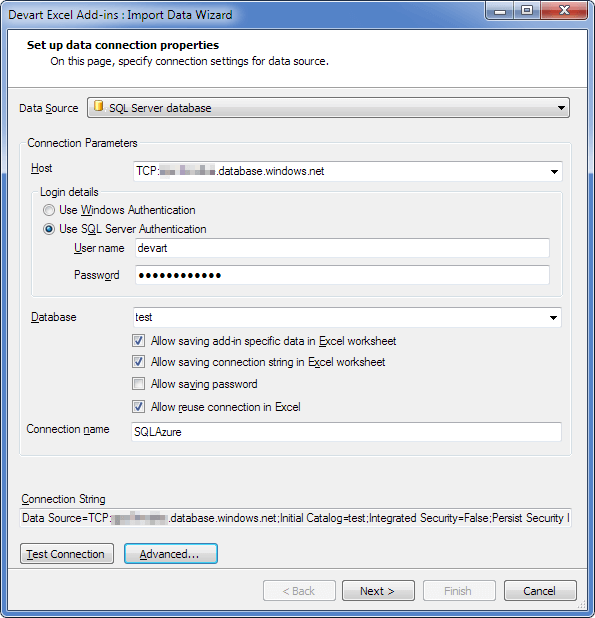
The Import Data Wizard set to a SQL Server database on Azure, with authentication type, database and the options for saving connection data.
Visual Query Builder or SQL
Excel Add-in for SQL Server lets you tick the columns you want, including columns from related tables, and set filter conditions and ordering without writing SQL. If you know SQL, switch to the SQL Query tab, then check the rows in Data Preview before you import.
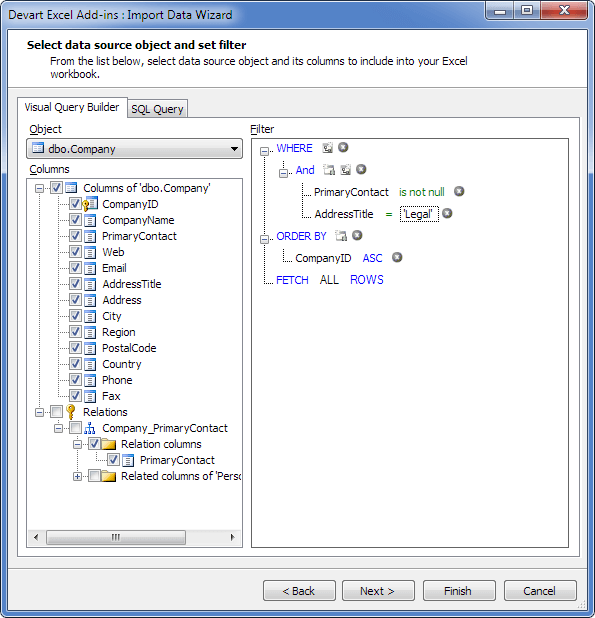
The Visual Query Builder on dbo.Company: columns ticked on the left, with WHERE and ORDER BY conditions on the right.
Edit rows and commit them
Excel Add-in for SQL Server has an Edit Mode button. You change cells, add rows or delete them, and each change is highlighted. Nothing reaches the database until you press Commit, and Rollback throws it all away.
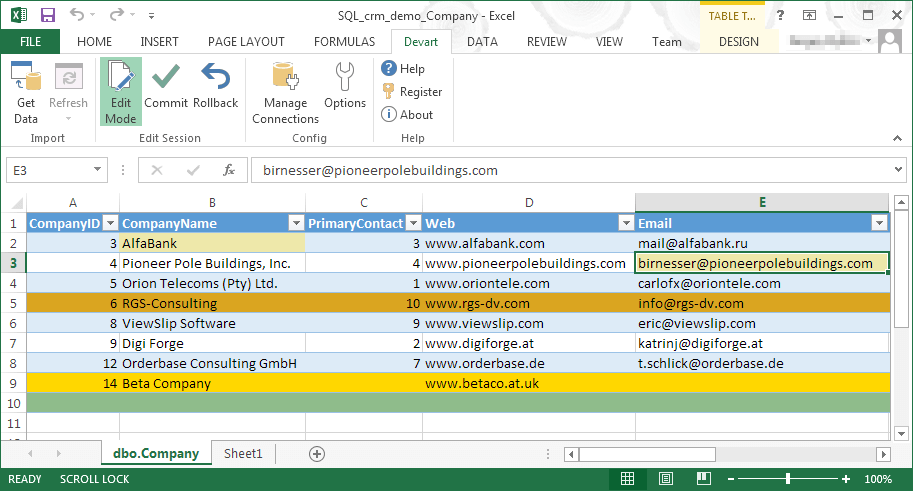
Edit Mode on a Company table, with changes highlighted in color and Commit and Rollback on the Devart ribbon.
Mistakes are caught as you type
Excel Add-in for SQL Server checks values against the column types and keys, and highlights a bad date, a duplicate primary key or text in a numeric column before you commit.
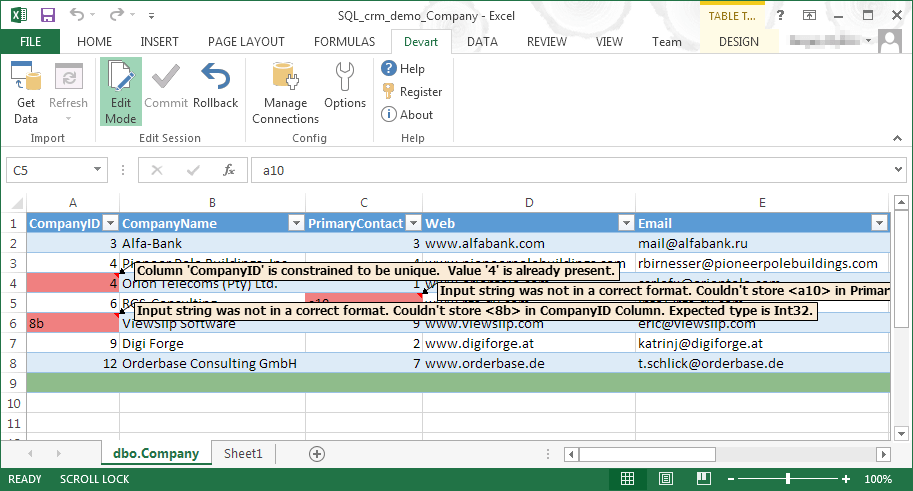
Validation messages: a value that breaks the CompanyID unique constraint, and an input string in the wrong format.
One-click refresh
Excel Add-in for SQL Server re-reads the query with the Refresh button, so a report, chart or pivot built on the sheet updates with no re-import.
Benefits
- Fewer data-fix tickets. The person who knows the data can correct it.
- No file shuffling. One live table replaces emailed CSV exports.
- Skills people already have. Filtering and copy-paste work in a tool they know.
Real-World Uses
- A product manager fixes prices in a catalog table on Azure SQL by filling down a column in Excel.
- A finance analyst refreshes a monthly sales extract from SQL Server with one click and keeps the pivot tables on top of it.
- A support lead corrects customer records that a web form saved badly, with validation blocking bad dates.
- A developer bulk-edits a configuration table by pasting from another sheet, then reviews the highlighted changes before committing.
Who It's For, and Who Should Skip It
It fits analysts and power users on Windows who need to change SQL Server data, along with the DBAs who would rather give them a controlled way to do it.
Skip it if you only read data: Excel's built-in Get Data handles SQL Server for free. Skip it too if your team works on Mac or in Excel for the web, or if your process needs macros to run the refresh, since VBA automation is the add-in's best-known gap.
Usage Guide
- Check that .NET Framework 4.0 or higher and Visual Studio 2010 Tools for Office Runtime are present.
- Download the installer with a free Devart account and run it with an administrator account.
- Open Excel and find the Devart tab. If it is missing, restart Excel and check that add-ins are enabled under File, Options, Add-ins.
- Click Get Data, choose SQL Server database, enter the host and login, and click Test Connection.
- Select a table and columns in Visual Query Builder, or write SQL, and finish the wizard.
- To change data, click Edit Mode, make your edits, and click Commit.
Where it falls short
There is no VBA automation. As of Devart's last public answer, in February 2019, macros could not trigger a refresh and it was not on the roadmap. We found nothing about VBA in the recent revision history.
Views may not be editable. Devart said in 2020 that a view could not be edited because it has no columns that uniquely identify rows, so you need a table with a primary key or a non-nullable unique index.
What Users Say
The individual add-in has few reviews of its own, so the wider family's ratings are worth a look.
Review sites
TrustRadius lists Devart Excel Add-ins, the whole family, at 9.3 out of 10 from about 33 reviews and ratings. Reviewers there like the range of database connections, and critics say security could be better for large organizations with in-house systems and want lower pricing for wider adoption.
For this add-in alone, G2 has one review at 5.0, with too few reviews for a buying insight. Capterra shows 4.0 out of 5 from one user. GetApp shows one review from March 2026 that scores it 8 out of 10 as a recommendation.
The VBA request
User ozkresgprm asked: "I would like to refresh data as part of another macro. Is this possible?" Devart replied in October 2018: "At the moment, Devart Excel Add-ins do not support interaction with VBA."
User pgleave, February 20, 2019: "The devart excel plugin is great but also almost useless if it can't be triggered by automation."
Devart answered: "At the moment VBA support is not included to our roadmap, and there is no timeframe."
Editing views
User jenniferhunter, May 11, 2020: "We have created editable views in SQL Server in order to allow users to see what they need and also keep the tables normalized."
Devart's dm-m replied: "Currently, it's not possible to edit view because it does not have columns that uniquely identify rows (primary key or non-nullable unique index columns)."
The recurring themes: people like loading and editing directly in Excel. They complain about automation, editable views and the price of rolling it out to many users.
Comparisons
Excel Add-in for SQL Server vs Excel's own Get Data
Excel's Get Data (Power Query) loads SQL Server data at no cost and handles transformations well, but it is a one-way street. The add-in costs $179.95 and adds the return trip: edit, validate, commit. If nobody needs to write back, you do not need it.
One add-in vs a pack
If you also work with MySQL, Oracle or cloud systems like Salesforce, Devart's packs bundle the add-ins. The Universal Pack of all 25 add-ins was listed at $599.95 on its product page.
Editions and Pricing
| Option | Price | Notes |
|---|
| One license, one year of updates | $179.95 | Keeps working for your version after the year |
| Renewal for the next year | $89.95 | Costs 20% more if 3 or more months late, 60% more after 12 months |
| Universal Pack | $599.95 listed | All 25 add-ins |
Volume discounts start at 5 licenses, and two- and three-year terms cost less per year. The cart turns on automatic renewal by default, and you can switch it off.
FAQs
Does Excel Add-in for SQL Server work on a Mac?
Excel Add-in for SQL Server does not work on a Mac. Devart states that only Microsoft Excel for Windows is supported.
Does Excel Add-in for SQL Server work with Microsoft 365?
Excel Add-in for SQL Server lists Excel 2007 to 2024, and the page does not name Microsoft 365. Test it on your own installation with the 30-day trial.
Can Excel Add-in for SQL Server connect to Azure SQL?
Excel Add-in for SQL Server connects to SQL Azure as well as SQL Server, and Devart's connection screenshot shows an Azure host.
Is my password stored in the workbook?
Excel Add-in for SQL Server stores a password only if you tick Allow saving password. You can also leave the connection out of the file altogether.
Are there discounts for several licenses?
Excel Add-in for SQL Server has volume discounts of 5% from 5 licenses, 10% from 10 and 15% from 20.
System Requirements
- Microsoft Excel 2007, 2010, 2013, 2016, 2019, 2021 or 2024 for Windows
- .NET Framework 4.0 or higher
- Visual Studio 2010 Tools for Office Runtime
- An account with administrator rights for the install
Conclusion
Excel Add-in for SQL Server is worth $179.95 when people need to change data, not just read it. The edit, validate and commit loop inside Excel is the one reason to buy, and Excel has nothing like it built in.
The main reason not to buy is automation. If your process needs macros to refresh or commit, Devart has said VBA is not supported, so confirm that before you pay.
Download Free TrialBuy Now