Short answer: On an Intel Mac, Apple's free Boot Camp Assistant installs Windows next to macOS, but Apple's instructions only cover Windows 10, and Boot Camp doesn't exist on Apple silicon (M1 to M5) Macs. On an Apple silicon Mac, the free way is a virtual machine app, UTM or VMware Fusion, running the Arm version of Windows 11. Pay for Parallels Desktop for Mac ($99.99 a year, or $219.99 once) when Windows is part of your working day: it's the only one of these that Microsoft lists as an authorized way to run Windows 11 on Apple silicon, and it installs Windows for you and blends Windows apps into the Mac desktop. Every route needs a Windows license on top.
At a glance
| What you get | Boot Camp | UTM | VMware Fusion | Parallels Desktop |
|---|
| Price | Free (built into macOS) | Free download, or $9.99 on the Mac App Store | Free, Broadcom account required | $99.99/year Standard, $219.99 one-time, Pro $119.99/year |
| Apple silicon Macs | ✗ | ✓ | ✓ | ✓ (version 27) |
| Intel Macs | ✓ | ✓ | ✓ | Version 26 only |
| How Windows runs | Instead of macOS, after a restart | In a window, next to macOS | In a window, next to macOS | In a window, or Windows apps as Mac windows (Coherence) |
| Windows version | Windows 10 (Apple's instructions) | Windows 11 on Arm (Apple silicon), Windows 11 x64 (Intel) | Windows 11 on Arm (Apple silicon), Windows 11 x64 (Intel) | Windows 11 on Arm, downloaded and installed for you |
| Named by Microsoft as authorized on Apple silicon | Not applicable | ✗ | ✗ | ✓ (Windows 11 Pro and Enterprise) |
| Support | Apple | Community, GitHub | Community forums only | Phone, email and chat for subscribers |
| Windows license included | ✗ | ✗ | ✗ | ✗ |
How we checked
- We read Microsoft's support page on running Windows 11 on Apple M-series Macs, its Windows 11 Arm64 download page and the Windows 11 prices in the Microsoft Store.
- We read Apple's Boot Camp instructions, including the list of Macs it supports.
- We read UTM's website, its Windows 11 guide and its latest release, and Broadcom's announcement and download instructions for VMware Fusion.
- We checked Parallels Desktop's buy page, price feed, version history and its knowledge base articles on installing and activating Windows 11.
What we checked: on November 22, 2026, the Parallels buy page listed Parallels Desktop Standard at $99.99 a year (with a Black Friday first-year price of $49.99), $219.99 as a one-time license, Pro at $119.99 a year and Business at $149.99 a year; the current Parallels Desktop is 27.1.0, released October 29, 2026; UTM's latest release was 5.0.9, published November 18, 2026; the Microsoft Store charged $199.99 for Windows 11 Pro and $139.00 for Windows 11 Home. We compared setup steps, requirements, licensing and prices from these pages, and didn't install Windows on a Mac ourselves or measure speed.
Step 1: check which kind of Mac you have
Your Mac's processor decides which ways of running Windows are open to you. Open the Apple menu and choose About This Mac. If it shows a Chip line with "Apple M1" (or M2, M3, M4, M5), you have an Apple silicon Mac. If it shows a Processor line with "Intel", you have an Intel Mac.
- Apple silicon Mac: Boot Camp isn't available. Windows runs only inside a virtual machine, and it has to be the Arm version of Windows 11. Most ordinary Intel (x64) Windows programs still run on it through Microsoft's built-in emulation.
- Intel Mac: you can choose between Boot Camp (Windows on its own, at full speed, after a restart) and a virtual machine (Windows in a window, next to your Mac apps). Parallels Desktop 27 no longer runs on Intel Macs; version 26 still does.
Step 2: plan for the Windows license
None of these routes includes Windows itself, so the real "free way" still has a Windows license in it. Microsoft's support page for Apple M-series Macs says you need a separate Windows 11 Pro license if you don't already have one, and that "a unique license is required for each instance of Windows 11 Pro, either on hardware or in a virtual machine." The same page says Windows 11 Pro product keys are platform agnostic (x64 vs Arm), so a Pro key bought for a PC also covers the Arm version. On November 22, 2026, the Microsoft Store charged $199.99 for Windows 11 Pro and $139.00 for Windows 11 Home.
Which edition to buy depends on the route. Microsoft's authorization for Parallels Desktop names Windows 11 Pro and Enterprise, so buy Pro if you choose Parallels. For UTM and Fusion, Microsoft doesn't name an edition, and UTM's own guide simply says you must have a valid license from Microsoft to run Windows.
Getting the installer is free. Microsoft's Windows 11 Arm64 download page offers a multi-edition ISO that, in Microsoft's words, is for users who want "to create a Windows 11 on Arm virtual machine on supported hardware." Your product key decides which edition installs.
Free way 1: Boot Camp (Intel Macs only)
Boot Camp Assistant is free, already on every Intel Mac, and runs Windows directly on the hardware, so games and heavy programs get the Mac's full speed and graphics. The catch is that Windows replaces macOS while it runs: you restart and hold the Option (Alt) key to choose which system starts.
Apple's support page lists the Intel Macs it works on: MacBook (2015 to 2017), MacBook Air and MacBook Pro (2012 to 2020, except the M1 models), Mac mini (2012 to 2018), iMac (2012 to 2020), every iMac Pro, and Mac Pro (2013 to 2019).
- Make sure you have at least 64 GB of free space (Apple recommends 128 GB) and a 64-bit Windows 10 Home or Pro ISO. Older Macs also need a 16 GB USB flash drive.
- Open Boot Camp Assistant from Applications > Utilities and follow its steps. Choose the Windows partition size carefully: Apple warns you can't change it later.
- The Mac restarts into the Windows installer. Install Windows on the BOOTCAMP partition.
- When Windows starts, let the Boot Camp installer add Apple's drivers, then restart.
Before you choose Boot Camp
- It's a Windows 10 route. Apple's Boot Camp instructions cover Windows 10 only, and Microsoft ended regular support for Windows 10 on October 14, 2025.
- One system at a time. You can't copy and paste between a Mac app and a Windows app, because only one of them is running.
- It ends with your Intel Mac. Your next Mac will be Apple silicon, where Boot Camp doesn't exist, and Parallels Desktop 27 dropped the option to run a Boot Camp partition as a virtual machine.
Free way 2: UTM (any Mac, open source)
UTM is a free, open-source virtual machine app for the Mac that runs Windows 11 on Arm on Apple silicon at, in its developer's words, "near native speed." It's built on QEMU and Apple's Hypervisor framework. The download from UTM's website is free; the Mac App Store version costs $9.99, has the same features and adds automatic updates, and the developer says buying it funds development. The latest release on November 22, 2026 was version 5.0.9, published November 18, 2026.
- Get a Windows 11 ISO. UTM's guide recommends the free CrystalFetch app, or Microsoft's Arm64 ISO page for Apple silicon Macs.
- In UTM, click +, choose Virtualize, then Windows, and pick how much memory and how many processor cores Windows gets.
- Keep Install Windows 10 or higher and Install drivers and SPICE tools ticked, browse to the ISO and set the disk size.
- Optionally pick a Mac folder to share with Windows, save the virtual machine, press Run and press a key to start the Windows installer.
On newer versions of UTM, Secure Boot and TPM are switched on automatically, so Windows 11's installer accepts the virtual machine. UTM's site also says it supports DirectX 11 and DirectX 12 in Windows 11, while calling game compatibility "ongoing work."
Where UTM falls short
- More setup by hand. You fetch the ISO yourself, and UTM's guide has a troubleshooting list for mouse capture, networking, the EFI shell and installer crashes.
- Intel Windows is slow on Apple silicon. UTM can emulate a full x86 PC, but its own site calls that "slower emulation". Use the Arm version of Windows 11 and let Windows translate your Intel programs instead.
- Less Mac integration. There's no equivalent of Parallels' Coherence mode, where Windows apps sit in the Mac Dock as their own windows.
- Not on Microsoft's authorized list. Microsoft's Apple silicon page names Parallels Desktop, not UTM.
Free way 3: VMware Fusion (free since November 2024)
VMware Fusion is a full commercial virtual machine app that Broadcom made free for "commercial, educational, and personal users alike" on November 11, 2024, when it stopped selling Fusion Pro. Broadcom says the free version includes all the features of the old paid one. Fusion runs the Arm version of Windows 11 on Apple silicon Macs, and the current release, 25H2, came out on October 14, 2025.
The hurdle is the download. Broadcom's instructions say you must register on the Broadcom Support Portal, and that your profile is then screened by its export compliance team before you can download, a process it says "can take several weeks." There's no support ticketing for free users: Broadcom points them to its community forums, documentation and knowledge base.
Once installed, Fusion works much like UTM: create a new virtual machine, point it at the Windows 11 Arm64 ISO, install, then add VMware Tools for shared folders, copy and paste and screen resizing. Fusion is a good free choice if you already know VMware from work, or if you also want to run Linux virtual machines in the same app.
Parallels Desktop for Mac: the paid way
- Price: Standard $99.99 a year or $219.99 as a one-time license; Pro $119.99 a year; Business $149.99 a year
- Sale: until November 23, 2026, the first year of a new Standard subscription is $49.99 and Pro is $59.99 (code PD50 at checkout); Business is $97.49
- Runs on: Apple silicon Macs with macOS Sonoma 14.7 or later, 8 GB of memory (16 GB recommended). Intel Macs: version 26
- Version: 27.1.0, released October 29, 2026
- Trial: 14 days of the Pro edition, after you enter an email address
- Guarantee: 30-day money-back on purchases from parallels.com; renewals are excluded
- Best for: anyone who uses a Windows program every day and wants it to feel like part of the Mac
Parallels Desktop does the setup for you. When you first open it, it offers to install Windows: click Install Windows and it downloads Windows 11 from Microsoft and builds the virtual machine, with Secure Boot and a virtual TPM 2.0 already set up. You then activate Windows in Settings > System > Activation, either with your own key or by buying one in the Microsoft Store app, which activates Windows automatically.
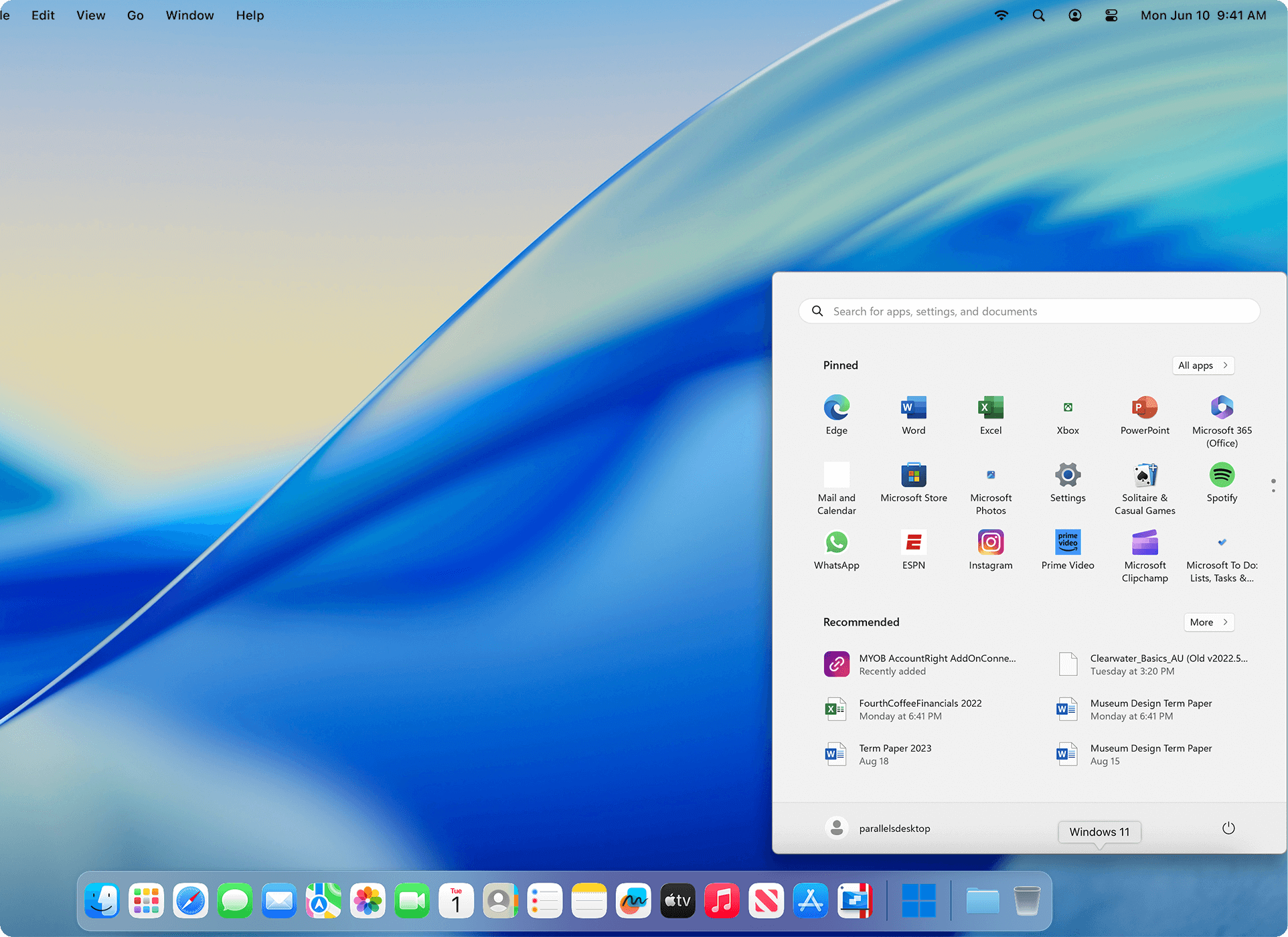
The Windows 11 Start menu opened from the Mac Dock, with no Windows desktop behind it (vendor image).
Parallels Desktop's Coherence mode is the feature the free apps don't match. It hides the Windows desktop and shows each Windows program as its own window among your Mac apps, with Windows apps in the Dock and Command-Tab switching. Folders such as Desktop and Downloads are shared, copy and paste works both ways, and you can drag a file from Finder into a Windows program. Version 27 also added a Metal-based graphics driver that raises Windows' OpenGL support to version 4.3, which many CAD and engineering programs need.
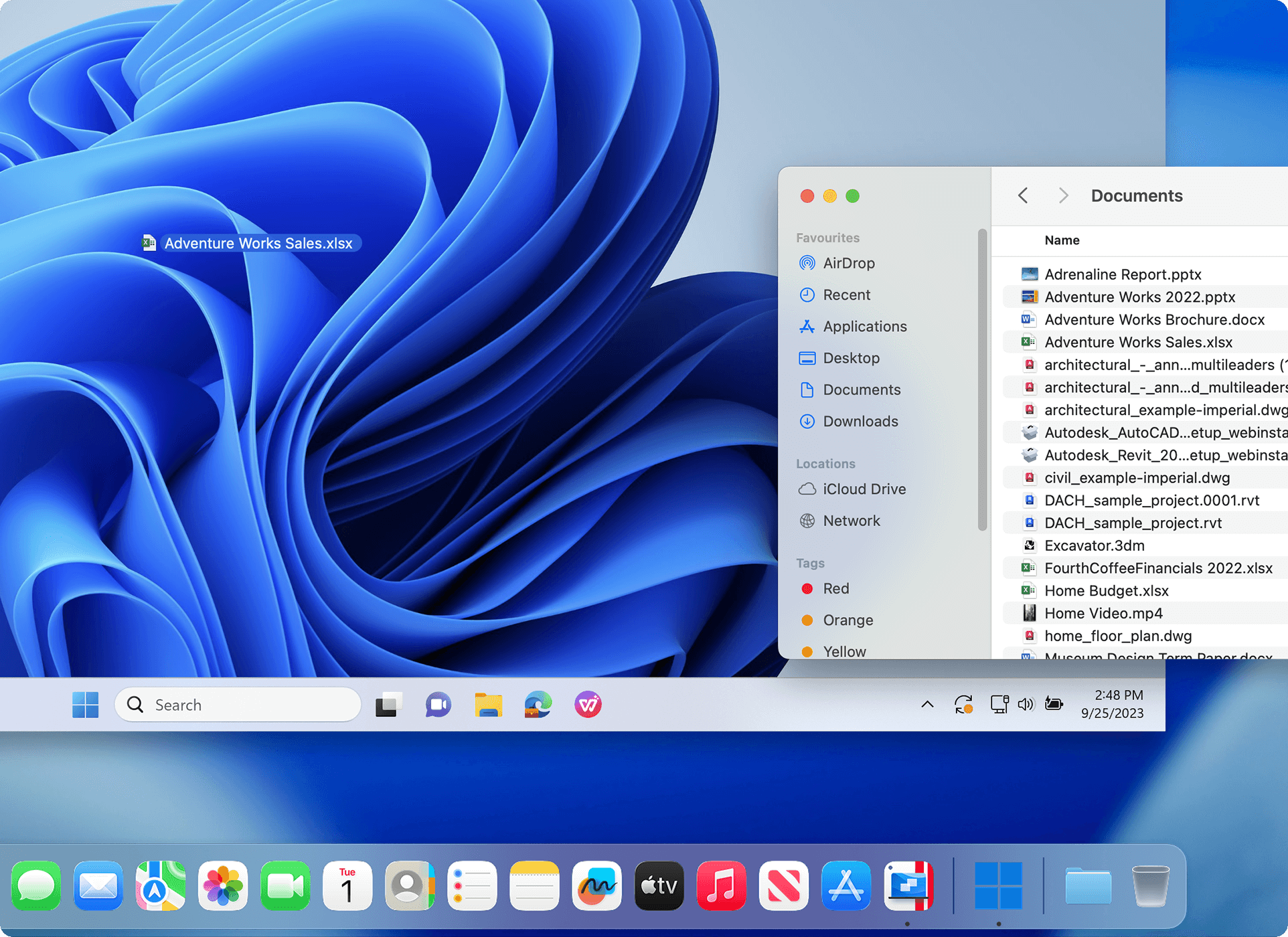
A Mac Finder window over the Windows 11 desktop, with an Excel file dragged from Documents onto the Windows desktop (vendor image).
Standard or Pro? Parallels Desktop Standard caps each virtual machine at 8 GB of memory and 4 virtual CPUs, which is plenty for office, accounting and school software. Pro raises that to 128 GB and 32 virtual CPUs and adds a command-line tool and developer features, for heavy design work, development or several virtual machines at once. The trial is the Pro edition, so if you plan to buy Standard, keep your test machine within Standard's limits.
What we like
- Downloads and installs Windows 11 for you
- Coherence mode puts Windows apps in the Mac Dock
- Named by Microsoft as an authorized way to run Windows 11 on Apple silicon
- Shared folders, clipboard, camera and USB devices work without setup
- A one-time Standard license still exists for people who hate subscriptions
- Phone, email and chat support for subscribers
Watch out for
- Yearly plans renew automatically, and the 30-day refund doesn't cover renewals
- The Windows license is extra
- DirectX tops out at 11.1, so many newer games won't run
- No WSL2, Hyper-V or other nested virtualization in Windows on Apple silicon
- Version 27 no longer runs on Intel Macs
- The one-time license gets 30 days of support and may need a paid upgrade for a future macOS
What reviewers and users say about Parallels Desktop
Macworld (Cliff Joseph, "Parallels Desktop 27 for Mac review: Still the best way to run Windows", updated October 14, 2026) gave Parallels Desktop 5 out of 5: "Parallels Desktop remains our leading choice for Mac users who need a full Windows environment for work or development. Its easy setup and close integration with macOS make it approachable, while its advanced controls cater to more demanding users. Version 27 expands graphics capabilities, but the cost of Parallels and any required Windows license can be hard to justify for occasional use."
9to5Mac (Bradley Chambers, August 29, 2026): "I know some customers don't like the subscription model, but if you rely on running VMs on macOS, it's worth the annual upgrade as it's much more of a rolling development to match Apple's latest features."
Business users rate it highly: in November 2026 Parallels Desktop for Mac averaged 4.4 out of 5 from 148 reviews on Capterra and 4.3 out of 5 from 59 reviews on G2. Trustpilot tells a different story: the parallels.com company page scored 1.7 out of 5 from about 1,800 reviews, mostly about billing. MattK (1 star, November 8, 2026): "Unexpected auto-renewals, no prior notification email and ZERO support to help resolve." On the Mac App Store, CardiologyGuy (5 stars): "I work at a hospital and they have on app which only works in Windows and I use a Mac. This app is a life saver!"
The pattern: people praise how quickly Windows is running and how well it fits into macOS, and complain about the subscription, automatic renewals and refunds. If you subscribe, note your renewal date.
Download Parallels Desktop Free TrialBuy Parallels Desktop for Mac
What the first year really costs
On an Apple silicon Mac, the cheapest legitimate route is a free virtual machine app plus a Windows 11 Pro license, about $200 in total. Parallels Desktop adds its own price on top. These are regular prices; Parallels' Black Friday sale lowers its first year until November 23, 2026.
First-year cost with a new Windows 11 Pro license (USD)
UTM (website download) + Windows 11 Pro$199.99
VMware Fusion + Windows 11 Pro$199.99
UTM (Mac App Store) + Windows 11 Pro$209.98
Parallels Desktop Standard, yearly + Windows 11 Pro$299.98
Parallels Desktop Pro, yearly + Windows 11 Pro$319.98
Parallels Desktop Standard, one-time + Windows 11 Pro$419.98
Regular prices on the Parallels buy page, UTM's App Store listing and the Microsoft Store, checked on November 22, 2026. If you already own a Windows 11 Pro key, subtract $199.99 from every bar. A Parallels subscription costs the same again each later year; the one-time license doesn't.
Which should you choose?
Pick by your Mac and by how often you need Windows. Here's our pick for the common situations.
| Your situation | Our pick | Why |
|---|
| Intel Mac, you want Windows games or full speed | Boot Camp | Free, runs Windows on the hardware with full graphics; accept that it's Windows 10 and needs a restart |
| Apple silicon Mac, one Windows program a few times a year | UTM | Free and open source, installs in minutes; a little more setup and less polish don't matter for occasional use |
| Apple silicon Mac, you already use VMware at work | VMware Fusion | Free with all features, familiar tools; allow time for Broadcom's account screening |
| Apple silicon Mac, a Windows program you use every working day | Parallels Desktop Standard | Windows apps in the Dock, shared files, Microsoft-authorized, support when it breaks |
| Heavy CAD, development or several virtual machines | Parallels Desktop Pro | Up to 128 GB and 32 virtual CPUs per machine, command line and developer tools |
| You hate subscriptions | Parallels Desktop Standard one-time, or UTM | $219.99 once for the current Parallels version; UTM never charges |
Who should skip Parallels Desktop: Intel Mac owners who want the newest version (27 won't install; Boot Camp or Parallels Desktop 26 are the options), people who need Windows only a few times a year (the free apps do the job), anyone whose main goal is modern DirectX 12 or anti-cheat games (they often fail in any virtual machine), and developers who need WSL2 or Hyper-V inside Windows on Apple silicon.
What commonly goes wrong
- Forgetting the Windows license. It's the most common complaint in Parallels' App Store reviews ("Should state that need to purchase Windows 11"), and it applies to every route in this guide.
- Downloading the wrong Windows. An Apple silicon Mac needs the Arm64 ISO. UTM's troubleshooting guide notes that booting into an EFI shell usually means the ISO doesn't match the Mac (arm64 for Apple silicon, amd64 for Intel).
- Expecting every Windows program to work. Microsoft lists the limits of Windows 11 on Arm on Apple M-series Macs: some hardware, games and apps don't work, including those that rely on DirectX 12, 32-bit Arm apps aren't supported, and features that need nested virtualization (Windows Subsystem for Linux, Windows Sandbox, virtualization-based security) don't run. Drivers for printers, dongles and scanners are the usual problem.
- Too little memory. Windows and macOS share your Mac's memory. On an 8 GB Mac, give Windows 4 GB and close what you don't need; 16 GB makes a real difference.
- An unwanted renewal. Parallels' yearly plans renew automatically and the money-back guarantee excludes renewals. Turn off auto-renewal in your Parallels account if you want to decide each year.
- A Boot Camp partition that's too small. Apple says you can't resize it later, and Windows updates need space. Give it at least 128 GB if you can.
FAQs
Can I run Windows on an M1, M2, M3 or M4 Mac for free?
Yes, the virtual machine apps UTM and VMware Fusion are free and run the Arm version of Windows 11 on Apple silicon Macs. Windows itself isn't free: Microsoft says you need a Windows 11 Pro license if you don't already have one ($199.99 in the Microsoft Store on November 22, 2026).
Does Boot Camp work on Apple silicon Macs?
No, Boot Camp works only on Intel Macs. Apple's list of supported models stops at Intel models from 2020 and excludes the M1 MacBook Air and MacBook Pro. On Apple silicon, Windows runs only in a virtual machine such as Parallels Desktop, UTM or VMware Fusion.
Is Parallels Desktop the only Microsoft-authorized way to run Windows 11 on a Mac?
Parallels Desktop is the only Mac app Microsoft names. Microsoft's support page lists Parallels Desktop as an authorized solution for running the Arm versions of Windows 11 Pro and Enterprise on Apple silicon Macs (the page itself names Parallels Desktop 18 to 20 and the M1 to M3 chips, and Parallels says the authorization covers its supported configurations on Apple silicon). Microsoft's only other option there is Windows 365, a Cloud PC service for organizations that streams Windows rather than running it on the Mac. UTM and VMware Fusion aren't named.
Can I use my Windows 11 Home or old PC license in a Mac virtual machine?
Depending on its terms, an existing key may work. Microsoft says Windows 11 Pro keys work for both the x64 and Arm versions, and that each Windows installation, physical or virtual, needs its own license. Microsoft's authorization for Parallels Desktop names Windows 11 Pro and Enterprise, not Home, so buy Pro if you're starting from scratch with Parallels.
Will my Intel Windows programs run on an Apple silicon Mac?
Most will. Windows 11 on Arm runs 64-bit Arm apps natively and Intel x64 and x86 apps through built-in emulation, in Parallels Desktop, UTM and VMware Fusion alike. Programs that need their own drivers (VPN clients, some antivirus, hardware dongles) and games that use DirectX 12 or anti-cheat software are the ones that often fail, so test yours in a free app or the Parallels trial before you pay for anything.
Can I play Windows games on a Mac this way?
Older games, often; newer ones, often not. Parallels Desktop supports DirectX up to 11.1, so many current DirectX 12 games won't start, and Microsoft's own page warns that apps relying on DirectX 12 may not work in Windows 11 on Arm on these Macs. On an Intel Mac, Boot Camp is the best free choice for games, because Windows runs directly on the hardware.
How much does Parallels Desktop cost after the first year?
Parallels Desktop Standard renews at $99.99 a year and Pro at $119.99 a year, the regular prices on the buy page on November 22, 2026. The Black Friday prices ($49.99 and $59.99, until November 23, 2026) apply to the first year of a new subscription only. The $219.99 one-time Standard license never renews, but a future macOS may need a paid upgrade.
Can I try Parallels Desktop before I buy it?
Yes, Parallels Desktop has a 14-day free trial of the Pro edition; you enter an email address to download it. You still need a Windows license to activate Windows in the trial, but you can install Windows and test whether your programs, files and devices work before paying for either. Purchases from parallels.com also carry a 30-day money-back guarantee, which doesn't apply to renewals.
Conclusion
Start free. On an Intel Mac, Boot Camp runs Windows at full speed if you can live with Windows 10 and a restart. On an Apple silicon Mac, install UTM (or VMware Fusion if you know VMware), download Microsoft's Arm64 ISO and see whether your Windows program runs: if you only need it now and then, you're done for the cost of a Windows license.
Buy Parallels Desktop for Mac when Windows is a daily tool, not an occasional one. It's the Microsoft-authorized route on Apple silicon, it installs Windows for you, and Coherence mode makes a Windows-only program feel like a Mac app, which is worth $99.99 a year (or $219.99 once) to people who live in that program. Use the 14-day trial with your real files first, and if you subscribe, note the renewal date.
Download Parallels Desktop Free TrialBuy Parallels Desktop for Mac