Parallels Desktop for Mac: Windows 11 Next to Your Mac Apps
Parallels Desktop for Mac is a virtual machine app that runs Windows 11, Linux and macOS inside windows on an Apple silicon Mac, so a Windows-only program opens next to Safari and Mail without a reboot. The Standard Edition costs $99.99 a year (on sale for $49.99 on November 16, 2026), or $219.99 as a one-time license; Pro and Business are yearly subscriptions. You need your own Windows license, and Intel Macs are limited to the older version 26.
The usual reason people buy it is one program: the accounting package your firm uses, a hospital app, a school's exam software, a CAD tool or an old game that never came to the Mac. Since Apple dropped Boot Camp with the move to its own chips, a virtual machine is the main way to run full Windows on a current Mac, and Parallels is the best-known one.
Quick facts
- Version: 27.1.0 (build 58756), released October 29, 2026. Version 27.0 came out on August 25, 2026
- Developer: Parallels (Parallels International GmbH)
- Runs on: Macs with Apple silicon (M-series), macOS Sonoma 14.7 or later. Intel Macs: Parallels Desktop 26 only
- Guest systems: Windows 11 on Arm (Pro and Enterprise), Arm Linux distributions, macOS
- Editions: Standard, Pro, Business, Enterprise, plus student pricing
- Price: Standard $99.99/year ($49.99 on sale) or $219.99 one-time; Pro $119.99/year ($59.99 on sale); Business $149.99/year ($97.49 on sale)
- Trial: 14 days of the Pro edition, after you enter an email address
- Guarantee: 30-day money-back guarantee on purchases made from parallels.com; renewals are excluded
- Not included: a Windows license
- What we checked: the trial download link served a 5.1 MB web installer (Install Parallels Desktop.dmg, version 1.8.1) that fetches the full app; the build list and system requirements from the Parallels knowledge base; and every edition's price on the Parallels buy page, all on November 16, 2026. We didn't install Windows or run a game in it ourselves.
Before you buy
- Budget for Windows. Parallels doesn't include it. If you don't already own an eligible Windows 11 Pro or Enterprise key, add Microsoft's price to the total.
- Check your Mac. Version 27 needs Apple silicon. An Intel Mac can only run Parallels Desktop 26, which still gets security and compatibility fixes.
- Subscriptions renew automatically. The yearly plans renew unless you turn renewal off in your Parallels account, and the 30-day refund doesn't cover renewals. Many of the bad reviews below are about exactly this, so put a reminder in your calendar.
- Test your own software in the trial. Windows on Arm runs most Intel Windows programs through emulation, but not every app, driver, plug-in or game.
Download Free TrialBuy Standard EditionBuy Pro EditionBuy Business EditionBuy Student Edition
Overview
Parallels Desktop creates a virtual machine: a complete Windows (or Linux, or macOS) computer that lives in a file on your Mac's drive and runs in a window. Its Installation Assistant downloads Windows 11 from Microsoft and sets up the virtual machine for you, so getting to a working Windows desktop takes a few clicks and a download, not an afternoon of settings.
Once Windows is running, Parallels works hard to hide the seams. Windows programs can appear in the Mac Dock, files drag between Finder and Windows, copy and paste works across both, and your Mac's camera, microphone and USB devices can be handed to Windows. On Apple silicon Macs the guest is the Arm version of Windows 11, which Microsoft lists as an authorized way to run Windows 11 Pro and Enterprise on these Macs.
Version 27 is mostly an engine update. It's built only for Apple silicon, adds a graphics driver built on Apple's Metal that raises Windows' OpenGL support from 4.1 to 4.3, and lets Windows and Linux virtual machines use the SME matrix instructions on M4 and M5 chips. It also removed Intel Mac support, Boot Camp support, Travel mode and shared Bluetooth.
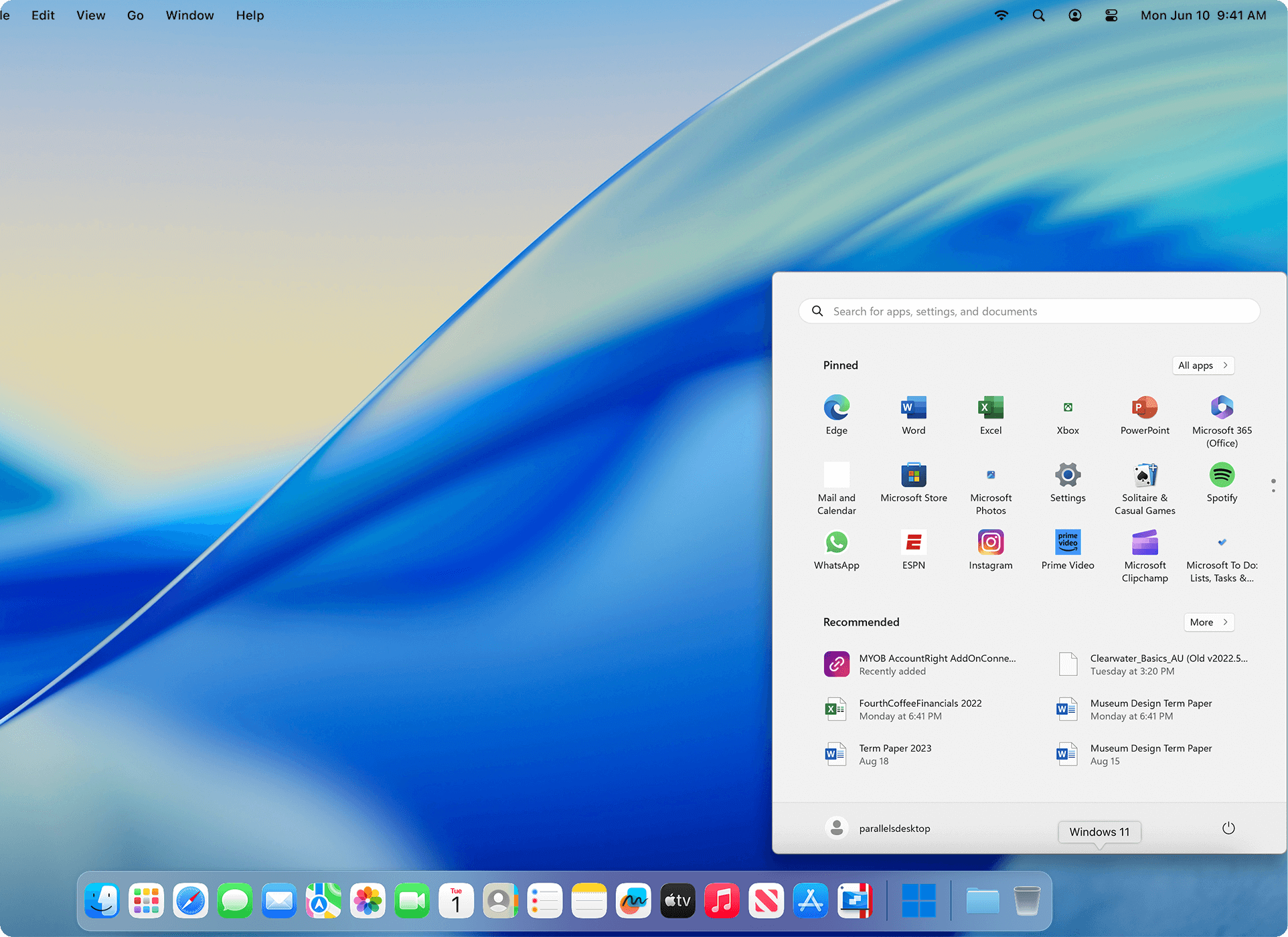
The Windows 11 Start menu opened from the Mac Dock, with no Windows desktop behind it (vendor image).
Features
Windows 11 installed for you
Parallels Desktop's Installation Assistant downloads Windows 11 from Microsoft and builds the virtual machine with sensible settings. You can also bring your own Windows image, or create Linux and macOS virtual machines from the same Control Center. Windows 11 virtual machines get Secure Boot and a virtual TPM 2.0, which Windows 11 requires.
Coherence mode: Windows apps without the Windows desktop
Parallels Desktop's Coherence mode hides the Windows desktop and leaves each Windows program in its own Mac-style window. Windows apps sit in the Dock, switch with Command-Tab and open your Mac files. If you'd rather keep Windows contained, it can also run in a single window or full screen.
Shared files, clipboard and devices
Parallels Desktop shares folders such as Desktop and Downloads between macOS and Windows, so you don't keep two copies of your work. Copy and paste and drag and drop work in both directions, and a USB drive you plug in can go to the Mac or to the virtual machine. You can also isolate a virtual machine from your Mac when you'd rather keep the two apart.
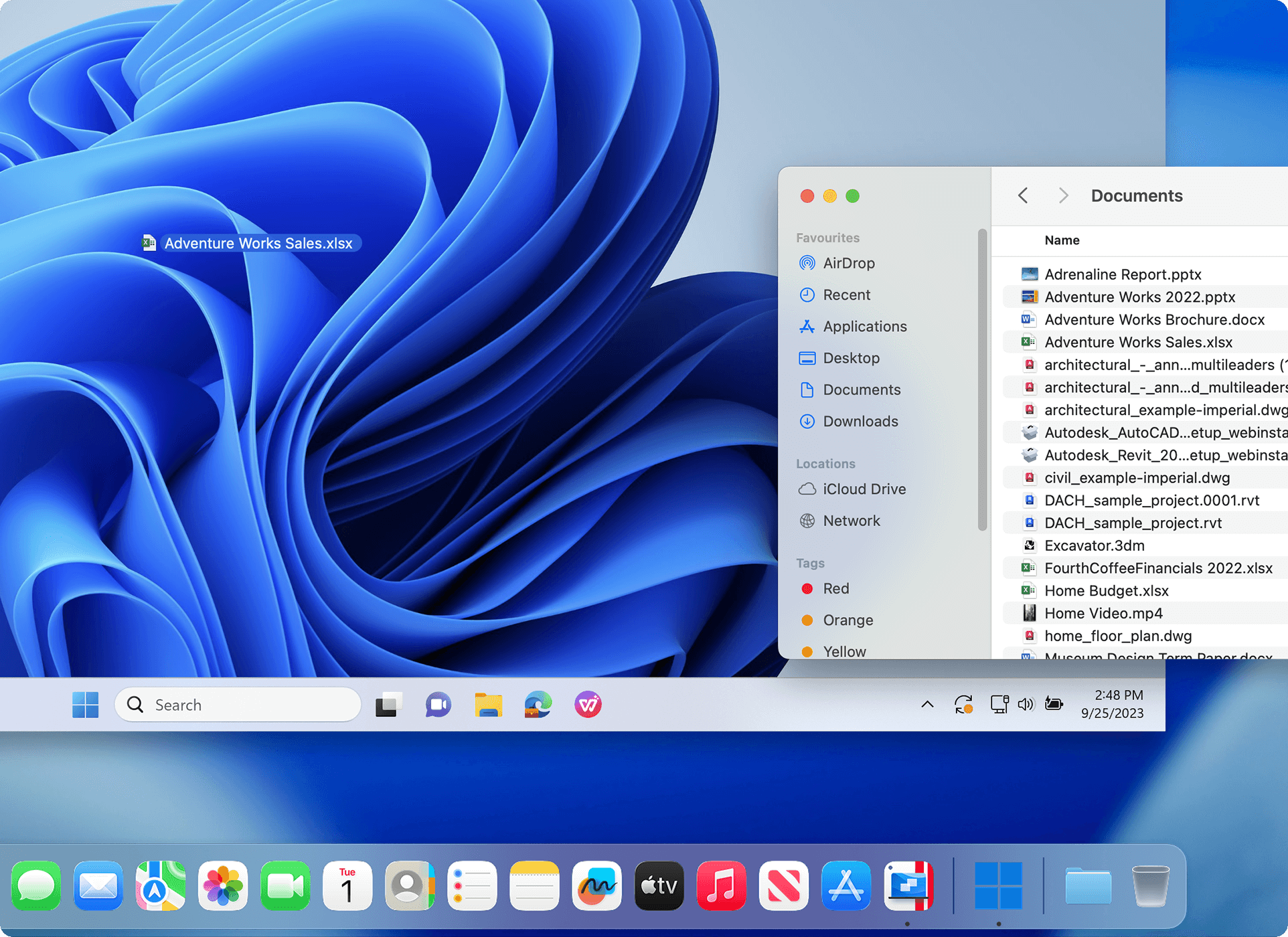
A Mac Finder window over the Windows 11 desktop, with a spreadsheet dragged from one to the other (vendor image).
Faster graphics in version 27
Parallels Desktop 27 replaces its OpenGL driver with one built on Apple's Metal, raising Windows' OpenGL support to version 4.3, the minimum many engineering and design programs need. Parallels says that's up to 2.6 times faster in its own tests on M3 and newer Macs, and names ArcGIS Pro, ZWCAD and Blender as programs it now runs. DirectX support stops at 11.1, so many newer games still won't start.
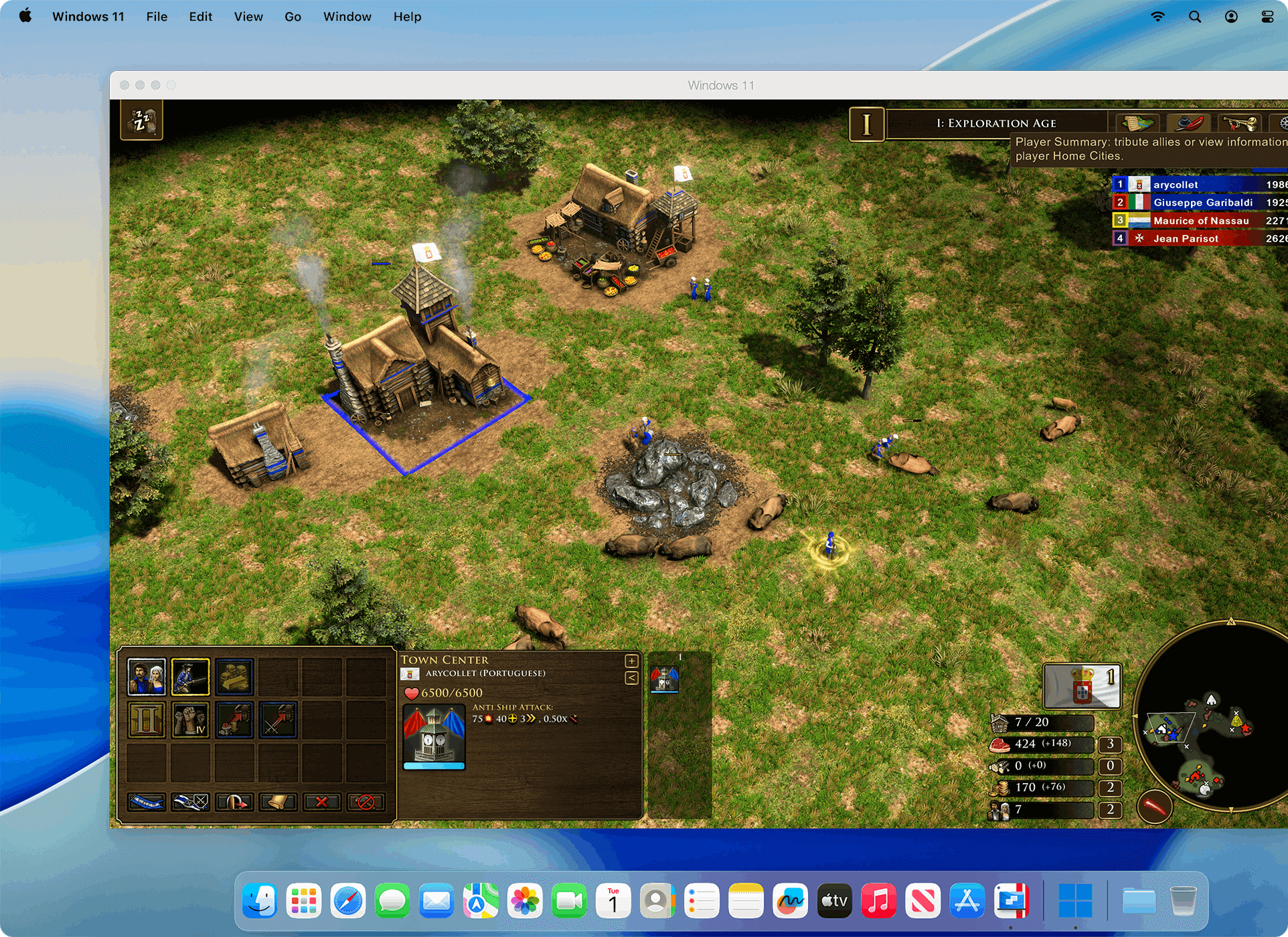
A Windows strategy game running in a Windows 11 window on the Mac (vendor image).
Developer tools in Pro
Parallels Desktop Pro gives each virtual machine up to 128 GB of memory and 32 virtual CPUs (Standard stops at 8 GB and 4), and adds the prlctl command line, a Develop menu with debugging and SSH shortcuts, advanced networking and an AI agent integration (MCP). Pro is also the edition that runs several virtual machines side by side for cross-platform testing.
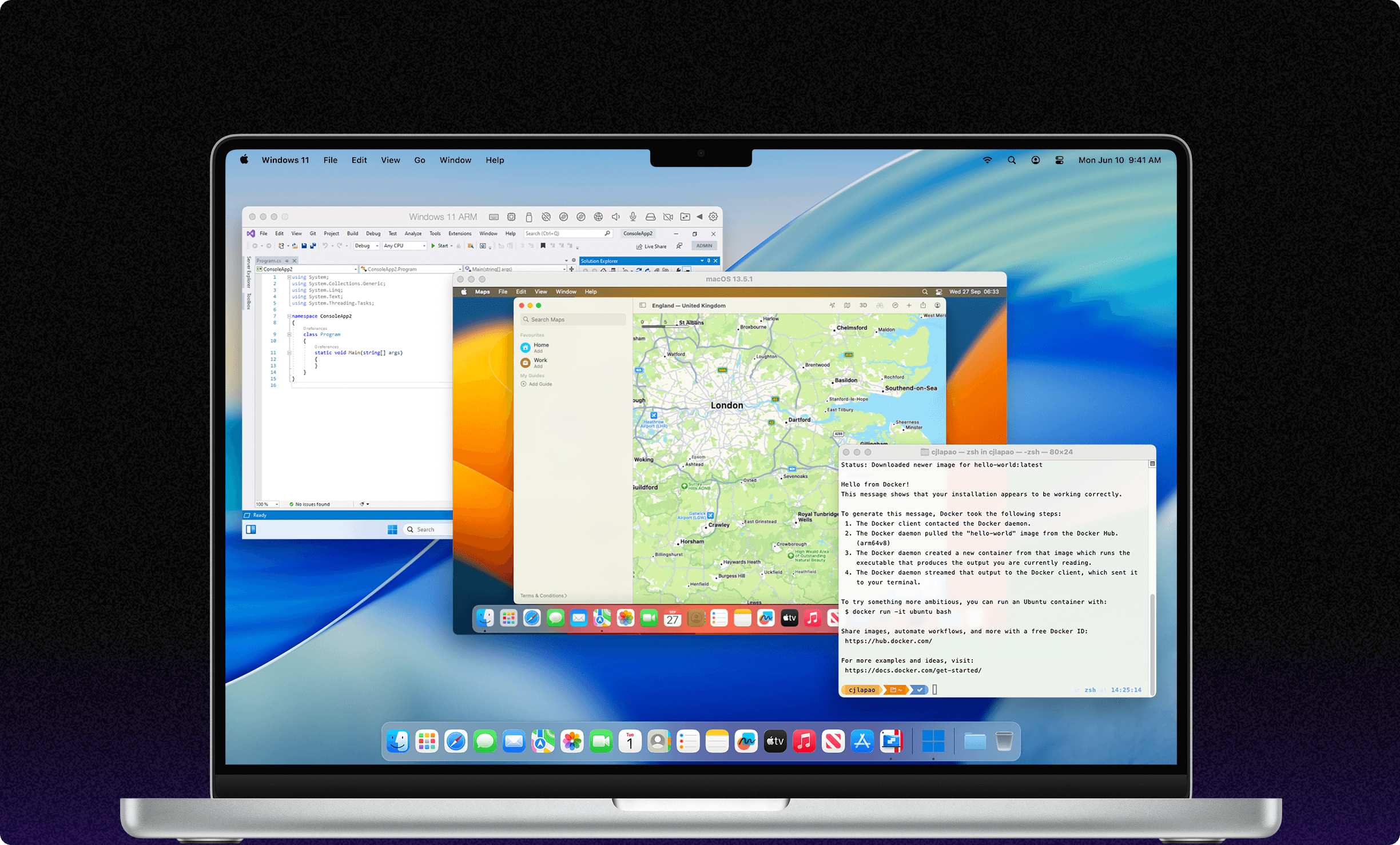
Two virtual machines at once: Windows 11 ARM with Visual Studio and a macOS 13.5.1 guest, next to a Mac terminal running Docker (vendor image).
Central management in Business
Parallels Desktop Business adds a central place to manage licenses, volume licensing, deployment through Jamf and Intune or a Parallels deployment package, and automation for CI/CD pipelines. It can also let selected users download a corporate Windows virtual machine prepared by IT. Enterprise goes further with policy enforcement, encrypted VMs and single sign-on, and is priced by Parallels' sales team.
Benefits
- One computer instead of two. You keep the Mac you like and still open the one Windows program your job or school requires.
- No restarting. Windows runs while macOS keeps running, so you don't reboot into a second system just to use one program for ten minutes.
- A safe place to experiment. Snapshots and separate virtual machines let you try a beta, a suspicious download or a new Linux distribution without touching macOS.
- Updates for the next macOS. A subscription includes each new major version, which matters because a virtual machine app has to keep up with Apple's yearly macOS changes.
Real-World Uses
- An office that runs on Windows software. An accountant on a MacBook keeps the firm's Windows-only tax or bookkeeping program in the Dock through Coherence mode and saves the files straight into the Mac's Documents folder.
- Engineering and design coursework. A student whose course uses the Windows version of a CAD or GIS program runs it in a Windows 11 virtual machine at the Student price, and checks during the trial that the files and plug-ins open.
- Cross-platform development. A developer runs Visual Studio in Windows 11, a Linux server in a second virtual machine and macOS for Xcode, scripting them with
prlctl in the Pro edition.
- Older Windows games. Someone who moved from a PC keeps playing DirectX 11 titles that never got a Mac version, while accepting that newer DirectX 12 games may not run.
- A managed fleet of Macs. An IT team deploys a prepared Windows virtual machine to a design department's Macs with the Business edition and Jamf or Intune.
Who It's For, and Who Should Skip It
Buy it if you have an Apple silicon Mac and depend on Windows software regularly: business programs, Microsoft Access, Visio or Project, Windows-only Excel add-ins, engineering tools, or development and testing across several systems. Standard covers everyday programs; Pro is for heavy workloads, several virtual machines or developer tools.
Skip it if:
- You have an Intel Mac. Version 27 won't install. Parallels Desktop 26 still runs there, and on Intel Macs Apple's Boot Camp can still install Windows itself for free.
- You mainly want modern Windows games. DirectX 12 titles and games with anti-cheat drivers often won't run in any virtual machine. Look at CrossOver, which runs some Windows games and apps without a Windows license.
- You need Windows twice a year. The yearly price plus a Windows license is a lot for occasional use. A free virtual machine app such as UTM may do.
- You need WSL2, Hyper-V or nested virtualization. These don't work in Windows on Apple silicon under Parallels; WSL1 does.
Usage Guide
- Install Parallels Desktop. Start the trial, download the small installer (Install Parallels Desktop.dmg), open it and let it fetch and install the app. Give it the permissions macOS asks for.
- Create the Windows virtual machine. In the Installation Assistant choose to get Windows 11 from Microsoft, or pick your own installation image. Parallels downloads Windows and sets the virtual machine up.
- Activate Windows. In Windows, open Settings > System > Activation and enter an eligible key, or buy one from Microsoft.
- Choose how Windows appears. Use the View menu to switch between a window, full screen and Coherence mode.
- Set sharing. In the virtual machine's Configuration, decide which Mac folders, devices and the clipboard Windows can use, or isolate it.
- Size it to your Mac. Also in Configuration, set the processors and memory. Leave enough for macOS: on an 8 GB Mac, Windows plus Mac apps gets tight.
- Take a snapshot once everything works, so you can go back to it after an update or experiment.
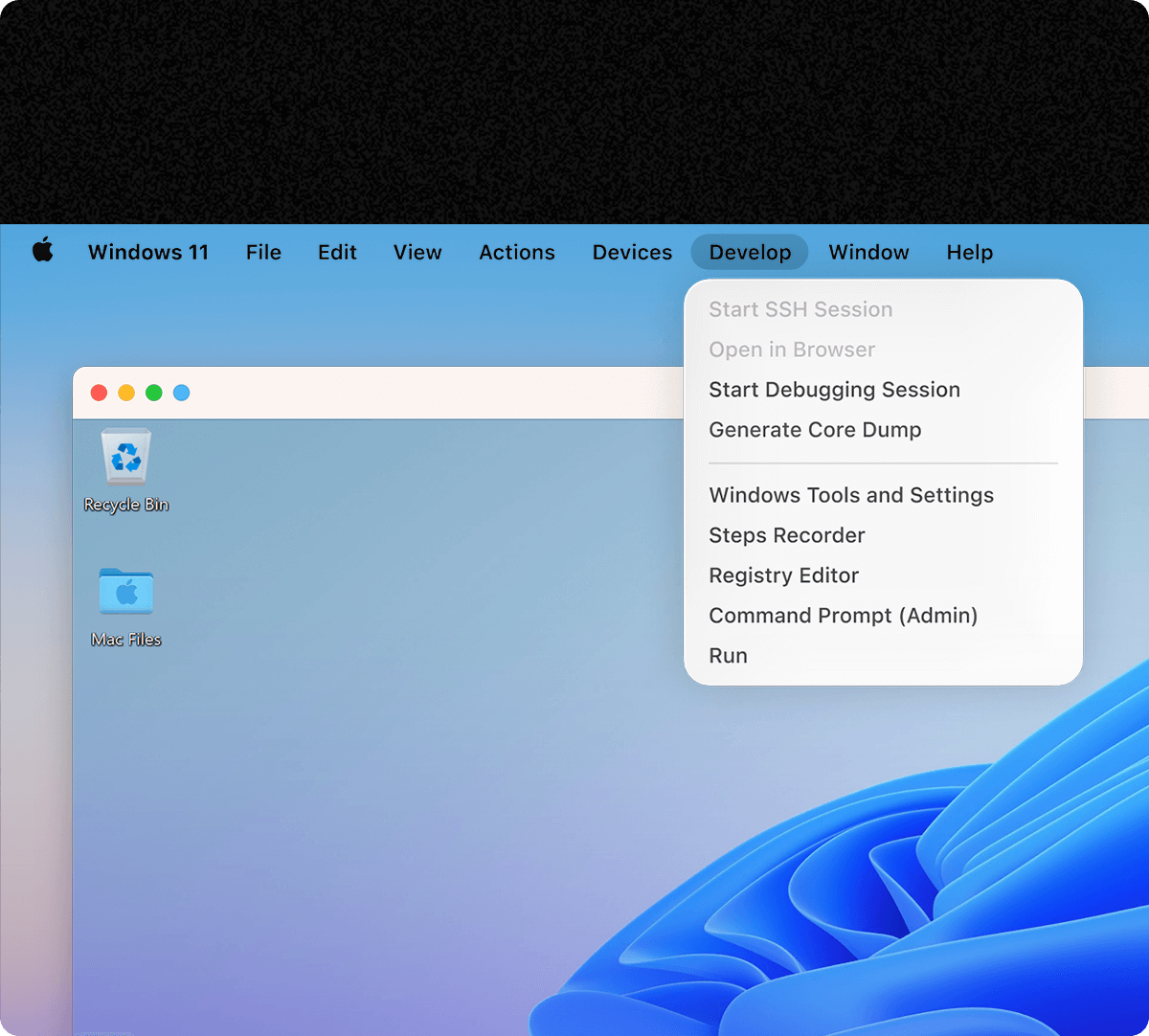
The Pro edition's Develop menu: SSH session, debugging session, core dump, and shortcuts to Windows tools such as Registry Editor and an admin Command Prompt (vendor image).
Tips
- Use the 14-day trial for one full, normal working session with your real files, printer and plug-ins, not just a quick launch.
- The trial is the Pro edition. If you plan to buy Standard, keep your test virtual machine at 4 CPUs and 8 GB or less so you see what you'll actually get.
- Students and teachers can get Standard or Pro at the student price after an eligibility check at checkout.
- If you buy the one-time Standard license, expect to pay for an upgrade when a future macOS release needs a newer Parallels; support is limited to 30 days.
Where it falls short
- Billing and renewals. Trustpilot is dominated by complaints about automatic renewals without notice, renewals charged after cancelling, and refused refunds. The 30-day guarantee excludes renewals.
- Games. DirectX tops out at 11.1. Macworld found Skyrim smooth but Clair Obscur: Expedition 33 glitchy.
- Arm Windows limits. Windows 11 on Arm runs many Intel Windows programs through Microsoft's emulation, but Parallels warns that some applications, games, hardware accessories and anything that relies on specific drivers or nested virtualization may not work.
- Memory. 8 GB is the minimum; with Windows and Mac apps open at once, 16 GB or more makes a real difference.
- Features removed in version 27. Shared Bluetooth, Travel mode and the security tab in preferences are gone; a Bluetooth device now needs a USB dongle to connect straight to Windows.
- Edition limits. Standard caps each virtual machine at 8 GB of memory and 4 virtual CPUs, which can feel tight for heavy design or development work.
What Users Say
Parallels Desktop gets two very different kinds of reviews. Critics and business users rate the software itself highly, while consumer review sites are full of complaints about subscriptions and billing.
Critics
Macworld (Cliff Joseph, "Parallels Desktop 27 for Mac review: Still the best way to run Windows", updated October 14, 2026) gave it 5 out of 5 after testing the Pro edition:
"Parallels Desktop remains our leading choice for Mac users who need a full Windows environment for work or development. Its easy setup and close integration with macOS make it approachable, while its advanced controls cater to more demanding users. Version 27 expands graphics capabilities, but the cost of Parallels and any required Windows license can be hard to justify for occasional use."
Its listed cons: "Most editions require an annual subscription", "Windows licensing can add to the cost", "Demanding workloads need plenty of memory and processor power" and "Limited suitability for modern Windows games". On integration: "Integration is where Parallels makes its strongest impression."
9to5Mac (Bradley Chambers, Apple @ Work, August 29, 2026): "This is the best edition of Parallels Desktop, and if you have a demanding Windows app to run on the Mac, it's worth the upgrade. I know some customers don't like the subscription model, but if you rely on running VMs on macOS, it's worth the annual upgrade as it's much more of a rolling development to match Apple's latest features."
Business software review sites
On Capterra, Parallels Desktop for Mac averages 4.4 out of 5 from 148 reviews, and on G2 it averages 4.3 out of 5 from 59 reviews. These reviewers are mostly people using it for work, and the scores are close to the critics'.
Trustpilot
The company page for parallels.com scores 1.7 out of 5 from about 1,800 reviews, and most recent ones are about billing rather than the software:
- Jorge Mario Gonzalez Figueroa, 1 star, "No renewal notice" (November 12, 2026): "I got no email or in-app notice beforehand saying the renewal was coming up, how much it would cost, or how to cancel."
- MattK, 1 star, "Terrible experience" (November 8, 2026): "Unexpected auto-renewals, no prior notification email and ZERO support to help resolve."
- Consumer, 1 star (September 21, 2026): "Charged me an extra year's subscription even after I logged in and disabled the auto renew."
- George, 2 stars (May 14, 2026): "Software works well, but no option to buy lifetime license, expensive as hell subscription"
- Robert S. Kaye, 2 stars (August 31, 2026): "Awesome software, but all of a sudden, no support, whatsoever."
- Mala, 5 stars, "I am a big fan of Parallels Desktop." (October 22, 2026): "Big life saver"
George's point is partly out of date: the Standard Edition is still sold as a one-time license, though Pro and Business are subscription only.
Mac App Store
These reviews are for the separate App Store Edition, which is billed through Apple and has the same basic features as Standard, with some differences because it runs in Apple's App Sandbox.
- CardiologyGuy, 5 stars, "Solid & relible" (July 23, 2026): "I work at a hospital and they have on app which only works in Windows and I use a Mac. This app is a life saver!"
- Lizz Lebron, 5 stars, "Worth it" (April 2, 2026): "I was able to get Window 11 up and running fast without doing troubleshooting."
- CD999888, 4 stars, "Needs more GPU/Metal acceleration" (April 5, 2026): "Would appreciate better GPU support within VMs, specifically allowing apps that need OpenGL/OpenCL and CUDA to have the calls translated to Metal on the bare metal."
- Mikethegreat2, 2 stars, "freezes" (June 3, 2026): "constantly have to deal with program freezing. but works well when its not frozen"
- Dave McK4, 1 star, "Need to purchase Windows" (August 2, 2026): "Should state that need to purchase Windows 11"
- LazarusLives!, 1 star, "Annoying Popup!" (August 25, 2026): "Every time I start parallels the stupid update/upgrade popup invades my screen and there's no way to disable it."
The pattern: people who use it for work praise how easily Windows installs and how well it blends into macOS, and critics still call it the best way to run Windows on a Mac. The complaints are about money more than the software: the subscription, automatic renewals and hard-to-get refunds, then the extra cost of Windows, freezes on some setups, and games that don't run. If you subscribe, note your renewal date.
Comparisons
Parallels Desktop vs VMware Fusion
VMware Fusion, which Broadcom now gives away free, also runs Windows 11 on Arm on Apple silicon Macs. Parallels Desktop's advantage is the Mac integration that critics single out: Coherence mode, the Windows 11 download assistant and the shared folders and devices. Pay for Parallels if you live in a Windows program every day; try the free option first if you only need a Windows machine now and then.
Parallels Desktop vs CrossOver
CrossOver runs some Windows programs and games directly on macOS without installing Windows, so there's no Windows license to buy. It only works with the programs it supports, though, while Parallels runs nearly anything that runs on Windows on Arm. Try CrossOver first for a specific game or app; choose Parallels when you need full Windows.
Standard vs Pro
Parallels Desktop Standard is enough for office software, accounting programs and light design work. Pro raises the per-VM limits from 8 GB and 4 vCPUs to 128 GB and 32 vCPUs and adds the command line, developer tools and AI integration. With the November 2026 sale, Pro costs $10 a year more than Standard.
Editions and Pricing
Prices on the Parallels buy page on November 16, 2026, in US dollars. The yearly plans were on a Black Friday sale; the regular price is shown in brackets. Each Buy button opens that edition on the Parallels order page.
| Edition | Price | License | What it adds | Buy |
|---|
| Standard | $49.99 a year ($99.99), or $219.99 one-time | 1 Mac; yearly subscription or one-time license | 8 GB vRAM and 4 vCPUs per VM; unlimited support with a subscription, 30 days with one-time | Buy Standard |
| Pro | $59.99 a year ($119.99); 2 years $159.99 | 1 Mac; subscription only | 128 GB vRAM and 32 vCPUs per VM, command line, developer tools, AI integration (MCP) | Buy Pro |
| Business | $97.49 a year ($149.99); 2 years $209.99 | Per Mac; subscription only, volume licensing | Everything in Pro plus central license management, Jamf/Intune deployment, CI/CD automation | Buy Business |
| Student and educator | Standard $49.99 a year, Pro $59.99 a year | 1 Mac; subscription, eligibility check at checkout | Same features as Standard or Pro, up to 50% off the regular price | Buy Student |
| Enterprise | Quote from Parallels sales | Organization license | Management portal, policies, encrypted VMs, SSO/SAML with SCIM, golden images | Contact Parallels |
The Standard button opens both Standard options; pick "Subscription" or "One-time purchase" there. Upgrade pricing for owners of an older one-time license is on the same page under Upgrade.
FAQs
Does Parallels Desktop include a Windows license?
No. Parallels Desktop downloads Windows 11 for you, but you activate it with your own eligible Windows 11 Pro or Enterprise license, or buy one from Microsoft. Depending on its terms, a key you already own may work.
Can I run Parallels Desktop 27 on an Intel Mac?
No. Parallels Desktop 27 requires Apple silicon. Intel Mac owners can use Parallels Desktop 26, which Parallels says will keep getting security and compatibility updates.
Can I use one Parallels Desktop license on two Macs?
No. Each Parallels Desktop license covers one Mac, so a second Mac needs its own license. The Business edition adds volume licensing for organizations.
How do I avoid an unwanted Parallels Desktop renewal?
Parallels Desktop subscriptions renew automatically. Turn off automatic renewal in your Parallels account after you buy if you'd rather decide each year, and do it well before the renewal date, because the 30-day money-back guarantee doesn't apply to renewals.
Can Parallels Desktop run WSL2 or Hyper-V inside Windows?
No. Parallels Desktop on Apple silicon doesn't support nested virtualization, so Hyper-V and WSL2 don't work inside the Windows virtual machine. WSL1 does, and Linux containers can run in a separate Linux virtual machine or on macOS itself.
Is Parallels Desktop authorized by Microsoft?
Yes. Microsoft lists Parallels Desktop as an authorized way to run the Arm versions of Windows 11 Pro and Windows 11 Enterprise on supported Apple silicon Macs. Windows 11 virtual machines also get Secure Boot and a virtual TPM 2.0.
How much Mac memory do I need for Parallels Desktop?
Parallels Desktop 27 needs at least 8 GB of memory and recommends 16 GB or more for graphics-heavy programs, development or several virtual machines. Plan on 600 MB for the app and at least 16 GB of disk space for Windows, plus room for your programs and files.
Is the App Store version of Parallels Desktop the same thing?
Not exactly. The Parallels Desktop App Store Edition has the same basic features as the Standard Edition, but it runs in Apple's App Sandbox, so some things differ, and Parallels doesn't recommend that existing users switch to it. The editions on this page are bought from parallels.com, which is also where the 30-day money-back guarantee applies.
System Requirements
- Processor: any Apple silicon chip (M-series); M3 or newer for full graphics acceleration
- Memory: 8 GB minimum, 16 GB or more recommended
- Storage: 600 MB for the app, plus at least 16 GB for Windows; an SSD
- macOS: Sonoma 14.7, Sequoia 15.5, Tahoe 26 or newer (the OpenGL 4.3 driver needs Sequoia or newer)
- Guests: Arm versions only: Windows 11 Pro and Enterprise on Arm, Arm Linux distributions such as Ubuntu, Fedora, Debian and Kali, and macOS
- Internet: needed for activation, updates and some features
Conclusion
Parallels Desktop is the easiest and most polished way to run full Windows on an Apple silicon Mac, and it's worth the money if Windows software is part of your daily work: the Windows 11 set-up takes minutes, Coherence mode makes Windows programs feel like Mac apps, and version 27 widens what design and engineering software will run. At the November 2026 sale price of $49.99 for a year of Standard, it's at its cheapest. The main reason not to buy is cost over time: a yearly subscription that renews automatically, plus a Windows license, is a lot for occasional use, and gamers with modern titles will be disappointed. Use the 14-day trial on your own programs first, buy Standard for everyday software or Pro for heavy work, and note your renewal date.
Download Free TrialBuy Standard EditionBuy Pro EditionBuy Business EditionBuy Student Edition