Short answer
Short answer: buy CorelDRAW Standard 2024 ($299 once) if you design for yourself or a very small business on Windows and want to own the software outright. Choose CorelDRAW Graphics Suite 2026 if you design for clients, send work to print shops, use a Mac, or want the AI tools: the annual plan ($269 a year) is the best value for working professionals, and the $549 one-time licence pays for itself after about two years if you don't need future versions.
Both have a 15-day free trial. Use it to check that Standard has every tool your projects need, because Corel's tutorials often show Graphics Suite features that Standard lacks.
At a glance
| CorelDRAW Standard 2024 | CorelDRAW Graphics Suite 2026 |
|---|
| Price | $299 one-time | $269 a year, $39 a month, or $549 one-time |
| Version you get | 2024 (no later feature updates) | Subscription: every new version. One-time: 2026 only |
| Windows | ✓ 64-bit Windows 11 or 10 (21H2+) | ✓ 64-bit Windows 11 or 10 |
| Mac | ✗ | ✓ macOS 14 Sonoma or later, Apple silicon and Intel |
| Web app | ✗ | ✓ CorelDRAW Web (subscription only) |
| Apps | CorelDRAW Standard, Corel PHOTO-PAINT Standard | CorelDRAW, Corel PHOTO-PAINT, Corel Font Manager, CAPTURE (Windows) |
| Generative AI | ✗ | ✓ text-to-vector, text-to-image, AI background removal (2,000 credits a month on subscription) |
| PowerTRACE bitmap-to-vector | ✓ | ✓ with AI background removal before tracing |
| Prepress tools (preflight, colour proofing, PDF/X) | ✗ | ✓ |
| Print Merge, Prep & Stretch for banners | ✗ | ✓ |
| Macros (VBA, VSTA, JavaScript) | ✗ | ✓ Windows |
| Included content | 1,000 clipart and images, 100 photos, 175 fonts, 60 templates | More templates and brushes; 1,700+ Google Fonts families in Font Manager |
| Free trial | 15 days | 15 days, no credit card |
| Refunds | 30 days on orders placed directly with Corel | 30 days on orders placed directly with Corel |
What we checked
- We compared the two CorelDRAW editions on this site, from Corel's product pages, comparison chart, FAQs and store data: tools, platforms, included content, licence terms and what each licence includes over time.
- We read the independent reviews of the 2026 suite and the CorelDRAW reviews on Trustpilot, including the complaints about stability and support.
- We worked out what each option costs over one, two and three years from the regular prices.
- What we checked: the regular US prices in Corel's store data on November 28, 2026 (Graphics Suite 2026 $269 a year, $39 a month, $549 one-time; CorelDRAW Standard 2024 $299 one-time), the Windows trial installers for both, and the Mac App Store version of Graphics Suite (2026.2, released September 24, 2026).
We compared features, licences and prices. We didn't run the same design job in both, so we can't speak to speed differences.
Corel's Black Friday sale, seen on November 28, 2026, cut the first year of the Graphics Suite annual plan to $159, the one-time licence to $329 and Standard to $239; everything else in this article uses regular prices.
What three years of CorelDRAW costs
CorelDRAW Standard is the cheapest way to own CorelDRAW, and the gap grows every year you keep it. The Graphics Suite one-time licence overtakes the annual plan in the third year.
Total cost over three years (USD, regular prices)
CorelDRAW Standard 2024 (one-time)$299
Graphics Suite 2026 one-time licence$549
Graphics Suite annual plan (3 x $269)$807
Graphics Suite monthly plan (36 x $39)$1,404
Regular prices in Corel's US store data on November 28, 2026. One-time licences stay on the version you bought; the subscription includes every new version.
| Years of use | Standard 2024 | Graphics Suite one-time | Graphics Suite annual |
|---|
| 1 year | $299 | $549 | $269 |
| 2 years | $299 | $549 | $538 |
| 3 years | $299 | $549 | $807 |
| 4 years | $299 | $549 | $1,076 |
CorelDRAW Graphics Suite 2026: the full professional package
- Price: $269 a year (about $22 a month), $39 a month, or $549 one-time for the 2026 version
- Runs on: Windows 11 and 10 (64-bit), macOS 14 or later, and CorelDRAW Web in a browser for subscribers
- Version: 2026, update 2026.2 (September 2026)
- Best for: sign makers, print and apparel shops, engravers and designers who work for clients

CorelDRAW Graphics Suite 2026.2 on Mac: the AI Generate inspector turns a text prompt into an editable vector illustration (from Corel's Mac App Store screenshots).
CorelDRAW Graphics Suite 2026 is CorelDRAW for vector illustration and page layout, Corel PHOTO-PAINT for photo editing, Corel Font Manager and, on Windows, the CAPTURE screen-capture tool. What separates it from Standard is the production side: Preflight Control, on-screen colour proofing, PDF/X-4 export, free Pantone libraries, Print Merge with QR codes and spreadsheet data, and Prep & Stretch with borders and grommets for banners. That's why sign and print businesses run on it.
The 2026 release adds generative AI: text-to-vector (added in the September 2026 update), text-to-image, prompt-based image remix and AI background removal before PowerTRACE tracing. Subscribers get 2,000 AI credits every month; the one-time licence gets 2,000 once, and credits don't roll over.

PowerTRACE in Graphics Suite: a photo on the left, the traced vector outlines on the right (Corel's Mac App Store screenshot).
What we like
- Prepress, Print Merge and banner tools that Standard lacks
- Windows, Mac and a web app
- Generative AI and AI background removal
- Still sold as a one-time licence, unlike Adobe
Watch out for
- The one-time licence is frozen at 2026, with AI credits only once
- Mac version has no CAPTURE and no VBA/VSTA macros
- Users report crashes with large files, especially on Mac
- Reaching Corel support is a common complaint
"CorelDRAW Graphic Suite 2026's tentpole feature is undoubtedly the integration of AI into many aspects of the software."
TechRadar (Steve Paris), April 3, 2026
"Two years paying for CorelDRAW on Mac. Same bugs, same answer: uninstall and reinstall."
Petros Kakoüros, 1 star on Trustpilot, November 4, 2026 (he adds: "On Windows it works very well")
TechRadar listed "AI Credits don't roll over" and "Macs don't get CAPTURE" as its reasons to avoid. The small Trustpilot page for coreldraw.com showed 1.9 out of 5 from 19 reviews, mostly about support and stability.
Download CorelDRAW Graphics Suite (Annual Plan) Free TrialBuy CorelDRAW Graphics Suite (Annual Plan)
The Buy button above orders the annual plan; the $39 monthly plan and the $549 one-time licence are on the same Corel store page.
CorelDRAW Standard 2024: CorelDRAW you buy once
- Price: $299 one-time
- Runs on: 64-bit Windows 11 or 10 (version 21H2 or later) only
- Apps: CorelDRAW Standard and Corel PHOTO-PAINT Standard
- Best for: hobbyists, crafters and home or micro businesses on Windows
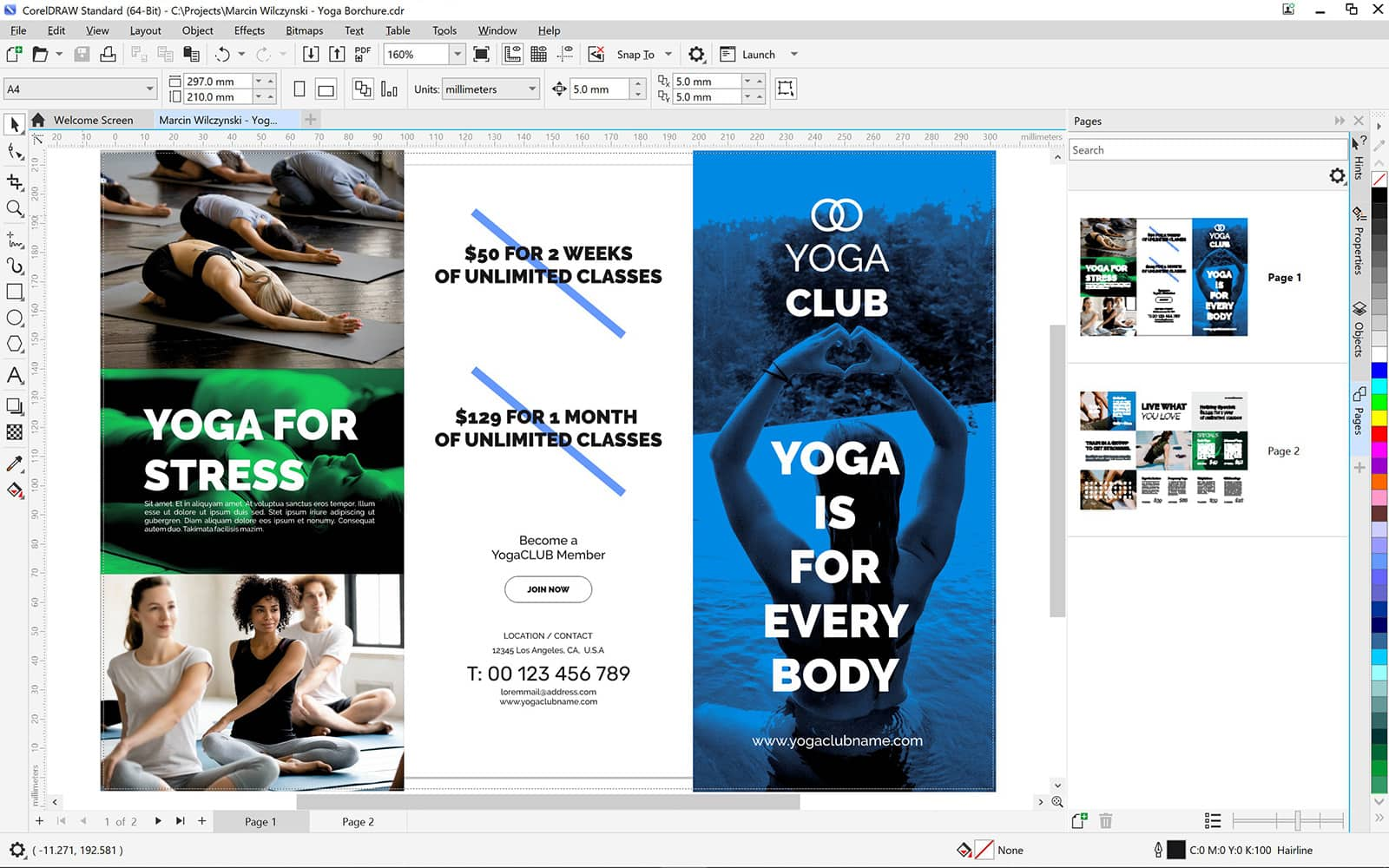
CorelDRAW Standard 2024 with a two-page brochure and the Pages docker (from Corel's product page).
CorelDRAW Standard 2024 gives you the core CorelDRAW way of working: curves, shapes, text, multi-page layouts with rulers, grids and guidelines, fills and transparency, and PowerTRACE for turning a scanned sketch or a low-resolution logo into vectors for a cutting machine or engraver. Corel PHOTO-PAINT Standard handles layered photo edits such as straightening, vibrance, retouching and bitmap effects. It imports and exports AI, PSD, PDF, EPS, SVG, PNG, JPG, TIFF, HEIF and WebP.
CorelDRAW Standard leaves out the professional output tools (preflight, colour proofing, Print Merge), Corel Font Manager, the AI tools, the Mac version and the web app. Corel warns that its learning materials may show tools Standard doesn't have, and one Trustpilot reviewer found out the hard way.
What we like
- $299 once, no subscription
- Real vector drawing, layout and PowerTRACE
- Photo editor included
- Opens and saves standard .cdr files, so you can move up later
Watch out for
- Windows only
- No AI, prepress or Font Manager
- You keep the 2024 version; no later feature updates
- No in-depth independent review of this edition
"It has no blur command you must have the designer version for that."
Jamie Photographer, 1 star on Trustpilot, May 29, 2026
"It still does exactly what I need. I really, really like it."
Varvara P, 5 stars on Trustpilot, July 28, 2025 (about CorelDRAW in general)
Download CorelDRAW Standard 2024 Free TrialBuy CorelDRAW Standard 2024
Tools: Graphics Suite wins for anything that gets printed commercially
CorelDRAW Graphics Suite has the full drawing toolset (Contour, Envelope, Blend, Mesh Fill, Variable Outline, Perspective Drawing, Symmetry and LiveSketch) plus the prepress chain a print shop expects. CorelDRAW Standard covers shapes, text, fills, transparency, multi-page layout and PowerTRACE, which is enough for flyers, cards, signs, cut files and web graphics you produce yourself.
If a commercial printer will ever ask you for a PDF/X file with checked colours, or you need numbered tickets from a spreadsheet, that is Graphics Suite territory.
Platforms: only Graphics Suite runs on a Mac
CorelDRAW Standard 2024 is Windows-only. CorelDRAW Graphics Suite 2026 runs natively on Apple silicon (M1 to M5) and on Intel Macs with AVX2 on macOS Sonoma 14 or later, and subscribers can also use CorelDRAW Web in a browser. The Mac version lacks CAPTURE, the VBA/VSTA macros and some workspace options, and most of the stability complaints come from Mac users.
Price and licence: Standard is cheapest to own, the annual plan is cheapest for one year
CorelDRAW Standard 2024 costs $299 once, and you keep it for as long as it runs on your Windows version. The Graphics Suite annual plan is cheaper for a single year ($269) and includes every new version and the monthly AI credits; it costs more than the one-time licence from the third year on. The $549 one-time licence suits professionals who want to stop paying and can live without future features.
Which should you choose?
Who should skip each one
- Skip CorelDRAW Standard 2024 if you use a Mac, design for clients or commercial printing, or want the AI tools.
- Skip CorelDRAW Graphics Suite 2026 if you only make occasional social posts (a free browser tool is enough), or if you exchange native Illustrator and InDesign files every day, since round trips aren't perfect.
What commonly goes wrong
- Learning from Graphics Suite tutorials on Standard. Corel says its learning materials may show tools Standard doesn't have. Check the tools you need during the trial.
- Expecting a one-time licence to get new features. Both one-time licences stay on the version you bought, and Corel doesn't promise support for future operating systems.
- Running out of AI credits. Credits don't roll over, and the one-time Graphics Suite licence gets its 2,000 credits only once.
- Big files on older hardware. Crashes with large files are the most common user complaint. Both editions ask for 8 GB of RAM and an OpenCL 1.2 graphics card with 3 GB of VRAM; Corel recommends 16 GB for Graphics Suite.
- Buying from a reseller. Corel's 30-day money-back guarantee covers only orders placed directly with Corel.
- Installing offline. Both need an internet connection to install and authenticate.
FAQs
What is the difference between CorelDRAW Standard and CorelDRAW Graphics Suite?
CorelDRAW Graphics Suite 2026 is the full professional suite for Windows, Mac and the web, with prepress and colour tools, Corel Font Manager, CAPTURE and generative AI. CorelDRAW Standard 2024 is a Windows-only, one-time edition with the core drawing, layout, PowerTRACE and photo-editing tools for hobbyists and home businesses.
Is CorelDRAW Standard a one-time purchase?
Yes. CorelDRAW Standard 2024 costs $299 once and you own that version. It doesn't receive later feature updates.
Can I buy CorelDRAW Graphics Suite without a subscription?
Yes. CorelDRAW Graphics Suite 2026 is sold as a one-time licence for $549. It excludes CorelDRAW Web, subscriber-only features and future versions, and includes 2,000 AI credits once.
Is CorelDRAW Standard enough for a small business?
For a home or micro business that makes its own flyers, signs, cards and web graphics, yes. If you send files to commercial printers or design for clients, Graphics Suite's prepress and colour tools are worth paying for.
Does CorelDRAW Standard work on Mac?
No. CorelDRAW Standard 2024 runs only on 64-bit Windows 11 and 10. Mac users need CorelDRAW Graphics Suite, which runs natively on Apple silicon.
Which is cheaper over time, the annual plan or the one-time licence?
The CorelDRAW Graphics Suite annual plan ($269) costs $538 over two years and $807 over three, so the $549 one-time licence becomes cheaper in the third year, as long as you're happy to stay on the 2026 version.
Can CorelDRAW Standard open files made in Graphics Suite?
CorelDRAW Standard opens CorelDRAW (.cdr) files, but effects made with tools Standard lacks may not edit the same way. Test files you receive from others during the 15-day trial.
Does CorelDRAW Standard have the AI tools?
No. Text-to-vector, text-to-image and AI background removal are in CorelDRAW Graphics Suite 2026 only, with monthly AI credits on the subscription.