Short answer
Short answer: for a few messages, open each .eml file in Outlook or Thunderbird and print it with Microsoft Print to PDF; it's free but one email at a time, and attachments don't come along. For a folder of hundreds or thousands of EML files, use a batch converter: Kernel EML Converter ($39 Home license) converts EML and EMLX files to PDF, PST, Word or MBOX in one run, and Kernel Email to PDF Converter ($29 a year or $49 lifetime) is built only for PDF, with attachments embedded in the PDF and file naming by date, sender or subject, and it also reads PST, OST and MBOX mailboxes.
Both trials convert 25 items per folder, enough to check that dates, attachments and non-English text come through before you pay.
At a glance
| Print to PDF (free) | Kernel EML Converter | Kernel Email to PDF Converter |
|---|
| Price | Free | Home $39 (1 PC, 1 year); Corporate $199; Technician $299 lifetime | Personal $29 a year or $49 lifetime; Corporate $99 / $199; Technician $299 a year |
| Batch conversion | ✗ one message at a time | ✓ files, folders, auto-search | ✓ files, folders, auto-search |
| Reads | Whatever the mail client opens | EML, EMLX | EML, EMLX, MSG, PST, OST, MBOX |
| Writes | PDF | PDF, PST, MSG, MBOX, EML, DOC, DOCX, HTML, MHT | PDF, plus EML, MSG, DOC, DOCX, HTML, MHT |
| Attachments | ✗ not in the PDF | Extracted to a folder | Embedded in the PDF, saved separately, or each as its own PDF |
| Date filter | ✗ | ✓ | ✓ plus item-type filters |
| PDF file naming | Manual | Default naming | By subject, date, sender or a mix |
| Free trial | n/a | ✓ 25 items per folder | ✓ 25 items per folder |
| Platform | Windows, Mac | Windows (Mac edition sold separately) | Windows (Mac version sold separately) |
What we checked
- We went through the free print-to-PDF route in Outlook, Thunderbird and Apple Mail and noted what it keeps and loses.
- We compared the two Kernel converters on their product pages, order pages, user guides and FAQs: input and output formats, attachment options, trial limits and license terms.
- On November 27, 2026 the vendor's product pages listed Kernel EML Converter version 26.0 and Kernel Email to PDF Converter version 26.1, and the installers on Kernel's server were 47.7 MB and 85.1 MB.
- What we checked: on November 27, 2026 Kernel's order pages listed Kernel Email to PDF Converter Personal at $29 for one year and $49 lifetime, Corporate at $99 and $199, and Technician at $299 for a year; Kernel EML Converter's Home license was $39 at checkout on November 25, 2026, with Corporate $199 and Technician $299.
We compared features, trial limits and prices. We didn't convert a mail archive ourselves, so output quality comes from the vendor and its customers.
Step 1: the free way, for a handful of emails
Any mail program that opens an .eml file can save it as a PDF. On Windows, double-click the file to open it in Outlook, or in Thunderbird use File > Open > Saved Message. Then choose Print, pick Microsoft Print to PDF as the printer and save. On a Mac, open the .eml or .emlx file in Apple Mail and use File > Export as PDF.
What the free way misses
- One email at a time. A folder of 2,000 messages means 2,000 print dialogs.
- No attachments. The PDF shows the attachment names but not the files; you save each one by hand.
- Inconsistent file names. You type every name yourself, so a large set of PDFs is hard to sort by date or sender.
- You need a mail client that still opens the format, and old Outlook Express or Windows Live Mail exports may not open cleanly in a new one.
If you have more than a few dozen messages, or the PDFs are for a lawyer, auditor or archive where every message and attachment must be there, use a batch converter.
Step 2: batch-convert a folder with Kernel EML Converter
- Price: Home $39 (1 machine, 1 year); Corporate $199 (10 machines, 2 years); Technician $299 (unlimited, lifetime); one-time payments, no automatic renewal
- Reads: EML and EMLX from Thunderbird, Eudora, Outlook Express, Windows Live Mail, Apple Mail and backup exports
- Writes: PDF, PST, MSG, MBOX, EML, DOC, DOCX, HTML, MHT
- Best for: large folders of loose EML files, especially when you also want them in Outlook
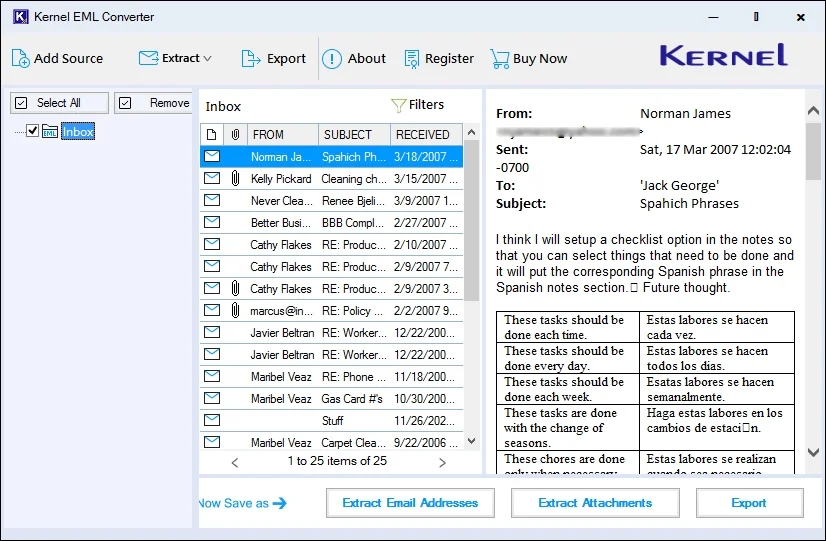
Kernel EML Converter's main window: an Inbox of 25 EML messages, the selected message in the preview pane, and the Extract Email Addresses, Extract Attachments and Export buttons.
- Install the trial and click Add Source. Add EML files, a whole folder, or let it search a drive for EML files.
- Click through a few messages in the preview to check dates, sender names and accents look right.
- Tick the folders you want, click Export and choose PDF. Set a From and To date if you only need part of the archive.
- Choose the destination and export. Use Extract Attachments to save every attachment into a folder alongside the PDFs.
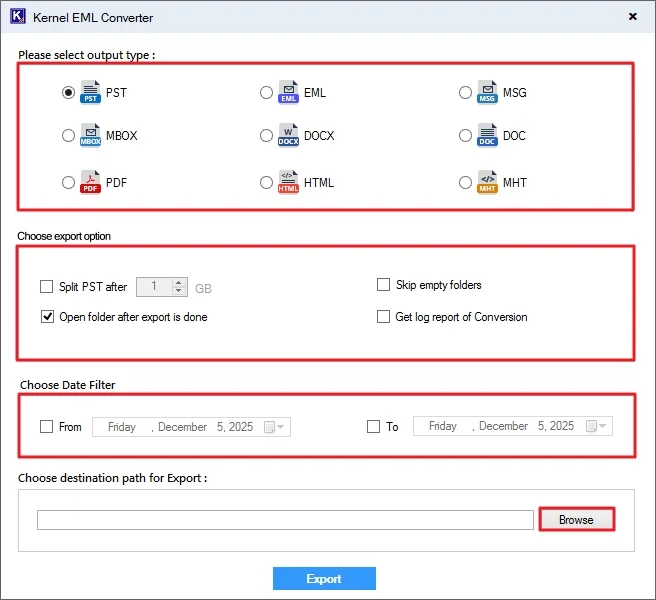
The export dialog: output type, options including "Split PST after", the date filter and the destination path.
What we like
- Converts thousands of EML/EMLX files in one run
- Nine output formats, so the same license also moves mail into Outlook
- Extracts attachments and email addresses
- Home license is only $39
Watch out for
- Home and Corporate licenses expire (1 and 2 years)
- Attachments go to a folder, not inside the PDF
- Kernel's product page contradicts itself on some details; trust the trial
- Windows and Mac are separate licenses
Download Kernel EML Converter TrialBuy Kernel EML Converter
Step 2, alternative: Kernel Email to PDF Converter for PDF-first jobs
- Price: Personal $29 for 1 year (2 systems, 25 files, 50 GB) or $49 lifetime (2 systems, 50 files, 250 GB); Corporate $99 / $199; Technician $299 a year
- Reads: EML, EMLX, MSG, PST, OST and MBOX
- Attachments: embedded in the PDF, saved in their original format, or each saved as its own PDF
- Best for: legal, HR and accounts requests where each email and its attachments must end up as one PDF record
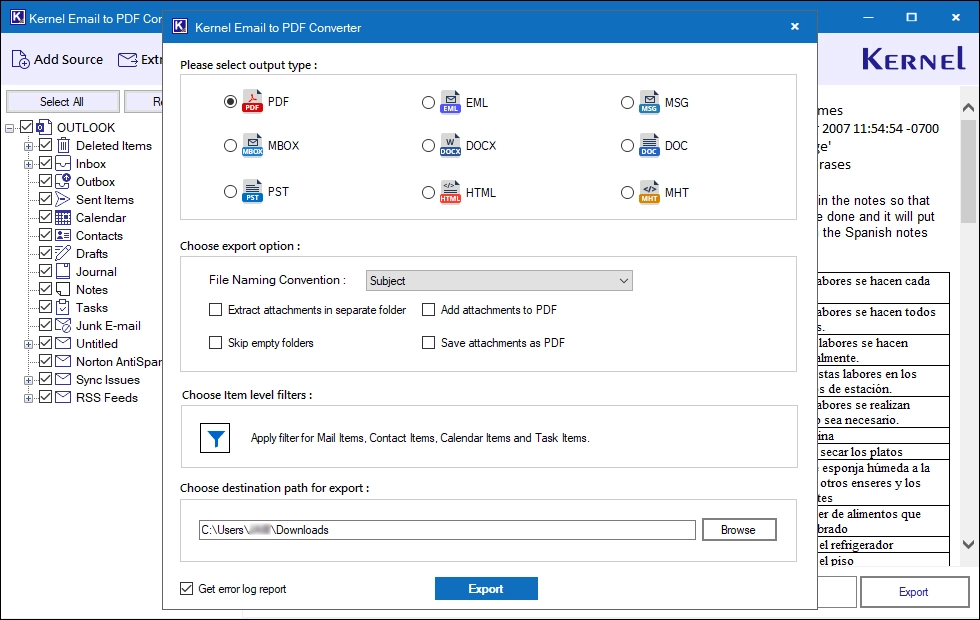
The export dialog: PDF chosen as output, naming by Subject, attachment options, item-level filters and the destination folder.
Kernel Email to PDF Converter works like Kernel EML Converter (add source, preview, export) but its export screen is built around PDF: you choose how files are named (subject, date, sender or a combination), how attachments are handled, and which item types and dates to include, and it writes a log of any message that failed. It also opens Outlook PST and OST files and Thunderbird MBOX archives, so one license covers EML files and whole mailboxes.
Two things to know before buying: the Personal licenses cap the number of source files and gigabytes (25 files and 50 GB for the 1-year license, 50 files and 250 GB for lifetime), and it asks for 4 GB of RAM. Every single .eml file you add may count as a source file, so for a folder of thousands of loose EML files, check this with Kernel or use Kernel EML Converter, whose licenses aren't capped that way.
What we like
- Attachments can be embedded right in each PDF
- Consistent PDF names by date, sender or subject
- Also converts PST, OST and MBOX mailboxes
- Lifetime license option for $49
Watch out for
- Personal licenses cap files and gigabytes converted
- Needs 4 GB of RAM
- Only PDF and document formats; no PST output
- No independent reviews of this exact tool
Download Kernel Email to PDF Converter TrialBuy Kernel Email to PDF Converter
What it costs
Cheapest license (USD)
Kernel Email to PDF Converter, Personal 1 year$29
Kernel EML Converter, Home 1 year$39
Kernel Email to PDF Converter, Personal lifetime$49
Kernel EML Converter, Technician lifetime$299
Prices from Kernel's order pages, checked on November 25 and 27, 2026. Print to PDF in your mail client is free.
What users say
On Kernel's product pages
"The Kernel EML Converter helped us manage a large email backup project. It converted thousands of EML files quickly and kept the original layout."
Michael Thompson, Australia, testimonial on Kernel's EML Converter page
"Our legal team only needed emails from a specific period, not the entire mailbox. The Item-Level and Date filter options of Kernel Email to PDF helped us to convert specific emails as per our requirement."
Raphael Koeche, testimonial on Kernel's Email to PDF Converter page
These are the vendor's own testimonials. On Trustpilot, Kernel Data Recovery as a company scores 4.9 out of 5 from 167 reviews, mostly short notes about helpful support, including one buyer whose wrongly chosen license was swapped for the right one. We found no detailed independent review of either converter, which makes the free trial on your own files the real test.
Which should you choose?
| Your situation | Pick | Why |
|---|
| Fewer than 20 emails | Print to PDF in Outlook, Thunderbird or Apple Mail | Free and quick enough |
| A folder of thousands of EML files | Kernel EML Converter | Bulk conversion, no file-count cap, $39 |
| Want them in Outlook as well as PDF | Kernel EML Converter | Same license writes PST too |
| Each email and its attachments as one PDF record | Kernel Email to PDF Converter | Embeds attachments, names files by date or sender |
| Mail is in a PST, OST or MBOX file, not EML | Kernel Email to PDF Converter | Reads mailbox files directly |
| Apple Mail on a Mac | Apple Mail's Export as PDF, or Kernel's Mac editions | The Windows licenses don't cover a Mac |
Skip both if your mail is still on an IMAP server: an email client can download it free, and then print or convert only what you need.
What commonly goes wrong
- Attachments left behind. Print to PDF never includes them; decide up front whether they must be inside the PDF or next to it.
- Garbled characters. Old EML files with unusual encodings can show broken accents. Check a few non-English messages in the trial before converting the lot.
- Expired license mid-project. Kernel EML Converter Home lasts a year and Kernel Email to PDF Converter's 1-year license too; finish the job inside it or buy lifetime.
- License caps. Kernel Email to PDF Converter's Personal licenses limit files and gigabytes, not just PCs.
- Converting the only copy. Work on a copy of the EML folder and keep the originals until you have checked the PDFs.
FAQs
How do I convert an EML file to PDF for free?
Open the .eml file in Outlook or Thunderbird, choose Print and select Microsoft Print to PDF. On a Mac, open it in Apple Mail and use File > Export as PDF. Attachments aren't included.
How do I convert multiple EML files to PDF at once?
Use a batch converter. Kernel EML Converter or Kernel Email to PDF Converter loads a whole folder of EML files and writes one PDF per email in a single export.
Can I keep email attachments when converting EML to PDF?
Kernel Email to PDF Converter can embed attachments in the PDF, save them in their original format, or turn each into its own PDF. Kernel EML Converter extracts attachments into a separate folder.
Do I need Outlook to convert EML to PDF?
No. Kernel EML Converter and Kernel Email to PDF Converter read EML files on their own; Outlook is only needed to open PST files you create.
Can these tools convert Apple Mail EMLX files?
Yes. Kernel EML Converter and Kernel Email to PDF Converter both read EMLX as well as EML on Windows.
Is it safe to use an online EML to PDF converter?
Online converters upload your emails to someone else's server. Kernel's converters run offline on your PC, which matters for confidential or legal mail.
What does the Kernel trial convert?
The trials of Kernel EML Converter and Kernel Email to PDF Converter convert 25 items per folder, with every feature working, so you can check the output before buying.
Conclusion
For a few emails, print to PDF from your mail client and stop there. For a real archive, Kernel EML Converter is the better value at $39: it converts thousands of EML and EMLX files to PDF in one run and can put the same mail into Outlook. Pick Kernel Email to PDF Converter when every email must become a self-contained PDF with its attachments inside, or when your mail is in a PST, OST or MBOX file, and watch its Personal license caps. Run either trial on a copy of your files first.
Download Kernel EML Converter TrialBuy Kernel EML Converter