Short answer
Short answer: WhatsApp now moves your chats from Android to iPhone for free. On the Android phone open WhatsApp > Settings > Chats > Transfer chats > Transfer to iPhone, then scan the QR code with WhatsApp on the iPhone. It needs Android 10 or later, iOS 15.5 or later, the same phone number, and an iPhone where WhatsApp isn't set up yet. Use a paid tool only when the free way doesn't fit: Wondershare MobileTrans ($29.99 for a month, $39.99 a year) can merge old chats into an iPhone that already has WhatsApp, moves WhatsApp Business, and works over USB through a PC; Wondershare Dr.Fone - Full Toolkit ($99.95 a year) does the same transfer plus recovery and repair.
Back up both phones before any transfer, and charge them: a long WhatsApp history with photos and videos can take an hour or more.
At a glance
| WhatsApp's own transfer (free) | Wondershare MobileTrans | Dr.Fone - Full Toolkit |
|---|
| Price | Free | $29.99 a month, $39.99 a year, $49.99 perpetual (Full Features, Windows) | $79.95 a month, $99.95 a year, $115.95 perpetual |
| How it connects | Both phones on the same Wi-Fi, QR code | Both phones by USB to a Windows PC | Both phones by USB to a Windows PC |
| Keeps chats already on the iPhone | ✗ chats can't be merged | ✓ Transfer & Merge | Transfer, no merge option advertised |
| WhatsApp Business | ✗ not supported | ✓ | ✓ backup and transfer |
| Android 9 or older | ✗ needs Android 10+ | ✓ | ✓ Android 5.0 and later |
| From a Google Drive backup | ✗ | ✓ Google Drive Transfer | ✗ |
| Free version | n/a | Backups and device check; transfers need a license | Backups and previews; transfers limited |
| Refunds | n/a | 7 days, technical faults only | 7 days, technical faults only |
What we checked
- We read WhatsApp's help center article on moving chats from Android to iPhone for its requirements and what does and doesn't move.
- We compared MobileTrans and Dr.Fone on Wondershare's product, pricing, tech-spec and refund pages, and gathered Trustpilot and independent reviews.
- The MobileTrans Windows web installer we downloaded on November 21, 2026 reports version 5.0.13; the Dr.Fone installer reports 14.0.0.
- What we checked: on November 27, 2026 Wondershare's MobileTrans pricing page for Windows listed Full Features at $39.99 a year, $29.99 for one month and $49.99 perpetual, with single-feature plans (such as WhatsApp Transfer alone) at $29.99 a year, and the Dr.Fone - Full Toolkit page listed $99.95 a year, $79.95 a month and $115.95 perpetual.
We compared the methods on their documented requirements, features and prices. We didn't move a WhatsApp history between two phones ourselves, so success rates come from the vendors and their users.
Step 1: prepare both phones
- Back up WhatsApp on Android (Settings > Chats > Chat backup) so you have a copy if anything goes wrong.
- Update WhatsApp to the latest version on both phones, from Google Play and the App Store.
- Check the versions: Android 10 or later and iOS 15.5 or later for the free method.
- Use the same phone number on the iPhone that you use with WhatsApp on Android.
- Charge both phones, keep them next to each other and on the same Wi-Fi, and don't run a mobile hotspot on either.
Step 2: the free way, with WhatsApp's own transfer
WhatsApp's built-in transfer sends your chats directly from the Android phone to the iPhone over Wi-Fi. You don't need a new or factory-reset iPhone for this method, but WhatsApp must not be registered on the iPhone yet: if it is, uninstall WhatsApp on the iPhone first.
- On the Android phone, open WhatsApp, go to Settings > Chats > Transfer chats > Transfer to iPhone and tap Start. A QR code appears.
- On the iPhone, install WhatsApp and verify it with the same phone number.
- Allow the network permissions both phones ask for.
- Scan the QR code with the camera inside WhatsApp on the iPhone, not the iPhone's Camera app.
- Tap Join, keep both phones unlocked and in WhatsApp until the progress bar finishes, then tap Next and finish setting up.
What moves: personal and group chats, Communities, Channels updates, call history, media, account information and settings. What doesn't: your display name, peer-to-peer payment messages and media received through Channels. Apple's Move to iOS app can also carry WhatsApp across, but only while you set up a new or factory-reset iPhone.
When the free way won't work
- You already use WhatsApp on the iPhone and want to keep those chats: WhatsApp's transfer can't merge them.
- You need to move WhatsApp Business: the built-in transfer doesn't support it.
- The Android phone runs Android 9 or older, or the iPhone is below iOS 15.5.
- The Android phone is gone and you only have the Google Drive backup.
- The Wi-Fi transfer keeps stopping part-way on a very large history.
Step 3: when you need a tool, Wondershare MobileTrans
- Price: Full Features $39.99 a year, $29.99 for one month, $49.99 perpetual; WhatsApp Transfer alone $29.99 a year; 1-5 phones on 1 PC
- Runs on: Windows 11, 10, 8, 7 (a separate MobileTrans for Mac license for Macs)
- Free version: phone backups and device checks; transfers need a license
- Best for: merging old chats into a working iPhone, WhatsApp Business, older Android phones
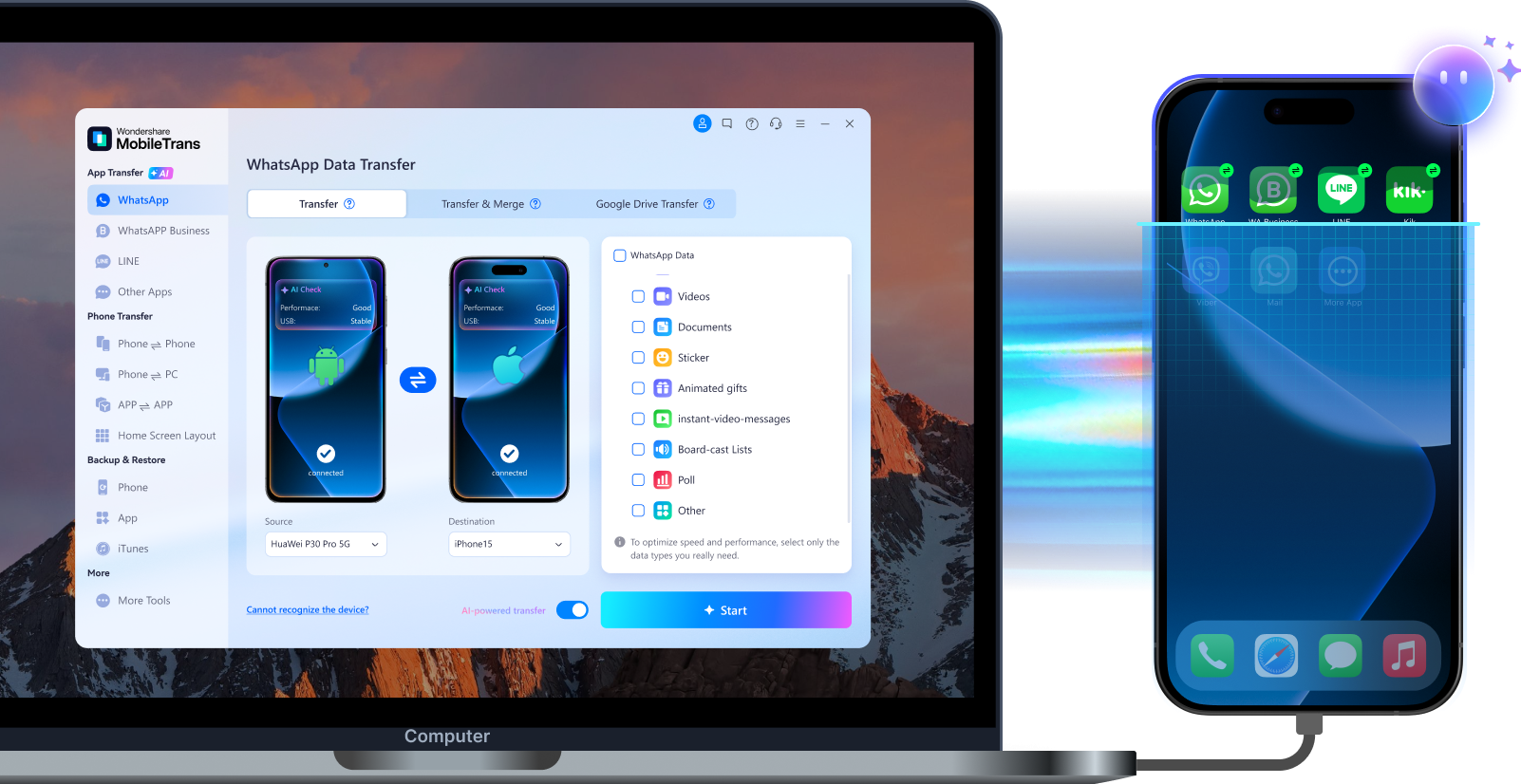
MobileTrans WhatsApp Data Transfer: a Huawei P30 Pro 5G as the source and an iPhone 15 as the destination, Transfer, Transfer & Merge and Google Drive Transfer tabs, and a checklist of WhatsApp data types (videos, documents, stickers, polls and more).
Wondershare MobileTrans connects both phones to a Windows PC by cable and copies WhatsApp messages, photos, videos, documents and stickers across. Its three modes cover the gaps in the free method: Transfer (a plain copy), Transfer & Merge (adds the Android chats to the ones already on the iPhone) and Google Drive Transfer (puts an Android WhatsApp backup from Google Drive onto the iPhone). WhatsApp Business, LINE, Kik and Viber have their own entries. Wondershare says no factory reset is needed.
- Install MobileTrans and choose WhatsApp in the sidebar.
- Connect both phones with USB cables; tap Trust on the iPhone and turn on USB debugging on Android as the on-screen pictures show.
- Check that the Android phone is the Source and the iPhone the Destination (use the swap button if not), pick Transfer or Transfer & Merge, and tick the data types.
- Buy a license when prompted (one month is enough for a single move), start the transfer and keep both phones connected until it finishes.
What we like
- Merges old chats with the ones already on the iPhone
- Moves WhatsApp Business, and restores from a Google Drive backup
- Works with Android phones older than Android 10
- One month at $29.99 covers a one-time switch
Watch out for
- Large transfers sometimes need several attempts, per Trustpilot reviewers
- WhatsApp app updates can leave the on-screen steps out of date
- Refunds only within 7 days and only for technical faults
- Windows license doesn't activate on a Mac
What users say about MobileTrans
Trustpilot showed MobileTrans at 4.5 out of 5 from 1,790 reviews on November 21, 2026, with 70% five-star and 16% one-star ratings.
"It took a while, more than 2 hours but eventually the job was done."
Hashim, Trustpilot, "Did what I wanted" (October 14, 2026)
"I was skeptical about this app, but it does work."
Dave, Trustpilot (November 7, 2026)
"The application has "wizards" to step through a process, including WhatsApp transfer from Android to iPhone."
Chris Waters, Trustpilot, "Does not work with current WhatsApp version" (September 5, 2026); the reviewer says the steps refer to WhatsApp menus that no longer exist
On Wondershare's own site one buyer wrote: "I was reticent AF but IT WORKED. Gave me error a few times because my disk was almost full, but once I cleared that up it worked perfectly."
Download MobileTrans FreeBuy Wondershare MobileTrans
Alternative: Wondershare Dr.Fone - Full Toolkit
- Price: $99.95 a year, $79.95 for one month, $115.95 perpetual, 5 mobile devices
- Includes: WhatsApp Transfer, Phone Transfer, Data Recovery, System Repair, backup, Data Eraser and more
- Best for: people who also need deleted chats recovered or a phone repaired
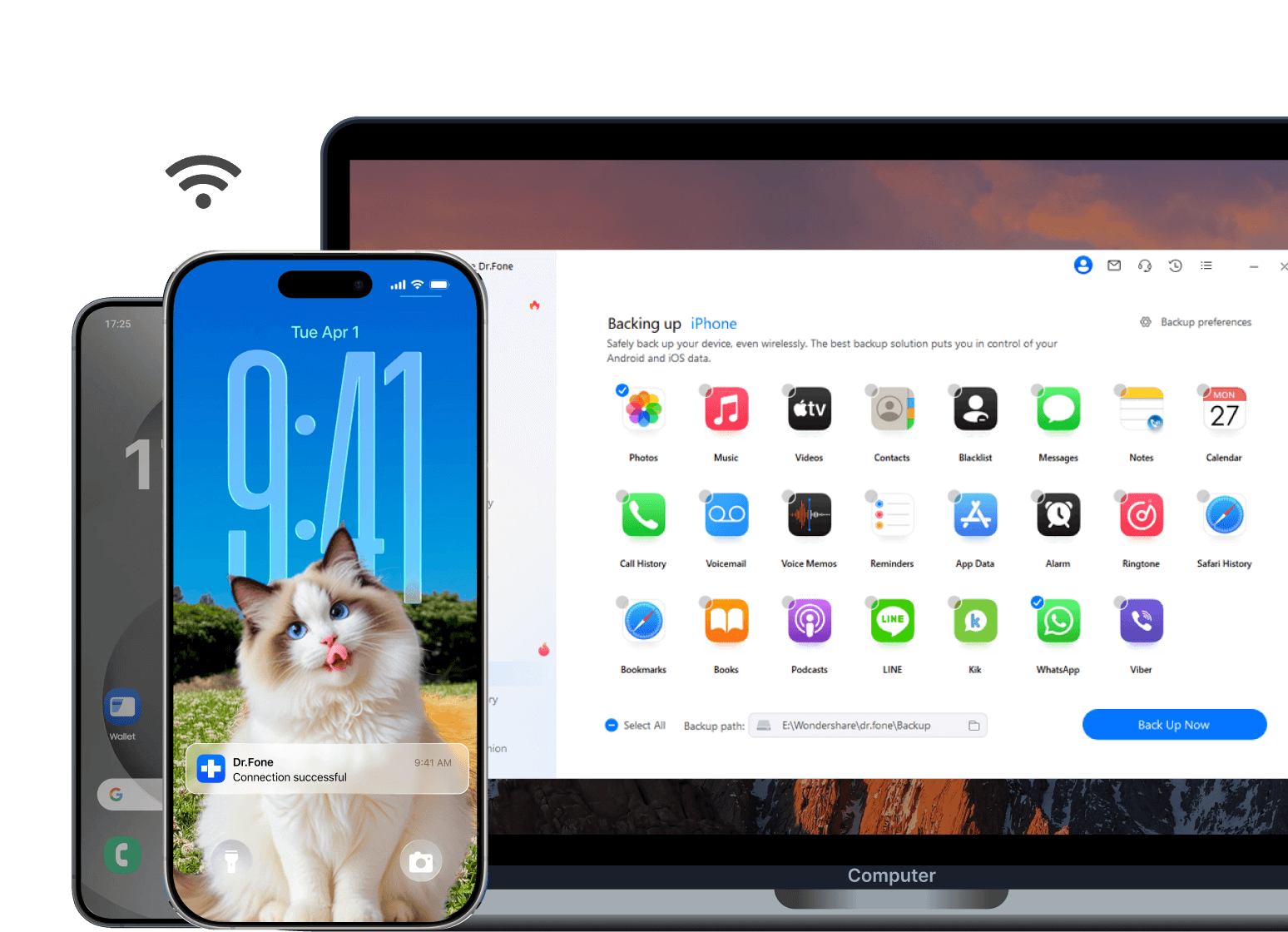
Dr.Fone's backup screen: choose data types such as Photos, Messages, WhatsApp and Call History, set the backup folder, and click Back Up Now.
Dr.Fone - Full Toolkit includes the same kind of cable-based WhatsApp Transfer between Android and iPhone, and backs up WhatsApp, WhatsApp Business, LINE, Kik, Viber and WeChat to the PC. It costs more than MobileTrans because it also recovers deleted photos and WhatsApp chats, repairs an iPhone stuck on the Apple logo and wipes an old phone. If moving WhatsApp is the only job, MobileTrans (or Dr.Fone's WhatsApp Transfer module bought on its own) is the cheaper buy. Trustpilot showed Dr.Fone at 4.3 out of 5 from 5,156 reviews on November 21, 2026.
"For heavy WhatsApp - It's Much Better than Samsung Switch. ... My data was around 41GB. This DrFone did it in mere two attempts."
Customer review published on Wondershare's Dr.Fone page
What we like
- WhatsApp transfer plus recovery, repair and backup in one program
- Can recover deleted WhatsApp chats, which transfer tools can't
- Covers 5 phones on one license
Watch out for
- $99.95 a year is a lot for a single WhatsApp move
- Same strict 7-day, technical-fault-only refund policy
- Results vary by phone model; some features work only on listed models
Download Dr.Fone FreeBuy Dr.Fone - Full Toolkit
What it costs
Price for a one-time WhatsApp move (USD)
WhatsApp's own transferFree
MobileTrans Full Features, 1 month$29.99
MobileTrans Full Features, 1 year$39.99
Dr.Fone - Full Toolkit, 1 month$79.95
Dr.Fone - Full Toolkit, 1 year$99.95
Prices from Wondershare's pricing pages, checked on November 27, 2026. WhatsApp's transfer is free.
Monthly and yearly plans renew automatically until you switch renewal off in your Wondershare account, so turn it off after a one-time move.
Which should you choose?
| Your situation | Pick | Why |
|---|
| New iPhone, Android 10 or later, normal WhatsApp | WhatsApp's own transfer | Free, official, moves chats, media and call history |
| iPhone already has WhatsApp chats you want to keep | Wondershare MobileTrans | Transfer & Merge adds the old chats instead of replacing them |
| WhatsApp Business account | Wondershare MobileTrans | The built-in transfer doesn't support Business |
| Android 9 or older | Wondershare MobileTrans | No Android 10 requirement |
| Old phone lost, only a Google Drive backup | Wondershare MobileTrans | Google Drive Transfer restores it to the iPhone |
| You also need deleted chats recovered or a phone repaired | Dr.Fone - Full Toolkit | Transfer, recovery and repair in one license |
Skip the paid tools if WhatsApp's own transfer works for you: it is free and comes from WhatsApp itself. Skip Dr.Fone if moving WhatsApp is all you need. And on a Mac, buy the Mac edition: Windows licenses don't activate on macOS.
What commonly goes wrong
- WhatsApp already set up on the iPhone. The free transfer only starts on an iPhone where WhatsApp isn't registered; uninstall it first, or use MobileTrans to merge.
- Scanning with the wrong camera. The QR code must be scanned from inside WhatsApp on the iPhone.
- Different phone numbers. Both methods expect the same WhatsApp number on the new phone.
- Huge media folders. Large histories take hours and can stop part-way. Keep the phones charging and connected, and untick data types you don't need.
- Buying before testing. Wondershare refunds only technical faults within 7 days, so confirm in the free version that both phones are detected before you pay.
FAQs
Can I transfer WhatsApp from Android to iPhone for free?
Yes. WhatsApp's own Transfer chats option (Settings > Chats > Transfer chats > Transfer to iPhone) moves chats, media and call history for free, with Android 10 or later, iOS 15.5 or later and the same phone number.
Do I need to factory reset my iPhone to move WhatsApp from Android?
No, not with WhatsApp's direct transfer: it only needs WhatsApp not to be registered on the iPhone yet. Apple's Move to iOS route does need a new or reset iPhone. Wondershare MobileTrans also works without a reset.
Can I merge Android WhatsApp chats with the chats already on my iPhone?
Not with WhatsApp's own transfer, which can't merge chats. Wondershare MobileTrans has a Transfer & Merge option that adds the Android chats to those already on the iPhone.
Can I move WhatsApp Business from Android to iPhone?
WhatsApp's built-in transfer doesn't support WhatsApp Business. Wondershare MobileTrans and Dr.Fone both handle WhatsApp Business data.
Can I restore a Google Drive WhatsApp backup to an iPhone?
Not with WhatsApp itself, because iPhones restore from iCloud. Wondershare MobileTrans has a Google Drive Transfer mode that moves an Android WhatsApp backup from Google Drive to an iPhone.
How long does a WhatsApp transfer from Android to iPhone take?
It depends on the size of your history, mostly the photos and videos. Small histories take minutes; MobileTrans users report large ones taking two hours or more.
Is MobileTrans a one-time payment?
Wondershare MobileTrans sells a $49.99 perpetual license, but the $29.99 monthly and $39.99 yearly plans renew automatically until you switch renewal off in your Wondershare account. For one move, the monthly plan is the cheapest.
Will my WhatsApp display name and payments transfer?
No. WhatsApp's transfer doesn't carry over your display name, peer-to-peer payment messages or media received through Channels.
Conclusion
Try WhatsApp's own Transfer to iPhone first: it is free, official and moves your chats, media and call history in one go. If you need what it can't do, such as merging old chats into an iPhone that already uses WhatsApp, moving WhatsApp Business, an older Android phone or a Google Drive backup, Wondershare MobileTrans is the tool to buy, and one month at $29.99 covers a single switch. Install the free version first to confirm it detects both phones, since refunds are limited. Choose Dr.Fone - Full Toolkit only if you also need recovery or repair.
Download MobileTrans FreeBuy Wondershare MobileTrans