Turning a folder of Word files into PDFs without doing it one at a time
You have a pile of old Word documents and need PDFs of every one. Opening each file and saving it separately takes far too long. PCVARE Word to PDF Converter is a Windows tool that converts .doc files to PDF in batches, and it doesn't need Microsoft Word installed.
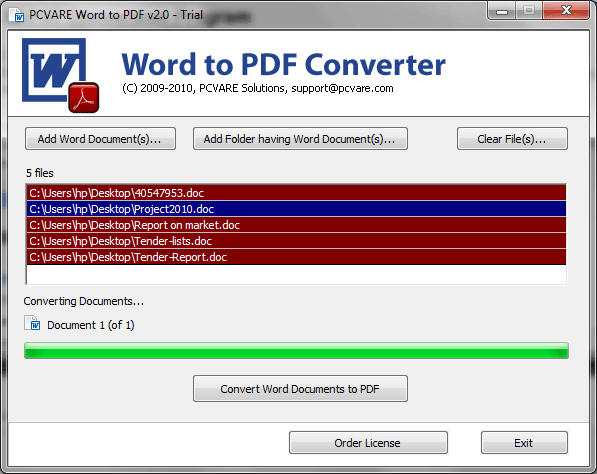
Quick facts
- Version: 3.0
- Platform: Windows 10, 8.1, 8, 7, Vista, XP and Windows Server editions. There is no Mac version.
- Price: $20
- Trial: a free demo converts one file at a time and stamps every page with "Created with PCVARE Word to PDF". Batch mode is disabled in the demo.
Key features
Convert many Word files in one run
Add individual documents, or add a whole folder. The vendor says it has been tested on more than 15,000 files.
One PDF per Word file, originals untouched
Each .doc file gets its own new PDF with the same number of pages. Nothing is overwritten.
Keeps links, images, tables and formatting
The converter carries over hyperlinks, OLE objects, images, forms, graphs and tables. It also keeps colors, layout, text style and font size.
Works with files from many Word editions
It reads .doc files made in Word 2019, 2016, 2003, 2002, 2000, 98 and 97.
Who it's for
It suits you if you hold a lot of legacy .doc documents, such as reports or theses, and want PDF copies on a Windows PC. You can run it on a machine without Office.
Pros and cons
Pros
- Batch conversion with folder import
- No need for Word to be installed
- Simple interface that needs no technical knowledge
- Free demo to test before buying
Cons
- .docx files aren't converted. You must first save them as Word 97-2003 format.
- Windows only
- The demo is limited to one file and adds a stamp
- You need Adobe Reader to view the PDFs
FAQs
Does it convert DOCX files?
No. Only DOC files are supported. Save a .docx as Word 97-2003 first.
Do I need Microsoft Word installed?
No, Word isn't required.
Does it run on a Mac?
No, it is Windows software.
What does the demo do?
It converts one file at a time and stamps the output. Batch mode is turned off.
System requirements
- Processor: minimum 2.4 GHz
- RAM: minimum 512 MB
- Disk space: 5.4 MB
- OS: Windows 10, 8.1, 8, 7, Vista, XP, Windows Server 2019, 2016, 2012, 2008, 2003