Your SQL Server database won't open, and the backup is missing or too old
A corrupted .mdf file, a drive that was formatted by mistake, or a database deleted from disk can stop a project cold. DiskInternals MSSQL Recovery is built for these cases. It reads the damaged database files directly and rebuilds as many tables as it can find.
Quick facts
- Version: 4.16
- Platform: Windows 7, 8 or 10
- Price: from $399.95
- Trial: free, with all functions of the paid version except export
- Works on: databases stored on Windows (NTFS or ReFS) and Linux (Ext2/3/4)
Key features
Repair a database that won't open
In "Repair existing database" mode, the program works around inaccessible or damaged files. That improves your chances of getting the remaining tables back.
Bring back a database that was deleted
In "Recover database from disk" mode, the program scans the disk for the parts of deleted databases and restores their integrity.
Check the results before you pay
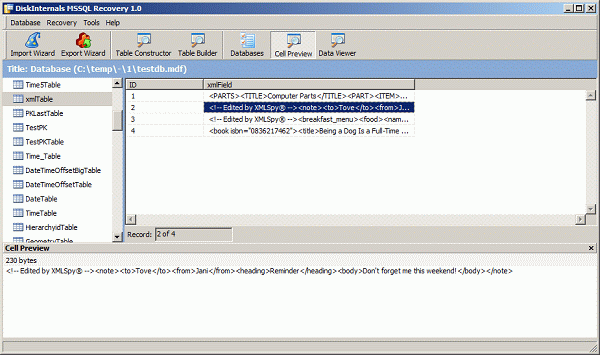
You can preview any recovered item, and previewing is free. Export is the step that needs a license.
Cover a wide range of SQL Server versions
It supports databases from SQL Server 2000 through 2019, including x86, x64 and Express editions where listed. It also handles encrypted databases from 2008 to 2019, page and row compression, and national and Unicode character tables.
Export straight to a SQL server
You can export recovered data to MSSQL through ADO/ODBC. A wizard walks you through choosing the mode, scanning, previewing and exporting.
Who it's for
Database administrators and IT staff who face a damaged or deleted .mdf file without a usable backup. The wizard also makes it workable if you rarely do recovery work.
Pros and cons
- Pro: a free trial with full scanning and preview, so you see what is recoverable first.
- Pro: covers two situations, damaged files and deleted databases.
- Pro: a long list of supported SQL Server versions and file systems.
- Con: the trial can't export, so you need a license to save anything.
- Con: Windows only, and the price starts at $399.95.
- Con: you need extra disk space to save recovered data.
FAQs
Can I try it before buying?
Yes. The trial is free and includes every function of the paid version except export.
What modes does it have?
Two: repairing an existing database, and recovering a database from disk.
Do I need to reinstall after buying a license?
The vendor's FAQ asks this question. After you buy, you receive a unique license key that enables saving.
Does it work with non-English data?
Yes. It supports all national and Unicode character tables.
System requirements
- OS: Windows 7, 8 or 10
- RAM: 2 GB
- Free space: 60 MB, plus space to save the recovered data. External storage works if your computer is short on space.